
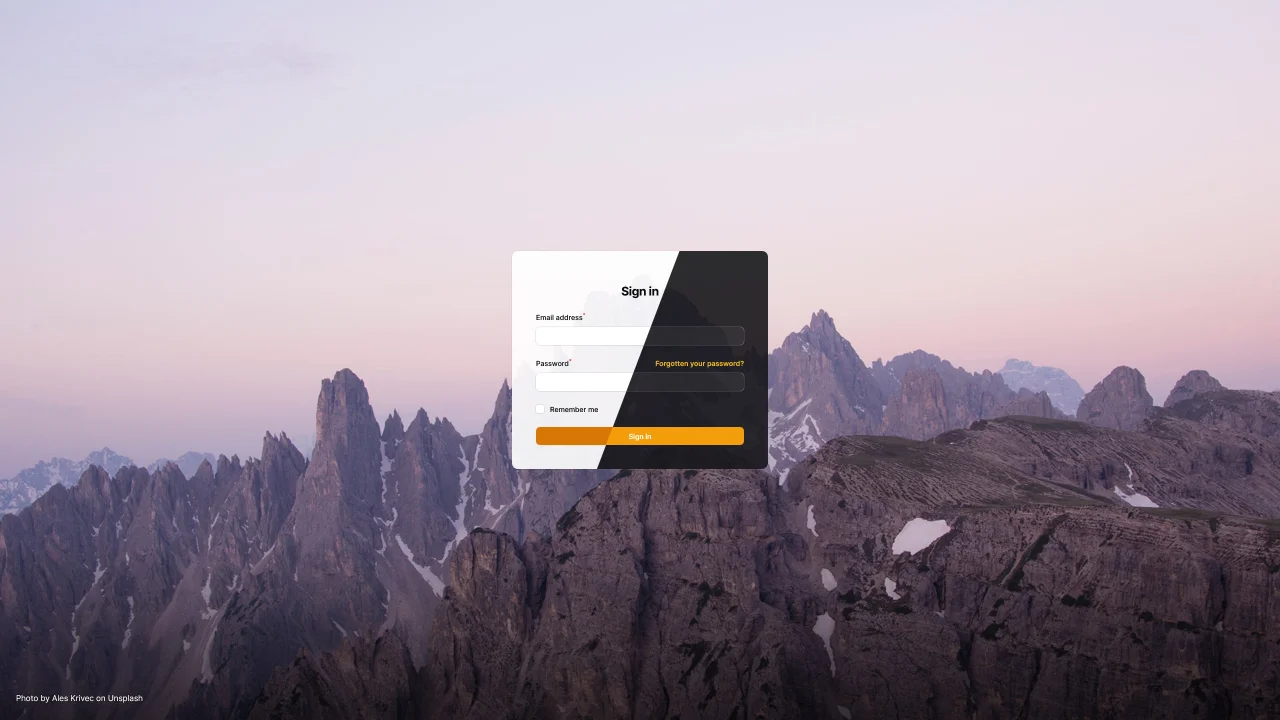
Backgrounds by SWIS
CommunityBeautiful backgrounds for Filament auth pages.
 Author:
SWIS
Author:
SWIS
Package health
Automated checks of this plugin's Composer package
15 checks
- Failed: GitHub Actions pinned to SHA — View details on Plumb
- Skipped: GitLab CI includes pinned to SHA
- Passed: Open security advisories
- Passed: Dependabot PR responsiveness — No open Dependabot PRs.
- Skipped: Renovate MR responsiveness
- Warning: Dependabot or Renovate configured — Updater does not cover the JavaScript ecosystem, which has a committed lockfile.
-
Failed:
Dependency update cooldown configured
—
No cooldown configured in
.github/dependabot.yml. View details on Plumb - Passed: Provides a security policy
- Passed: Abandoned or archived — No consulted source marks the package abandoned (packagist, github).
- Warning: Commit and release recency — Low activity: last commit 91 days ago; last release 185 days ago.
-
Passed:
composer.lock not committed by library
—
composer.lockis absent from the released dist archive. - Passed: Dist archive is lean
-
Passed:
Current Laravel version supported
—
Package dependencies resolve together with current Laravel
13.0. -
Passed:
Current PHP version supported
—
Constraint
^8.2supports current PHP8.5. - Skipped: Current Symfony version supported
filament/
namespace. Review the source and install at your own risk. Found
malware or an unresolved security issue the author won't
address?
Report it
.
Documentation
- Version Compatibility
- Installation
- Usage
- Testing
- Changelog
- Contributing
- Security Vulnerabilities
- Credits
- License
- SWIS ❤️ Open Source






A curated list of (free to use) images, to give your Filament auth pages a unique look. Rather use your own images? No problem, you can also use your own images. Or go wild and create your own image provider based on the weather, time of day, or whatever you can think of!

#Version Compatibility
| Plugin Version | Filament Version | PHP Version |
|---|---|---|
| 2.x | 4.x,5.x | 8.2+ |
| 1.x | 3.x | 8.1+ |
#Installation
You can install the package via composer:
composer require swisnl/filament-backgrounds
Next, publish the images if you want to use the default list:
php artisan filament-backgrounds:install
#Usage
Add the plugin to your panel provider:
use Swis\Filament\Backgrounds\FilamentBackgroundsPlugin;

public function panel(Panel $panel): Panel
{
    return $panel
        ->plugins([
            FilamentBackgroundsPlugin::make(),
        ])
}
#Hide attribution
You can disable attribution by passing false to the showAttribution method on the plugin. Please note that this is not recommended, and sometimes prohibited, as the photographers deserve credit for their work, or the license requires you to show the attribution!
use Swis\Filament\Backgrounds\FilamentBackgroundsPlugin;

public function panel(Panel $panel): Panel
{
    return $panel
        ->plugins([
            FilamentBackgroundsPlugin::make()
                ->showAttribution(false),
        ])
}
#Remember
You can specify a cache time in seconds using the remember method on the plugin. This is especially useful if you use an image provider that uses an API or other external source, so you don't hit the API on every request!
use Swis\Filament\Backgrounds\FilamentBackgroundsPlugin;

public function panel(Panel $panel): Panel
{
    return $panel
        ->plugins([
            FilamentBackgroundsPlugin::make()
                ->remember(900),
        ])
}
#Use your own images
You can use your own images by passing an instance of MyImages to the imageProvider method on the plugin. This provider allows you to specify a directory (inside your public directory) where your images are stored. The images will be randomly picked from this directory.
use Swis\Filament\Backgrounds\FilamentBackgroundsPlugin;
use Swis\Filament\Backgrounds\ImageProviders\MyImages;

public function panel(Panel $panel): Panel
{
    return $panel
        ->plugins([
            FilamentBackgroundsPlugin::make()
                ->imageProvider(
                    MyImages::make()
                        ->directory('images/backgrounds')
                ),
        ])
}
#Available image providers
#Swis\Filament\Backgrounds\ImageProviders\CuratedBySwis
Default curated set of (free to use) images from multiple sources, based on the day of the month. You can find the images in the resources/images/curated-by-swis directory.
#Swis\Filament\Backgrounds\ImageProviders\MyImages
#Swis\Filament\Backgrounds\ImageProviders\Triangles
A set of low poly patterns created using Trianglify. You can find the patterns in the resources/images/triangles directory.
#Writing a custom image provider
To create your own image provider, you need to implement the ProvidesImages interface. This interface has one method, getImage, which should return an Image object. The image object takes two arguments, the first is the CSS background-image property, the second is the attribution text. The image will be directly used as background-image in CSS, so it should include url(), which allows you to even use gradients or other fancy stuff!
<?php

use Swis\Filament\Backgrounds\Contracts\ProvidesImages;
use Swis\Filament\Backgrounds\Image;

class MyImageProvider implements ProvidesImages
{
    public static function make(): static
    {
        return app(static::class);
    }

    public function getImage(): Image
    {
        return new Image(
            'url("[link to photo]")',
            'Photo by ...'
        );
    }
}
N.B. Make sure you cache the result if you use an API or other external sources, so you don't hit the API on every request!
#Testing
composer test
#Changelog
Please see CHANGELOG for more information on what has changed recently.
#Contributing
Please see CONTRIBUTING for details.
#Security Vulnerabilities
Please review our security policy on how to report security vulnerabilities.
#Credits
#License
The MIT License (MIT). Please see License File for more information.
All images included in this package are free to use for commercial and noncommercial purposes and come from multiple sources:
#SWIS ❤️ Open Source
SWIS is a web agency from Leiden, the Netherlands. We love working with open source software.
The author
SWIS is a web agency from Leiden, the Netherlands. We love working with open source software.
From the same author
Featured Plugins
A selection of plugins curated by the Filament team

Sharp Theme
A theme that gives panels a precise, technical look with square corners, strong borders, and clear contrast.
 Filament

Custom Dashboards
Let your users build and share their own dashboards with a drag-and-drop interface. Define your data sources in PHP and let them do the rest.
Filament

Spotlight Pro
Browse your Filament Panel with ease. Filament Spotlight Pro adds a Spotlight like Command Palette to your Filament Panel.
 Dennis Koch

