
Image Caption Upload
CommunityExtends FileUpload to attach a per-image caption to each uploaded file, with zero build step and support for dark mode and multiple languages.
filament/
namespace. Review the source and install at your own risk. Found
malware or an unresolved security issue the author won't
address?
Report it
.
 Author:
Steven Chang
Author:
Steven Chang
Documentation



A Filament v5 form component that extends the built-in FileUpload to attach a per-image caption beneath each uploaded file — with no build step required.
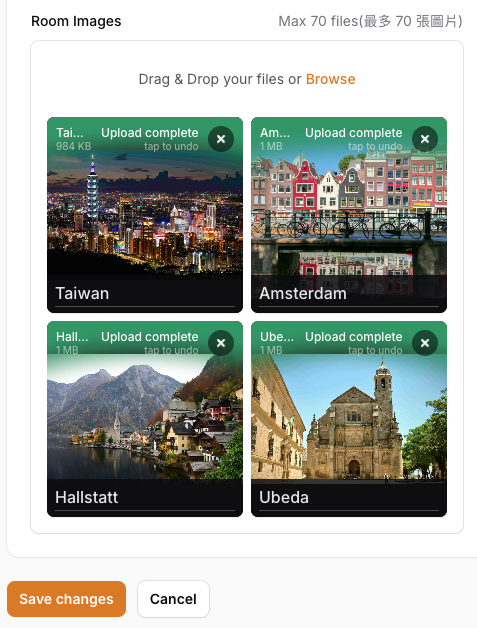
#Features
- Drop-in replacement — extends Filament's native
FileUpload, so every existing option (->image(),->multiple(),->reorderable(),->disk(),->directory(),->maxFiles(), …) works unchanged - Zero build step — no npm, no Vite, no esbuild; pure Blade + Alpine.js inline
- Reorder-safe — captions follow their image through drag-and-drop reordering
- Duplicate-filename safe — maps FilePond internal IDs to Filament UUIDs directly, so ten files all named
banner.jpgeach keep their own caption - Race-condition safe — captions typed before an upload finishes are preserved and migrated to the final UUID automatically
- Simple storage — saved as a plain
[{image, caption}]JSON array in a single column; no extra tables or relationships needed
#Requirements
- PHP 8.2+
- Laravel 12+
- Filament 5.x
#Installation
Choose the version that matches your Filament installation:
| Filament | Version |
|---|---|
| 3.x | ^1.0 |
| 4.x | ^2.0 |
| 5.x | ^3.0 |
# Filament 3.x
composer require imsyuan/filament-image-caption-upload "^1.0"

# Filament 4.x
composer require imsyuan/filament-image-caption-upload "^2.0"

# Filament 5.x
composer require imsyuan/filament-image-caption-upload "^3.0"
Laravel auto-discovers the service provider — no manual registration needed.
#Usage
use Imsyuan\ImageCaptionUpload\Forms\Components\ImageCaptionUpload;

ImageCaptionUpload::make('photos')
    ->multiple()
    ->image()
    ->reorderable()
    ->captionPlaceholder('Enter a caption…'),
Cast the column as an array in your model:
// app/Models/Post.php
protected $casts = [
    'photos' => 'array',
];
Each field saves an array of {image, caption} pairs:
[
  { "image": "photos/living-room.jpg", "caption": "Living room view" },
  { "image": "photos/kitchen.jpg",     "caption": "Kitchen detail" }
]
#Options
#captionPlaceholder(string|Closure $placeholder)
Sets the placeholder text shown inside each caption input. Accepts a plain string or a closure. Defaults to 'Caption...'.
// Static
->captionPlaceholder('Add a description…')

// Dynamic
->captionPlaceholder(fn () => __('fields.caption_placeholder'))
#All native FileUpload options
Because ImageCaptionUpload extends Filament's FileUpload directly, every built-in option is available:
ImageCaptionUpload::make('photos')
    ->multiple()
    ->image()
    ->maxFiles(10)
    ->reorderable()
    ->appendFiles()
    ->disk('s3')
    ->directory('photos')
    ->visibility('public')
    ->panelLayout('grid')
    ->imageResizeMode('cover')
    ->imageResizeTargetWidth('400')
    ->imageResizeTargetHeight('400'),
#How it works
- Hydration —
[{image, caption}]from the database is split on load: file paths go into Filament's UUID-keyed state; captions are stored in a sibling Livewire key (_icap_<fieldname>). - Alpine — A
MutationObserverwatches for FilePond item additions and injects a caption<input>beneath each file panel. Typing syncs directly to Livewire state via$wire.set(). - UUID mapping — FilePond's internal IDs are mapped to Filament UUIDs by reading the FilePond instance directly (
pond.getFiles()), ensuring correctness regardless of stored filename or UUID-based disk naming. - Dehydration — On save,
{uuid: path}and{uuid: caption}are zipped back into[{image, caption}].
#License
MIT — see LICENSE.
Featured Plugins
A selection of plugins curated by the Filament team

Blueprint
Filament Blueprint is a premium Laravel Boost extension that helps AI agents produce accurate, detailed implementation plans and security reports for Filament apps.
 Filament

Spotlight Pro
Browse your Filament Panel with ease. Filament Spotlight Pro adds a Spotlight/Raycast like Command Palette to your Filament Panel.
 Dennis Koch

Advanced Tables (formerly Filter Sets)
Supercharge your tables with powerful features like user-customizable views, quick filters, multi-column sorting, advanced table searching, convenient view management, and more. Compatible with Resource Panel Tables, Relation Managers, Table Widgets, and Table Builder!
 Kenneth Sese

