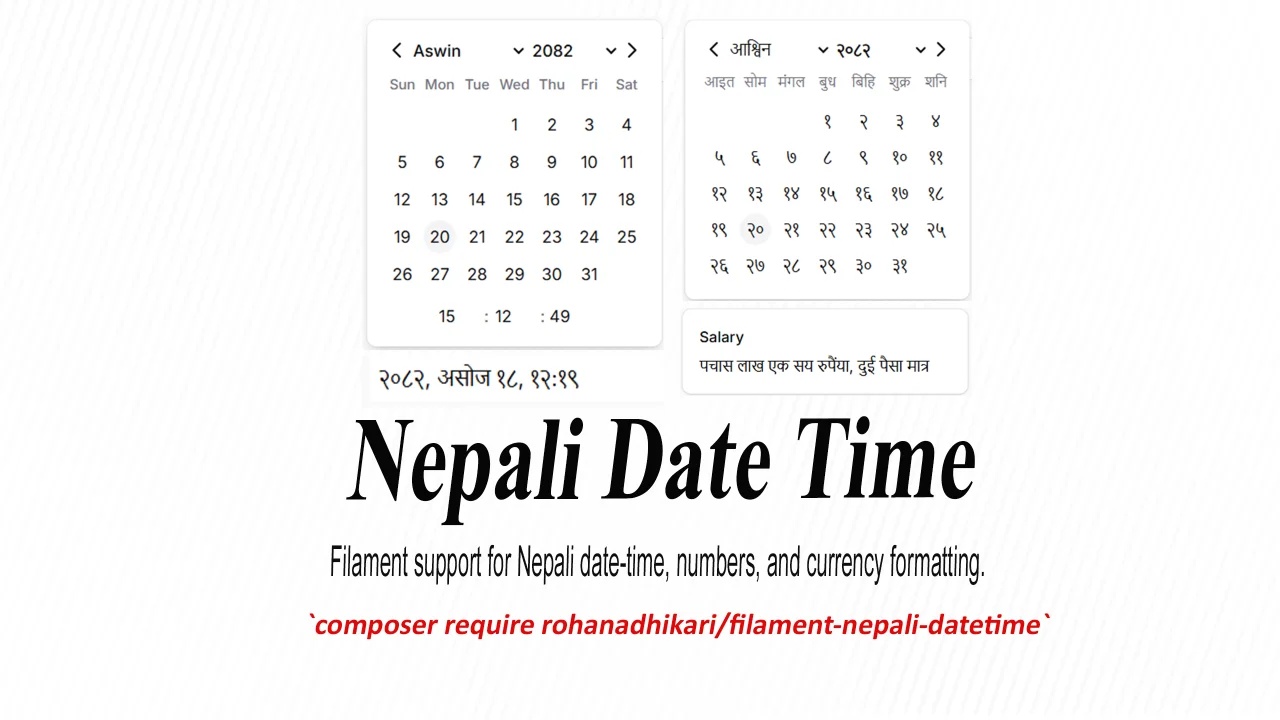
Nepali DateTime
Filament support for Nepali date-time, numbers, and currency formatting.
 Author:
Rohan Adhikari
Author:
Rohan Adhikari
Documentation
- Installation
- Screenshots
- Usage
- 1. NepaliDateTimePicker
- Configuring the locale
- Configuring the first day of the week
- Disable Navigation When Out Of Range
- Saving Date in Nepali Format
- Methods Supporting NepaliDate
- DatePicker Key Bindings
- 2. ClockTimePicker
- 3. Nepali Functions
- nepaliDate()
- toNepaliDate()
- nepaliSince()
- nepaliNumber()
- nepaliWord()
- nepaliMoney()
- nepaliNumeric()
- NepaliFunctions for Tooltip
- Contributing
- Security Vulnerabilities
- Credits
- License



A FilamentPHP plugin that adds support for Nepali Date (Bikram Sambat - BS) in Filament’s form, infolist and table components.

#Installation
Require the package using Composer:
composer require rohanadhikari/filament-nepali-datetime
#Screenshots
#Nepali DateTime Picker in Form
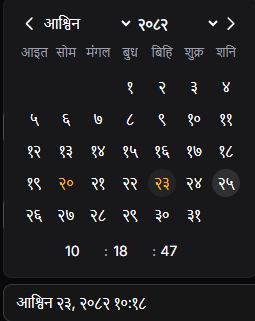
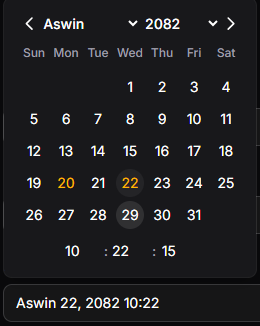
#Nepali Date Picker in Form
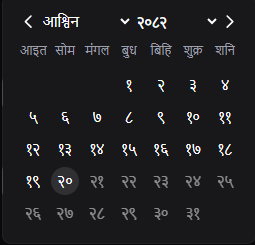
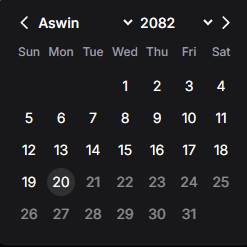
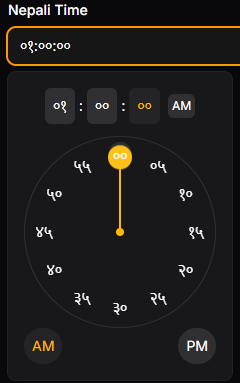
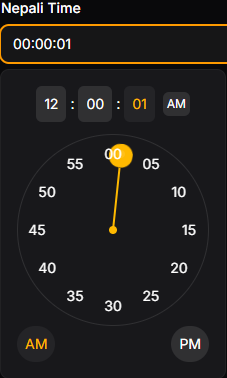
#CLock TimePicker
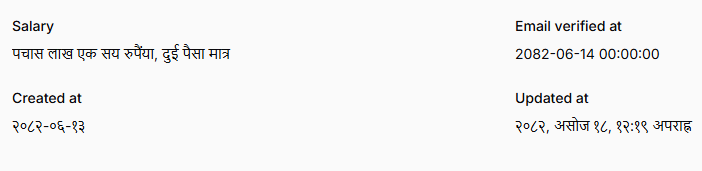
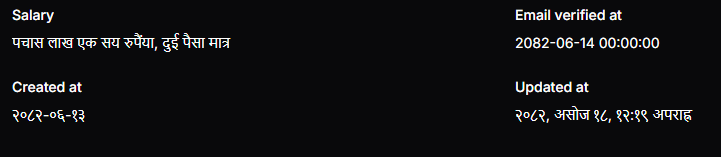
#Nepali Functions
#Usage
To use NepaliDate, please refer to the documentation of NepaliDate.
#1. NepaliDateTimePicker
[!WARNING]
If you are usingtimestampanddatetimecolumn type consider usingADAsNepaliDateordatetimecast in model.
It extends Filament DateTimePicker to support Nepali Date (BS).
use RohanAdhikari\FilamentNepaliDatetime\NepaliDatetimePicker;
use RohanAdhikari\FilamentNepaliDatetime\NepaliDatePicker;

NepaliDatetimePicker::make('dob')
    ->label('Date of Birth (BS)')
    ->weekStartsOnSaturday()
    ->dehydrateStateInNepali()
    ->locale(NepaliDate::NEPALI)
    ->maxDate(NepaliDate::now())
    ->minDate(now()->subYear(20)), // Suport NepaliDate/ Carbon / Nepalidate string

    //or for date only
NepaliDatePicker::make('dob')
    ->format('d-m-Y')
    ->locale(NepaliDate::NEPALI)
    ->maxDate(NepaliDate::now()),
#Configuring the locale
The picker supports two locales:
'en'– English'np'– Nepali
NepaliDatetimePicker::make('dob')
    ->locale(NepaliDate::NEPALI);
#Configuring the first day of the week
Similar to Filament Datetime Picker. New convenient helper method is added.
NepaliDatePicker::make('dob')
    ->weekStartsOnSaturday()
#Disable Navigation When Out Of Range
By Default, Navigation is disabled when date is out of range(like after maxdate or before mindate). To enable navigation even Date is Out of Range You can use ->disableNavWhenOutOfRange(false).
NepaliDatePicker::make('dob')
    ->disableNavWhenOutOfRange(false)
#Saving Date in Nepali Format
By Default, Datetime is saved in english format even locale is 'np'. You can configure it to save in Nepali Unicode in the database.
[!WARNING]
In Laravel migrations, don’t usetimestampfor Nepali dates. Instead, usestring, becausetimestampanddatetimecannot store Unicode characters.
[!NOTE]
If you are using any cast fromNepaliDatein model, date will automatically be converted to the English locale.
NepaliDatetimePicker::make('dob')
    ->dehydrateStateInNepali()
#Methods Supporting NepaliDate
These methods support NepaliDate, Carbon, or NepaliDate string:
| Method | Description | Example Usage |
|---|---|---|
defaultFocusedDate() |
Sets the default date when the picker opens | ->defaultFocusedDate(NepaliDate::now()) |
disabledDates() |
Disables specific dates (array of Carbon/NepaliDate/strings) | ->disabledDates([NepaliDate::now(),now()->addDay()]) |
maxDate() |
Sets the maximum selectable date | ->maxDate(NepaliDate::now()) |
minDate() |
Sets the minimum selectable date | ->minDate(now()->subYear(20)) |
#DatePicker Key Bindings
The DatePicker supports keyboard navigation for accessibility and ease of use.
#Navigation
- Arrow Left → Move focus to the previous day
- Arrow Right → Move focus to the next day
- Arrow Up → Move focus to the same week day in the previous week
- Arrow Down → Move focus to the same week day in the next week
#Month / Year Shortcuts
- Alt + Arrow Left → Focus the previous month
- Alt + Arrow Right → Focus the next month
- Alt + Arrow Up → Focus the previous year
- Alt + Arrow Down → Focus the next year
#Page Navigation
- Page Up → Previous month
- Page Down → Next month
- Shift + Page Up → Previous year
- Shift + Page Down → Next year
#Week Navigation
- Home → Jump to the start of the week
- End → Jump to the end of the week
#Selection & Clearing
- Enter → Select the currently focused day
- Backspace / Delete / Clear → Clear the selected date
#2. ClockTimePicker
ClockTimePicker provides an interactive clock interface that allows users to select a time visually. It offers a more intuitive way to pick hours, minutes and seconds compared to traditional input fields.
[!Important] IF you are using Filament Panels, you must have to set up a custom theme. to setup follow the instruction in the Filament Custom Theme Doc
After setting up custom theme add the Clocktime picker css to your theme css file.
@import '../../../../vendor/rohanadhikari/filament-nepali-datetime/resources/css/clock-time-picker.css';
#Usage
    ClockTimePicker::make('nepali_time')
       ->label('Nepali Time')
       ->defaultFocusedTime(NepaliDate::now())
       ->disabledTimes(['09:00 AM', '10:00 AM'])
       ->maxTime('01:00 PM')
       ->seconds(false)
       ->closeOnTimeSelection()
       ->locale('np')
       ->suffixAction(
           Action::make('now')
            ->action(fn(Set $set) => $set('nepali_time', NepaliDate::now()))
       ),
#Close picker after selecting time
Use ->closeOnTimeSelection() to automatically close the picker once a time is selected:
ClockTimePicker::make('nepali_time')
       ->label('Nepali Time')
       ->closeOnTimeSelection()
#Disable Second Selection
Use ->seconds(false) to disable seconds selection:
ClockTimePicker::make('nepali_time')
       ->label('Nepali Time')
       ->seconds(false)
#3. Nepali Functions
The following functions are available on TextColumn and TextEntry.
#nepaliDate()
Formats a stored BS (Bikram Sambat) date into English or Nepali locale.
[!NOTE]
This does not convert AD → BS. If you want conversion, usetoNepaliDate().
TextColumn::make('dob')
    ->nepaliDate(
        locale: 'np'
    );
    //or
TextEntry::make('dob')
    ->nepaliDateTime(
        locale: 'en'
    );
        //or
TextEntry::make('dob')
    ->nepaliTime(
        locale: 'en'
    );
| Argument | Type | Default | Description |
|---|---|---|---|
format |
string | Closure | null |
default(from filament) | Output format (BS). |
timezone |
string | Closure | null |
null |
Timezone for displaying date. |
locale |
string('en' or 'np') | Closure |
'en' |
Language/locale for formatted output. |
#toNepaliDate()
Converts a stored AD date into BS date, then formats it.
// Table Column
TextColumn::make('dob')
    ->toNepaliDate(format: 'd M, Y', locale: 'np');
// Infolist Text Entry
TextEntry::make('dob')
    ->toNepaliDate(format: 'd M, Y', locale: 'en');
    //also
TextColumn::make('dob')
    ->toNepaliDateTime(locale: 'np');
TextEntry::make('dob')
    ->toNepaliTime(locale: 'en');
| Argument | Type | Default | Description |
|---|---|---|---|
format |
string | Closure | null |
default(from filament) | Output format (BS). |
timezone |
string | Closure | null |
null |
Timezone for displaying date. |
locale |
string('en' or 'np') | Closure |
'en' |
Language/locale for formatted output. |
#nepaliSince()
Displays a human-readable difference (e.g., “2 days ago”) between a stored BS date-time and the current time.
TextColumn::make('published_at')
    ->nepaliSince();
| Argument | Type | Default | Description |
|---|---|---|---|
timezone |
string | Closure | null |
null |
Timezone for the comparison. |
#nepaliNumber()
Converts numbers into Nepali numerals or formatted currency representations.
TextEntry::make('salary')
    ->nepaliNumber(currencySymbol: true, locale: 'np');
| Argument | Type | Default | Description |
|---|---|---|---|
currencySymbol |
bool | Closure | string |
false |
Displays the currency symbol (e.g., रू). |
only |
bool | Closure |
false |
Appends “Only” to the end of the formatted number. |
locale |
'en' | 'np' | Closure |
'en' |
Output locale for numerals. |
format |
bool | Closure |
true |
Whether to apply number formatting (commas, etc.). |
#nepaliWord()
Converts numeric values into Nepali or English words, optionally as currency words.
TextEntry::make('amount')
    ->nepaliWord(locale: 'en');
| Argument | Type | Default | Description |
|---|---|---|---|
currency |
bool | Closure |
false |
Whether to convert the number into currency words. |
only |
bool | Closure |
false |
If true, Show Only at the end. |
locale |
'en' | 'np' | Closure |
'en' |
Language of the output (English or Nepali). |
#nepaliMoney()
Formats numeric values as Nepali currency, complete with symbols, localization, and optional unit division.
TextEntry::make('total')
    ->nepaliMoney(currencySymbol: true, divideBy: 100, locale: 'np');
| Argument | Type | Default | Description |
|---|---|---|---|
currencySymbol |
bool | string |
true |
Whether to show currency symbol. |
divideBy |
int |
0 |
Divide numeric value before display. |
locale |
'en' | 'np' |
'en' |
Output language. |
only |
bool |
true |
Append “Only” after amount. |
#nepaliNumeric()
Display numeric values using Nepali digit formatting (commas, symbols).
TextEntry::make('population')
    ->nepaliNumeric(locale: 'np');
| Parameter | Type | Default | Description |
|---|---|---|---|
locale |
'en' | 'np' |
'en' |
Output language. |
#NepaliFunctions for Tooltip
You can append Tooltip to any Nepali function to display formatted tooltips.
TextColumn::make('created_at')->nepaliSinceTooltip();
For example:
nepaliDate()→nepaliDateTooltip()nepaliSince()→nepaliSinceTooltip()nepaliMoney()→nepaliMoneyTooltip()
#Contributing
Please see CONTRIBUTING for details.
#Security Vulnerabilities
Please review our security policy on how to report security vulnerabilities.
#Credits
#License
The MIT License (MIT). Please see License File for more information.
The author
Rohan Adhikari is a full-stack web developer from Nepal, passionate about building clean and functional web applications. He enjoys working with Laravel and modern web technologies, and is always eager to learn and take on new challenges.
Featured Plugins
A selection of plugins curated by the Filament team

Custom Dashboards
Let your users build and share their own dashboards with a drag-and-drop interface. Define your data sources in PHP and let them do the rest.
 Filament

Data Lens
Advanced Data Visualization for Laravel Filament - a premium reporting solution enabling custom column creation, sophisticated filtering, and enterprise-grade data insights within admin panels.
 Padmission

Custom Fields
Eliminate custom field migrations forever. Let your users create and manage form fields directly in Filament admin panels with 20+ built-in field types, validation, and zero database changes.
 Relaticle

