Vacuum
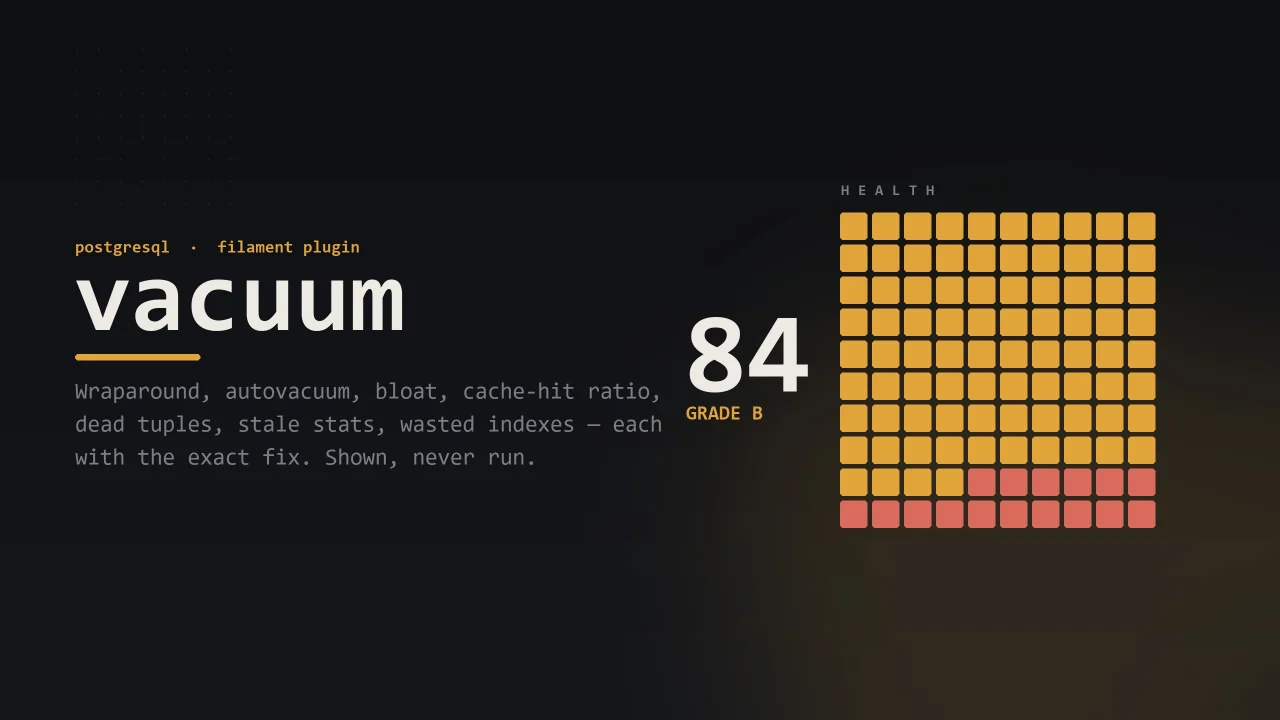
CommunityVacuum is a Filament plugin that reads PostgreSQL's own statistics views and surfaces them as a Vacuum panel group — an Overview with health score and charts, plus read-only Tables, Indexes, Sessions, and Statements resources — telling you what's wrong with your database, what it's costing you, and the exact SQL that would fix it, without ever running a change itself.
filament/
namespace. Review the source and install at your own risk. Found
malware or an unresolved security issue the author won't
address?
Report it
.
 Author:
Rati Rukhadze
Author:
Rati Rukhadze
Documentation
- What it tells you
- Requirements
- Installation
- Inside Filament
- Who may look
- Which database
- In your pipeline
- History over time
- The SQL console
- Tuning the thresholds
- Writing your own rule
- Restyling the dashboard
- Development
- License



A PostgreSQL monitoring and tuning dashboard for Laravel.
Vacuum reads what PostgreSQL already knows about itself — pg_stat_user_tables, pg_stat_user_indexes, pg_stat_activity, pg_stat_database, pg_stat_statements, pg_class — and turns it into a page that says what is wrong, what it is costing you, and the statement that would put it right.
It shows you that statement. It never runs it.
Status: 0.3.0 — an early release. The
0.xline follows semantic versioning, which means the surface may still shift between minor versions.
#What it tells you
| Rule | Finds |
|---|---|
wraparound |
Tables nothing has frozen, on their way to shutting the database down |
multixact-wraparound |
The same road, on the other clock: tables whose row locks nothing has frozen |
autovacuum-disabled |
A server with autovacuum switched off and left off |
dead-tuples |
Tables carrying more deleted-but-unreclaimed rows than they should |
stale-statistics |
Tables the planner is reasoning about from numbers that are no longer true |
table-bloat |
Tables whose files are much larger than the rows inside them |
unused-index |
Large indexes no query has ever read |
duplicate-index |
Indexes that are an exact copy of another index on the same table |
invalid-index |
Indexes every write maintains and no query is allowed to use |
cache-hit-ratio |
A database going to disk more often than it should |
idle-in-transaction |
Transactions opened and then abandoned |
blocked-session |
Sessions stuck waiting on somebody else's lock |
slow-statement |
The shapes of query that cost the most per run |
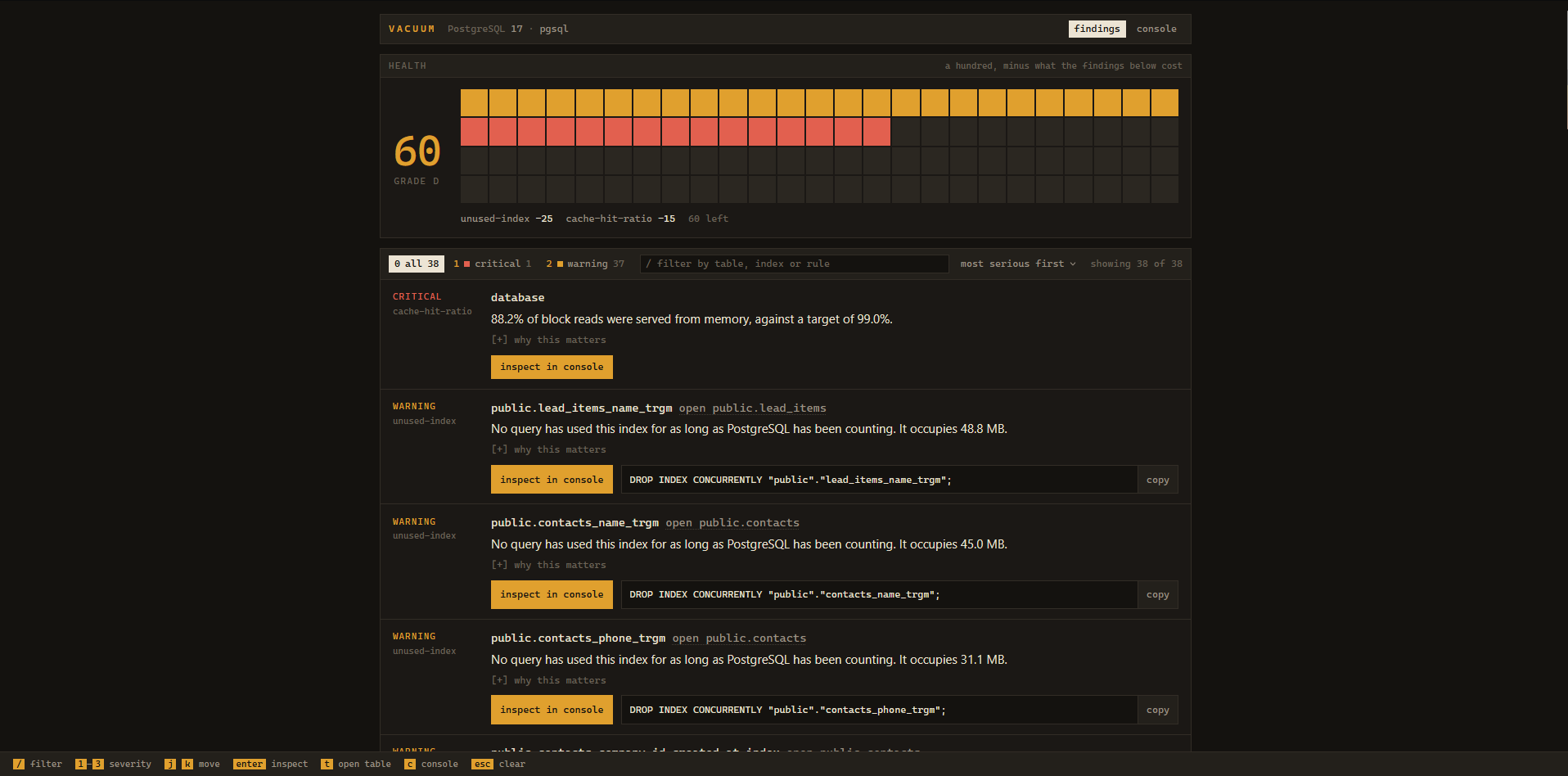
Every finding carries a severity, what the problem costs you, and — where a single statement would fix it — the SQL to run. Findings roll up into a health score out of 100, which is computed from the findings themselves, so the grade can never disagree with the list beneath it.
Most of those rules describe a database that is slower than it could be. wraparound describes one that stops: PostgreSQL counts transactions in 32 bits, and a table nothing freezes drags the whole cluster toward the end of that count, at which point the server refuses every write until it is shut down and vacuumed in single-user mode. It gives no warning of its own, and it does not slow down first.
PostgreSQL has two of those clocks, and either one running out stops the cluster. The second counts multixacts — the objects it allocates when more than one transaction holds a lock on the same row at once, which is ordinary on a table with foreign keys pointing at it or one read with SELECT ... FOR UPDATE. It has its own horizon (autovacuum_multixact_freeze_max_age, 400 million by default, twice the transaction one) and autovacuum advances it separately. A table under a lock-heavy workload can therefore be perfectly healthy on wraparound and be the table that stops your database. multixact-wraparound watches that clock. The remedy is the same VACUUM (FREEZE, ANALYZE) — only the seeing had to be added.
#Requirements
- PHP 8.3+
- Laravel 11 or 12
- PostgreSQL 14+
- Filament 4 or 5 — optional, only if you want the UI inside a panel
pg_stat_statements is optional. Without it, Vacuum says so on the page rather than quietly showing you an empty panel.
#Installation
composer require heyosseus/vacuum
php artisan vacuum:install
vacuum:install publishes the config and asks one question: serve the UI as the standalone Blade dashboard, or inside a Filament panel? Answer Blade (the default) and you are done — open /vacuum. Prefer to do it by hand? php artisan vendor:publish --tag=vacuum-config and open /vacuum is the whole of the Blade path.
#The standalone dashboard
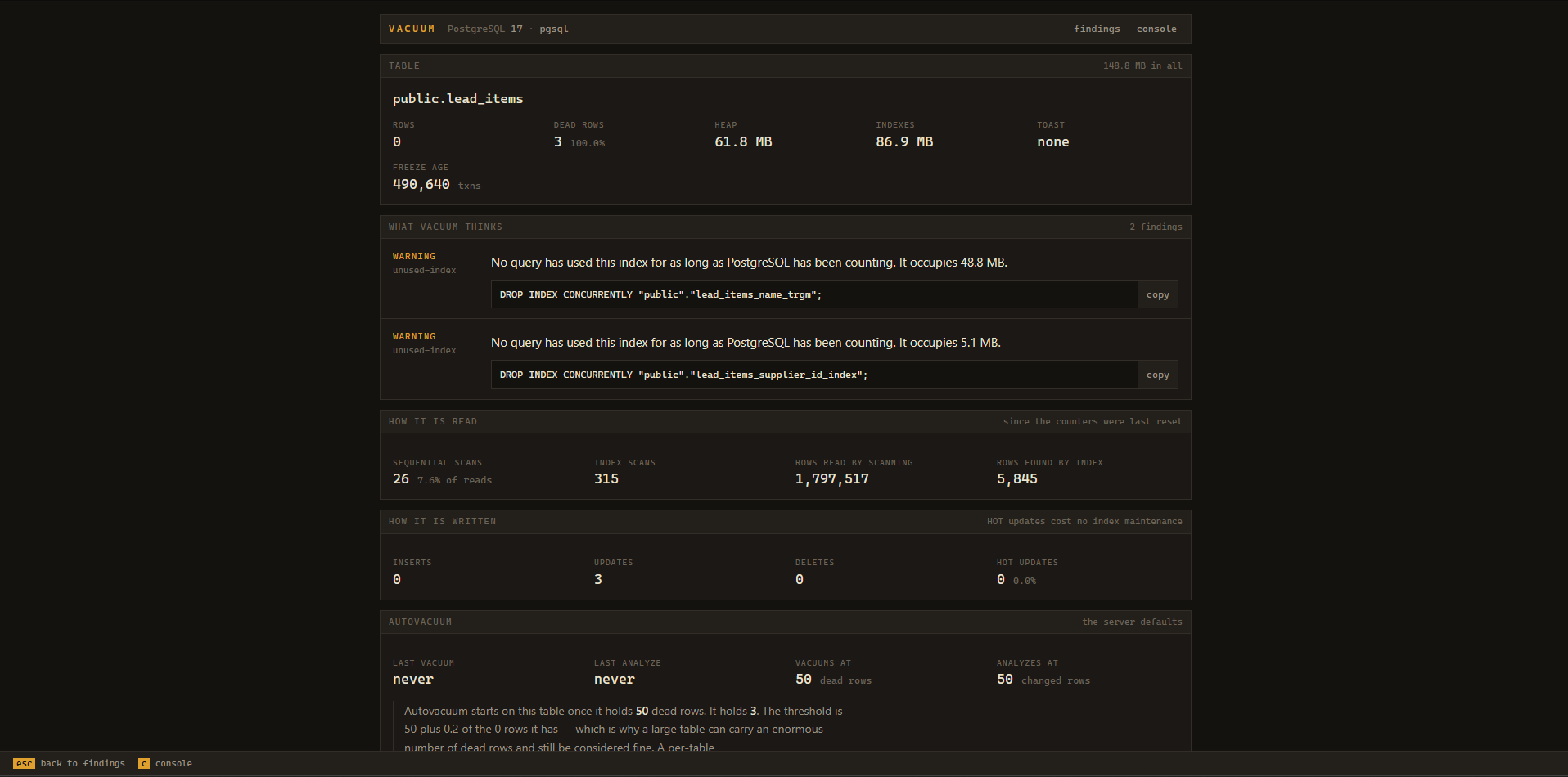
Open any table to see its full profile — size, dead rows, freeze age, how it is read and written, and the findings against it — worst first, each with the statement that would fix it.
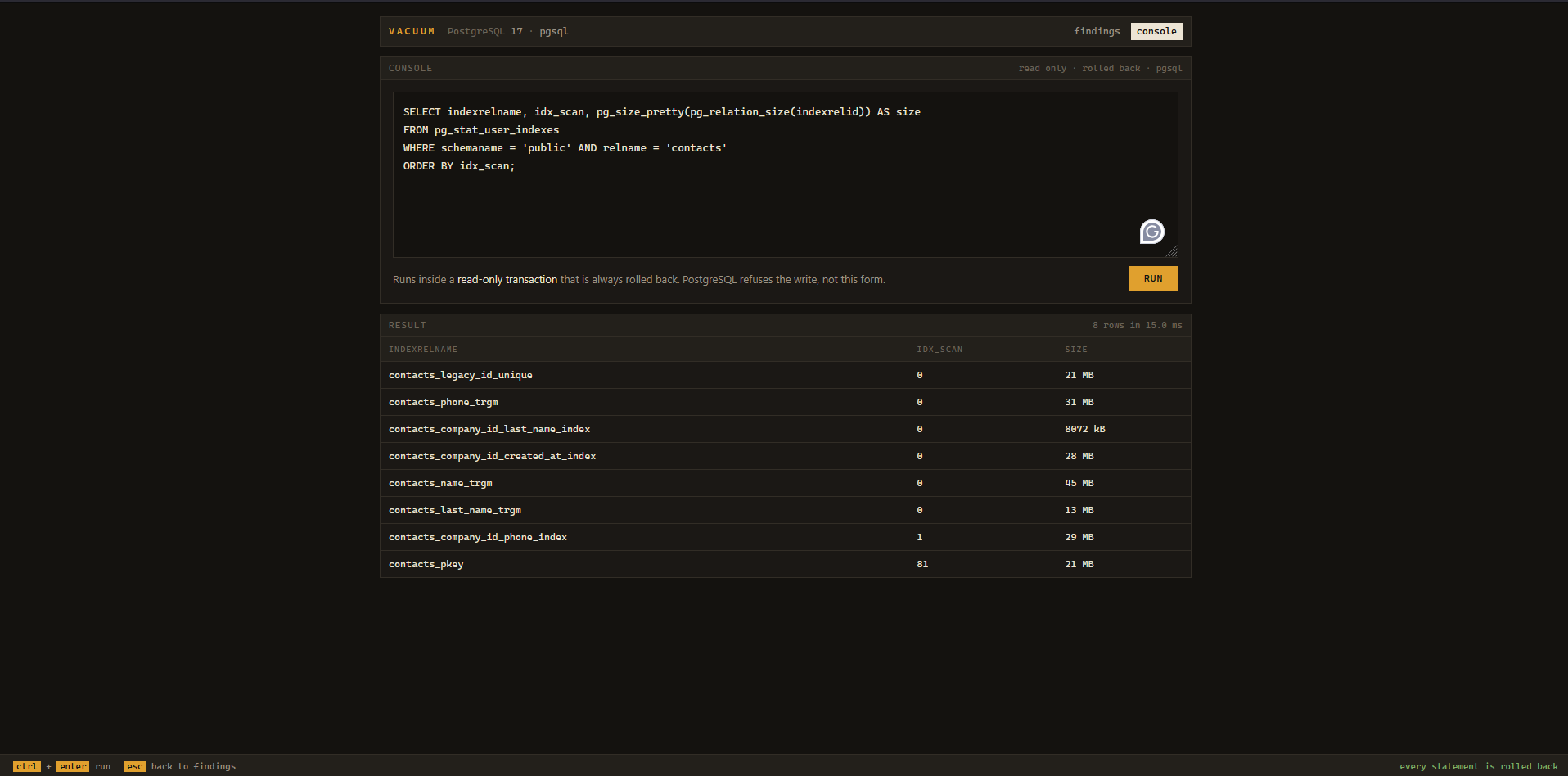
The built-in SQL console runs every statement inside a read-only transaction that is always rolled back.
#Inside Filament
If your app already runs a Filament v4 or v5 panel, Vacuum can live inside it rather than at a separate /vacuum URL — the same data the Filament way.
Filament is an optional peer. The package never requires filament/filament; the plugin's classes load only when your app already has it, so nothing changes for a Blade-only install.
composer require heyosseus/vacuum
php artisan vacuum:install --filament
On the Filament path the installer finds your panel provider (app/Providers/Filament/*PanelProvider.php) and registers the plugin on it for you. It edits that file by parsing it, not matching text — it locates the return $panel …; chain with PHP's own tokenizer, backs the file up, splices in the plugin, and runs php -l on the result; if anything looks wrong it restores the backup and prints the one line to add by hand instead. It will not silently edit a file it cannot parse, and in a non-interactive shell it prints rather than writes unless you pass --force.
The one line it adds:
->plugin(\Heyosseus\Vacuum\Filament\VacuumPlugin::make())
Then set the UI mode so the standalone Blade routes stand down and the same data is not reachable by two different doors:
VACUUM_UI=filament
Authorization is shared, not duplicated: the plugin's canAccess() calls the same Vacuum::auth() callback the Blade dashboard uses. One gate governs both.
#What the panel gives you
Everything lands in one Vacuum navigation group:
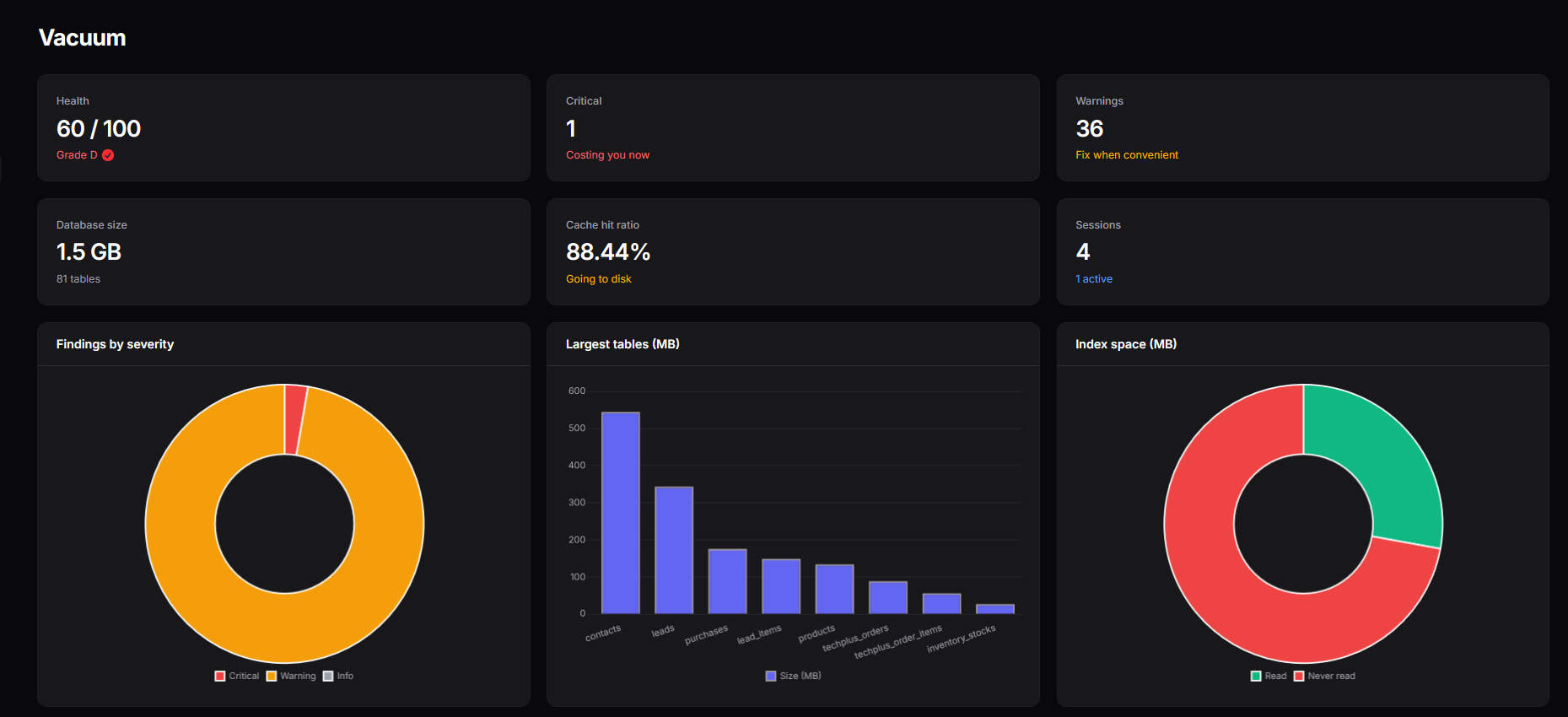
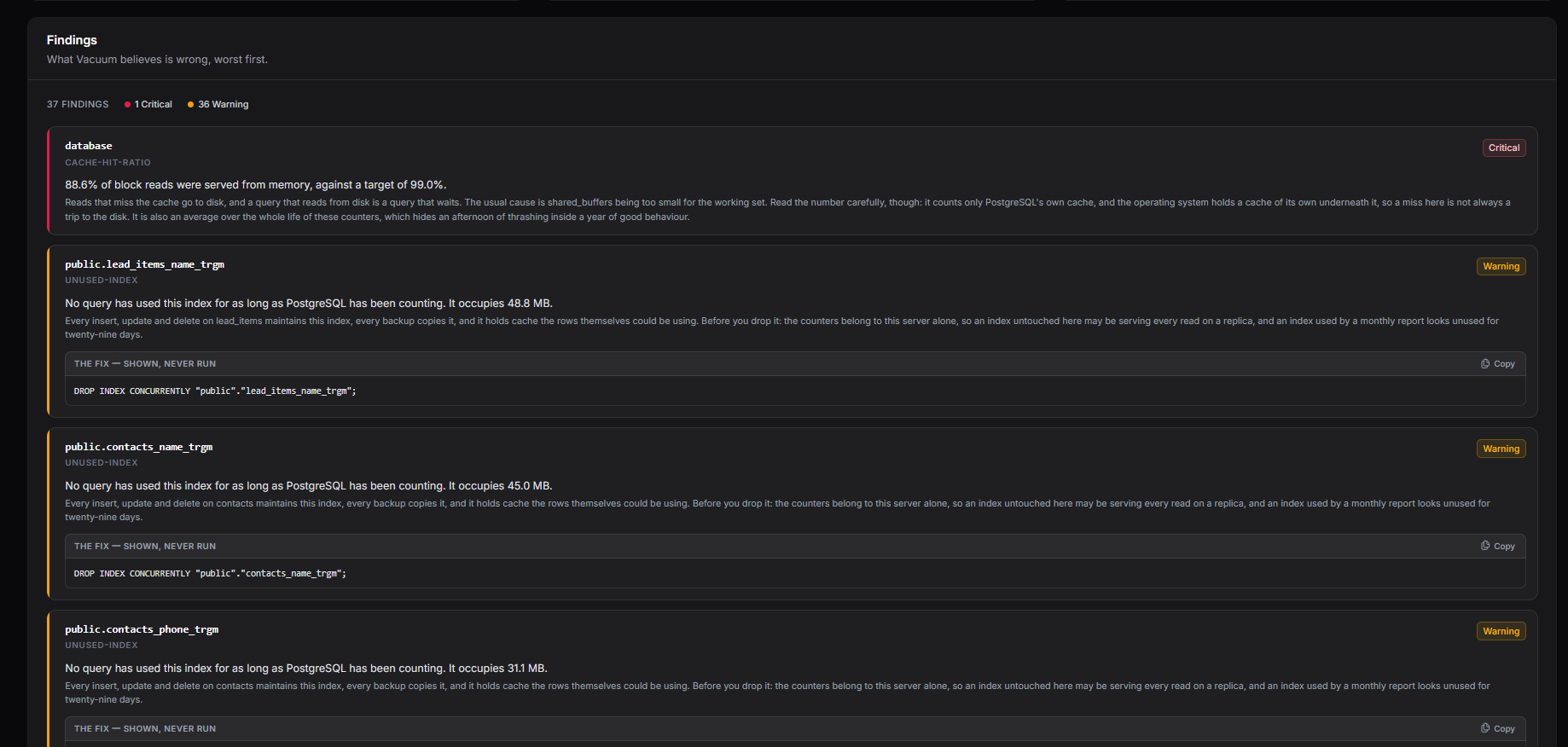
- Overview — the health story at a glance: the score and its grade, database vitals (size, table count, cache-hit ratio, live sessions), and charts for findings by severity, the largest tables, and how much index space is read versus never touched. Beneath them, the findings themselves, worst first — each with the statement that would put it right, shown and copied with one click, never run — and a live view of any vacuums PostgreSQL is running at that moment.
- History — where the database has been and where it is heading: the health line over time, what is newly wrong, what has cleared, and what is forecast to cross critical. Appears only when history is switched on — see History over time.
- Tables — a read-only resource over
pg_stat_user_tableswith native Filament sort, search, filter and pagination, and a drill-down carrying the same profile and findings as the Blade table page. - Indexes, Sessions, Statements — the same read-only treatment over
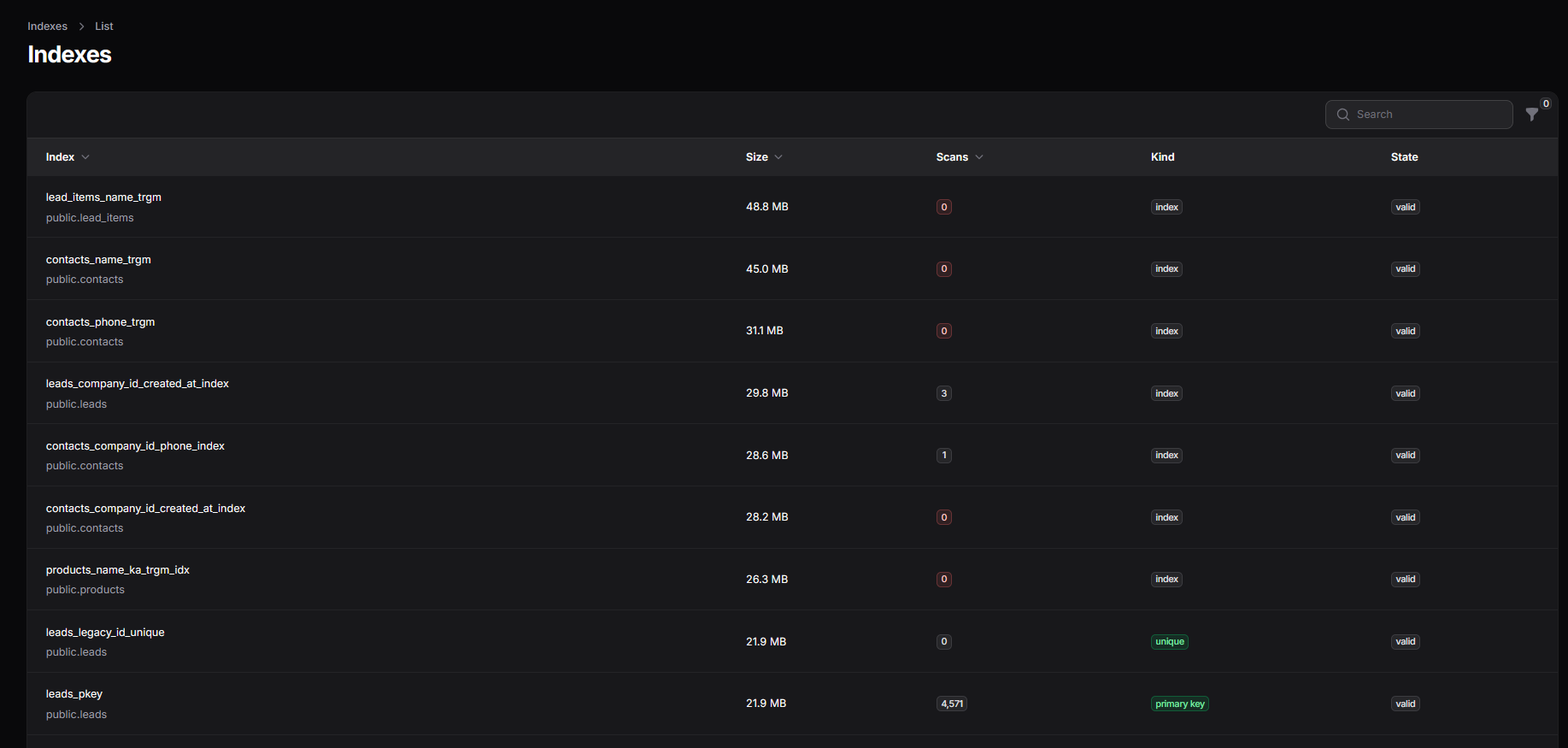
pg_stat_user_indexes,pg_stat_activity(live, polling) andpg_stat_statements. The last hides itself where the extension is not installed.
Every surface asks that one Vacuum::auth() callback, and every one opts out of Filament's tenant scoping — the catalogs Vacuum reads belong to the server, not to any one tenant — so the panel is at home in a multi-tenant install rather than throwing on a relationship these read-only models have no reason to carry.
The read-only resources over pg_stat_user_indexes and pg_stat_statements come with native Filament sort, search, filter and pagination.
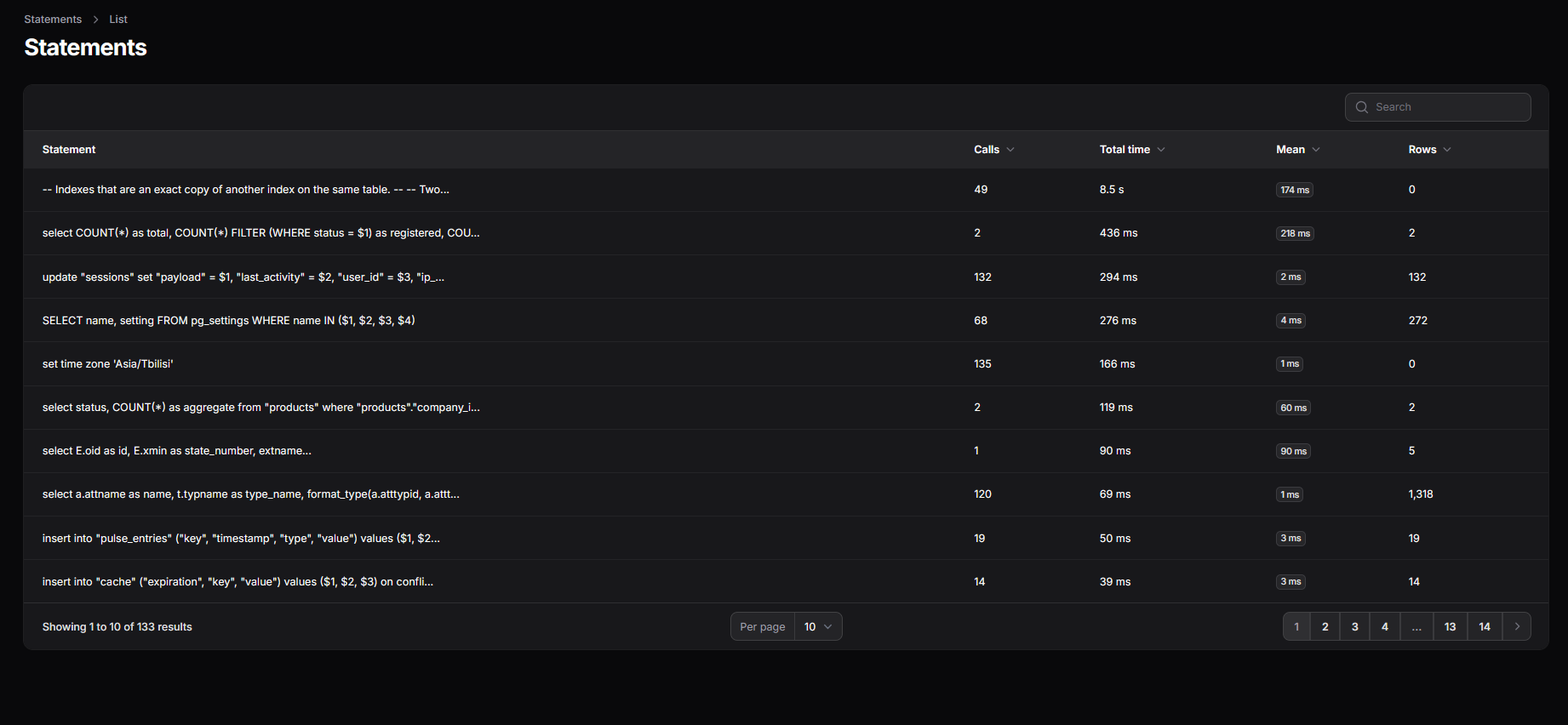
The SQL console stays on the Blade UI for now. It is not yet a Filament page, and
VACUUM_UI=filamentstands the standalone routes down, so if you rely on the console keep the Blade UI until a later release brings it inside the panel.
Flags for scripted installs: --blade / --filament skip the prompt, --panel=<name> picks one panel out of several, --force applies the edit without confirming.
#Who may look
Vacuum opens in local and refuses everywhere else. A forgotten configuration should lock the door, not publish the shape of your database.
To let anyone else in, register a callback — typically in AppServiceProvider::boot():
use Heyosseus\Vacuum\Vacuum;

Vacuum::auth(fn (Request $request) => $request->user()?->isAdmin() === true);
This is a callback rather than a Laravel gate on purpose. A gate is skipped entirely for a guest unless its first parameter is nullable, so the fn ($user) => … everyone writes would silently deny a developer who is not logged in, on their own laptop, where the dashboard is most useful.
If you authorize on the user, keep session middleware in the stack, or $request->user() will be null:
'middleware' => ['web', 'auth'],
Vacuum appends its own authorization middleware to whatever you list, so the dashboard cannot be exposed by emptying that array.
#Which database
By default Vacuum inspects your application's default connection, which must be PostgreSQL — it refuses anything else rather than reporting nonsense.
VACUUM_CONNECTION=pgsql_readonly
Point that at a role granted pg_monitor and nothing else. Vacuum never needs write access, and giving it none is the cheapest safety net you will ever configure.
#In your pipeline
The dashboard only tells you something if somebody opens it. The same rules run from a terminal:
php artisan vacuum:check
It exits non-zero when the advisor finds something critical, so a migration that ships a duplicate index fails the build, and a staging database drifting toward wraparound fails the nightly job, whether or not anybody was looking.
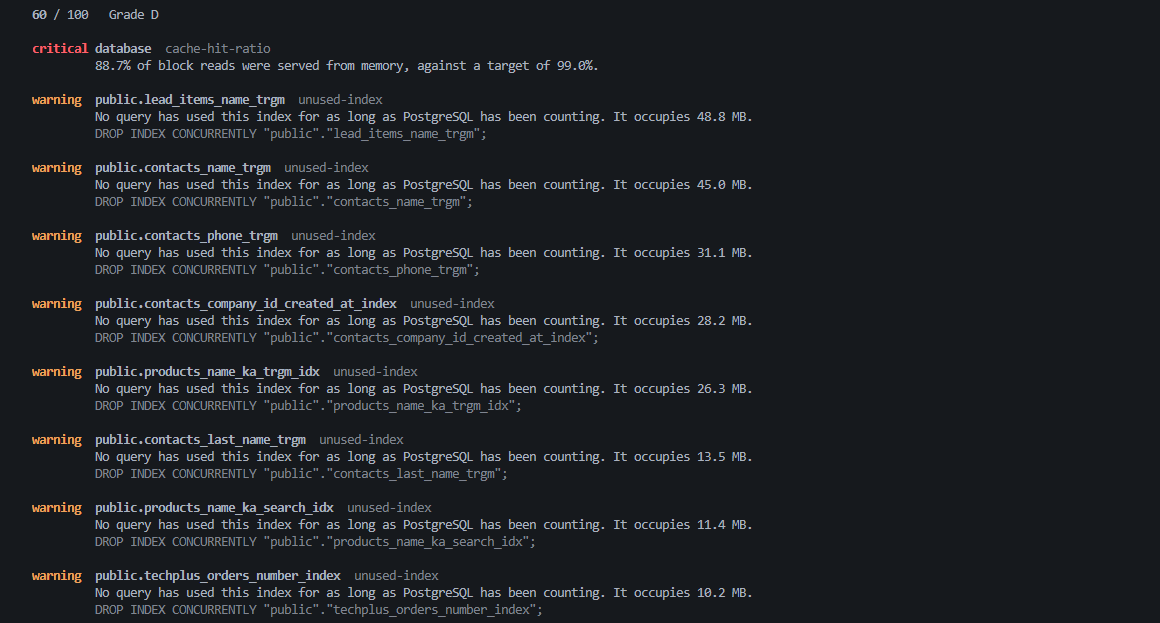
php artisan vacuum:check --fail-on=warning   # critical, warning, info, or never
php artisan vacuum:check --format=json       # score, grade, deductions, findings
Two things worth knowing. It never writes — the remediation is printed for you to read and decide on, exactly as it is on the page. And if Vacuum is disabled it fails rather than passing: a check that goes green because it never looked is worse than no check at all.
#History over time
Vacuum is point-in-time by default: every page and every vacuum:check reads the database as it is this instant. Switch history on and it records a snapshot on a schedule, so it can tell you which way a number is moving — bloat that is growing, a freeze age that climbs and never resets, a cache-hit ratio measured over the last hour rather than over the life of the server.
VACUUM_HISTORY_ENABLED=true
php artisan vendor:publish --tag=vacuum-migrations
php artisan migrate
Then take a snapshot on a schedule — hourly is a sensible default:
use Illuminate\Support\Facades\Schedule;

Schedule::command('vacuum:snapshot')->hourly();
Or let Vacuum register that for you: leave VACUUM_HISTORY_SCHEDULE at its default and it schedules the command itself. Set it to null when you would rather wire it up by hand.
This is the package's only write path, and it never touches the database it inspects. Snapshots are written with ordinary Eloquent to your application's own database — the published migration's tables live there — while the inspected server is still only ever read, read-only, through the same rolled-back transaction everything else uses. Point VACUUM_HISTORY_CONNECTION at a different connection to keep the history somewhere else again.
Once two snapshots exist, four things a single reading cannot say become available:
- Interval-accurate numbers.
cache-hit-ratioandslow-statementare lifetime averages until history can difference two snapshots; then they report what the database actually did over the last interval. That is also what quietly clears the false alarm a one-offVACUUM FULLleaves behind in the slow-statement list. - Direction. Each finding is marked climbing, easing or new, so a bloat figure inside its threshold but rising reads differently from the same figure holding steady.
- A forecast. For the numbers that only climb — freeze age, table size — Vacuum fits the recent trend and projects when it will cross the line that makes it critical: wraparound-critical in about nine days at the current rate. It stays silent unless it has enough snapshots and the points genuinely sit on a line; a guess wearing the clothes of a measurement is worse than nothing.
- What changed. The findings that are new since the previous snapshot, and the ones that have cleared.
Inside Filament this is a History page in the Vacuum group; on the Blade dashboard it is a history tab. Both appear only while history is on. Snapshots older than VACUUM_HISTORY_RETENTION_DAYS (90 by default) are pruned as each new one is taken.
#The SQL console
Off by default. Off means the route does not exist — not a page that says no.
VACUUM_CONSOLE_ENABLED=true
Statements run inside a transaction PostgreSQL has been told is READ ONLY, with a statement_timeout, and the transaction is always rolled back.
The keyword check is not what makes this safe. Vacuum turns away statements that do not begin with a word that reads, but that is a courtesy for people who type DELETE by accident. It is not a defence, and it cannot be one:
WITH written AS (INSERT INTO orders (id) VALUES (1) RETURNING *) SELECT * FROM written
That begins with WITH, walks straight past any keyword filter, and writes to your database. What stops it is PostgreSQL, which refuses the write inside a read-only transaction. There is a test that smuggles exactly that statement through and then asserts the table is still empty.
And the read-only transaction is not the whole story either. It constrains this backend's writes through MVCC. It does not constrain a function that opens a second backend, or effects that happen outside MVCC — and all of these begin with SELECT:
SELECT dblink('dbname=app', 'DELETE FROM users');  -- a second backend, not read-only
SELECT pg_read_file('/etc/passwd');                -- reads the server's disk
SELECT pg_terminate_backend(pid);                  -- kills connections
Vacuum refuses those by name, as another courtesy. What actually bounds the console is the role it connects as — and with VACUUM_CONNECTION unset that is your application's own role, often the owner of everything. If you turn the console on, give it a dedicated role that owns nothing and has those functions revoked. SECURITY.md has the grants.
Rows are capped by VACUUM_CONSOLE_MAX_ROWS (500), applied by PostgreSQL rather than to the answer: the statement is wrapped in a subquery with a LIMIT, so the rows past the cap are never produced. Every statement the console runs is written to the log — who, what, how many rows, how long — and the route is throttled.
EXPLAIN ANALYZE really runs the query it explains, so it needs its own switch:
VACUUM_CONSOLE_EXPLAIN_ANALYZE=true
#A word on Laravel and read-only transactions
This is worth writing down, because it is not obvious and it silently defeats the naive implementation.
Laravel's LostConnectionDetector treats PostgreSQL's SQLSTATE[25006] — cannot execute INSERT in a read-only transaction — as a lost connection. If your read-only transaction is one Laravel does not know about (a raw BEGIN TRANSACTION READ ONLY), then Connection::run() catches the rejection, decides the connection died, reconnects, and retries the statement on a fresh connection outside the transaction — committing the very write PostgreSQL just refused.
Vacuum opens the transaction through Laravel's own beginTransaction() and then issues SET TRANSACTION READ ONLY. With transactions >= 1, Laravel rethrows instead of retrying. That is the entire reason the safety claim above is true rather than merely asserted, and it is covered by a test named it does not let a rejected write be retried onto a fresh connection.
#Tuning the thresholds
Every rule reads its limits from config/vacuum.php. The defaults are set for a database somebody depends on, not for a table you made a minute ago:
'thresholds' => [
    'dead_tuple_ratio' => 0.20,
    'dead_tuple_minimum' => 1_000,
    'cache_hit_ratio' => 0.99,
    'cache_hit_minimum_blocks' => 100_000,
    'wraparound_xid_age' => 200_000_000,          // match your autovacuum_freeze_max_age
    'wraparound_xid_age_critical' => 1_000_000_000,
    'wraparound_mxid_age' => 400_000_000,         // match your autovacuum_multixact_freeze_max_age
    'wraparound_mxid_age_critical' => 1_000_000_000,
    'stale_statistics_ratio' => 0.20,             // autoanalyze fires at 0.10
    'stale_statistics_minimum' => 10_000,
    'stale_statistics_minimum_rows' => 1_000,
    'bloat_bytes' => 100 * 1024 * 1024,
    'unused_index_min_size' => 1024 * 1024,
    'long_running_query_seconds' => 60,
    'idle_in_transaction_seconds' => 300,
    'slow_query_milliseconds' => 500,
],
#Writing your own rule
A rule is handed one value object and returns a finding or nothing. It never touches the database, so it tests without one:
use Heyosseus\Vacuum\Advisor\{Finding, Severity, TableRule};
use Heyosseus\Vacuum\Values\TableStatistic;

final readonly class NeverAnalyzed implements TableRule
{
    public function inspect(TableStatistic $table): ?Finding
    {
        if ($table->lastAnalyzedAt() !== null) {
            return null;
        }

        return new Finding(
            rule: 'never-analyzed',
            subject: $table->qualifiedName(),
            severity: Severity::Warning,
            summary: 'Nothing has ever analyzed this table, so the planner is guessing.',
            impact: 'Without statistics the planner cannot estimate row counts, and it will choose a bad plan confidently.',
            remediation: "ANALYZE {$table->qualifiedName()};",
        );
    }
}
Tag it, and the advisor picks it up:
use Heyosseus\Vacuum\VacuumServiceProvider;

$this->app->tag([NeverAnalyzed::class], VacuumServiceProvider::TABLE_RULES);
There is a tag per subject — TABLE_RULES, BLOAT_RULES, INDEX_RULES, DUPLICATE_RULES, CACHE_RULES, SESSION_RULES, STATEMENT_RULES, SETTING_RULES — because a rule should be given the one thing it reasons about, and adding a rule should never widen what has to be queried before it can run.
#Restyling the dashboard
php artisan vendor:publish --tag=vacuum-views
The stylesheet is inlined rather than fetched from a CDN, on the grounds that the dashboard is what you open when the database is unwell, sometimes from a machine that cannot reach the internet.
#Development
Vacuum tests against a real PostgreSQL server. The statistics views it reads are the whole product, and SQLite cannot pretend to have them.
composer install
cp phpunit.xml.dist phpunit.xml     # then put your database credentials in it
composer test
phpunit.xml is gitignored, which is where your credentials should live.
composer test runs Rector, Pint, PHPStan at level: max, 100% type coverage and 100% line coverage. All of them have to pass.
For the pg_stat_statements tests, the extension must exist. It needs the library preloaded, which is read at startup:
ALTER SYSTEM SET shared_preload_libraries = 'pg_stat_statements';  -- then restart the server
CREATE EXTENSION pg_stat_statements;
Those tests skip themselves if it is missing, though the coverage gate will then fail.
#License
MIT. See LICENSE.md.
Featured Plugins
A selection of plugins curated by the Filament team

Blueprint
Filament Blueprint is a premium Laravel Boost extension that helps AI agents produce accurate, detailed implementation plans and security reports for Filament apps.
 Filament

Spotlight Pro
Browse your Filament Panel with ease. Filament Spotlight Pro adds a Spotlight/Raycast like Command Palette to your Filament Panel.
 Dennis Koch

Custom Fields
Eliminate custom field migrations forever. Let your users create and manage form fields directly in Filament admin panels with 20+ built-in field types, validation, and zero database changes.
 Relaticle