
AI Table Filters by Pruna Catalin
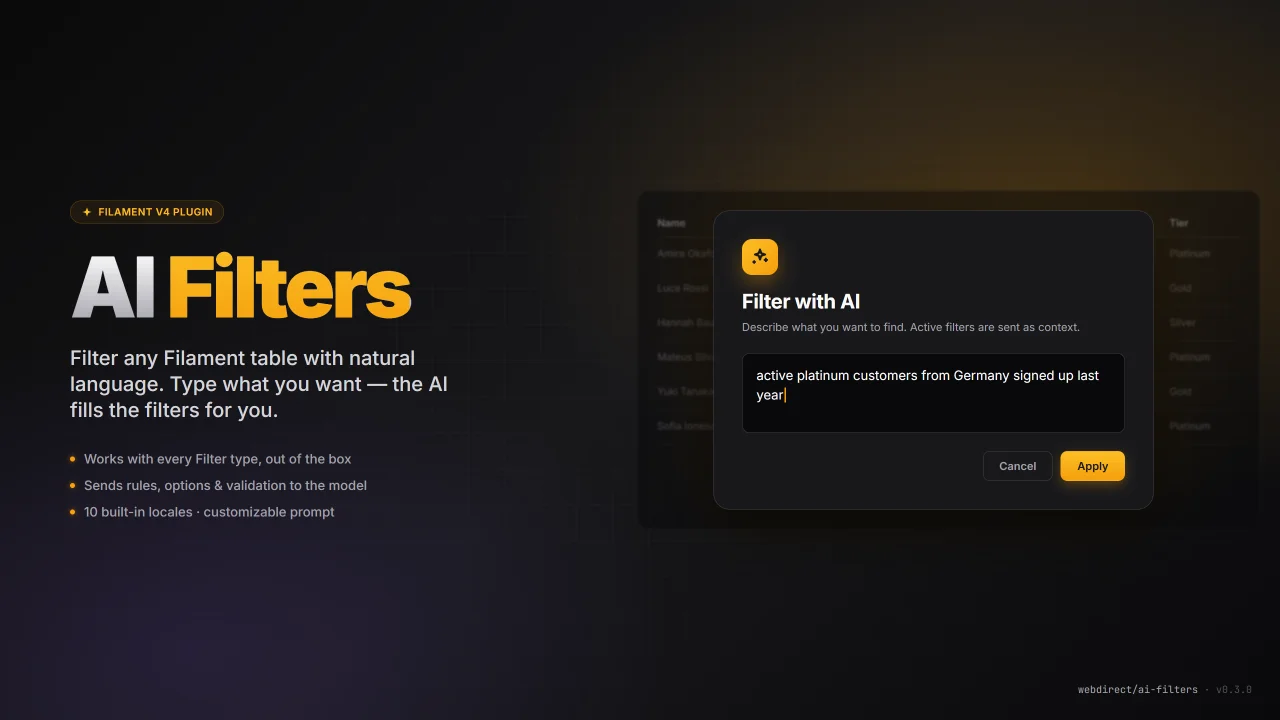
CommunityFilter any Filament table with natural language. Describe what you want in plain English; the AI translates it into filter values and applies them to the table.
 Author:
Pruna Catalin
Author:
Pruna Catalin
Package health
Automated checks of this plugin's Composer package
15 checks
- Skipped: GitHub Actions pinned to SHA
- Skipped: GitLab CI includes pinned to SHA
- Passed: Open security advisories
- Passed: Dependabot PR responsiveness — No open Dependabot PRs.
- Skipped: Renovate MR responsiveness
- Skipped: Dependabot or Renovate configured
- Skipped: Dependency update cooldown configured
- Failed: Provides a security policy — View details on Plumb
- Passed: Abandoned or archived — No consulted source marks the package abandoned (packagist, github).
- Passed: Commit and release recency — Active: last commit 0 days ago; last release 0 days ago.
-
Passed:
composer.lock not committed by library
—
composer.lockis absent from the released dist archive. - Passed: Dist archive is lean
-
Passed:
Current Laravel version supported
—
Package dependencies resolve together with current Laravel
13.0. -
Passed:
Current PHP version supported
—
Constraint
^8.3supports current PHP8.5. - Skipped: Current Symfony version supported
filament/
namespace. Review the source and install at your own risk. Found
malware or an unresolved security issue the author won't
address?
Report it
.
Documentation
- Requirements
- Installation
- Usage
- Configuration reference
- How it works
- Troubleshooting
- Architecture
- Credits
- License
Credits: the idea for this plugin came from this video on the Filament Daily channel by Povilas Korop. Huge thank-you — go subscribe.
A Filament v4 panel plugin that lets users filter any table with natural language.
Click the AI Filter button on a table, type what you want ("active platinum customers from Germany signed up last year"), and the plugin sends your prompt
plus the table's available filters to an AI model. The model responds with a
structured set of filter values that the plugin applies to the table.
Powered by the official laravel/ai
package, so any provider it supports (Anthropic, OpenAI, Gemini, ...) can be
used.
#Requirements
| Package | Version |
|---|---|
| PHP | ^8.3 |
| Laravel | ^11 / ^12 / ^13 |
| filament/filament | ^4.0 / ^5.0 |
| laravel/ai | ^0.6 / ^1.0 |
#Installation
#1. Require the package
composer require webdirect/ai-filters
laravel/ai is pulled in automatically. The plugin's service provider is
auto-discovered, no manual registration needed.
#2. Publish the config
php artisan vendor:publish --tag=ai-filters-config
This creates config/ai-filters.php.
#3. Configure your AI provider
The plugin uses whatever provider you configure in config/ai.php. The fastest
path for Anthropic:
ANTHROPIC_API_KEY=sk-ant-...
AI_FILTERS_PROVIDER=anthropic
AI_FILTERS_MODEL=claude-haiku-4-5-20251001
For OpenAI:
OPENAI_API_KEY=sk-...
AI_FILTERS_PROVIDER=openai
AI_FILTERS_MODEL=gpt-4o-mini
If you want to override the provider's API key from the plugin's own config,
set AI_FILTERS_API_KEY instead — the plugin will rewrite
ai.providers.<provider>.key at boot.
#4. Register the plugin on a panel
use Webdirect\AiFilters\AiFiltersPlugin;

public function panel(Panel $panel): Panel
{
    return $panel
        // ...
        ->plugin(AiFiltersPlugin::make());
}
Registering the plugin is optional today — the action works on its own — but doing so future-proofs you for panel-level configuration helpers.
#Usage
Add AiFilterAction::make() to any Filament table's headerActions():
use Webdirect\AiFilters\Actions\AiFilterAction;

public static function configure(Table $table): Table
{
    return $table
        ->columns([/* ... */])
        ->filters([
            SelectFilter::make('status')
                ->options([
                    'active' => 'Active',
                    'inactive' => 'Inactive',
                ])
                ->multiple(),
            // ...
        ])
        ->headerActions([
            AiFilterAction::make(),
        ]);
}
That's it. Open the table, click AI Filter, write what you want, hit Apply.
#Supported filter types
The plugin is fully dynamic: it introspects each filter's form schema and
sends the AI a rich description of every form field — its name, type, label,
whether it's required, its Laravel validation rules, and (for Select/Radio)
the accepted options.
This means any Filament filter works out of the box, including your own custom-schema filters. The built-in handling for the common ones:
| Filter | Fields exposed to AI |
|---|---|
SelectFilter (single) |
value + option keys |
SelectFilter with ->multiple() |
values (array) + option keys |
TernaryFilter |
value + booleanLike: true |
Filter (toggle / no schema) |
isActive (Checkbox / Toggle) |
Filter with custom schema |
every form field: name, type, required, rules, options, inputType (email/number/url), inputFormat (date/datetime/time), placeholder |
For custom-schema filters, the AI sees the field names you defined, so use
descriptive keys like from, until, min_revenue, email_domain.
#Global search
If the table has searchable columns and the user's request maps to free text (e.g. "find Amira"), the AI will fall back to setting the table's global search. Filters are preferred whenever a matching one exists.
#Customising the action
AiFilterAction::make() returns a regular Filament Action, so you can chain
on top of it:
AiFilterAction::make('aiFilter')
    ->label('Ask AI')
    ->icon('heroicon-o-bolt')
    ->color('warning')
    ->visible(fn () => auth()->user()->can('use-ai-filters'));
#Translations
The plugin ships with translations for the following locales:
en (default) · ro · es · fr · de · it · nl · pt_BR · pl · tr
Laravel automatically picks the right file based on the active locale
(App::setLocale() / APP_LOCALE). If a locale is missing, Laravel falls
back to the configured fallback locale (English by default).
Publishing translations — to customize the shipped strings:
php artisan vendor:publish --tag=ai-filters-translations
This copies every locale to lang/vendor/ai-filters/<locale>/ai-filters.php.
Edit whichever you need. Published files take precedence over the ones
shipped in the package.
Overriding via config — for a table-specific label you can bypass
translations entirely by setting the string in config/ai-filters.php:
'action' => [
    'label' => 'Ask the AI',           // wins over the translation
    'modal_heading' => null,           // null → translation is used
    'modal_description' => null,
],
Every null value falls back to the translated string; every string value
wins over it.
Missing a language? PRs welcome — copy
resources/lang/en/ai-filters.php, translate, open a pull request.
#Customising the system prompt
The full system prompt that steers the AI lives in a Markdown file, not in PHP code. You can override it with your own file without touching the package.
1. Publish the default template so you have a copy to work from:
php artisan vendor:publish --tag=ai-filters-prompt
This copies the built-in template to
resources/prompts/ai-filters/filter-agent.md.
2. Point the plugin at your file either via .env:
AI_FILTERS_PROMPT_PATH="${PWD}/resources/prompts/ai-filters/filter-agent.md"
or directly in config/ai-filters.php:
'prompt_path' => resource_path('prompts/ai-filters/filter-agent.md'),
When prompt_path is null, the built-in template is used.
3. Placeholders — the template is rendered with strtr() against:
| Placeholder | Replaced with |
|---|---|
{{available}} |
pretty-printed JSON list of filters + fields + rules + options |
{{current}} |
JSON of the current tableFilters state |
{{searchable}} |
JSON array of searchable column names |
{{currentSearch}} |
current global search value |
{{extra}} |
rendered ai-filters.instructions text (empty when not set) |
Any placeholder you omit is simply not rewritten — keep only what you need.
#Configuration reference
config/ai-filters.php:
return [
    'provider' => env('AI_FILTERS_PROVIDER', 'anthropic'),
    'model'    => env('AI_FILTERS_MODEL'),
    'api_key'  => env('AI_FILTERS_API_KEY'),

    'instructions' => null, // extra system-prompt text appended to the agent

    'prompt_path'  => env('AI_FILTERS_PROMPT_PATH'), // override path to MD template, null = built-in

    'action' => [
        'label'             => 'AI Filter',
        'icon'              => 'heroicon-o-sparkles',
        'modal_heading'     => 'Filter with AI',
        'modal_description' => 'Describe what you want to find. Active filters are sent as context.',
    ],
];
| Key | Purpose |
|---|---|
provider |
Name of the laravel/ai provider to use (anthropic, openai, ...). |
model |
Specific model id. null = provider default. |
api_key |
Optional. Overrides the provider's configured API key at boot. |
instructions |
Free text appended to the agent's system prompt. Use for table-specific business rules. |
prompt_path |
Absolute path to a Markdown prompt template. null = built-in template. |
action.* |
Visual defaults for the action button and modal. |
#How it works
- The user clicks AI Filter and types a prompt.
- The plugin reads the table's filters via
$table->getFilters()and extracts each filter's name, type, accepted form-field keys, and (forSelectFilter) its options. - It also reads the current
$livewire->tableFiltersand$livewire->tableSearch. - All of the above is passed to a
FilterAgent(alaravel/aiAgent withHasStructuredOutput), which returns:{ "filters": [ { "filter": "status", "key": "values", "values": ["active"] }, { "filter": "tier", "key": "value", "value": "platinum" } ], "search": null } - The plugin merges those updates back into
$livewire->tableFilters(and sets$livewire->tableSearchif the AI returned a search query). - Filament re-renders the table with the new state.
#Troubleshooting
#AI provider [anthropic] has insufficient credits or quota
Anthropic free credit grants are scoped to the Workbench / Claude Code, not the API. Add real billing credit at console.anthropic.com → Billing and create a fresh API key afterwards.
#model: claude-3-5-haiku-20241022 not found
Some legacy models are not enabled on every tier. Switch to a current model:
AI_FILTERS_MODEL=claude-haiku-4-5-20251001
#"No matching filters" warning
The AI couldn't map the request to any available filter. Either:
- Add more filters to the table that cover the request, or
- Add hints in
ai-filters.instructions(e.g. mappings between user terminology and filter names), or - Make the request more specific.
#Verify config is loaded after .env changes
php artisan config:clear
#Inspecting the agent's raw response
A Log::info('AiFilterAction', [...]) entry is written on every run. Check
storage/logs/laravel.log to see the prompt, the filter list sent to the AI,
and the structured response it returned.
#Architecture
packages/webdirect/ai-filters/
├── composer.json
├── config/
│   └── ai-filters.php
├── resources/
│   └── prompts/
│       └── filter-agent.md         # default system prompt template
└── src/
    ├── AiFiltersPlugin.php         # Filament Plugin contract
    ├── AiFiltersServiceProvider.php # config + prompt publish, provider key override
    ├── Actions/
    │   └── AiFilterAction.php      # the table header action
    └── Agents/
        └── FilterAgent.php         # laravel/ai agent w/ structured output
#Credits
- Original idea: this video on the Filament Daily channel by Povilas Korop. Go subscribe.
- Built on top of
laravel/aiand Filament v4.
#License
MIT
The author
Laravel & Filament developer at Webdirect, focused on admin panels and line-of-business applications. Most of my day is spent turning messy operational workflows into clean Filament resources, tables, and forms.
I publish open-source plugins whenever an idea shows up more than twice across my own projects. The goal is always the same: make the common case easy, keep the API predictable, and write enough tests that future-me doesn't get burned.
From the same author
Featured Plugins
A selection of plugins curated by the Filament team

Custom Dashboards
Let your users build and share their own dashboards with a drag-and-drop interface. Define your data sources in PHP and let them do the rest.
 Filament

Spotlight Pro
Browse your Filament Panel with ease. Filament Spotlight Pro adds a Spotlight like Command Palette to your Filament Panel.
 Dennis Koch

Advanced Tables (formerly Filter Sets)
Supercharge your tables with powerful features like user-customizable views, quick filters, multi-column sorting, advanced table searching, convenient view management, and more. Compatible with Resource Panel Tables, Relation Managers, Table Widgets, and Table Builder!
 Kenneth Sese
