AI writer
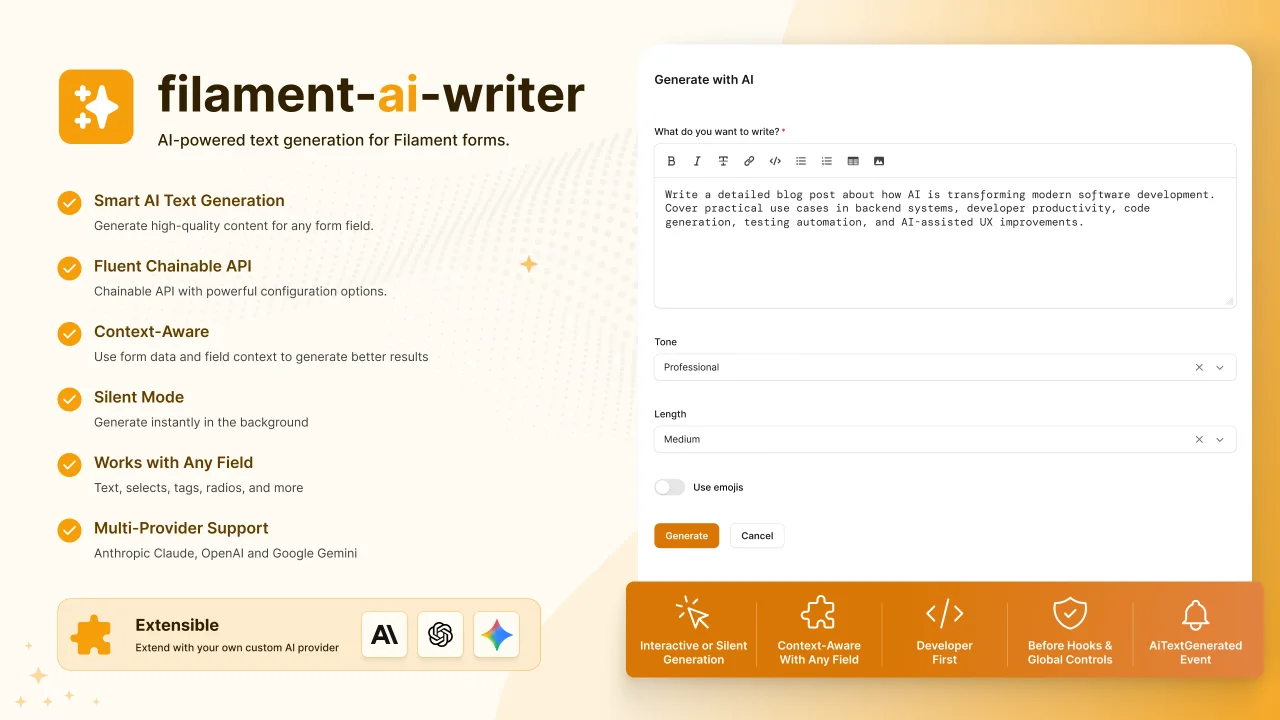
A Filament action that adds AI-powered text generation to any form field, with support for Anthropic Claude, OpenAI, and Google Gemini.
 Author:
Pedro Lucas
Author:
Pedro Lucas
Documentation
- Requirements
- Installation
- Configuration
- Usage
- API reference
- AiWriterAction::make(?string $name = null): static
- ->targetField(string $field): static
- ->prompt(string $prompt): static
- ->contextFields(array $fields): static
- ->silent(bool $condition = true): static
- ->valueMap(array $map): static
- ->allowedValues(array $values): static
- ->expectArray(bool $condition = true): static
- ->normalizeArrayCase(bool $condition = true): static
- ->beforeGenerate(callable $callback): static
- AiWriterAction::globalBeforeGenerate(callable $callback): void
- AiTextGenerated event
- Supported providers
- Package structure
- Extending with a custom provider
- Local development
- Contributing
- License
A reusable Filament Action that adds AI-powered text generation to any form field. Supports Anthropic Claude, OpenAI, and Google Gemini out of the box.
Status: Beta — This package is in active development. APIs may change and issues can occur.
#Requirements
- PHP 8.1+
- Laravel 10, 11, or 12
- Filament 4.x
#Installation
composer require pdro-lucas/filament-ai-writer
The service provider is auto-discovered by Laravel. No manual registration needed.
#Configuration
Add your API key to .env depending on which provider you want to use:
# Anthropic (default)
ANTHROPIC_API_KEY=sk-ant-...

# OpenAI
OPENAI_API_KEY=sk-...

# Google Gemini
GEMINI_API_KEY=...
To switch providers or customize the model, add the following variables:
AI_WRITER_PROVIDER=anthropic   # anthropic | openai | gemini
AI_WRITER_MODEL=claude-sonnet-4-20250514
AI_WRITER_MAX_TOKENS=2048
AI_WRITER_CONNECT_TIMEOUT=10
AI_WRITER_TIMEOUT=60
AI_WRITER_RETRY_TIMES=2
AI_WRITER_RETRY_SLEEP_MS=500
If you need to customize the full configuration, publish the config file:
php artisan vendor:publish --tag=filament-ai-writer-config
This creates config/filament-ai-writer.php in your project where you can set per-provider models, API keys, and token limits. Publishing is optional — the package works with just the .env variables.
#Usage
Import the action and attach it to any Filament form field using hintAction or suffixAction.
use PdroLucas\FilamentAiWriter\Actions\AiWriterAction;
The action works in two modes: interactive and silent. Interactive mode opens a modal where the user describes what they want. Silent mode reads other fields from the current form as context and generates immediately, with no modal.
#Interactive mode
The user clicks the sparkles button, a modal opens with a free-text area, and the AI generates content based on the user input and the configured prompt. The result is injected into the target field.
use Filament\Forms\Components\MarkdownEditor;

MarkdownEditor::make('content')
    ->hintAction(
        AiWriterAction::make()
            ->targetField('content')
            ->prompt('
                You are a content writing expert.
                Write rich Markdown with headers, lists, and well-structured paragraphs.
                Return ONLY the Markdown content, no explanations.
            ')
    ),
use Filament\Forms\Components\Textarea;

Textarea::make('excerpt')
    ->hintAction(
        AiWriterAction::make('ai_excerpt')
            ->targetField('excerpt')
            ->prompt('
                Write a concise and engaging summary in 2-3 sentences.
                Tone: professional but accessible.
                Return ONLY the summary.
            ')
    ),
#Silent mode
The user clicks the button and the AI generates immediately, reading the specified context fields from the current form. No modal is shown. A success notification is displayed when generation completes.
If any of the context fields are empty when the button is clicked, the action shows a warning notification listing the missing fields and does not generate.
use Filament\Forms\Components\TextInput;

TextInput::make('slug')
    ->hintAction(
        AiWriterAction::make('ai_slug')
            ->targetField('slug')
            ->contextFields(['title'])
            ->prompt('
                Generate a URL-friendly slug based on the provided title.
                Return ONLY the slug, lowercase, hyphenated, no special characters.
            ')
            ->silent()
    ),
#Silent mode with a select field
Use ->valueMap() when the target field is a select or radio. Pass the same id => name map used in ->options(). The AI receives the available options as context and returns the key of the chosen option.
use Filament\Forms\Components\Select;

$categories = Category::all()->pluck('name', 'id');

Select::make('category_id')
    ->label('Category')
    ->options($categories)
    ->hintAction(
        AiWriterAction::make('ai_category')
            ->targetField('category_id')
            ->contextFields(['title', 'body'])
            ->valueMap($categories->toArray())
            ->prompt('
                Based on the title and body, choose the most appropriate category.
                Return ONLY the numeric ID of the chosen category, nothing else.
            ')
            ->silent()
    ),
#Silent mode with tags or multi-select
Use ->allowedValues() when the target field is a tags input or multi-select. The AI receives the list of allowed values and must return a JSON array containing only values from that list. Values not present in the list are filtered out before injection.
use Filament\Forms\Components\TagsInput;

TagsInput::make('tags')
    ->hintAction(
        AiWriterAction::make('ai_tags')
            ->targetField('tags')
            ->contextFields(['title', 'body'])
            ->allowedValues(['laravel', 'filament', 'php', 'api', 'frontend', 'backend'])
            ->normalizeArrayCase()
            ->prompt('
                Suggest relevant tags based on the title and body.
                Return ONLY a raw JSON array of strings from the allowed list, no markdown, no explanation.
                Example: ["laravel","filament","php"]
            ')
            ->silent()
    ),
// Dynamically from the database
$tags = Tag::all()->pluck('name')->toArray();

TagsInput::make('tags')
    ->hintAction(
        AiWriterAction::make('ai_tags')
            ->targetField('tags')
            ->contextFields(['title', 'body'])
            ->allowedValues($tags)
            ->normalizeArrayCase()
            ->prompt('
                Suggest relevant tags based on the title and body.
                Return ONLY a raw JSON array of strings from the allowed list, no markdown, no explanation.
                Example: ["laravel","filament","php"]
            ')
            ->silent()
    ),
When no ->allowedValues() is provided but the target field still expects an array, use ->expectArray():
TagsInput::make('tags')
    ->hintAction(
        AiWriterAction::make('ai_tags')
            ->targetField('tags')
            ->contextFields(['title', 'body'])
            ->expectArray()
            ->normalizeArrayCase()
            ->prompt('
                Suggest up to five relevant tags based on the title and body.
                Return ONLY a raw JSON array of strings, no markdown, no explanation.
                Example: ["laravel","filament","php"]
            ')
            ->silent()
    ),
#API reference
#AiWriterAction::make(?string $name = null): static
Creates a new action instance. Defaults to 'ai_writer'. If you attach more than one action to the same form, give each a unique name.
#->targetField(string $field): static
The name of the form field where the generated text will be injected.
#->prompt(string $prompt): static
The system prompt sent to the AI provider. Use this to define tone, format, length constraints, and domain-specific instructions. The more specific the prompt, the better the output.
#->contextFields(array $fields): static
An array of field names to read from the current form and pass to the AI as context. Used in silent mode.
#->silent(bool $condition = true): static
Enables silent mode. The action generates immediately on click with no modal, using contextFields as input.
#->valueMap(array $map): static
An id => name map for select or radio fields. The AI receives the options as context and returns a single key. Use this instead of ->allowedValues() when the field expects a scalar value.
#->allowedValues(array $values): static
A flat array of allowed values for tags inputs or multi-selects. The AI must return a JSON array containing only values from this list. Values not present in the list are filtered out before injection.
#->expectArray(bool $condition = true): static
Tells the action to parse the AI response as an array even when no ->allowedValues() is defined. Useful for free-form tags where any value is acceptable.
#->normalizeArrayCase(bool $condition = true): static
Converts all values in the generated array to lowercase before injection. Useful for tags to ensure consistent casing regardless of what the AI returns.
#->beforeGenerate(callable $callback): static
Register a callback that runs before AI generation on this action instance. Return false to cancel generation. Useful for credit checks, permissions, or rate limiting.
use Filament\Forms\Components\TextInput;

TextInput::make('meta_description')
    ->hintAction(
        AiWriterAction::make()
            ->targetField('meta_description')
            ->beforeGenerate(function (): bool {
                if (auth()->user()->credits <= 0) {
                    return false;
                }
                return true;
            })
            ->prompt('Write a meta description.')
    ),
#AiWriterAction::globalBeforeGenerate(callable $callback): void
Register a global callback that runs before every AI generation across all action instances. Typically called in AppServiceProvider::boot(). The instance-level ->beforeGenerate() runs after this global hook.
// AppServiceProvider
use PdroLucas\FilamentAiWriter\Actions\AiWriterAction;

public function boot(): void
{
    AiWriterAction::globalBeforeGenerate(function (): bool {
        if (auth()->user()->cannot('use-ai-writer')) {
            Notification::make()
                ->warning()
                ->title('AI writing is not available')
                ->send();
            return false;
        }
        return true;
    });
}
#AiTextGenerated event
Dispatched after every successful AI generation. The payload contains:
| Key | Description |
|---|---|
user |
The authenticated user (or null) |
field |
The target field name |
provider |
The AI provider name (e.g. openai) |
model |
The model used for generation |
result |
The raw text returned by the provider |
Listen to this event to debit credits, log usage, or send notifications:
// app/Providers/EventServiceProvider.php
use PdroLucas\FilamentAiWriter\Events\AiTextGenerated;

protected $listen = [
    AiTextGenerated::class => [DebitUserCredits::class],
];
// app/Listeners/DebitUserCredits.php
class DebitUserCredits
{
    public function handle(AiTextGenerated $event): void
    {
        $user = $event->payload['user'];

        if ($user === null) {
            return;
        }

        $user->decrement('ai_credits');
    }
}
#Supported providers
| Provider | Default model | Environment variable |
|---|---|---|
| Anthropic | claude-sonnet-4-20250514 |
ANTHROPIC_API_KEY |
| OpenAI | gpt-4o |
OPENAI_API_KEY |
| Gemini | gemini-3.1-flash-lite |
GEMINI_API_KEY |
#Package structure
src/
  Actions/
    AiWriterAction.php                  # The Filament Action
  Contracts/
    AiProvider.php                      # Interface for AI providers
  Events/
    AiTextGenerated.php                 # Event dispatched after generation
  Providers/
    AnthropicProvider.php
    OpenAiProvider.php
    GeminiProvider.php
  FilamentAiWriterServiceProvider.php
config/
  filament-ai-writer.php
#Extending with a custom provider
Implement the AiProvider contract and rebind it in your AppServiceProvider:
use PdroLucas\FilamentAiWriter\Contracts\AiProvider;

public function register(): void
{
    $this->app->bind(AiProvider::class, fn () => new MyCustomProvider());
}
#Local development
To use this package in a local project, add a path repository to your project's composer.json:
{
    "repositories": [
        {
            "type": "path",
            "url": "../filament-ai-writer"
        }
    ],
    "require": {
        "pdro-lucas/filament-ai-writer": "@dev"
    }
}
Then run:
composer require pdro-lucas/filament-ai-writer @dev
Composer will symlink the local package directory, so any changes you make to the package are reflected immediately in the project.
#Contributing
Contributions are welcome! Feel free to open an issue or submit a pull request.
Before contributing, please ensure your changes follow the existing code style and include any necessary updates to documentation.
- Fork the repository
- Create a feature branch (
git checkout -b feat/my-feature) - Commit your changes using conventional commits
- Push to your fork and open a pull request
#License
This project is open-sourced under the MIT license.
Featured Plugins
A selection of plugins curated by the Filament team

Custom Dashboards
Let your users build and share their own dashboards with a drag-and-drop interface. Define your data sources in PHP and let them do the rest.
 Filament

Spotlight Pro
Browse your Filament Panel with ease. Filament Spotlight Pro adds a Spotlight/Raycast like Command Palette to your Filament Panel.
 Dennis Koch

Advanced Tables (formerly Filter Sets)
Supercharge your tables with powerful features like user-customizable views, quick filters, multi-column sorting, advanced table searching, convenient view management, and more. Compatible with Resource Panel Tables, Relation Managers, Table Widgets, and Table Builder!
 Kenneth Sese

