SEO Pro
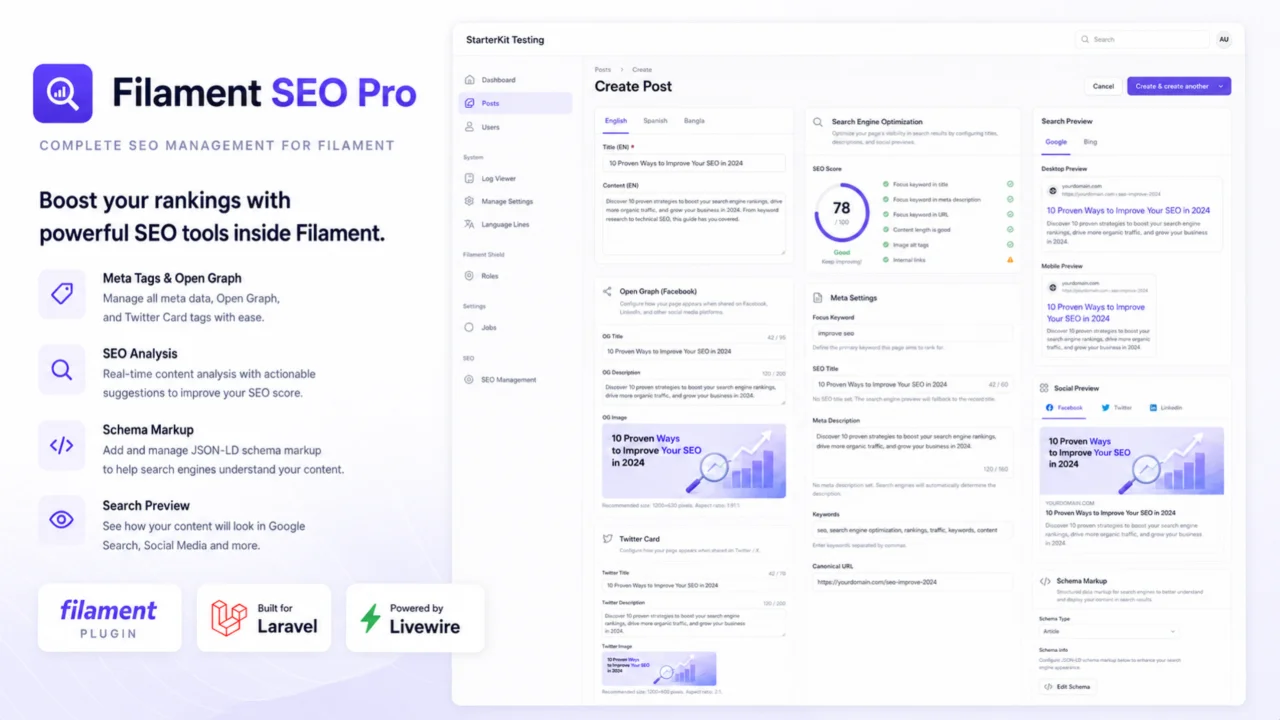
CommunityThe definitive SEO toolkit for Filament. Bring a complete, Yoast-like content analysis system, Google searches, social media preview cards, Schema markup, and automated metrics into your Filament Admin panels.
filament/
namespace. Review the source and install at your own risk. Found
malware or an unresolved security issue the author won't
address?
Report it
.
 Author:
nomanur rahman
Author:
nomanur rahman
Documentation



The definitive SEO toolkit for Filament v4.
For full developer documentation, guides, and interactive configurations, visit nomanur.github.io/filament-seo-pro.
Filament SEO Pro brings a complete Yoast-like SEO experience directly into your Filament panels. It provides live analysis of your content as you type, Google and social media preview cards, Schema.org type selection, a dashboard widget, and a bulk SEO management page.
#Features
- 🟢 Live SEO Analysis — 13 comprehensive checks for titles, descriptions, content length, keywords, headings, and links.
- 📖 Readability Analysis — Scores your content based on sentence length, paragraph structure, passive voice, and transition words.
- 🔍 Google Search Preview — See exactly how your content will look in Google search results, updated in real-time.
- 🔗 Social Media Previews — Live preview cards for Open Graph (Facebook) and Twitter.
- 🎯 Dashboard Widget — Overview of your site's SEO health with average scores and missing meta tags.
- 📊 Bulk Management Page — View, filter, analyze, and export the SEO status of all your content from one place.
#Installation
You can install the package via composer:
composer require nomanur/filament-seo-pro
Publish the assets:
php artisan filament:assets
Publish and run the migrations:
php artisan vendor:publish --tag="filament-seo-pro-migrations"
php artisan migrate
You can optionally publish the config file:
php artisan vendor:publish --tag="filament-seo-pro-config"
#Setup
#1. Register the Plugin
Add SeoPlugin::make() to your panel provider (e.g., app/Providers/Filament/AdminPanelProvider.php):
use Nomanur\FilamentSeoPro\SeoPlugin;

public function panel(Panel $panel): Panel
{
    return $panel
        // ...
        ->plugins([
            SeoPlugin::make(),
        ]);
}
#2. Prepare your Models
Add the HasSeo trait to any models that require SEO metadata:
use Illuminate\Database\Eloquent\Model;
use Nomanur\FilamentSeoPro\Traits\HasSeo;

class Post extends Model
{
    use HasSeo;
    // ...
}
#3. Add to your Resources
Add SeoTab::make() to your resource's form schema. For example, within a Tabs component:
use Filament\Forms\Components\Tabs;
use Nomanur\FilamentSeoPro\Forms\SeoTab;

public static function form(Form $form): Form
{
    return $form
        ->schema([
            Tabs::make('Post')
                ->tabs([
                    Tabs\Tab::make('Content')
                        ->schema([
                            // Your content fields
                        ]),
                    SeoTab::make(), // Automatically injects the full SEO interface
                ])
        ]);
}
If you aren't using tabs, you can use SeoSection::make() instead:
use Nomanur\FilamentSeoPro\Forms\SeoSection;

public static function form(Form $form): Form
{
    return $form
        ->schema([
            // Your content fields...
            SeoSection::make(),
        ]);
}
#Configuration
#Plugin Configuration
You can configure the plugin directly when registering it in your panel provider:
SeoPlugin::make()
    ->defaultContentField('body') // Field used for content analysis (default: 'content')
    ->defaultTitleField('name')   // Field used as fallback title (default: 'title')
    ->defaultSlugField('permalink') // Field used for URL preview (default: 'slug')
    ->enableDashboardWidget(true) // Show SEO Overview widget on dashboard
    ->enableManagementPage(true)  // Show SEO Management page in navigation
    ->models([                    // Models to include in the SEO Management page
        \App\Models\Post::class,
        \App\Models\Page::class,
    ]);
#Tab Configuration
You can override the default fields on a per-resource basis:
SeoTab::make()
    ->contentField('post_body')
    ->titleField('post_title')
    ->slugField('post_slug')
#Testing
composer test
#Changelog
Please see CHANGELOG for more information on what has changed recently.
#Contributing
Please see CONTRIBUTING for details.
#Security
If you discover any security related issues, please email nomanurrahman@gmail.com instead of using the issue tracker.
#Credits
#License
The MIT License (MIT). Please see License File for more information.
The author
I’m Nomanur Rahman, a passionate full-stack developer with strong experience in Laravel, FilamentPHP, Livewire, Vue.js, Quasar Framework, and mobile app development.
Over the years, I’ve focused on building scalable web applications, admin panels, developer tools, and reusable packages that improve developer productivity. I enjoy working deeply within the Laravel ecosystem and have extensive experience creating custom solutions with Filament and Livewire for modern application development.
I’m currently focused on building open-source tools and packages for the Laravel and Filament community, with the goal of contributing developer-friendly solutions that solve real-world problems and improve the ecosystem.
I strongly believe in clean architecture, maintainable code, and creating products that developers genuinely enjoy using. My current work includes building advanced Filament packages aimed at bringing WordPress-like powerful features into the Laravel ecosystem.
I’m excited to contribute to the Filament community as a plugin author and share high-quality packages that help developers build better applications faster.
Featured Plugins
A selection of plugins curated by the Filament team

Blueprint
Filament Blueprint is a premium Laravel Boost extension that helps AI agents produce accurate, detailed implementation plans and security reports for Filament apps.
 Filament

Custom Fields
Eliminate custom field migrations forever. Let your users create and manage form fields directly in Filament admin panels with 20+ built-in field types, validation, and zero database changes.
 Relaticle

Advanced Tables (formerly Filter Sets)
Supercharge your tables with powerful features like user-customizable views, quick filters, multi-column sorting, advanced table searching, convenient view management, and more. Compatible with Resource Panel Tables, Relation Managers, Table Widgets, and Table Builder!
 Kenneth Sese

