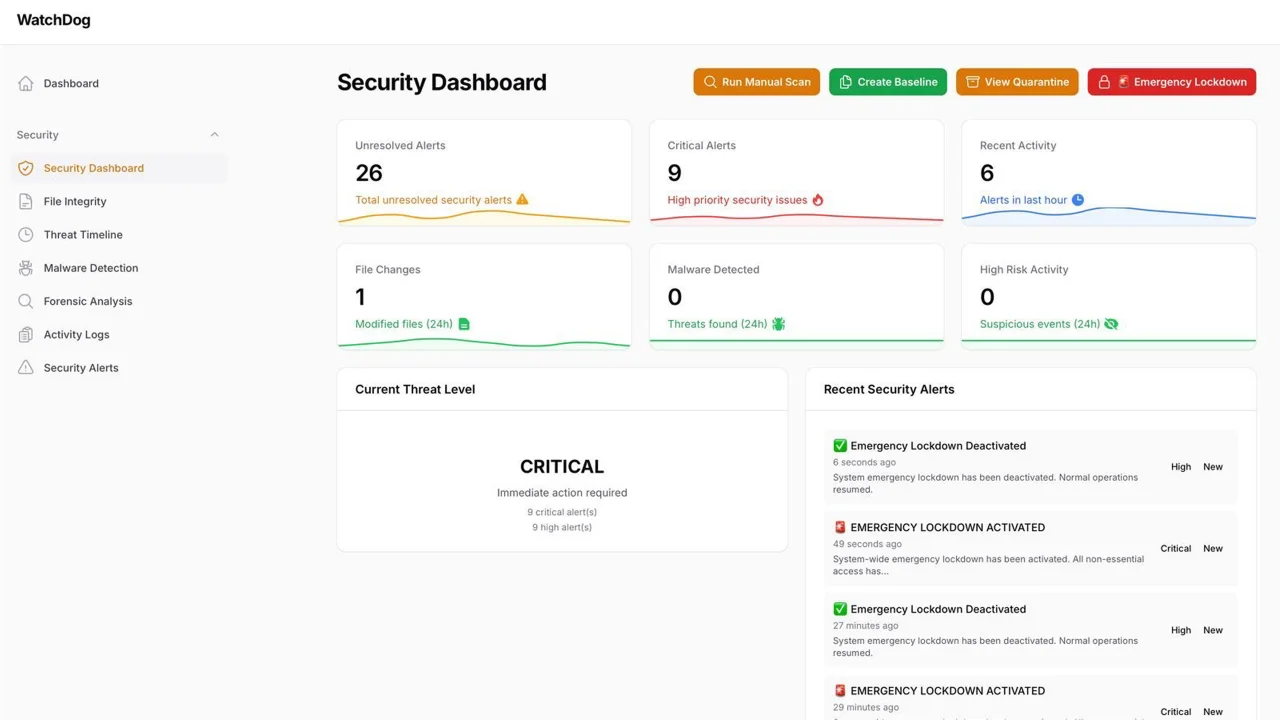
Watchdog
Advanced security monitoring and intrusion detection for Filament applications.
 Author:
Martin Knops
Author:
Martin Knops
Documentation

Advanced security monitoring and intrusion detection plugin for FilamentPHP



#Features
🛡️ Real-time Protection
- Real-time file integrity monitoring
- Automated malware detection with signature scanning
- Activity logging and anomaly detection
🚨 Alert System
- Email alerts for security events
- Customizable notification thresholds
- Real-time dashboard notifications
🔍 Forensic Tools
- Detailed forensic analysis tools
- Quarantine system for suspicious files
- Emergency lockdown system
#Installation
Install the package via Composer:
composer require mkwebdesign/filament-watchdog:^1.0
Publish the configuration file:
php artisan vendor:publish --tag=filament-watchdog-config
Optionally, publish the views (if you want to customize them):
php artisan vendor:publish --tag=filament-watchdog-views
Then run the auto-installer script from your Laravel root directory:
bash install-filament-watchdog.sh
And migrate the database:
php artisan migrate
#Configuration
After publishing the config file, you can customize the settings in config/filament-watchdog.php:
return [
    'monitoring' => [
        'enabled' => true,
        'scan_interval' => 'everyMinute', // How often to run scans
    ],
    'alerts' => [
        'email' => [
            'enabled' => true,
            'recipients' => ['admin@yoursite.com'],
        ],
    ],
    'emergency' => [
        'auto_publish_views' => true,
        'lockdown_enabled' => true,
    ],
    // ... more settings
];
#Cronjob Setup (Required)
FilamentWatchdog requires the Laravel scheduler to run automated security scans. Add the standard Laravel cronjob to your server:
# Edit your crontab
crontab -e

# Add this line (standard Laravel scheduler - runs every minute)
* * * * * cd /path/to/your/laravel/project && php artisan schedule:run >> /dev/null 2>&1
Example with full path:
* * * * * php /home/username/domains/yoursite.com/public_html/artisan schedule:run >> /dev/null 2>&1
Note: This is the standard Laravel scheduler cronjob that should run every minute. FilamentWatchdog will automatically schedule its security scans within this framework.
Manual scan commands:
# Run file integrity scan
php artisan watchdog:scan-integrity

# Run malware detection scan
php artisan watchdog:scan-malware

# Create new file baseline
php artisan watchdog:create-baseline

# Run complete security scan
php artisan watchdog:scan-all
#Panel Registration
Register the plugin in your AdminPanelProvider:
use MKWebDesign\FilamentWatchdog\FilamentWatchdogPlugin;

// Inside the panel() method:
->plugin(FilamentWatchdogPlugin::make());
#Usage
After installation, visit:
/admin/security/dashboard
to access the security monitoring interface.
#Key Features:
- Security Dashboard - Overview of system security status
- File Monitoring - Real-time detection of file changes
- Malware Scanner - Automated scanning for malicious files
- Alert System - Email notifications for security events
- Emergency Lockdown - Immediate site protection in case of threats
- Quarantine System - Safe isolation of suspicious files
#Requirements
- PHP 8.1 or higher
- Laravel 10.x or 11.x
- FilamentPHP 3.x
- Cronjob access on your server
#Troubleshooting
#Config Not Published?
If the configuration file doesn't appear in config/filament-watchdog.php, try:
# Clear caches first
php artisan config:clear
php artisan cache:clear

# Then publish again
php artisan vendor:publish --tag=filament-watchdog-config --force

# Verify the file exists
ls -la config/filament-watchdog.php
#Cronjob Not Working?
- Check if the Laravel scheduler is configured correctly
- Verify the path to your Laravel project in the cronjob
- Ensure PHP is in your server's PATH
- Check cronjob logs:
grep CRON /var/log/syslog
#Permission Issues?
Make sure the web server user has write permissions to:
storage/app/directorystorage/logs/directorystorage/app/quarantine/directory
#Support
Need help? Feel free to:
- Open an issue on GitHub
- Contact us directly via email
#Author
Martin Knops | MKWebDesign
- Website: https://mkwebdesign.nl
- Email: info@mkwebdesign.nl
- GitHub: @mkwebdesign
#License
The MIT License (MIT). Please see License File for more information.
Made with ❤️ by MKWebDesign
The author
I am Martin Knops, a freelance PHP developer and founder of MKWebDesign.nl. With years of experience in Laravel and FilamentPHP, I build custom solutions for clients with a strong focus on quality, security, and ease of use.
Feel free to reach out on GitHub if you have any questions or suggestions!
From the same author

Featured Plugins
A selection of plugins curated by the Filament team

Custom Dashboards
Let your users build and share their own dashboards with a drag-and-drop interface. Define your data sources in PHP and let them do the rest.
 Filament

Data Lens
Advanced Data Visualization for Laravel Filament - a premium reporting solution enabling custom column creation, sophisticated filtering, and enterprise-grade data insights within admin panels.
 Padmission

Advanced Tables (formerly Filter Sets)
Supercharge your tables with powerful features like user-customizable views, quick filters, multi-column sorting, advanced table searching, convenient view management, and more. Compatible with Resource Panel Tables, Relation Managers, Table Widgets, and Table Builder!
 Kenneth Sese

