Advanced States and Rules
A rule-driven state machine with validated transitions, lifecycle events, audit logs, and clear failure reasons
 Author:
Ľuboš Duda
Author:
Ľuboš Duda
Documentation
- ✨ Why This Exists
- Screenshots
- 🚀 Key Capabilities
- 🧱 Built on Rock-Solid Foundations
- 🏢 Built for Real Use Cases
- 💼 A Professional, Paid Plugin
- 🧭 Summary
- Requirements
- Installation
- Translations
- Usage
- README Documentation Page
- Authorization & Permissions
- Important Notes
- Using Spatie Laravel Permission
- Using Laravel Gates and Policies
- Advanced Authorization Scenarios
- Best Practices
- Filament v3 and v4 Compatibility
- Summary
- Interactive Demo
- Advanced States UI
- Events & Lifecycle Hooks
- Choosing the Right Approach: Rules vs Events vs Override
- Public API and Stability Guarantees
- Refreshing the Package
- Error Logging
- Support & Issues
- License
- Maintained by
A Filament-first, UI-driven state machine built on Spatie Model States — for real business workflows, approvals, processes, and lifecycle control.
Supports Filament v3 and Filament v4.
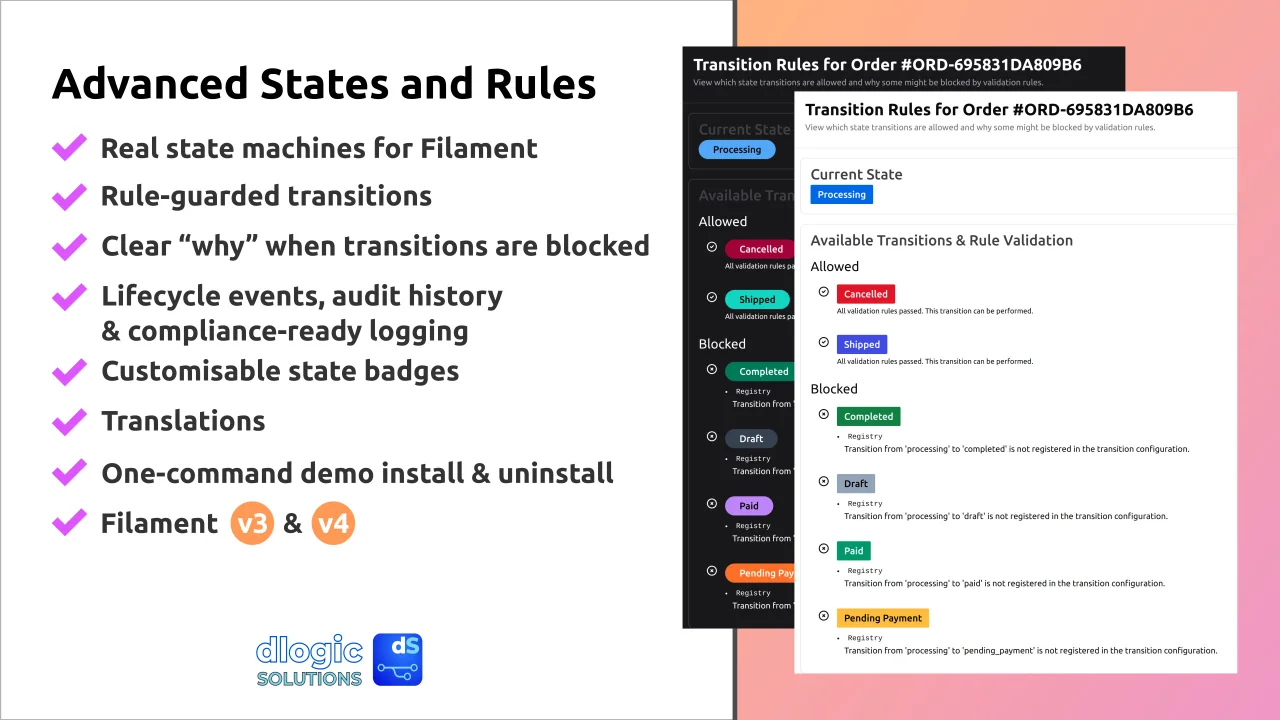
Filament Advanced States turns your models into fully managed lifecycle systems — with visual state control, rule-guarded transitions, business logic hooks, explicit refusal reasons, audit-ready history, and beautifully rendered UI badges.
If you’ve ever needed more than a simple enum…
If your application has “Draft → Pending → Approved → Rejected” but with exceptions, roles, validation rules, automation hooks, accountability requirements, or compliance needs…
This plugin is built exactly for that.
This is workflow confidence — inside Filament.
#✨ Why This Exists
Simple state values aren’t enough for real software.
Production systems need:
- multiple allowed transition paths
- rules that decide when a transition is allowed
- human-readable why when something is refused
- clear UI communication to teams
- history logs & accountability
- advanced configurable error logging
- reliable events to attach automation to
Filament Advanced States delivers all of that in a clean, powerful package that feels native to Filament.
#Screenshots
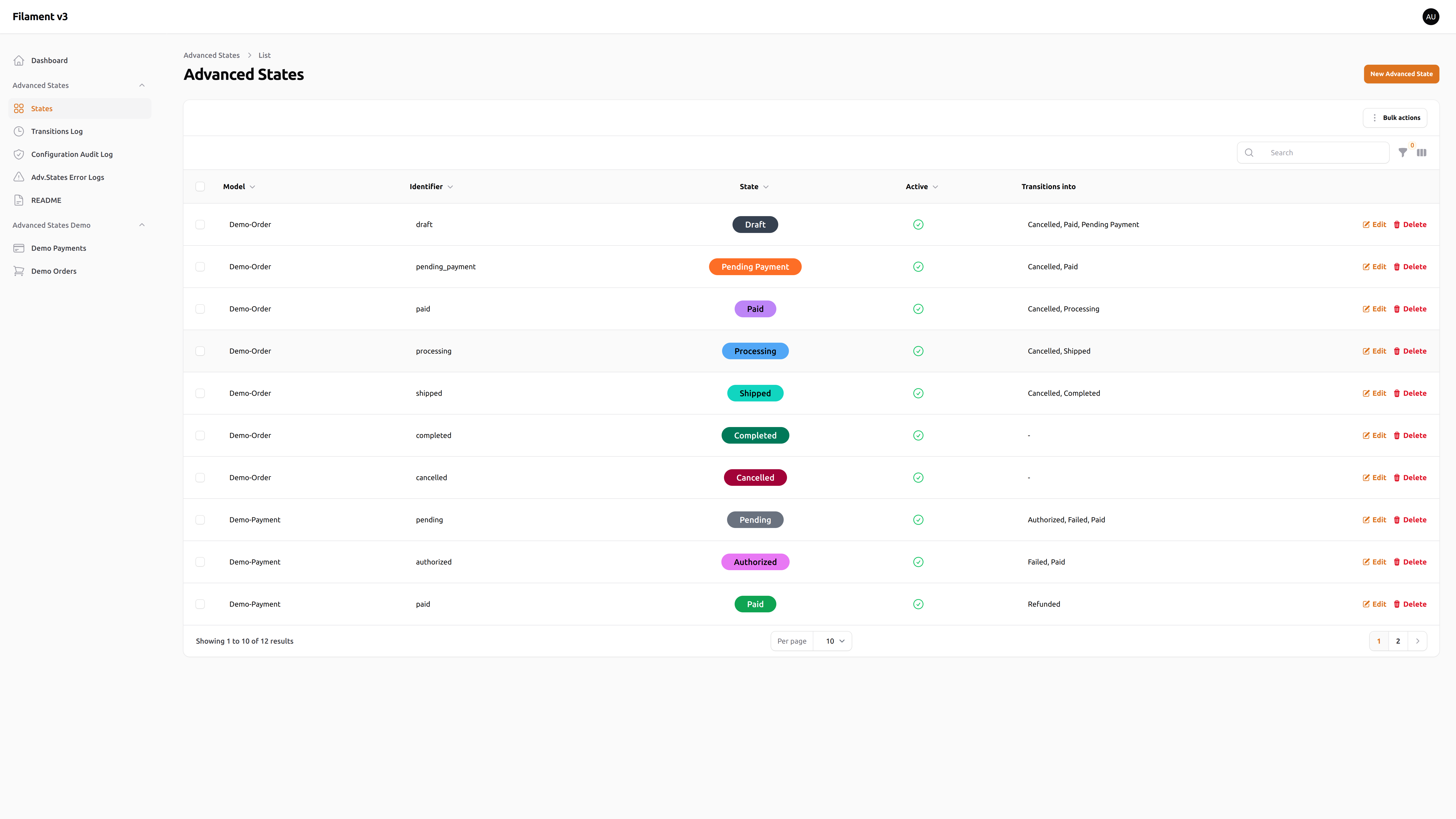
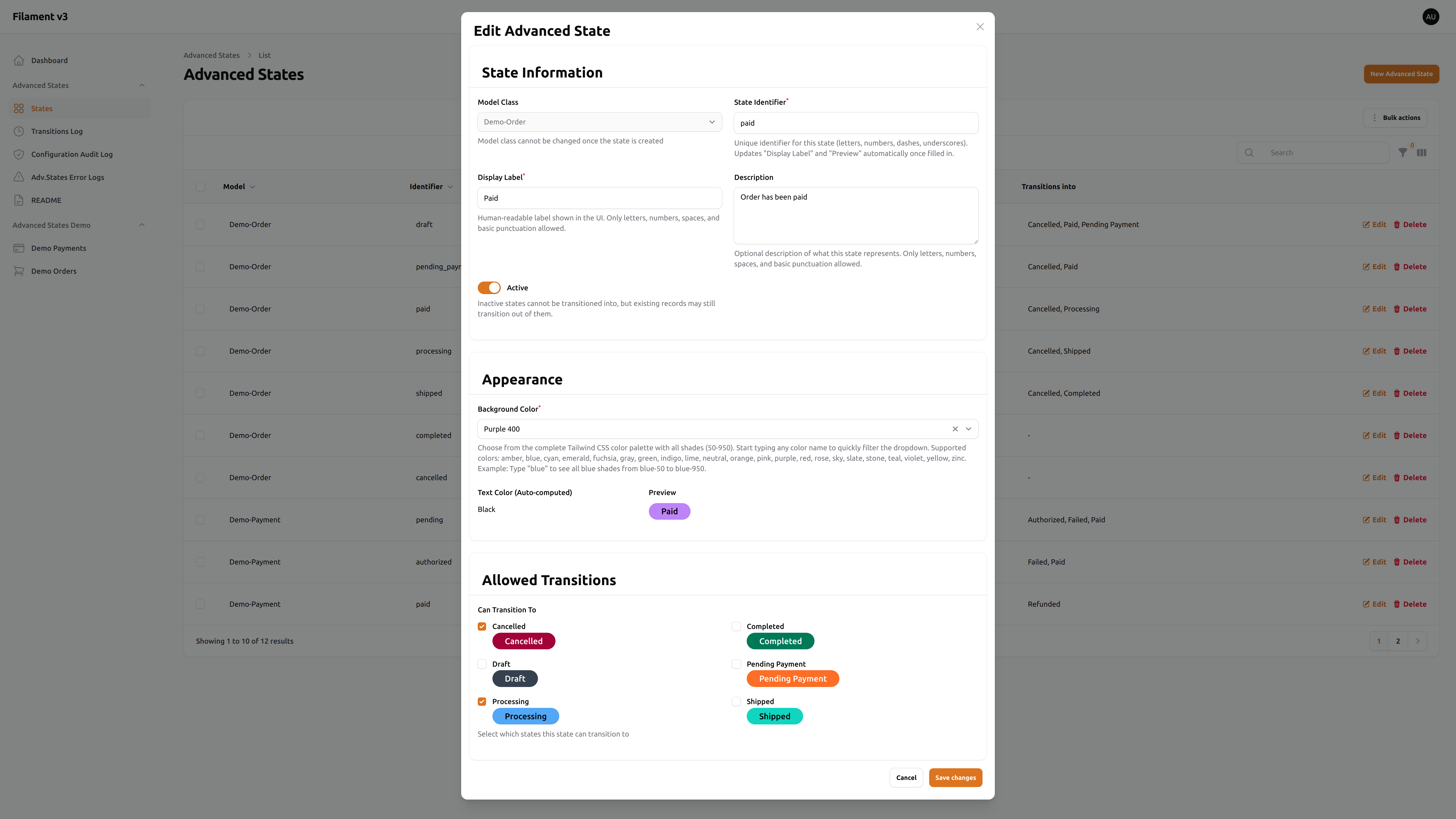
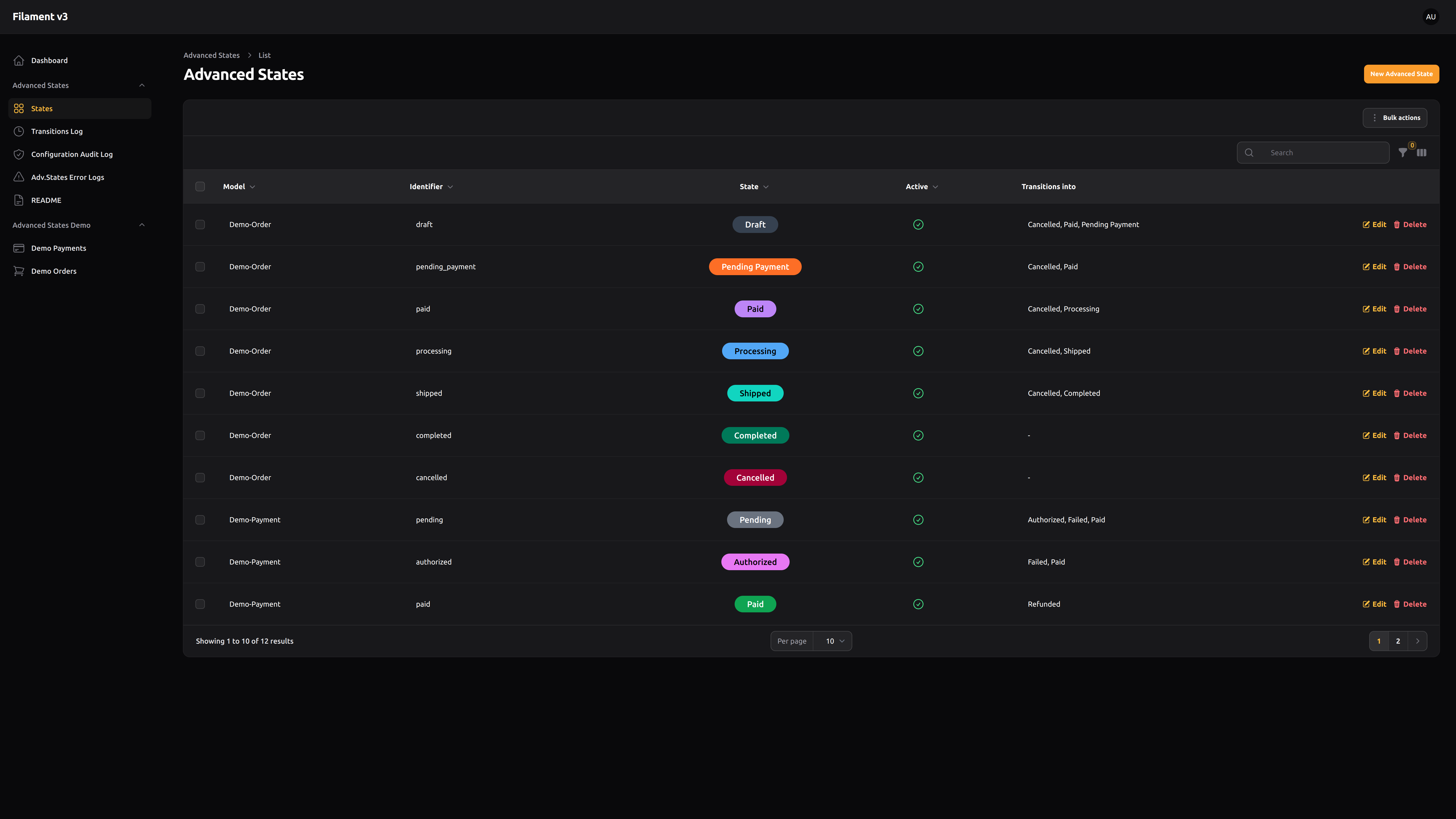
Click any screenshot to view it in full size (on GitHub and Filament Plugins).
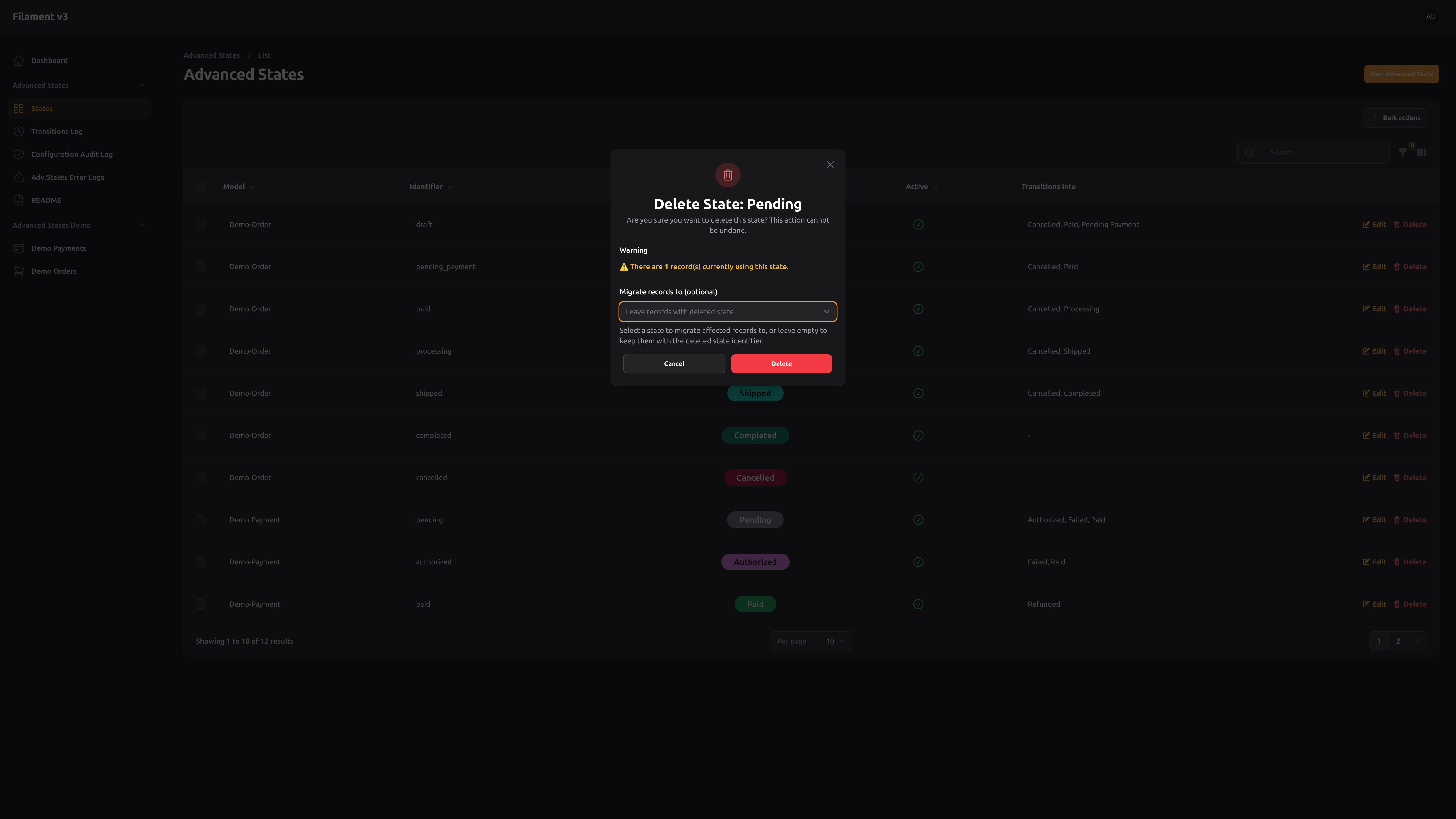
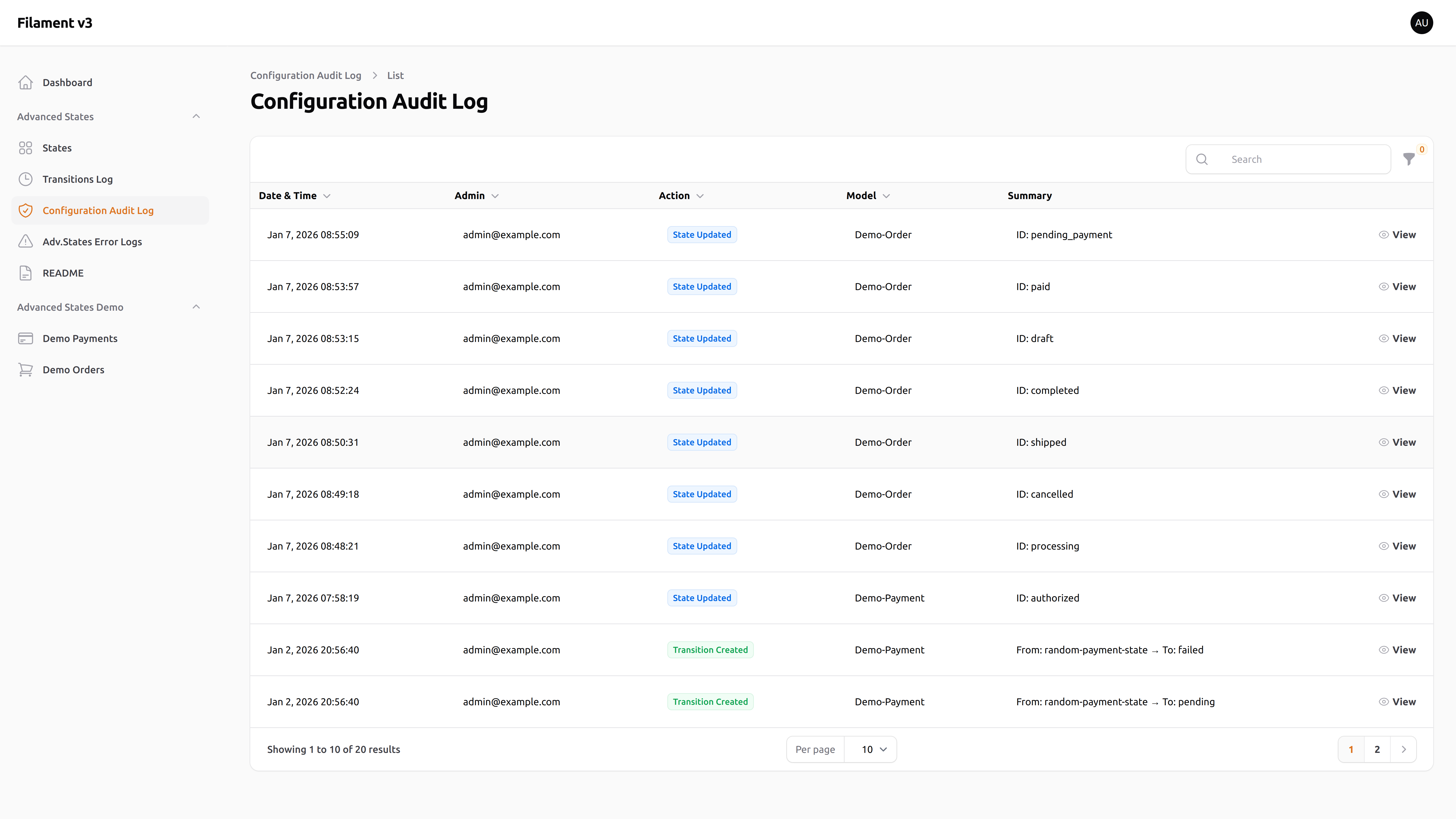
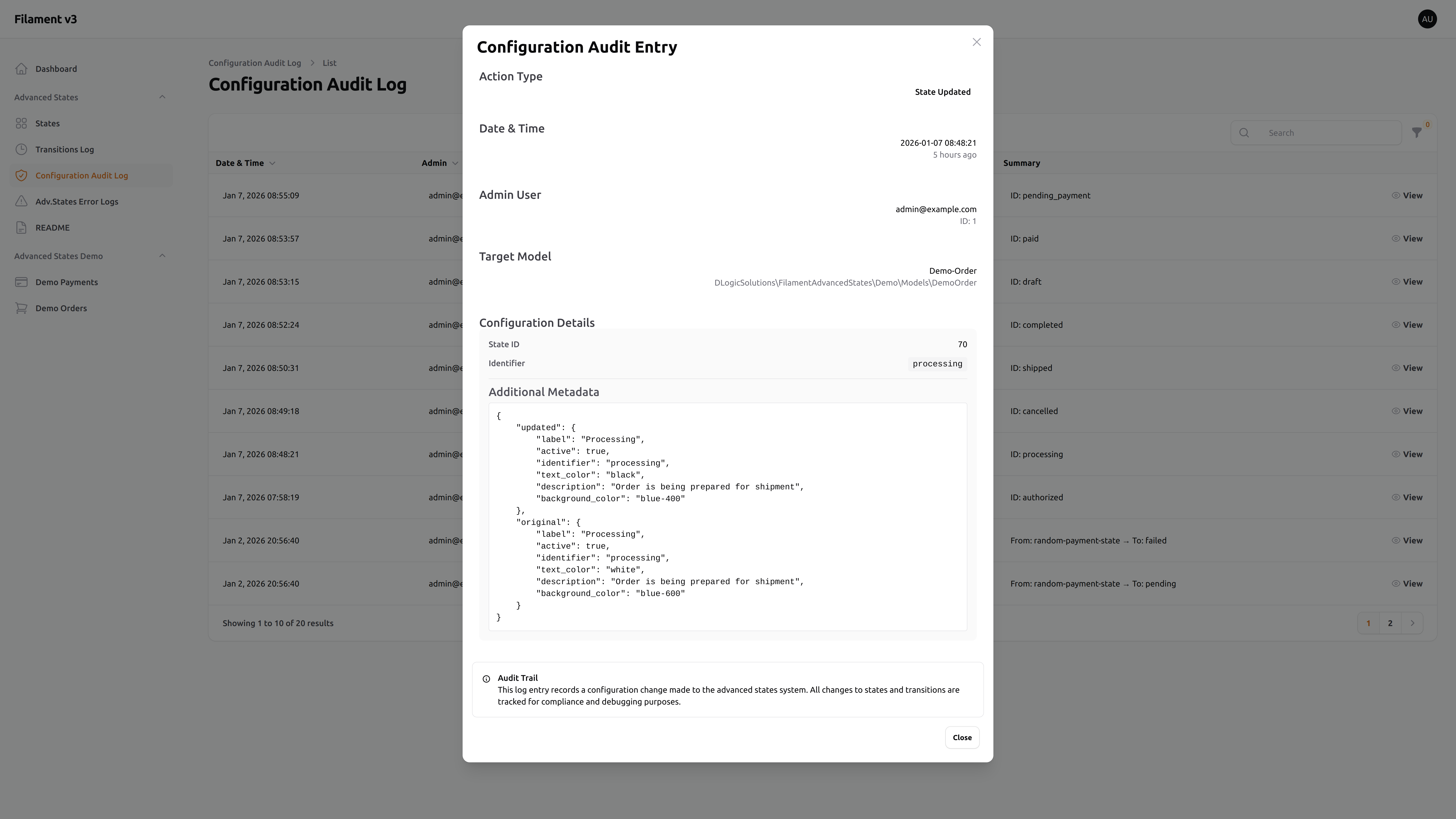
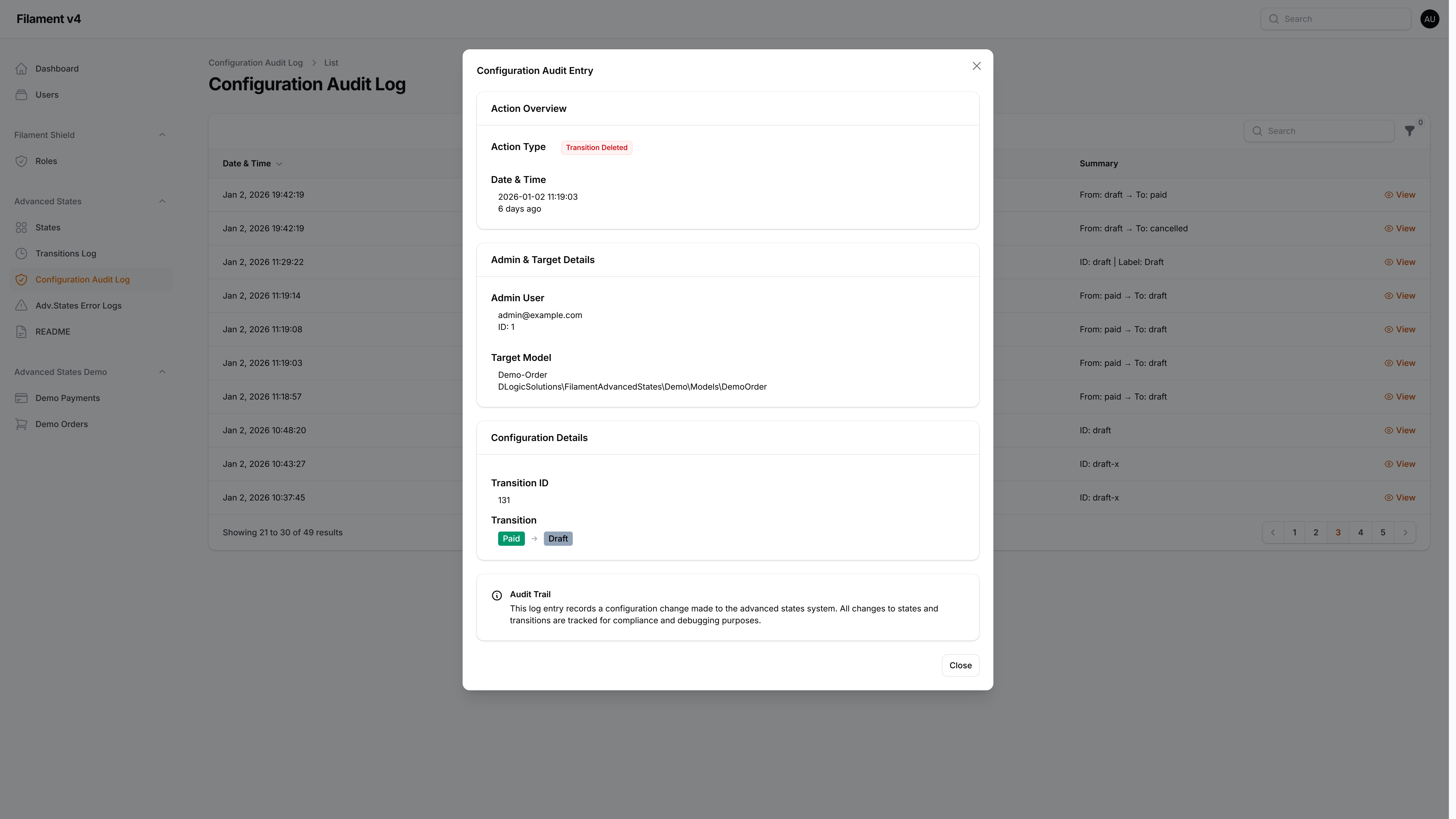
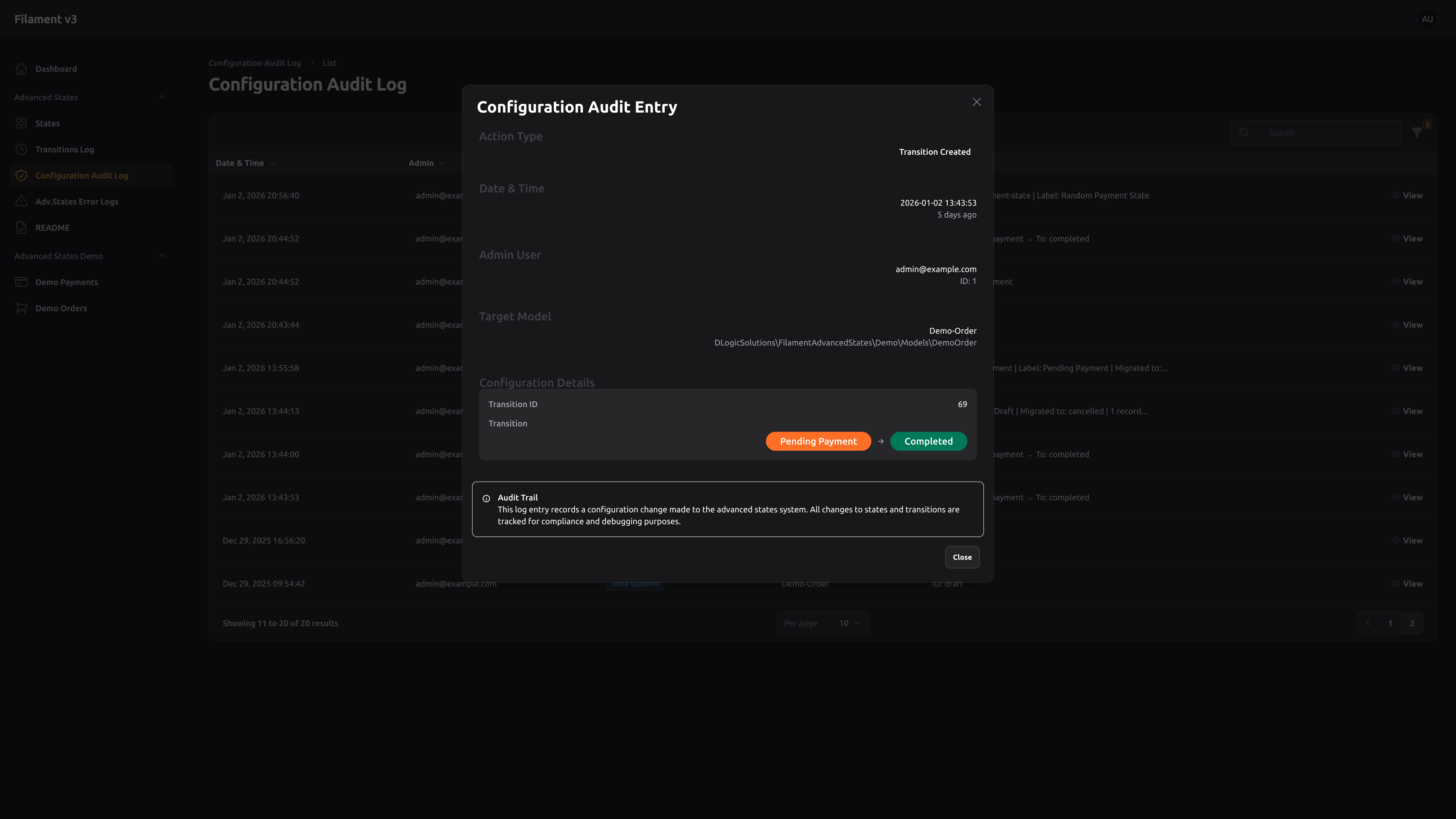
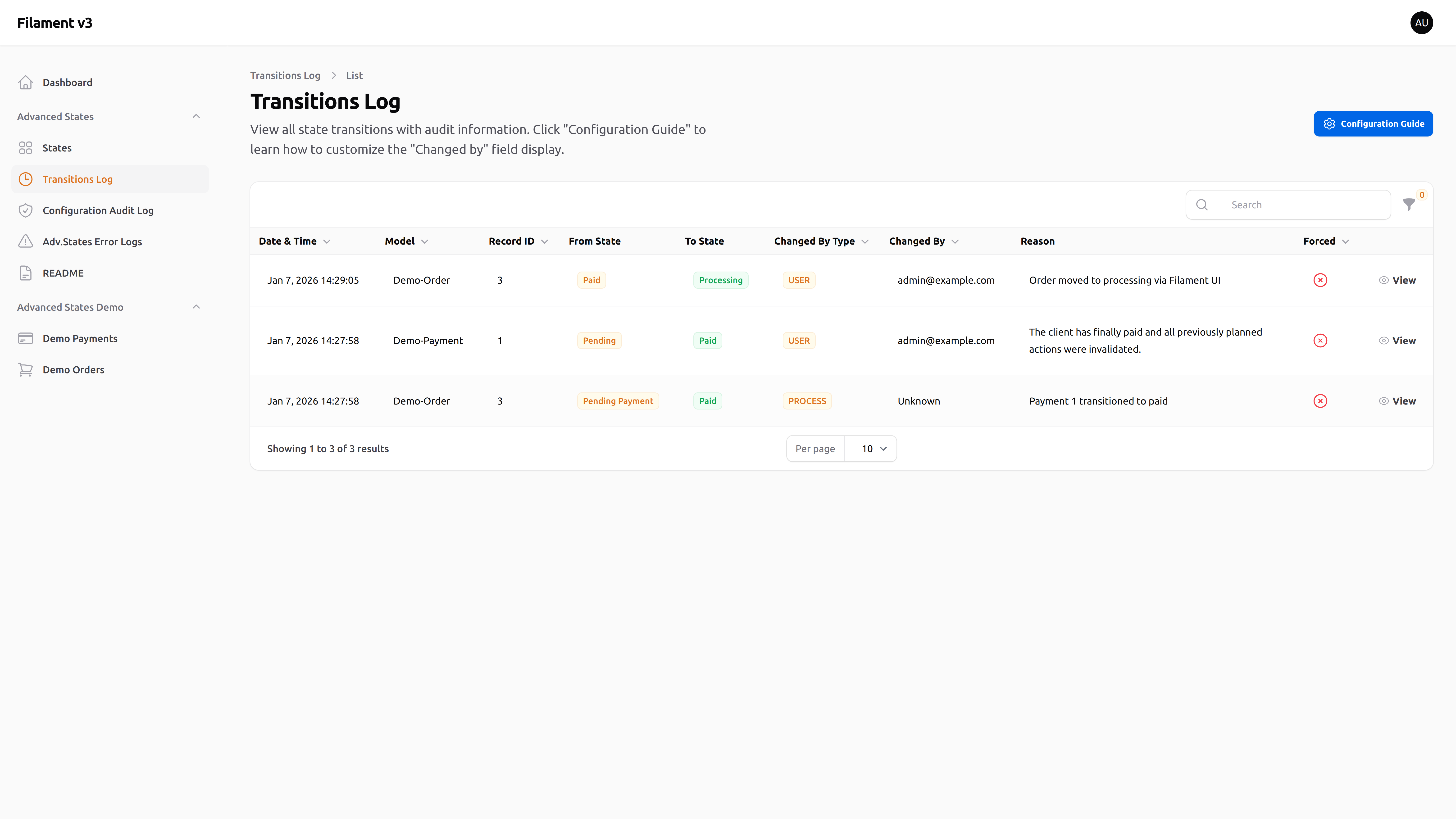
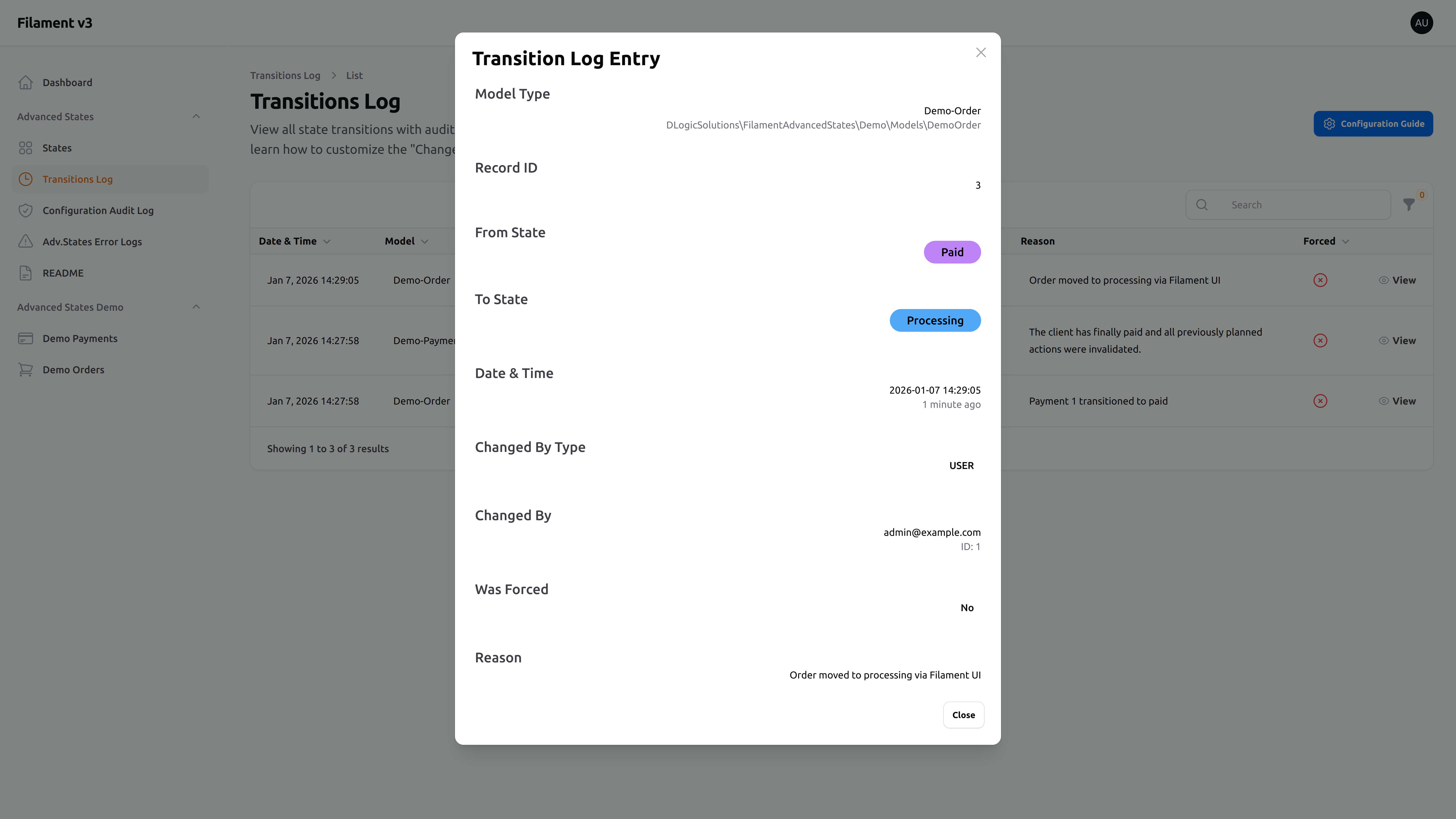
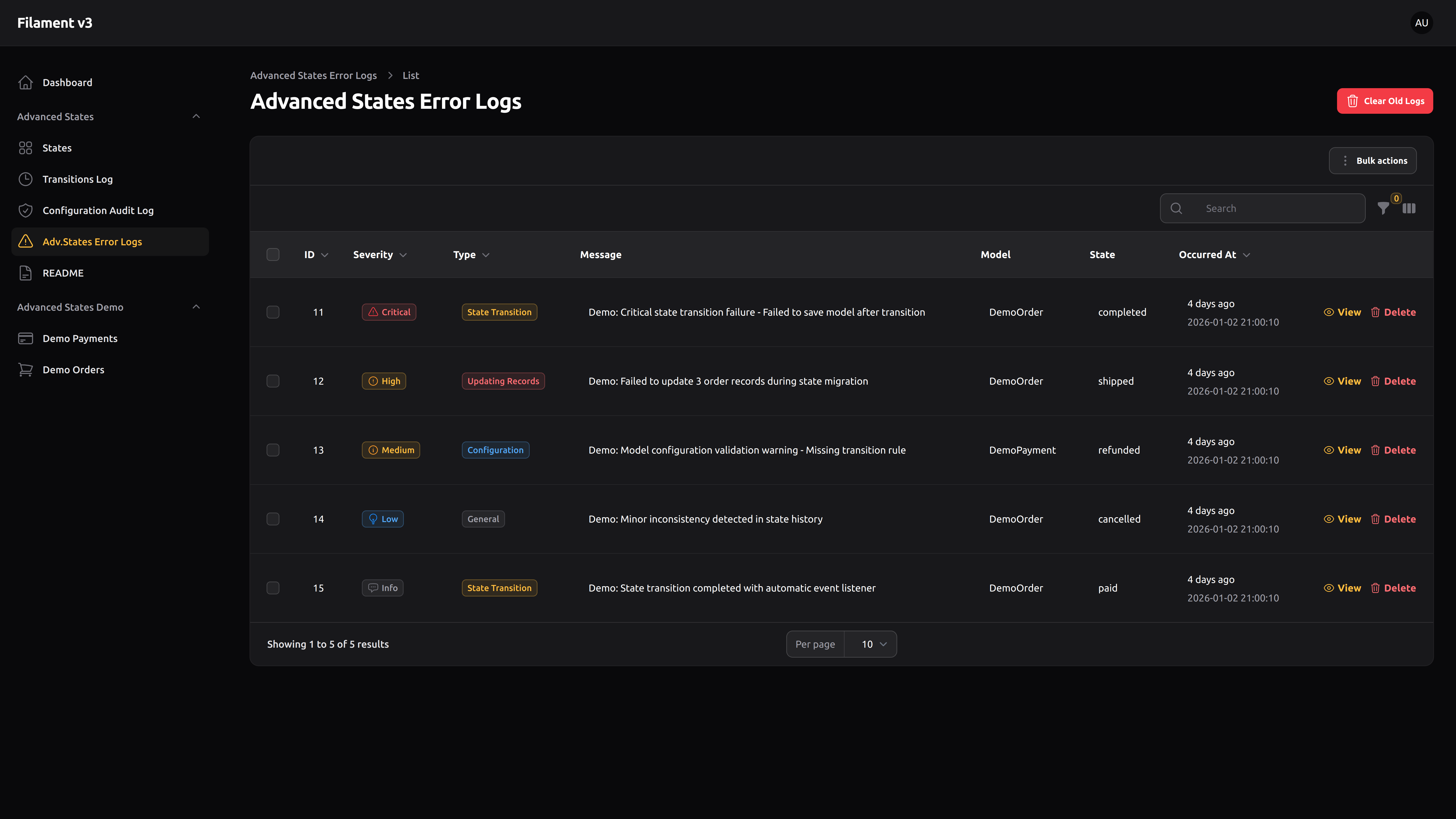
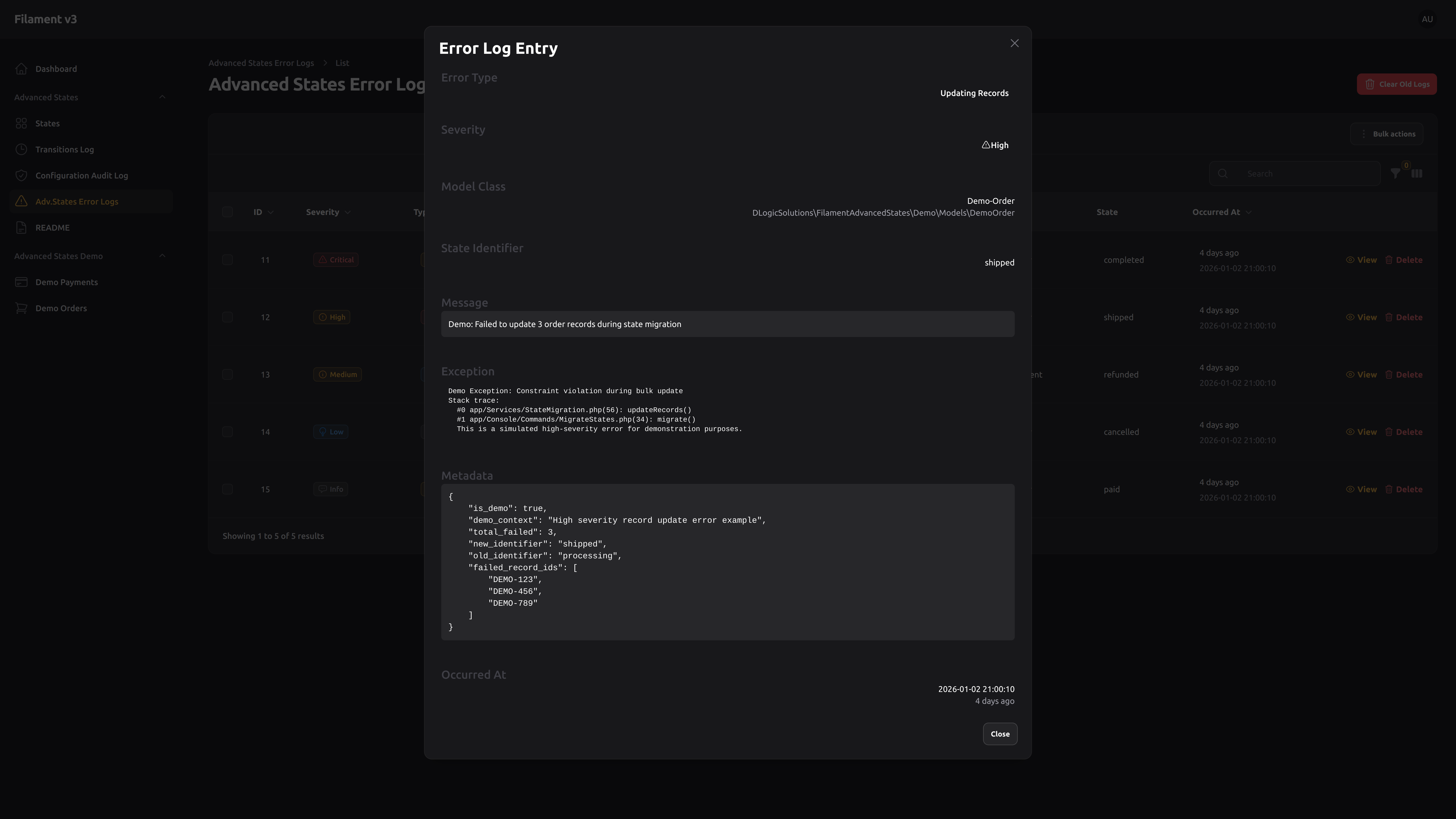
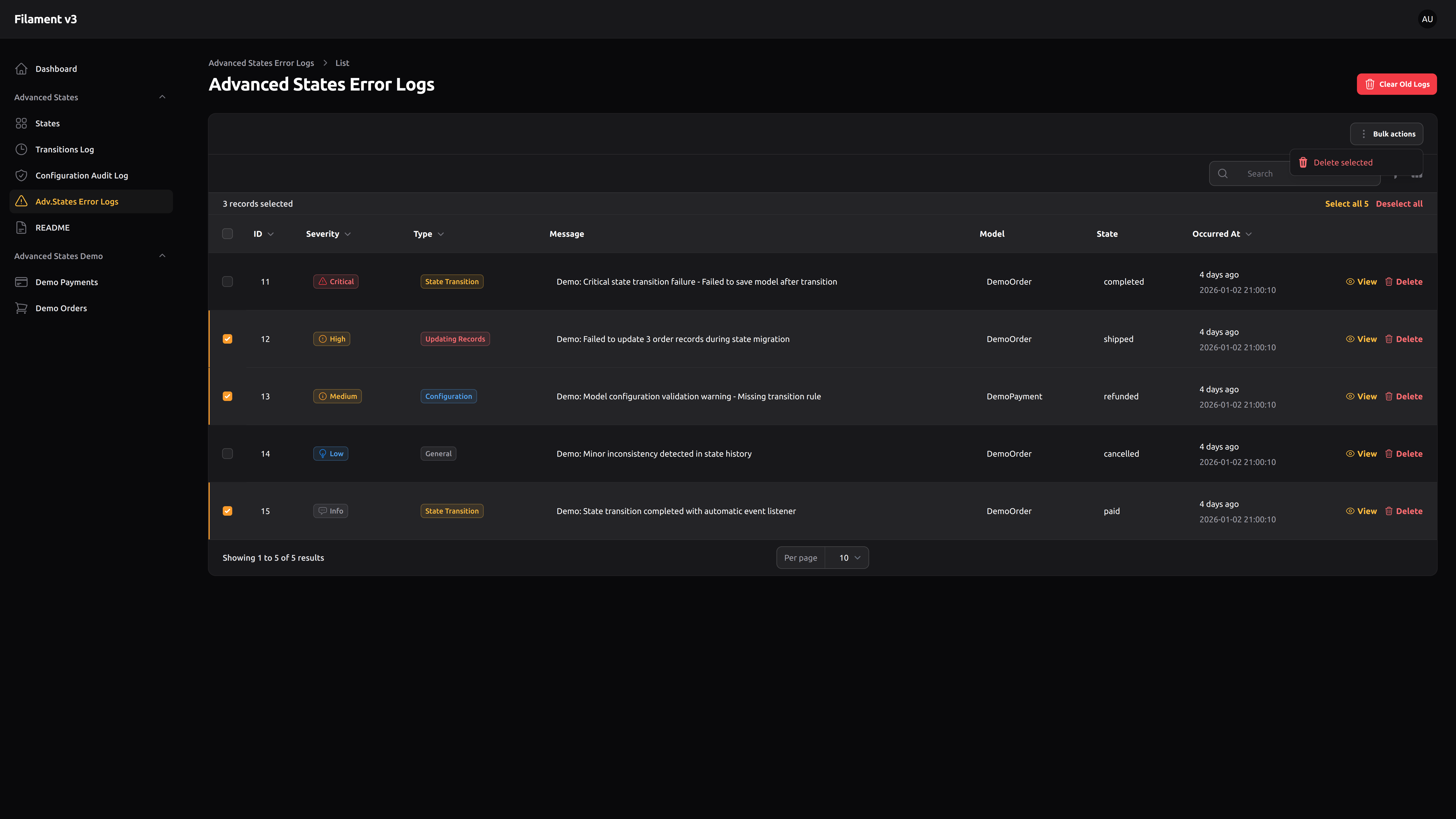
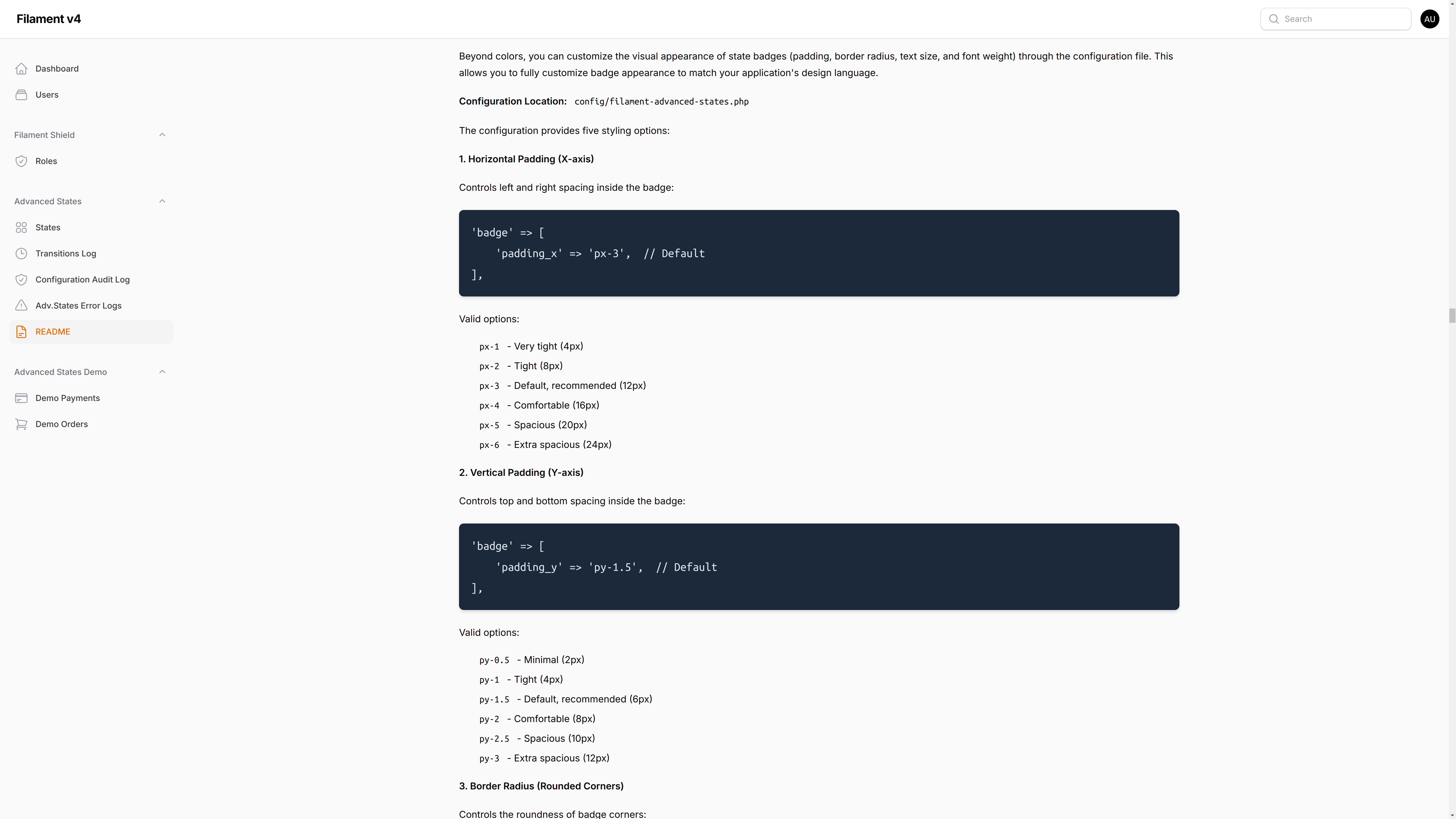
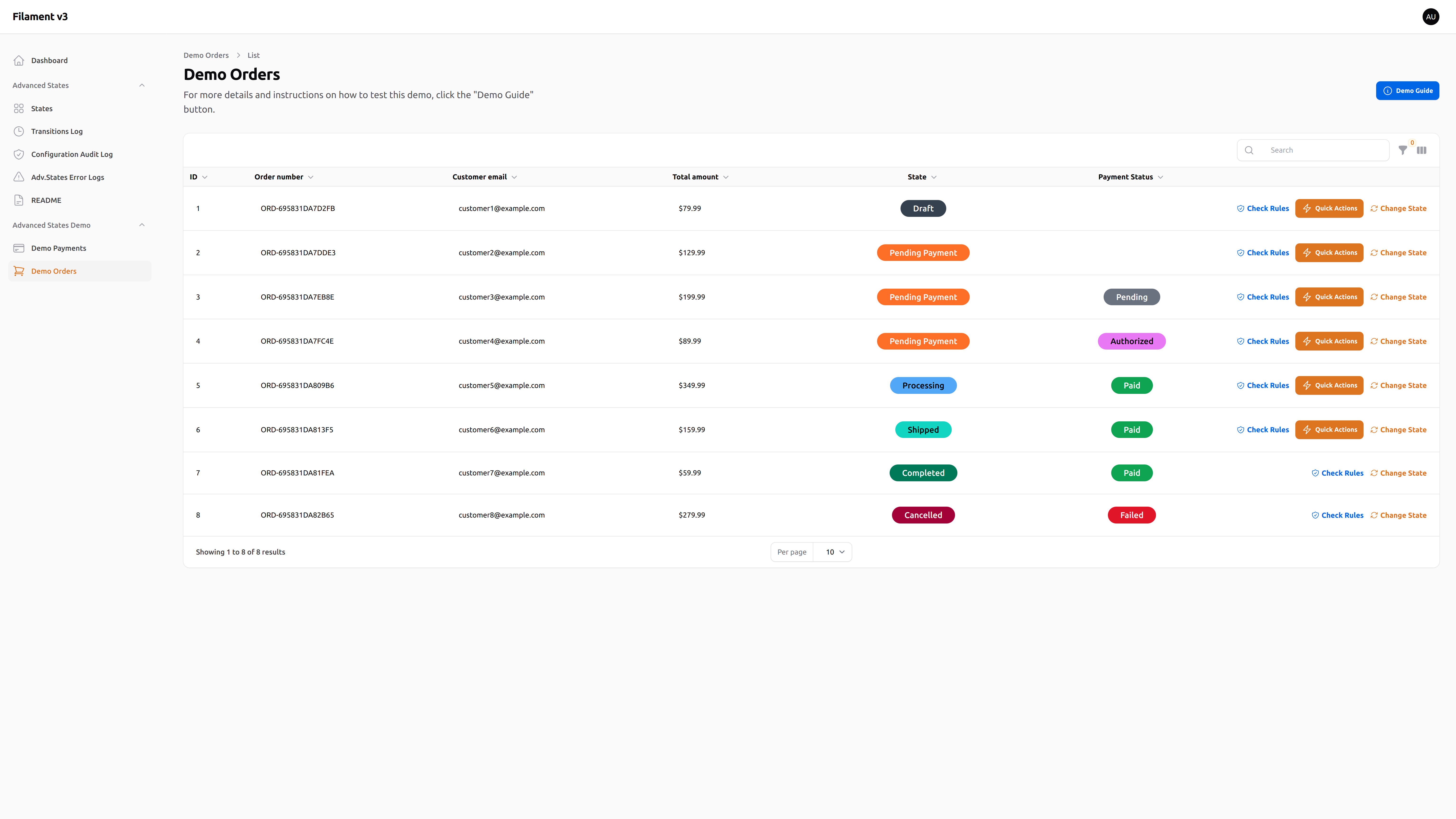
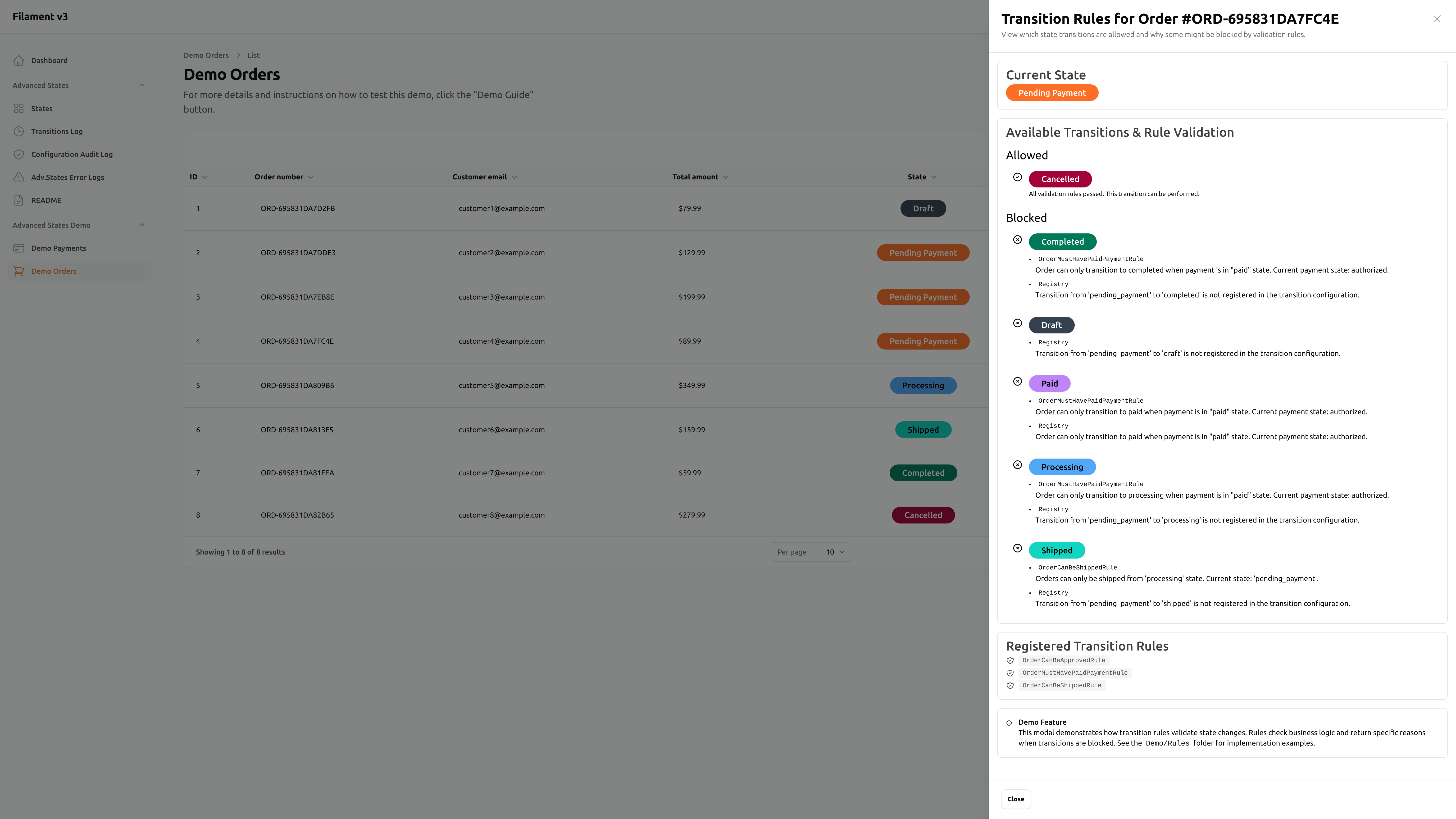
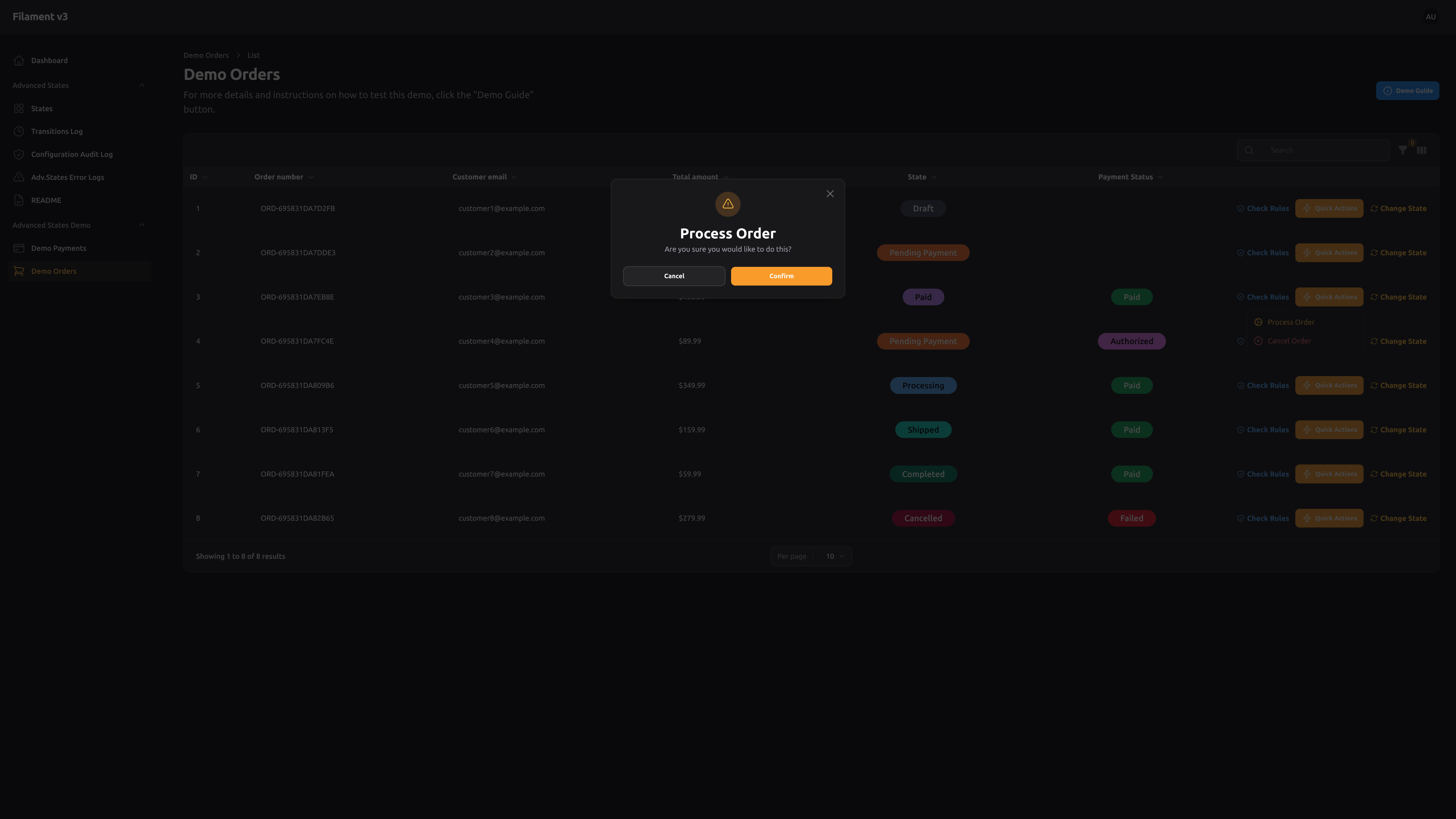
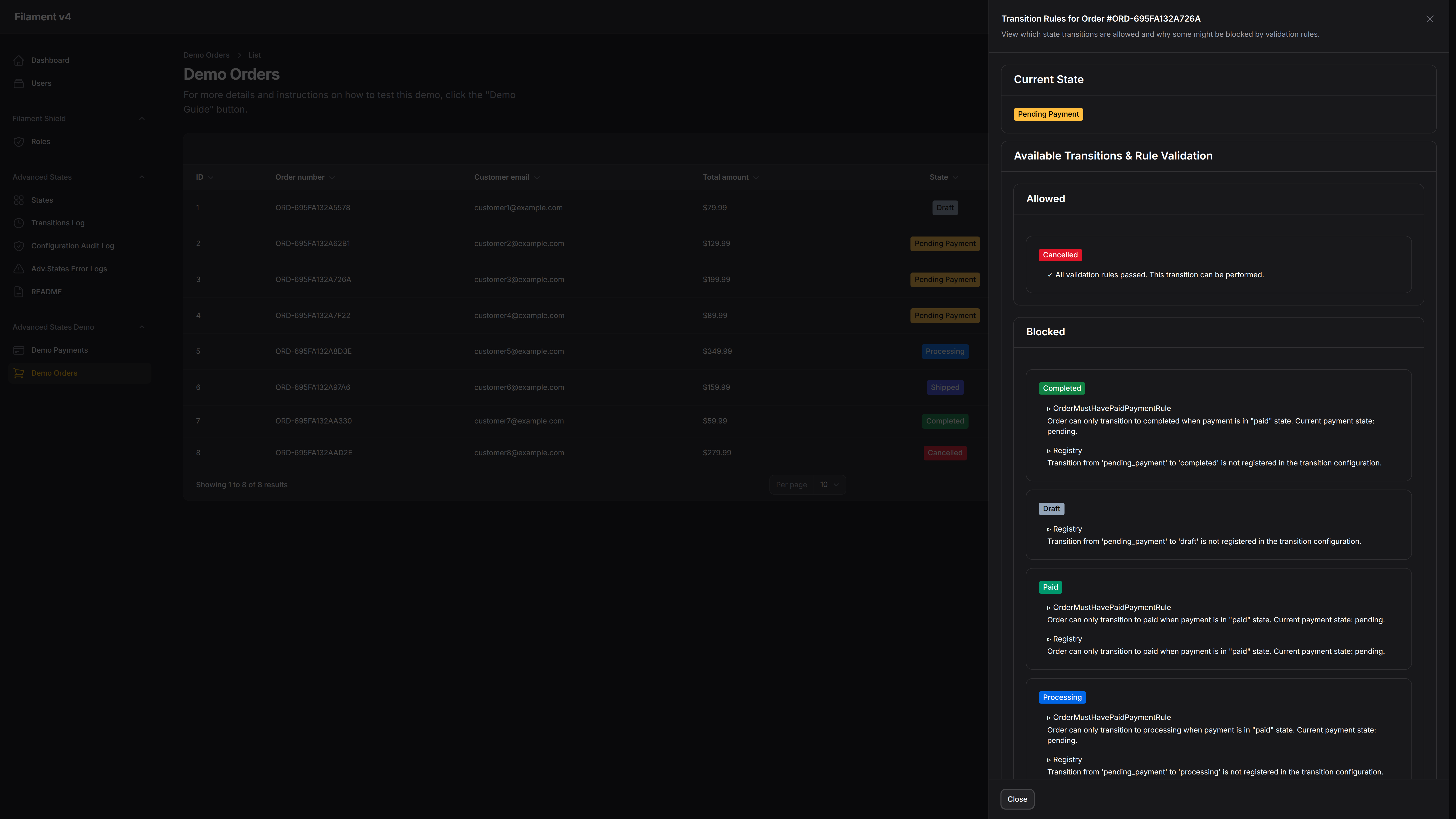
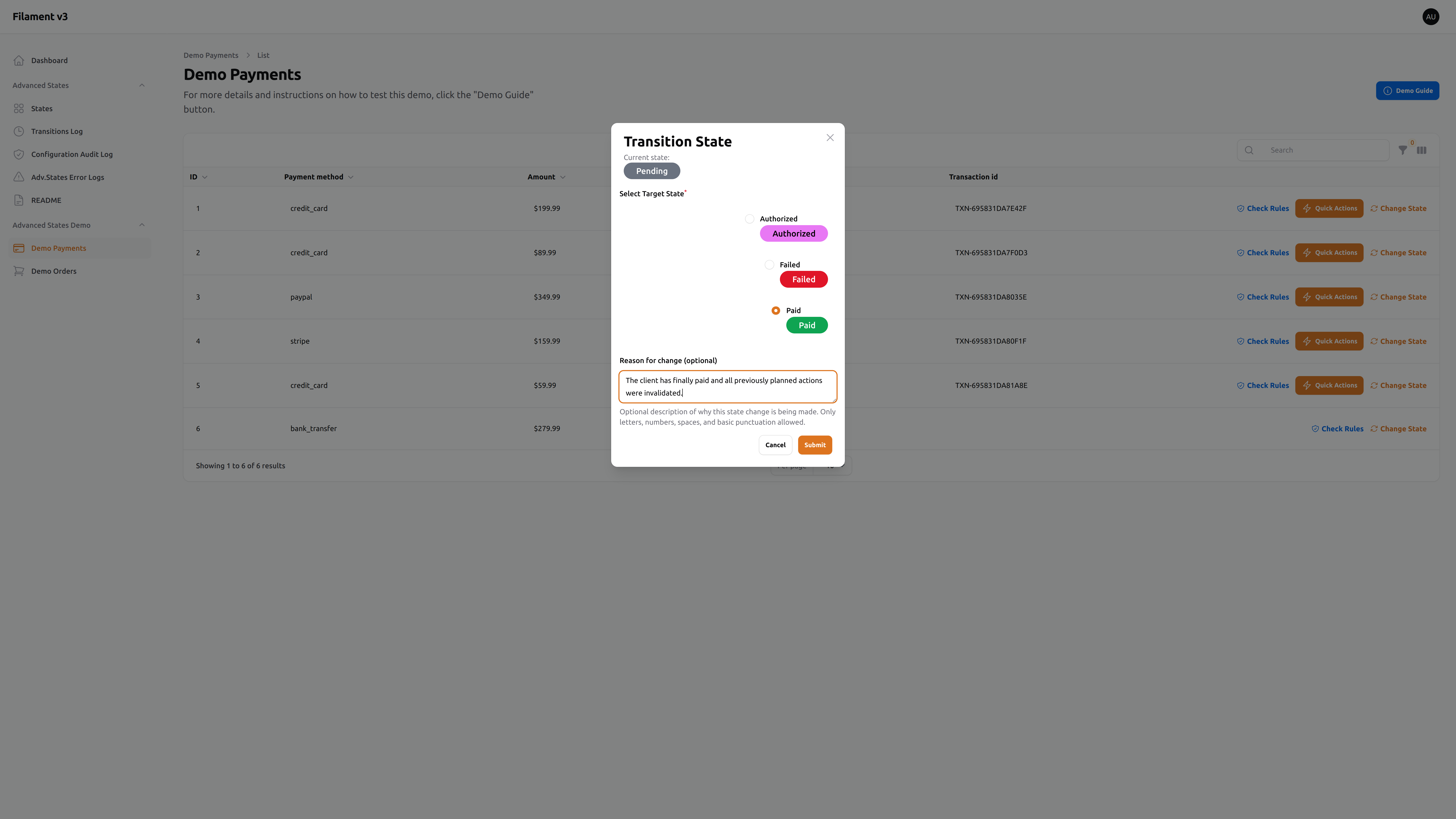
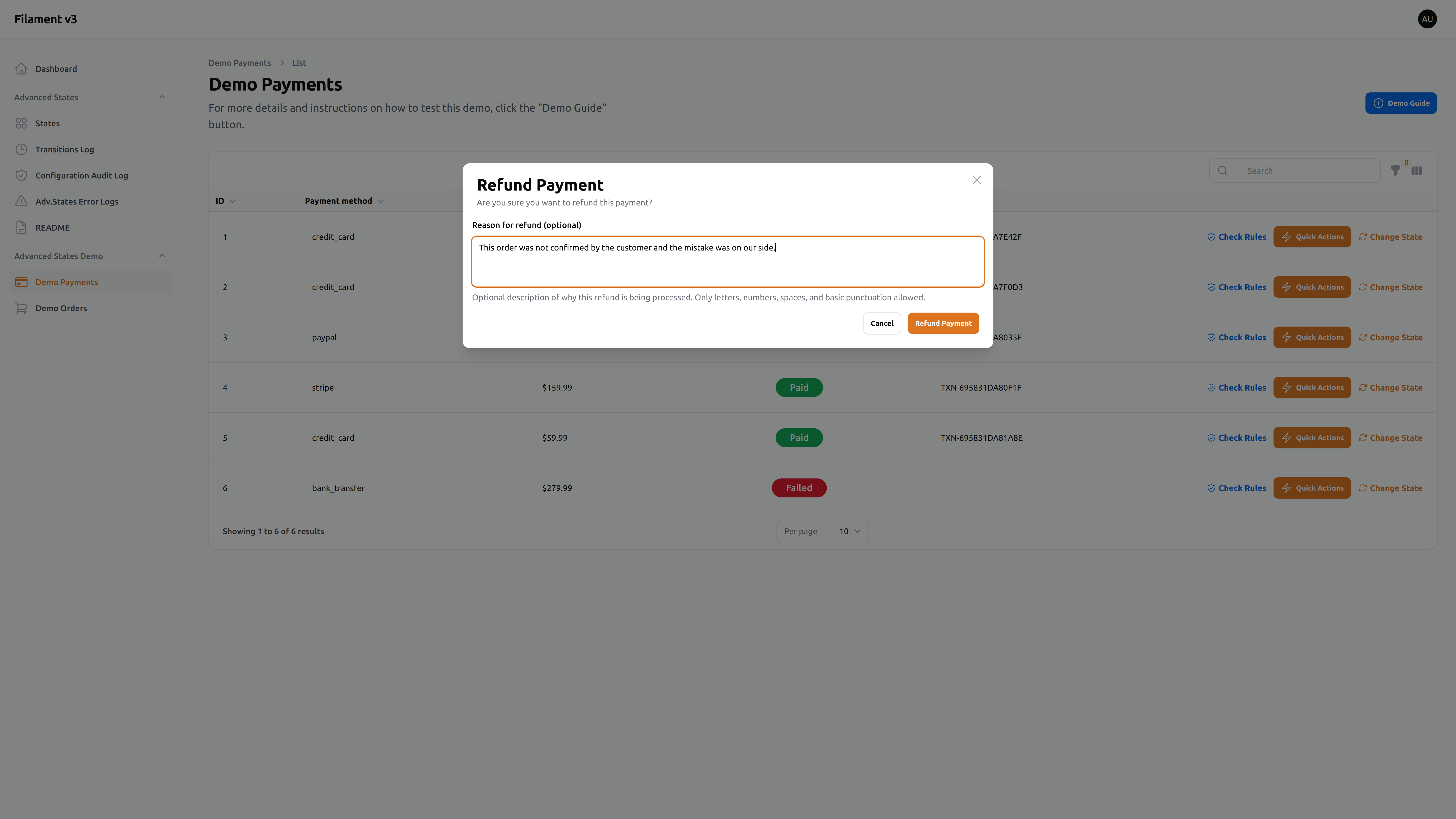
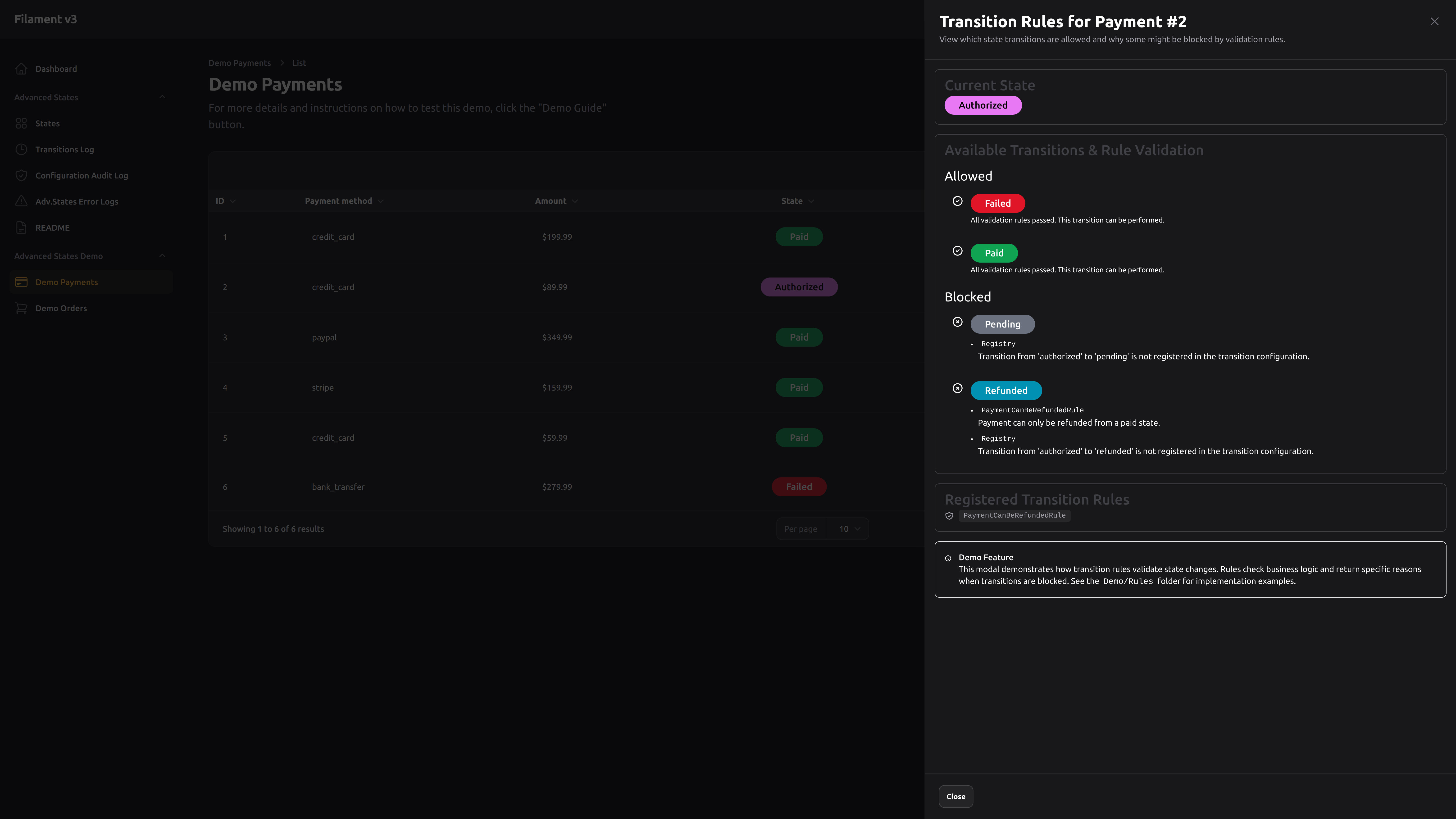
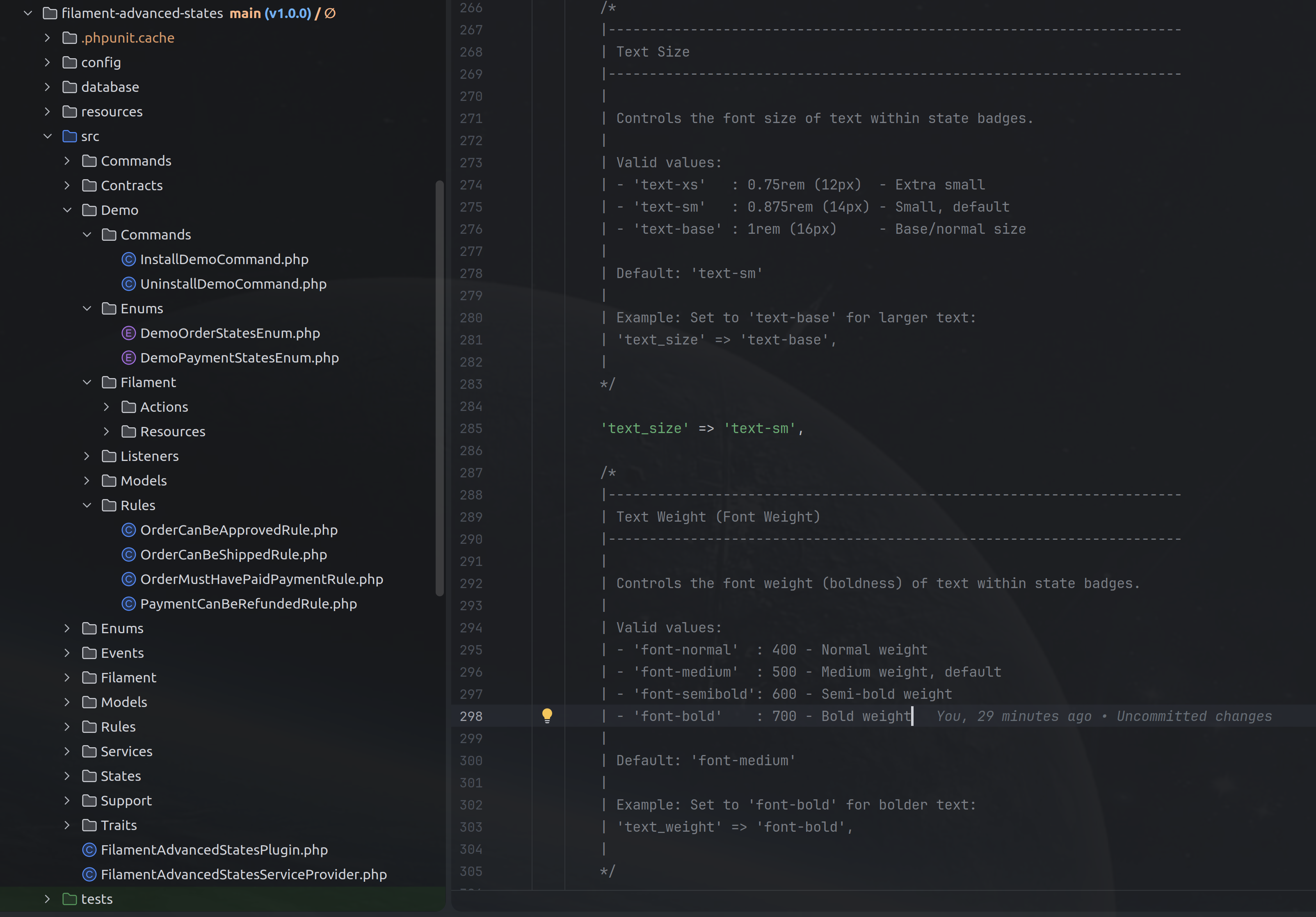
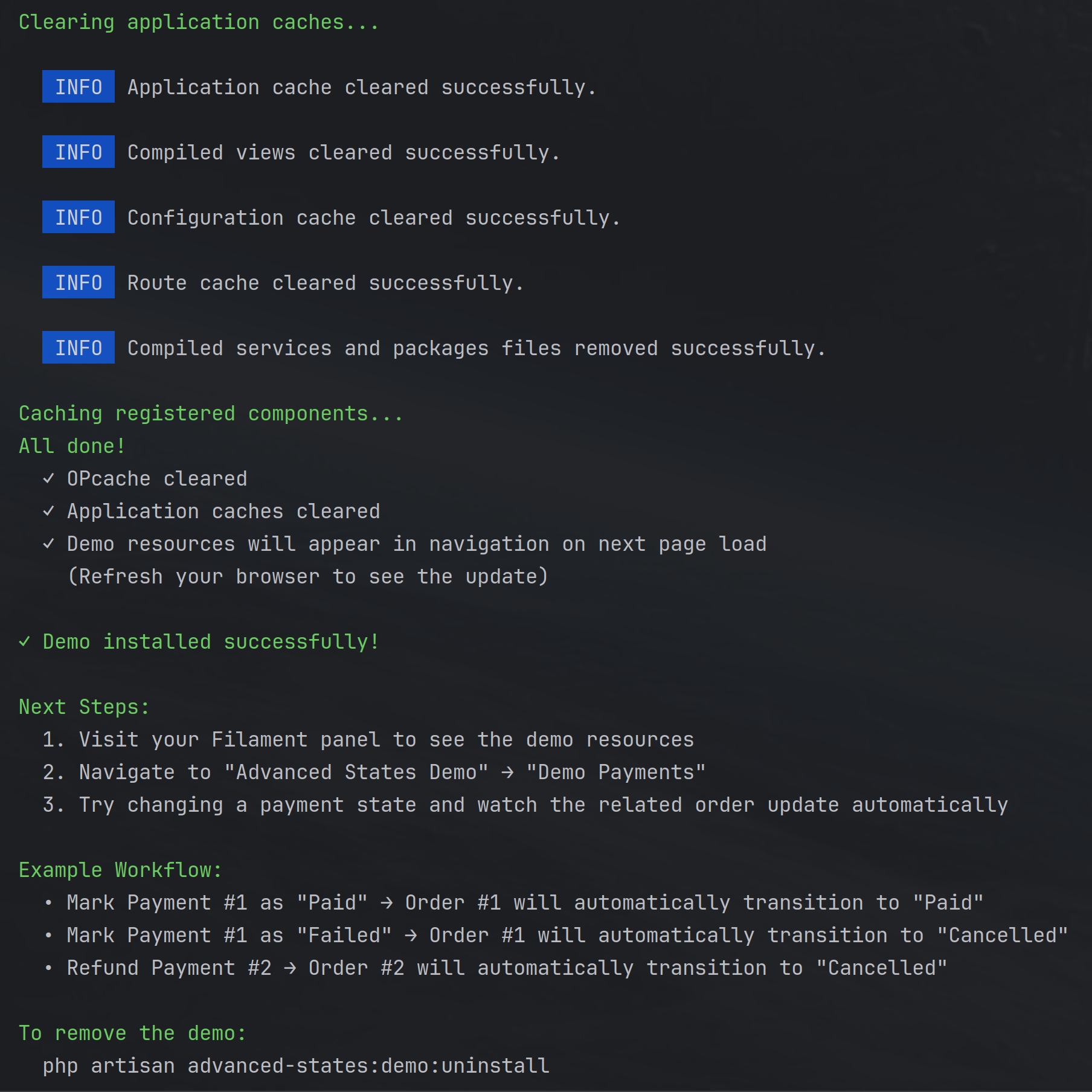
#🚀 Key Capabilities
#🔁 True Multi-Path State Transitions
Not just swapping values.
Define explicit, many-to-many transition maps so your app’s lifecycle is structured, predictable, and safe.
#🧠 Rule-Based Transition Guards
Attach custom Rule classes to transitions:
- simple checks or deep business logic
- refuse transitions with clear textual reasons
- prevent invalid lifecycle movement before it happens
Users never wonder “why did that fail?” — they see it.
#🎨 Intelligent UI & Communication
States are not only data. They’re meaning.
✔ Configurable colors
✔ Descriptions
✔ Optional visual tweaks (padding, rounding, shape)
✔ Beautiful badge rendering
✔ Immediate clarity for users & teams
#📡 Events & Lifecycle Hooks
Everything important is evented.
React to lifecycle changes to:
- send notifications
- trigger automation
- sync to external tools
- cascade business processes
No hacks. No awkward workarounds. Just clean extensibility.
#🕵️ Full Accountability & Traceability
This is where "nice plugin" becomes professional tooling.
Advanced States records:
- current state
- transition history per model
- reasons
- contextual metadata
- UI-recorded history
- database-persisted logs
Plus: Advanced Error Logging
- Centralized error tracking for all state-related operations
- Dual logging support - log to package's AdvancedStateErrorLog, Laravel's log, or both
- Severity-based filtering (Critical, High, Medium, Low, Info)
- Configurable rethrow behavior - control which errors propagate vs. suppress
- Rich error context - model info, state identifiers, stack traces, metadata
- Filament UI resource for viewing, filtering, and analyzing errors
- Production-ready - toggle display visibility without disabling logging
Perfect for debugging. Perfect for audits. Perfect for serious systems.
#🧪 Fully Interactive Demo (Optional Install)
Ship confidence, not mystery.
Developers can instantly:
- install demo states
- explore transitions
- inspect configs
- test example workflows
- see real working code
Rapid onboarding with zero friction.
#🌍 Multi-Language Support
Ship globally, communicate locally.
The package includes translations for 10 languages out of the box: English, Czech, German, Spanish, French, Italian, Dutch, Polish, Portuguese (Brazil), and Slovak.
All UI elements are fully translatable — navigation labels, form fields, table columns, modals, notifications, and more. Easily publish and customize translations or add your own languages.
#🧱 Built on Rock-Solid Foundations
- Powered by Spatie Model States
- Designed specifically for Filament
- Fully supports v3 and v4
This plugin respects your stack and behaves like it belongs.
#🏢 Built for Real Use Cases
Perfect for:
- approval workflows
- publishing pipelines
- e-commerce order lifecycles
- onboarding flows
- ticketing processes
- subscription / contract states
- compliance-sensitive systems
- anywhere state chaos becomes risk
#💼 A Professional, Paid Plugin
Filament Advanced States is a commercial, proprietary plugin.
You’re buying stability, polish, reliability, and long-term care — not a toy.
It ships with:
- clean architecture
- thoughtful UX
- extensive documentation
- demo tools
- professionally maintained roadmap
If your software depends on states, it deserves something built seriously.
#🧭 Summary
Filament Advanced States is your lifecycle engine inside Filament:
predictable workflows, enforced rules, meaningful UI, automation hooks, and historical accountability — done right.
(installation, configuration, pricing, support & licence sections follow below)
#Requirements
- PHP 8.1 or higher
- Laravel 10, 11, or 12
- Filament 3 or 4
- Spatie Laravel Model States 2.0 or higher
#Installation
You can install the package via composer using a local path repository:
{
    "repositories": [
        {
            "type": "path",
            "url": "../filament-advanced-states"
        }
    ]
}
Then require the package:
composer require dlogic-solutions/filament-advanced-states
#Publishing Configuration
You can publish the config file with:
php artisan vendor:publish --provider="DLogicSolutions\FilamentAdvancedStates\FilamentAdvancedStatesServiceProvider"
This will publish the configuration file to config/filament-advanced-states.php.
#Configuring for Non-Standard User Models
The package automatically tracks who made each state transition in the Transitions Log. By default, it assumes you're using Laravel's standard App\Models\User model and will display the name field.
If your project uses a different user model or field, you need to publish and customize the configuration:
-
Publish the configuration file (if you haven't already):
php artisan vendor:publish --provider="DLogicSolutions\FilamentAdvancedStates\FilamentAdvancedStatesServiceProvider" -
Edit
config/filament-advanced-states.phpto customize thechanged_byconfiguration:For custom user model namespace:
'changed_by' => [
    'model' => App\Domain\Auth\Models\Admin::class,  // Your custom model
    'display_field' => 'name',  // Field to display
    'fallback' => 'Unknown',
],
For displaying email instead of name:
'changed_by' => [
    'model' => App\Models\User::class,
    'display_field' => 'email',  // Display email instead of name
    'fallback' => 'Unknown',
],
For custom display logic:
'changed_by' => [ 'model' => App\Models\User::class, 'display_field' => 'name', 'fallback' => 'Unknown', 'resolver' => function (string $changedBy): string { if ($changedBy === 'system') { return 'Automated System'; } $user = \App\Models\User::find($changedBy); return $user ? "{$user->name} ({$user->email})" : 'Unknown User'; }, ], -
Clear the config cache:
php artisan config:clear
Configuration Options:
model: The fully qualified class name of your user/admin modeldisplay_field: Which field to display (supports dot notation for relationships, e.g.,profile.display_name)fallback: What to show when a user can't be found (e.g., deleted users)resolver: (Optional) Custom closure for complex display logic - overridesmodelanddisplay_fieldwhen set
Note: The package stores user identifiers as strings (typically the user ID from auth()->id()), so it's flexible and doesn't enforce any specific user model structure.
#Registering Models with Advanced States
IMPORTANT: Before you can create states in the UI, you must explicitly register all models that will use advanced states in your configuration file.
#Why Explicit Registration?
- Clear visibility: See all models using states in one place
- Custom aliases: Provide friendly display names for better UI readability (aliases are used through-out the UI consistently)
- Namespace conflicts: Handle multiple models with the same class name (e.g.,
App\Models\UservsApp\Admin\Models\User) - Prevents accidents: Avoids creating states for unintended models
#Configuration Steps
-
Publish the configuration file (if you haven't already):
php artisan vendor:publish --tag=filament-advanced-states-config -
Register your models in
config/filament-advanced-states.php:'models' => [ ['class' => App\Models\Order::class, 'alias' => 'Order'], ['class' => App\Models\Payment::class, 'alias' => 'Payment'], ['class' => App\Domain\Shipping\Models\Shipment::class, 'alias' => 'Shipment'], ['class' => App\Admin\Models\User::class, 'alias' => 'Admin-User'], ['class' => App\Customer\Models\User::class, 'alias' => 'Customer-User'], ], -
Clear the config cache:
php artisan config:clear
#Configuration Requirements
Each model entry must have:
class: The fully qualified class namealias: A unique, human-readable display name
CRITICAL:
- Both
classandaliasvalues MUST be unique across all entries - Models MUST use the
HasAdvancedStatestrait - Duplicate values will trigger validation errors when creating states
#Example with Multiple User Models
If your application has different types of users in different namespaces:
'models' => [
    // E-commerce models
    ['class' => App\Models\Order::class, 'alias' => 'Order'],
    ['class' => App\Models\Cart::class, 'alias' => 'Shopping Cart'],

    // User management
    ['class' => App\Models\User::class, 'alias' => 'Customer'],
    ['class' => App\Admin\Models\User::class, 'alias' => 'Admin User'],

    // Shipping domain
    ['class' => App\Domain\Shipping\Models\Shipment::class, 'alias' => 'Shipment'],
    ['class' => App\Domain\Shipping\Models\Package::class, 'alias' => 'Package'],
],
#Validation Errors
The Create State form will automatically detect and display configuration errors in a red alert box:
Common errors:
- ❌ Duplicate model classes:
"Duplicate model classes found in configuration: App\Models\User" - ❌ Duplicate aliases:
"Duplicate model aliases found in configuration: User" - ❌ Missing trait:
"Model 'Order' (App\Models\Order) does not use the HasAdvancedStates trait" - ❌ Class doesn't exist:
"Model class 'App\Models\InvalidModel' (alias: 'Invalid') does not exist"
Fix these by:
- Opening
config/filament-advanced-states.php - Ensuring all class names are unique
- Ensuring all aliases are unique
- Verifying all models use the
HasAdvancedStatestrait - Running
php artisan config:clear
#Translations
The package ships with full translation support for all UI elements — navigation labels, form fields, table columns, modals, action buttons, notifications, and more.
#Supported Languages
Out of the box, the package includes translations for 10 languages:
| Language | Locale Code |
|---|---|
| English | en |
| Czech | cs |
| German | de |
| Spanish | es |
| French | fr |
| Italian | it |
| Dutch | nl |
| Polish | pl |
| Portuguese (Brazil) | pt_BR |
| Slovak | sk |
#Publishing Translation Files
To customize existing translations, publish them to your application:
php artisan vendor:publish --tag=filament-advanced-states-translations
This will copy all translation files to lang/vendor/filament-advanced-states/. You can then edit any language file to match your application's terminology.
#Customizing Translations
After publishing, edit the files in lang/vendor/filament-advanced-states/{locale}/messages.php. For example, to customize English translations:
// lang/vendor/filament-advanced-states/en/messages.php
return [
    'navigation' => [
        'group' => 'Workflow States',  // Custom group name
        'states' => 'State Definitions',
        // ...
    ],
    // ...
];
#Adding New Languages
To add support for a new language:
-
Create a new language directory in
lang/vendor/filament-advanced-states/:mkdir -p lang/vendor/filament-advanced-states/ja -
Copy an existing language file as a starting point:
cp lang/vendor/filament-advanced-states/en/messages.php lang/vendor/filament-advanced-states/ja/messages.php -
Translate all strings in the new
messages.phpfile to your target language. -
Clear the translation cache:
php artisan cache:clear
The package will automatically detect and use your new language when Laravel's locale matches the directory name.
#Usage
#Registering the Plugin
To use the plugin, register it in your Filament panel provider:
use DLogicSolutions\FilamentAdvancedStates\FilamentAdvancedStatesPlugin;

public function panel(Panel $panel): Panel
{
    return $panel
        // ...
        ->plugins([
            FilamentAdvancedStatesPlugin::make(),
        ]);
}
#README Documentation Page
The package includes a built-in README documentation page that appears in the Filament navigation menu under the "Advanced States" group. This page displays the package's README.md file with formatted markdown rendering, providing easy access to documentation directly within your admin panel.
#Disabling the README Page
If you prefer not to show the README page in your navigation, you can disable it by setting the configuration option in your config/filament-advanced-states.php file:
return [
    // ...

    /*
    |--------------------------------------------------------------------------
    | Show README Page in Navigation
    |--------------------------------------------------------------------------
    |
    | Determines whether the README documentation page is displayed in the
    | Filament navigation menu under the "Advanced States" group.
    |
    | Set to false to hide the README page from navigation.
    |
    */

    'show_readme_page' => false,

    // ...
];
After changing this setting, run the refresh command to clear the caches:
php artisan advanced-states:refresh
The README page will no longer appear in your navigation menu.
#Authorization & Permissions
This section provides practical examples of how to integrate authorization and access control with the Advanced States package. These examples are for reference only and assume you're using authorization packages like Spatie Laravel Permission or Laravel's built-in authorization features.
#Important Notes
- These are examples only - The package does not include or require any specific authorization library
- Compatible with Filament v3 and v4 - All examples work with both versions
- Flexible integration - Use any authorization approach that fits your application (Spatie Permissions, Laravel Gates/Policies, custom logic, etc.)
- Not required - Authorization is optional; the package works without any access control
#Using Spatie Laravel Permission
Imagine you've installed and configured Spatie Laravel Permission in your application. Here are practical examples of controlling access to Advanced States features:
#Controlling Navigation Visibility
Hide or show the Advanced States navigation items based on user permissions by overriding navigation methods in the resource classes:
// In AdvancedStateResource.php (extend and override if needed)
use Filament\Resources\Resource;

class AdvancedStateResource extends Resource
{
    public static function shouldRegisterNavigation(): bool
    {
        return auth()->user()?->can('view_states');
    }
}
#Controlling Resource Access
Restrict who can view, create, edit, or delete states and transitions. There are three approaches depending on your Filament version and preference:
#Option 1: Resource Methods (Filament v3)
Simple boolean methods in your Resource class. Note: In Filament v4, these methods are ignored if a Laravel Policy exists for the model.
use DLogicSolutions\FilamentAdvancedStates\Models\AdvancedState;
use Filament\Resources\Resource;

class AdvancedStateResource extends Resource
{
    // Control who can view the resource list
    public static function canViewAny(): bool
    {
        return auth()->user()?->can('view_states');
    }

    // Control who can create new states
    public static function canCreate(): bool
    {
        return auth()->user()?->can('create_states');
    }

    // Control who can edit existing states
    public static function canEdit(Model $record): bool
    {
        return auth()->user()?->can('edit_states');
    }

    // Control who can delete states
    public static function canDelete(Model $record): bool
    {
        return auth()->user()?->can('delete_states');
    }

    // Control who can view individual state details
    public static function canView(Model $record): bool
    {
        return auth()->user()?->can('view_states');
    }
}
#Option 2: Authorization Response Methods (Filament v4)
For Filament v4, use these methods when you need custom authorization logic in the Resource and want to override Laravel Policies:
use Illuminate\Auth\Access\Response;
use Filament\Resources\Resource;

class AdvancedStateResource extends Resource
{
    public static function getViewAnyAuthorizationResponse(): ?Response
    {
        if (auth()->user()?->can('view_states')) {
            return Response::allow();
        }

        return Response::deny('You do not have permission to view states.');
    }

    public static function getCreateAuthorizationResponse(): ?Response
    {
        if (auth()->user()?->can('create_states')) {
            return Response::allow();
        }

        return Response::deny('You do not have permission to create states.');
    }

    public static function getEditAuthorizationResponse(Model $record): ?Response
    {
        if (auth()->user()?->can('edit_states')) {
            return Response::allow();
        }

        return Response::deny('You do not have permission to edit this state.');
    }

    public static function getDeleteAuthorizationResponse(Model $record): ?Response
    {
        if (auth()->user()?->can('delete_states')) {
            return Response::allow();
        }

        return Response::deny('You do not have permission to delete this state.');
    }

    public static function getViewAuthorizationResponse(Model $record): ?Response
    {
        if (auth()->user()?->can('view_states')) {
            return Response::allow();
        }

        return Response::deny('You do not have permission to view this state.');
    }
}
#Option 3: Laravel Model Policies (Recommended - Works in Both v3 & v4)
The recommended approach is to use Laravel's built-in Policy system. Create a policy for your model:
php artisan make:policy AdvancedStatePolicy --model=AdvancedState
Then define your authorization logic in app/Policies/AdvancedStatePolicy.php:
<?php

namespace App\Policies;

use App\Models\User;
use DLogicSolutions\FilamentAdvancedStates\Models\AdvancedState;
use Illuminate\Auth\Access\Response;

class AdvancedStatePolicy
{
    /**
     * Determine whether the user can view any models.
     */
    public function viewAny(User $user): bool
    {
        return $user->can('view_states');
    }

    /**
     * Determine whether the user can view the model.
     */
    public function view(User $user, AdvancedState $advancedState): bool
    {
        return $user->can('view_states');
    }

    /**
     * Determine whether the user can create models.
     */
    public function create(User $user): bool
    {
        return $user->can('create_states');
    }

    /**
     * Determine whether the user can update the model.
     */
    public function update(User $user, AdvancedState $advancedState): bool
    {
        return $user->can('edit_states');
    }

    /**
     * Determine whether the user can delete the model.
     */
    public function delete(User $user, AdvancedState $advancedState): bool
    {
        return $user->can('delete_states');
    }

    /**
     * Determine whether the user can restore the model.
     */
    public function restore(User $user, AdvancedState $advancedState): bool
    {
        return $user->can('edit_states');
    }

    /**
     * Determine whether the user can permanently delete the model.
     */
    public function forceDelete(User $user, AdvancedState $advancedState): bool
    {
        return $user->can('delete_states');
    }
}
Register the policy in app/Providers/AuthServiceProvider.php:
use DLogicSolutions\FilamentAdvancedStates\Models\AdvancedState;
use App\Policies\AdvancedStatePolicy;

protected $policies = [
    AdvancedState::class => AdvancedStatePolicy::class,
];
💡 Recommendation: Use Option 3 (Laravel Policies) for the most maintainable and Laravel-standard approach. Policies work consistently in both Filament v3 and v4, and keep your authorization logic separate from your Filament resources.
#Controlling Table Actions
Restrict specific actions based on user roles or permissions:
use Filament\Tables\Actions\Action;
use Filament\Tables\Actions\DeleteAction;
use Filament\Tables\Actions\EditAction;

public static function table(Table $table): Table
{
    return $table
        ->actions([
            EditAction::make()
                ->visible(fn () => auth()->user()?->can('edit_states')),

            DeleteAction::make()
                ->visible(fn () => auth()->user()?->can('delete_states')),

            Action::make('deactivate')
                ->label('Deactivate')
                ->visible(fn () => auth()->user()?->hasRole('admin')),
        ]);
}
#Protecting State Transitions Based on User Roles
Create custom transition rules that check user permissions:
use DLogicSolutions\FilamentAdvancedStates\Rules\AbstractTransitionRule;
use Illuminate\Database\Eloquent\Model;

class OnlyManagersCanApproveOrdersRule extends AbstractTransitionRule
{
    protected function evaluate(
        Model $model,
        string $fromState,
        string $toState,
        array $context = []
    ): bool {
        // Only check approval transitions
        if ($toState !== 'approved') {
            return true;
        }

        $user = auth()->user();

        // User must be authenticated
        if (!$user) {
            $this->setReason('You must be logged in to approve orders.');
            return false;
        }

        // User must have manager role
        if (!$user->hasRole('manager')) {
            $this->setReason('Only managers can approve orders. Please contact your supervisor.');
            return false;
        }

        return true;
    }
}

// Register the rule in your model
class Order extends Model
{
    use HasAdvancedStates;

    protected function getTransitionRules(): array
    {
        return [
            new OnlyManagersCanApproveOrdersRule(),
            // ... other rules
        ];
    }
}
#Checking State Values in Your Code
IMPORTANT: The state attribute is a DynamicAdvancedState object, not a string. Direct string comparisons will always fail.
#❌ Common Mistakes (These Don't Work):
// ❌ WRONG - Will always be false
if ($order->state === 'pending') {
    // This code will NEVER run
}

// ❌ WRONG - Will always be false
if ($order->state == 'shipped') {
    // This code will NEVER run
}

// ❌ WRONG - Will not find the object in the array
if (in_array($order->state, ['pending', 'processing'])) {
    // This code will NEVER run
}

// ❌ WRONG - Filament action will never show
Tables\Actions\Action::make('ship')
    ->visible(fn ($record) => $record->state === 'processing')  // Never true!
Why This Happens:
The HasAdvancedStates trait automatically casts the state column to a DynamicAdvancedState object using Laravel's attribute casting. When you access $model->state, you get an object, not a string.
#✅ Correct Methods:
The HasAdvancedStates trait provides helper methods for state checking:
Method 1: Use isState(string $stateIdentifier)
// ✅ CORRECT
if ($order->isState('pending')) {
    // This works!
}

// ✅ CORRECT - Filament action visibility
Tables\Actions\Action::make('ship')
    ->visible(fn ($record) => $record->isState('processing'))
Method 2: Use getCurrentState()
// ✅ CORRECT
if ($order->getCurrentState() === 'pending') {
    // This works!
}

// ✅ CORRECT - Multiple states check
if (in_array($order->getCurrentState(), ['pending', 'processing'])) {
    // This works!
}
Method 3: Use isNotState(string $stateIdentifier)
// ✅ CORRECT - Check if NOT in a specific state
if ($order->isNotState('cancelled')) {
    // This works!
}
#Complete Examples:
Example 1: Filament Table Actions with State-Based Visibility
use Filament\Tables;

Tables\Actions\ActionGroup::make([
    Tables\Actions\Action::make('approve')
        ->visible(fn ($record) => $record->isState('pending'))
        ->action(fn ($record) => $record->transitionTo('approved')),

    Tables\Actions\Action::make('ship')
        ->visible(fn ($record) => $record->isState('approved'))
        ->action(fn ($record) => $record->transitionTo('shipped')),

    Tables\Actions\Action::make('cancel')
        ->visible(fn ($record) => !in_array($record->getCurrentState(), ['shipped', 'cancelled']))
        ->color('danger')
        ->action(fn ($record) => $record->transitionTo('cancelled')),
]);
Example 2: Custom Logic in Controllers
public function processOrder(Order $order)
{
    // ✅ CORRECT - Using isState()
    if ($order->isState('pending')) {
        $order->transitionTo('processing');
        return redirect()->back()->with('success', 'Order is now being processed');
    }

    // ✅ CORRECT - Using getCurrentState()
    if (in_array($order->getCurrentState(), ['processing', 'approved'])) {
        // Process the order
    }

    return redirect()->back()->with('error', 'Order cannot be processed in current state');
}
Example 3: Blade Views
@if($order->isState('pending'))
    <span class="badge badge-warning">Awaiting Approval</span>
@elseif($order->isState('approved'))
    <span class="badge badge-success">Approved</span>
@endif

{{-- Using getCurrentState() --}}
<p>Current status: {{ $order->getCurrentState() }}</p>
Example 4: Query Scopes (Alternative Approach)
For database queries, use the provided query scopes instead of checking state values:
// ✅ CORRECT - Using query scopes
Order::whereState('pending')->get();
Order::whereStateIn(['pending', 'processing'])->get();
Order::whereStateNot('cancelled')->get();
Order::whereStateNotIn(['cancelled', 'refunded'])->get();
#Available State-Checking Methods:
| Method | Return Type | Usage |
|---|---|---|
isState(string $state) |
bool |
Check if model is in a specific state |
isNotState(string $state) |
bool |
Check if model is NOT in a specific state |
getCurrentState() |
string |
Get the current state identifier as a string |
whereState(string $state) |
Builder |
Query scope for filtering by state |
whereStateIn(array $states) |
Builder |
Query scope for filtering by multiple states |
whereStateNot(string $state) |
Builder |
Query scope for excluding a state |
whereStateNotIn(array $states) |
Builder |
Query scope for excluding multiple states |
#Troubleshooting:
Problem: My Filament action never shows up, even though the record has the correct state
Cause: You're using direct string comparison ($record->state === 'some_state')
Solution: Change to $record->isState('some_state') or $record->getCurrentState() === 'some_state'
Problem: My if condition never evaluates to true
Cause: Direct comparison with state object
Solution: Use isState() or getCurrentState() methods
Problem: How do I debug what state a model is actually in?
Solution: Use dd($model->getCurrentState()) or check the database column directly
#Permission-Based Transition Actions
Control which transition actions are available to different users:
use DLogicSolutions\FilamentAdvancedStates\Filament\Actions\TransitionStateAction;

// In your Filament Resource
public static function table(Table $table): Table
{
    return $table
        ->actions([
            // Standard transition action - only for users with permission
            TransitionStateAction::make()
                ->visible(fn () => auth()->user()?->can('transition_states')),

            // Custom quick action for managers only
            Tables\Actions\Action::make('approve')
                ->label('Approve')
                ->icon('heroicon-o-check-circle')
                ->color('success')
                ->visible(function (Model $record) {
                    return auth()->user()?->hasRole('manager')
                        && $record->canTransitionTo('approved');
                })
                ->action(function (Model $record) {
                    $record->transitionTo('approved', [
                        'changed_type' => AdvancedStateChangedByEnum::USER,
                        'changed_by' => auth()->id(),
                        'changed_reason' => 'Approved by manager',
                    ]);
                }),

            // Refund action - only for finance team
            Tables\Actions\Action::make('refund')
                ->label('Refund')
                ->visible(function (Model $record) {
                    return auth()->user()?->hasPermissionTo('process_refunds')
                        && $record->canTransitionTo('refunded');
                })
                ->requiresConfirmation()
                ->action(function (Model $record) {
                    $record->transitionTo('refunded', [
                        'changed_type' => AdvancedStateChangedByEnum::USER,
                        'changed_by' => auth()->id(),
                    ]);
                }),
        ]);
}
#Role-Based State Management
Different user roles might need different levels of access to state management:
// Admin users - Full access to all state management features
if (auth()->user()?->hasRole('admin')) {
    // Can view, create, edit, delete states and transitions
    // Can see all transition history
    // Can see configuration audit logs
}

// Manager users - Can view and transition, but not configure
if (auth()->user()?->hasRole('manager')) {
    // Can view states
    // Can perform transitions they're authorized for
    // Can view history for their department's records
}

// Regular users - Read-only or limited transition access
if (auth()->user()?->hasRole('user')) {
    // Can only view their own records' states
    // Can perform self-service transitions (e.g., cancel their own orders)
}
Example implementation:
// In your Order Resource
use DLogicSolutions\FilamentAdvancedStates\Models\AdvancedStateTransitionHistory;

public static function table(Table $table): Table
{
    return $table
        ->actions([
            // All users can view history
            Tables\Actions\Action::make('view_history')
                ->label('View History')
                ->icon('heroicon-o-clock')
                ->modalContent(function (Model $record) {
                    $history = $record->getTransitionHistory();
                    return view('filament.transition-history', ['history' => $history]);
                }),

            // Only users can cancel their own orders
            Tables\Actions\Action::make('cancel')
                ->label('Cancel My Order')
                ->visible(function (Model $record) {
                    $user = auth()->user();
                    return $record->user_id === $user?->id
                        && $record->canTransitionTo('cancelled');
                })
                ->requiresConfirmation()
                ->action(function (Model $record) {
                    $record->transitionTo('cancelled', [
                        'changed_type' => AdvancedStateChangedByEnum::USER,
                        'changed_by' => auth()->id(),
                        'changed_reason' => 'Cancelled by customer',
                    ]);
                }),

            // Managers can cancel any order
            Tables\Actions\Action::make('manager_cancel')
                ->label('Cancel Order (Manager)')
                ->visible(function (Model $record) {
                    return auth()->user()?->hasRole('manager')
                        && $record->canTransitionTo('cancelled');
                })
                ->requiresConfirmation()
                ->action(function (Model $record) {
                    $record->transitionTo('cancelled', [
                        'changed_type' => AdvancedStateChangedByEnum::USER,
                        'changed_by' => auth()->id(),
                        'changed_reason' => 'Cancelled by manager',
                    ]);
                }),
        ]);
}
#Using Laravel Gates and Policies
If you prefer Laravel's built-in authorization features instead of Spatie Permissions:
#Defining Gates
// In App\Providers\AuthServiceProvider.php
use Illuminate\Support\Facades\Gate;

public function boot(): void
{
    // Gate for managing states
    Gate::define('manage-states', function (User $user) {
        return $user->is_admin || $user->hasRole('state-manager');
    });

    // Gate for approving high-value orders
    Gate::define('approve-high-value-orders', function (User $user, Order $order) {
        return $user->is_manager && $order->total_amount <= 50000;
    });

    // Gate for processing refunds
    Gate::define('process-refunds', function (User $user) {
        return $user->department === 'finance';
    });
}
#Using Gates in Resources
use Illuminate\Support\Facades\Gate;

class AdvancedStateResource extends Resource
{
    public static function canViewAny(): bool
    {
        return Gate::allows('manage-states');
    }

    public static function canCreate(): bool
    {
        return Gate::allows('manage-states');
    }
}
#Using Gates in Transition Rules
use DLogicSolutions\FilamentAdvancedStates\Rules\AbstractTransitionRule;
use Illuminate\Support\Facades\Gate;

class RequireManagerApprovalRule extends AbstractTransitionRule
{
    protected function evaluate(
        Model $model,
        string $fromState,
        string $toState,
        array $context = []
    ): bool {
        if ($toState === 'approved') {
            if (!Gate::allows('approve-high-value-orders', $model)) {
                $this->setReason('This order requires manager approval. Please escalate to your manager.');
                return false;
            }
        }

        return true;
    }
}
#Creating Model Policies
For more granular control, create policies for your models:
// php artisan make:policy OrderPolicy --model=Order

namespace App\Policies;

use App\Models\Order;
use App\Models\User;

class OrderPolicy
{
    public function viewAny(User $user): bool
    {
        return true; // All authenticated users can view orders
    }

    public function view(User $user, Order $order): bool
    {
        // Users can view their own orders, managers can view all
        return $user->id === $order->user_id || $user->hasRole('manager');
    }

    public function update(User $user, Order $order): bool
    {
        // Only managers can update orders
        return $user->hasRole('manager');
    }

    public function delete(User $user, Order $order): bool
    {
        // Only admins can delete orders
        return $user->hasRole('admin');
    }

    // Custom policy method for state transitions
    public function transition(User $user, Order $order, string $targetState): bool
    {
        // Users can cancel their own orders
        if ($targetState === 'cancelled' && $user->id === $order->user_id) {
            return true;
        }

        // Managers can perform most transitions
        if ($user->hasRole('manager') && !in_array($targetState, ['completed', 'refunded'])) {
            return true;
        }

        // Finance team can process refunds
        if ($targetState === 'refunded' && $user->hasPermissionTo('process-refunds')) {
            return true;
        }

        return false;
    }
}
#Using Policies in Resources
use App\Models\Order;

class OrderResource extends Resource
{
    public static function canViewAny(): bool
    {
        return auth()->user()?->can('viewAny', Order::class) ?? false;
    }

    public static function canEdit(Model $record): bool
    {
        return auth()->user()?->can('update', $record) ?? false;
    }

    public static function canDelete(Model $record): bool
    {
        return auth()->user()?->can('delete', $record) ?? false;
    }
}
#Using Policies in Transition Rules
use DLogicSolutions\FilamentAdvancedStates\Rules\AbstractTransitionRule;

class CheckUserPolicyForTransitionRule extends AbstractTransitionRule
{
    protected function evaluate(
        Model $model,
        string $fromState,
        string $toState,
        array $context = []
    ): bool {
        $user = auth()->user();

        if (!$user) {
            $this->setReason('You must be logged in to perform this transition.');
            return false;
        }

        // Use the policy's custom transition method
        if (!$user->can('transition', [$model, $toState])) {
            $this->setReason("You don't have permission to transition this order to '{$toState}'.");
            return false;
        }

        return true;
    }
}
#Advanced Authorization Scenarios
#Multi-Tenant Applications
Scope state transitions to tenant boundaries:
use DLogicSolutions\FilamentAdvancedStates\Rules\AbstractTransitionRule;

class TenantBoundaryRule extends AbstractTransitionRule
{
    protected function evaluate(
        Model $model,
        string $fromState,
        string $toState,
        array $context = []
    ): bool {
        $user = auth()->user();

        // Check if user belongs to the same tenant as the model
        if ($model->tenant_id !== $user->tenant_id) {
            $this->setReason('You cannot transition records outside your organization.');
            return false;
        }

        return true;
    }
}
#Time-Based Access Control
Restrict transitions based on time windows or business hours:
class BusinessHoursOnlyRule extends AbstractTransitionRule
{
    protected function evaluate(
        Model $model,
        string $fromState,
        string $toState,
        array $context = []
    ): bool {
        // Only allow critical transitions during business hours
        if (in_array($toState, ['approved', 'refunded'])) {
            $now = now();
            $isBusinessHours = $now->hour >= 9 && $now->hour < 17;
            $isWeekday = $now->isWeekday();

            if (!$isBusinessHours || !$isWeekday) {
                $this->setReason('This transition can only be performed during business hours (Mon-Fri, 9 AM - 5 PM).');
                return false;
            }
        }

        return true;
    }
}
#Conditional Permissions Based on Record State
Dynamically adjust permissions based on the current state:
Tables\Actions\Action::make('approve')
    ->visible(function (Model $record) {
        $user = auth()->user();

        // Junior managers can only approve pending orders under $1000
        if ($user?->hasRole('junior-manager')) {
            return $record->isState('pending') && $record->total_amount < 1000;
        }

        // Senior managers can approve any pending order
        if ($user?->hasRole('senior-manager')) {
            return $record->isState('pending');
        }

        return false;
    })
#Audit Trail with User Context
Automatically capture which user performed transitions:
// In your action handler
Tables\Actions\Action::make('approve')
    ->action(function (Model $record) {
        $user = auth()->user();

        $record->transitionTo('approved', [
            'changed_type' => AdvancedStateChangedByEnum::USER,
            'changed_by' => $user->id,
            'changed_reason' => "Approved by {$user->name} ({$user->email})",
            'meta' => [
                'user_role' => $user->roles->pluck('name')->toArray(),
                'ip_address' => request()->ip(),
                'user_agent' => request()->userAgent(),
            ],
        ]);
    })
#Best Practices
- Layer your security - Use multiple authorization checks (resource access, action visibility, transition rules)
- Fail securely - Default to denying access when authorization status is unclear
- Provide clear feedback - Use meaningful error messages in transition rules
- Audit everything - Log who performed transitions and include user context
- Test thoroughly - Verify authorization works for all user roles and edge cases
- Keep it simple - Don't over-complicate authorization logic
- Use the right tool - Gates for simple checks, Policies for model-specific logic, Rules for business validation
- Document permissions - Maintain clear documentation of which roles can do what
#Filament v3 and v4 Compatibility
All authorization examples in this section work with both Filament v3 and v4. The package's authorization integration points (resource methods, action visibility, transition rules) are compatible across both versions.
// This pattern works in both Filament v3 and v4
public static function canViewAny(): bool
{
    return auth()->user()?->can('view_states') ?? false;
}
#Summary
The Advanced States package integrates seamlessly with any authorization approach:
- Spatie Laravel Permission - Role and permission-based access control
- Laravel Gates - Simple authorization checks
- Laravel Policies - Model-specific authorization logic
- Custom Rules - Business logic with user context
- Or mix and match - Use whatever fits your application architecture
Choose the approach that best fits your application's security requirements and organizational structure.
#Interactive Demo
The package includes an optional interactive demo that showcases real-world usage through a Payment and Order workflow. The demo is safe for local development environments and demonstrates:
- Event-driven cross-model state reactions
- Transition rules and validation
- History logging and audit trails
- Filament UI integration with state badges and actions
#What the Demo Includes
The demo implements a realistic e-commerce scenario:
Models:
DemoPayment- Manages payment states (pending, authorized, paid, failed, refunded)DemoOrder- Manages order states (draft, pending_payment, paid, processing, shipped, completed, cancelled)
Event-Driven Reactions: When a payment's state changes, associated orders automatically react:
- Payment transitions to "paid" → Order transitions to "paid"
- Payment transitions to "failed" → Order transitions to "cancelled"
- Payment transitions to "refunded" → Order transitions to "cancelled"
Transition Rules:
PaymentCanBeRefundedRule- Payments can only be refunded from a "paid" stateOrderCanBeApprovedRule- Orders must meet minimum amount requirementsOrderMustHavePaidPaymentRule- Orders require paid payments before processing
Filament Resources:
- Interactive tables with state badges and filters
- State transition actions with validation feedback
- Relationship displays showing payment and order connections
Demo Error Logs:
- Sample error log entries showcasing all severity levels (Critical, High, Medium, Low, Info)
- Examples of all error types (State Transition, Updating Records, Configuration, General)
- Realistic simulated exceptions and metadata to demonstrate error tracking capabilities
- Note: These are clearly marked as demo entries with
is_demometadata and are automatically removed during uninstall
#Installing the Demo
Prerequisites:
Ensure the FilamentAdvancedStatesPlugin is registered in your panel provider (see "Registering the Plugin" section above).
Install the demo with a single command:
php artisan advanced-states:demo:install
This command will:
- Publish and run demo database migrations
- Create state definitions for both models
- Create allowed transitions between states
- Generate sample payment and order records
- Create demo error log entries (5 entries covering all severity levels and error types)
- Register the event listener for cross-model reactions
- Make demo resources available in your Filament panel
#Exploring the Demo
After installation:
- Visit your Filament admin panel
- Look for "Advanced States Demo" in the navigation
- Open "Demo Payments" to view payment records
- Open "Demo Orders" to view order records
Try these workflows:
Workflow 1: Successful Payment
- Find a payment in "pending" state
- Click "Mark as Paid" action
- Navigate to the associated order
- Notice the order automatically transitioned to "paid" state
- Check the order's transition history to see the automated change
Workflow 2: Failed Payment
- Find a payment in "pending" or "authorized" state
- Click "Mark as Failed" action
- Navigate to the associated order
- Notice the order automatically transitioned to "cancelled" state
Workflow 3: Payment Refund
- Find a payment in "paid" state
- Click "Refund" action
- Navigate to the associated order
- Notice the order automatically transitioned to "cancelled" state
Workflow 4: Validation Rules
- Try to refund a payment that isn't paid (rule blocks the transition)
- Try to process an order without a paid payment (rule blocks the transition)
- Observe validation feedback showing why transitions were blocked
#Viewing Transition History
Each model maintains a complete audit trail:
use DLogicSolutions\FilamentAdvancedStates\Demo\Models\DemoOrder;

$order = DemoOrder::first();
$history = $order->getTransitionHistory();

foreach ($history as $record) {
    echo "{$record->from_state} → {$record->to_state} ";
    echo "by {$record->changed_by} ";
    echo "at {$record->changed_at}\n";
}
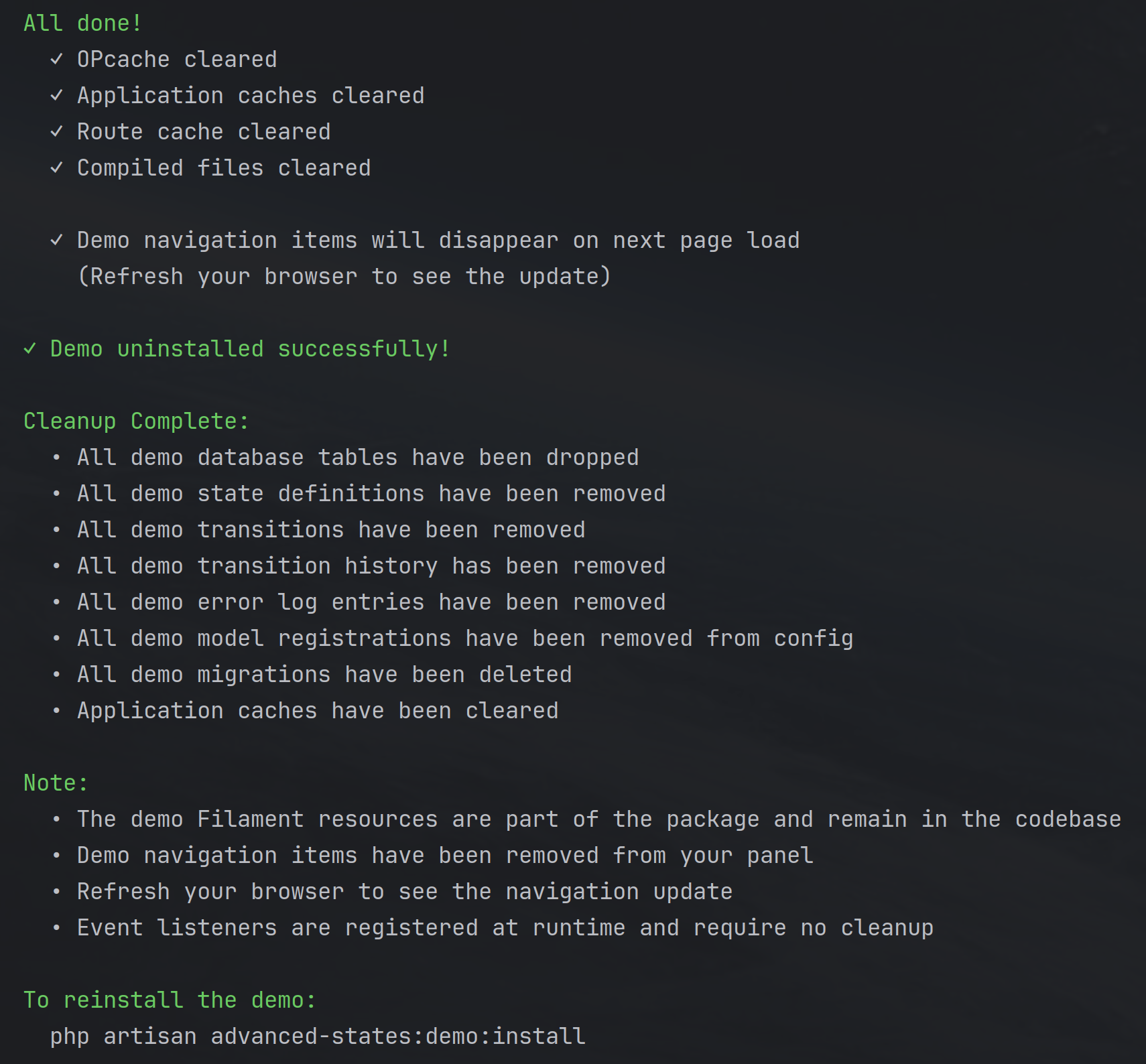
#Uninstalling the Demo
Remove all demo data, migrations, and tables:
php artisan advanced-states:demo:uninstall
This command will:
- Drop demo database tables (
demo_payments,demo_orders) - Remove all demo state definitions
- Remove all demo transitions
- Remove all demo transition history
- Remove all demo error log entries (marked with
is_demometadata) - Delete published demo migrations
- Clean migration records from the database
The demo resources will automatically disappear from your Filament panel once the tables are removed.
#Demo Code Location
All demo code lives in clearly separated namespaces within packages/filament-advanced-states/src/Demo:
Models/ - Example models using the HasAdvancedStates trait
DemoPayment.phpandDemoOrder.phpdemonstrate trait configuration, default state setup, and rule registration- Shows how to define the state attribute, set default states, and register custom transition rules
Rules/ - Custom transition validation examples
PaymentCanBeRefundedRule.php- Validates that payments can only be refunded from a "paid" stateOrderMustHavePaidPaymentRule.php- Blocks order processing unless payment is confirmedOrderCanBeApprovedRule.php- Demonstrates custom business logic validation (minimum amount checks)- Each rule extends
AbstractTransitionRuleand shows how to set custom failure reasons
Listeners/ - Event-driven cross-model state reactions
UpdateOrderOnPaymentStateChange.php- Listens for payment state changes and automatically transitions related orders- Demonstrates how to use the
AdvancedStateTransitionedevent to create cascading state changes across models - Shows practical patterns for syncing states between related entities (e.g., payment fails → order cancels)
Enums/ - State identifier constants
DemoPaymentStatesEnum.phpandDemoOrderStatesEnum.phpprovide type-safe state identifier references- Useful for avoiding magic strings and enabling IDE autocomplete in your codebase
Filament/Resources/ - Full Filament resource implementations
DemoPaymentResource.phpandDemoOrderResource.phpshow how to integrate state badges, filters, and transition actions in tables- Page classes demonstrate standard CRUD operations with state-aware UI components
- Examples of using
TransitionStateActionfor elegant state change workflows
Commands/ - Installation and cleanup commands
InstallDemoCommand.php- Sets up demo database, states, transitions, and sample dataUninstallDemoCommand.php- Clean removal of all demo artifacts
These are demonstration components for reference only and should not be used directly in production applications. Use them as templates for implementing your own state-driven workflows.
#Learning from the Demo
The demo source code serves as a practical reference for:
Using the HasAdvancedStates trait:
// See: src/Demo/Models/DemoPayment.php
public function getStateAttributeName(): string
{
    return 'state';
}

protected function getDefaultState(): ?string
{
    return 'pending';
}

protected function getTransitionRules(): array
{
    return [new PaymentCanBeRefundedRule()];
}
Creating custom transition rules:
// See: src/Demo/Rules/OrderMustHavePaidPaymentRule.php
class OrderMustHavePaidPaymentRule extends AbstractTransitionRule
{
    protected function evaluate(Model $model, string $fromState, string $toState, array $context = []): bool
    {
        if ($toState === 'processing' && ! $model->payment?->isPaid()) {
            $this->setReason('Order requires paid payment before processing.');
            return false;
        }
        return true;
    }
}
Listening to state transition events:
// See: src/Demo/Listeners/UpdateOrderOnPaymentStateChange.php
Event::listen(AdvancedStateTransitioned::class, function ($event) {
    if ($event->model instanceof DemoPayment) {
        $event->model->orders->each(function ($order) {
            $order->transitionTo('cancelled', [
                'changed_type' => AdvancedStateChangedByEnum::PROCESS,
                'changed_by' => 'payment-listener',
                'changed_reason' => 'Payment failed',
            ]);
        });
    }
});
Building Filament resources with state actions:
// See: src/Demo/Filament/Resources/DemoPaymentResource.php
Tables\Actions\Action::make('mark_paid')
    ->action(function (DemoPayment $record) {
        $record->transitionTo('paid', [
            'changed_type' => AdvancedStateChangedByEnum::USER,
            'changed_by' => auth()->id(),
            'changed_reason' => 'Marked as paid via Filament UI',
        ]);
    })
#Advanced States UI
The package provides a complete Filament interface for managing states, transitions, and colours visually. All state management is database-driven, allowing you to configure states without writing code.
#Managing States
Navigate to Advanced States → States in your Filament panel to access the state management UI.
#Creating States
- Click "Create" to open the state creation modal
- Select Model Class - Choose which model this state applies to
- State Identifier - Unique identifier (e.g.,
draft,pending,approved) - Display Label - Human-readable name shown in the UI
- Background Color - Choose from the full Tailwind color palette
- Text Color - Automatically calculated based on background luminosity
- Description (optional) - Document what this state represents
- Active - Toggle to enable/disable this state
The state identifier auto-generates the display label, and you can customize it as needed.
#State Colors
States support the full Tailwind color palette with proper luminosity-based text color calculation:
- Background Colors: Select from any Tailwind color like
amber-400,sky-300,emerald-600, etc. - Text Colors: Automatically set to black or white based on background luminosity
- Real-time Preview: See exactly how your state will render before saving
Colors are stored as Tailwind class identifiers (e.g., blue-600) and rendered with proper contrast in all UI contexts.
Examples:
gray-500→ White text on gray backgroundamber-400→ Black text on amber backgroundred-600→ White text on red backgroundemerald-600→ White text on emerald background
#Badge Styling Configuration
Beyond colors, you can customize the visual appearance of state badges (padding, border radius, text size, and font weight) through the configuration file. This allows you to fully customize badge appearance to match your application's design language.
Configuration Location: config/filament-advanced-states.php
The configuration provides five styling options:
1. Horizontal Padding (X-axis)
Controls left and right spacing inside the badge:
'badge' => [
    'padding_x' => 'px-3',  // Default
],
Valid options:
px-1- Very tight (4px)px-2- Tight (8px)px-3- Default, recommended (12px)px-4- Comfortable (16px)px-5- Spacious (20px)px-6- Extra spacious (24px)
2. Vertical Padding (Y-axis)
Controls top and bottom spacing inside the badge:
'badge' => [
    'padding_y' => 'py-1.5',  // Default
],
Valid options:
py-0.5- Minimal (2px)py-1- Tight (4px)py-1.5- Default, recommended (6px)py-2- Comfortable (8px)py-2.5- Spacious (10px)py-3- Extra spacious (12px)
3. Border Radius (Rounded Corners)
Controls the roundness of badge corners:
'badge' => [
    'rounded' => 'rounded-lg',  // Default
],
Valid options:
rounded-none- Square corners (0px)rounded-sm- Slightly rounded (2px)rounded- Rounded (4px)rounded-md- Medium rounded (6px)rounded-lg- Default, large rounded (8px)rounded-xl- Extra large rounded (12px)rounded-2xl- 2x extra large (16px)rounded-3xl- 3x extra large (24px)rounded-full- Pill-shaped (fully rounded)
4. Text Size (Font Size)
Controls the font size of text within badges:
'badge' => [
    'text_size' => 'text-sm',  // Default
],
Valid options:
text-xs- Extra small (12px / 0.75rem)text-sm- Small, default, recommended (14px / 0.875rem)text-base- Base/normal size (16px / 1rem)
5. Text Weight (Font Weight)
Controls the font weight (boldness) of text within badges:
'badge' => [
    'text_weight' => 'font-medium',  // Default
],
Valid options:
font-normal- Normal weight (400)font-medium- Medium weight, default, recommended (500)font-semibold- Semi-bold weight (600)font-bold- Bold weight (700)
Example Configurations:
Compact, square badges:
'badge' => [
    'padding_x' => 'px-2',
    'padding_y' => 'py-1',
    'rounded' => 'rounded-none',
],
Spacious, pill-shaped badges:
'badge' => [
    'padding_x' => 'px-5',
    'padding_y' => 'py-2',
    'rounded' => 'rounded-full',
],
Comfortable, moderately rounded badges:
'badge' => [
    'padding_x' => 'px-4',
    'padding_y' => 'py-2',
    'rounded' => 'rounded-md',
],
Important Notes:
- Validation: Invalid values automatically fall back to defaults (
px-3,py-1.5,rounded-lg) - Consistency: Badge styling applies uniformly across all state badges in the UI
- Tailwind CSS: These settings use Tailwind utility classes - ensure your Tailwind configuration includes these classes (see Tailwind CSS Configuration)
- Cache: After changing badge configuration, run
php artisan advanced-states:refreshto clear caches
Where Badge Styling Applies:
Badge styling affects all rendered state badges throughout the package:
- State transition modals (current state display and target state options)
- Table columns showing state badges
- Form fields displaying state values
- Any custom UI using the
getCombinedClasses()orgetBadgeStylingClasses()helper methods
Rendering Badges in Your Code:
The package provides centralized badge rendering methods that automatically apply all configured styling. You should always use these methods instead of manually building badge HTML.
Using in PHP (Filament Resources):
use DLogicSolutions\FilamentAdvancedStates\Support\TailwindColorHelper;
use DLogicSolutions\FilamentAdvancedStates\Services\AdvancedStateRepository;

// In a Filament table column
Tables\Columns\TextColumn::make('state')
    ->formatStateUsing(function (string $state, $record): \Illuminate\Support\HtmlString {
        $stateRepo = app(AdvancedStateRepository::class);
        $stateModel = $stateRepo->findByIdentifier(get_class($record), $state);

        if (!$stateModel) {
            // Render a fallback badge with custom color
            return TailwindColorHelper::renderBadge($state, 'gray-500');
        }

        // Render from state model (recommended)
        return TailwindColorHelper::renderStateBadge($stateModel);
    })
Using in Blade Templates:
{{-- Import the helper at the top of your Blade file --}}
@php
    use DLogicSolutions\FilamentAdvancedStates\Support\TailwindColorHelper;
@endphp

{{-- Render a state badge (use {!! !!} for raw HTML output) --}}
@if($stateModel)
    {!! TailwindColorHelper::renderStateBadge($stateModel) !!}
@else
    <span class="text-gray-500">{{ $stateIdentifier }}</span>
@endif

{{-- Or render a custom badge with specific colors --}}
{!! TailwindColorHelper::renderBadge('Pending', 'amber-400') !!}
Available Methods:
renderStateBadge($state)- Renders a badge from an AdvancedState model (recommended)renderBadge($label, $backgroundColorIdentifier, $textColor = null)- Renders a badge with custom values
All badge styling (padding, border radius, text size, text weight) is automatically applied from your config file.
#Managing Transitions
Transitions are configured inline when creating or editing a state:
- Open a state for editing
- Scroll to "Allowed Transitions" section
- Check states this state can transition to
- Each option shows a colored preview of the target state
- Save to update the transition configuration
Transitions are:
- Model-scoped: Only states for the same model are available
- Many-to-many: A state can transition to multiple target states
- Directional: Transitions are from-to relationships
- Database-driven: No code changes required
#Editing States
Each state row displays:
- Model - Which model class it belongs to
- Identifier - The unique state identifier
- State - Rendered with configured background and text colors
- Active - Visual indicator of state status
Click "Edit" to modify any aspect of the state or its transitions.
#Deleting States
When you delete a state, the package provides safeguards to handle records that are currently using that state:
Delete Confirmation Modal:
- Click "Delete" on a state row
- The modal displays a warning showing how many records are currently using this state
- If other states exist for the same model, you'll see a dropdown to select a replacement state (optional)
- Choose whether to:
- Migrate records - Select a replacement state from the dropdown, and all affected records will automatically transition to the new state
- Leave records unchanged - Leave the dropdown empty, and records will keep the deleted state identifier
Example:
⚠️ There are 15 record(s) currently using this state.

Migrate records to (optional): [Select state dropdown]
                                 ↓
                               [Pending]  ← Select this to migrate all 15 records
                               [Failed]
                               [Cancelled]

Helper text: Select a state to migrate affected records to, or leave empty
to keep them with the deleted state identifier.
State Migration:
- Records are automatically updated before the state is deleted
- The migration is logged in the audit trail with the count of migrated records
- Transactions ensure data integrity
Handling Records with Deleted States:
If records were not migrated during state deletion, they will retain the deleted state identifier. The package provides a special action to fix these records:
"Set State" Action:
- Appears automatically on any record with an invalid/deleted state
- Shows a warning icon in the table actions
- Opens a modal with:
- Message: "The current state is no longer available. The state previously assigned to this record has been deleted."
- Display of the invalid state identifier
- Dropdown to select a new valid state for the record
Using the Action:
- Navigate to your model's table (e.g., Payments, Orders)
- Find records with gray badges (indicating deleted states)
- Click the "Set State" action with the warning icon
- Select a valid state from the dropdown
- Save to update the record
This allows you to fix orphaned records one by one or in batches as needed, giving you full control over how to handle legacy data.
Best Practices:
- Before deleting a state, review how many records are using it
- For bulk migrations, select a replacement state during deletion
- For selective updates, leave records unchanged and use the "Set State" action individually
- Check the audit logs to track which records were migrated and when
#Visual State Rendering
States appear throughout your Filament UI as colored badges using the centralized rendering methods described above. The package automatically handles all styling, colors, and contrast for you - no manual HTML required!
#State Transition UX
The package includes a reusable TransitionStateAction that provides an elegant transition experience:
use DLogicSolutions\FilamentAdvancedStates\Filament\Actions\TransitionStateAction;

Tables\Actions\Action::make([
    TransitionStateAction::make(),
])
Transition Flow:
- User clicks "Change State" action
- Modal displays current state with color
- Modal shows available target states as colored radio options
- Optional "Reason for change" textarea (max 200 characters)
- User selects target state and optionally provides reason
- Transition executes through the engine with full validation
The Reason Field:
- Optional: Does not block transitions
- Persisted: Stored in
advanced_state_transition_histories.changed_reason - Audit Trail: Visible in transition history for compliance
- User Context: Helps explain why state changes occurred
Validation:
- Rules are evaluated before showing the modal
- Only valid transitions appear as options
- If no transitions are available, the modal displays "There are no states to transition into." with only a Close button
- Rule failures show clear error messages
Example Transition with Reason:
// User transitions order to "cancelled" with reason
// Saved as:
[
    'from_state' => 'processing',
    'to_state' => 'cancelled',
    'changed_type' => 'USER',
    'changed_by' => '42',
    'changed_reason' => 'Customer requested cancellation',
]
#Bulk Actions and Bulk Editing
Important Limitation: Due to the complex nature of state transitions, bulk actions and bulk editing for states are not currently supported.
#Why Bulk State Operations Are Not Supported
The Advanced States package is built on a sophisticated state machine architecture that includes:
- Transition Rules - Custom validation logic that may depend on individual record context
- Advanced Transition Guards - Business rules that evaluate model-specific data
- Transition Events - Lifecycle hooks that fire for each state change
- Event Listeners - Side effects and cascading changes that depend on specific model instances
- Audit Trail Requirements - Each transition must be individually logged with full context
The Problem with Bulk Operations:
When transitioning states for multiple records at once, the package would need to:
- Evaluate custom rules independently for each record (some may pass, some may fail)
- Handle partial success scenarios (10 records succeed, 5 fail validation)
- Fire events for each individual record in the correct sequence
- Maintain audit integrity by logging each transition separately
- Provide clear feedback about which records succeeded and which failed, and why
This complexity makes bulk state transitions unpredictable and potentially error-prone in business-critical workflows.
#Recommended Approach
Instead of bulk operations, use individual state transitions with:
- Table actions for single-record transitions (using
TransitionStateAction) - Background jobs for processing multiple records with proper error handling and logging
- Batch processing with queues when you need to transition many records programmatically
Example - Processing Multiple Records Safely:
use App\Jobs\TransitionOrderStateJob;

// Queue individual transitions for proper validation and audit trails
$orders = Order::where('state', 'pending')->get();

foreach ($orders as $order) {
    TransitionOrderStateJob::dispatch($order, 'approved', [
        'changed_type' => AdvancedStateChangedByEnum::PROCESS,
        'changed_by' => 'batch-processor',
        'changed_reason' => 'Automated approval batch',
    ]);
}
This approach ensures:
- Each record is validated independently
- Failures don't block other records
- Full audit trail is maintained
- Events fire correctly for each transition
- You can monitor and retry failures individually
#Configuration Management
All state and transition changes are logged to advanced_state_configuration_audit_logs:
Tracked Actions:
STATE_CREATED- New state definitionsSTATE_UPDATED- Modifications to state propertiesSTATE_DELETED- State removalsTRANSITION_CREATED- New allowed transitionsTRANSITION_UPDATED- Transition modificationsTRANSITION_DELETED- Transition removals
Each log entry captures:
- Timestamp of the change
- Admin who made the change
- Action type
- Target model class
- Before/after metadata for updates
This provides complete audit compliance for state machine configuration changes.
#Events & Lifecycle Hooks
The package dispatches events at key points in the state transition lifecycle, allowing you to hook into the process and trigger custom logic. Events are the recommended way to react to state changes with side effects like notifications, external API calls, or cascading updates.
#Available Events
#AdvancedStateTransitioned
When: Fires after a state transition has been successfully completed and persisted to the database.
Use for:
- Sending notifications (email, SMS, Slack, etc.)
- Triggering follow-up workflows
- Updating related models
- Syncing to external systems
- Analytics and tracking
- Cascading state changes to dependent models
Available Properties:
$event->model       // The model instance that transitioned
$event->fromState   // Previous state identifier (string)
$event->toState     // New state identifier (string)
$event->history     // The persisted AdvancedStateTransitionHistory record
$event->context     // Additional context array passed during transition
Example Usage:
use DLogicSolutions\FilamentAdvancedStates\Events\AdvancedStateTransitioned;
use Illuminate\Support\Facades\Event;

// Register in EventServiceProvider or boot() method
Event::listen(AdvancedStateTransitioned::class, function ($event) {
    // Send email when order is completed
    if ($event->model instanceof Order && $event->toState === 'completed') {
        Mail::to($event->model->customer->email)
            ->send(new OrderCompletedMail($event->model));
    }

    // Sync to external CRM when deal is won
    if ($event->model instanceof Deal && $event->toState === 'won') {
        CrmService::syncDeal($event->model);
    }

    // Log important transitions
    if (in_array($event->toState, ['approved', 'rejected', 'cancelled'])) {
        Log::info('Critical state transition', [
            'model' => get_class($event->model),
            'id' => $event->model->id,
            'from' => $event->fromState,
            'to' => $event->toState,
            'user' => $event->context['changed_by'] ?? 'system',
        ]);
    }
});
#AdvancedStateTransitioning
When: Fires before a state transition is executed, after all validation rules have passed but before the database is updated.
Use for:
- Preparing data for the transition
- Locking resources or inventory
- Pre-transition cleanup
- Validating external system readiness
- Setting up related records
Important: This event fires after validation succeeds. Listeners cannot prevent the transition. Use custom TransitionRule implementations if you need to block transitions based on business logic.
Available Properties:
$event->model       // The model instance being transitioned
$event->fromState   // Current state identifier (string)
$event->toState     // Target state identifier (string)
$event->context     // Additional context array passed during transition
Example Usage:
use DLogicSolutions\FilamentAdvancedStates\Events\AdvancedStateTransitioning;
use Illuminate\Support\Facades\Event;

Event::listen(AdvancedStateTransitioning::class, function ($event) {
    // Reserve inventory before shipping
    if ($event->model instanceof Order && $event->toState === 'shipped') {
        $event->model->items->each(function ($item) {
            Inventory::reserve($item->product_id, $item->quantity);
        });
    }

    // Generate shipping label before marking as shipped
    if ($event->model instanceof Shipment && $event->toState === 'in_transit') {
        ShippingService::generateLabel($event->model);
    }

    // Lock record for processing
    if ($event->toState === 'processing') {
        Cache::put("processing:{$event->model->id}", true, now()->addHours(2));
    }
});
#Registering Event Listeners
Option 1: EventServiceProvider (Recommended for Production)
// app/Providers/EventServiceProvider.php
use DLogicSolutions\FilamentAdvancedStates\Events\AdvancedStateTransitioned;
use App\Listeners\SendOrderCompletedNotification;

protected $listen = [
    AdvancedStateTransitioned::class => [
        SendOrderCompletedNotification::class,
        UpdateInventoryListener::class,
        SyncToCrmListener::class,
    ],
];
Option 2: Dedicated Listener Classes
// app/Listeners/SendOrderCompletedNotification.php
namespace App\Listeners;

use DLogicSolutions\FilamentAdvancedStates\Events\AdvancedStateTransitioned;
use App\Models\Order;
use Illuminate\Contracts\Queue\ShouldQueue;
use Illuminate\Queue\InteractsWithQueue;

class SendOrderCompletedNotification implements ShouldQueue
{
    use InteractsWithQueue;

    public bool $afterCommit = true;

    public function handle(AdvancedStateTransitioned $event): void
    {
        if (!$event->model instanceof Order) {
            return;
        }

        if ($event->toState === 'completed') {
            Mail::to($event->model->customer->email)
                ->send(new OrderCompletedMail($event->model));
        }
    }
}
Option 3: Closure Listeners (Quick Prototyping)
// app/Providers/AppServiceProvider.php
use DLogicSolutions\FilamentAdvancedStates\Events\AdvancedStateTransitioned;
use Illuminate\Support\Facades\Event;

public function boot(): void
{
    Event::listen(AdvancedStateTransitioned::class, function ($event) {
        // Quick inline logic
    });
}
#IMPORTANT: Avoid Double-Registration of Listeners (Laravel 11+)
The package dispatches AdvancedStateTransitioned and AdvancedStateTransitioning events that you can listen to for implementing side effects (like updating counters, sending notifications, or triggering workflows).
Laravel 11 and Laravel 12 introduced automatic event listener discovery. If you place your listeners in the app/Listeners/ directory, Laravel will automatically register them.
Common Mistake: Manually registering listeners in EventServiceProvider or AppServiceProvider when Laravel already auto-discovered them.
Problem: This causes listeners to be registered twice, which means:
- Your listener will execute twice for every event
- Counters will increment by 2 instead of 1
- Duplicate notifications/records will be created
- Side effects will occur multiple times
How to Check:
php artisan event:list
Look for your event and ensure each listener appears only once:
✅ CORRECT (each listener appears once):
DLogicSolutions\FilamentAdvancedStates\Events\AdvancedStateTransitioned
  ⇂ App\Listeners\ApplicationHiredListener@handle
  ⇂ App\Listeners\ApplicationRejectedListener@handle

❌ WRONG (listeners are duplicated):
DLogicSolutions\FilamentAdvancedStates\Events\AdvancedStateTransitioned
  ⇂ App\Listeners\ApplicationHiredListener@handle
  ⇂ App\Listeners\ApplicationRejectedListener@handle
  ⇂ App\Listeners\ApplicationHiredListener@handle  ← DUPLICATE!
  ⇂ App\Listeners\ApplicationRejectedListener@handle  ← DUPLICATE!
Solution for Laravel 11+:
Option 1 (Recommended): Use auto-discovery, remove manual registration
// app/Providers/AppServiceProvider.php or EventServiceProvider.php
public function boot(): void
{
    // ✅ DO NOTHING - Laravel will auto-discover listeners in app/Listeners/
}
Option 2: Disable auto-discovery, use manual registration only
In bootstrap/app.php:
return Application::configure(basePath: dirname(__DIR__))
    ->withEvents(discover: false)  // ← Disable auto-discovery
    ->create();
Then register manually in AppServiceProvider:
use DLogicSolutions\FilamentAdvancedStates\Events\AdvancedStateTransitioned;
use App\Listeners\ApplicationHiredListener;
use Illuminate\Support\Facades\Event;

public function boot(): void
{
    Event::listen(
        AdvancedStateTransitioned::class,
        ApplicationHiredListener::class
    );
}
For Laravel 10 and Earlier:
Laravel 10 does NOT have automatic listener discovery. You MUST manually register:
// app/Providers/EventServiceProvider.php
protected $listen = [
    AdvancedStateTransitioned::class => [
        ApplicationHiredListener::class,
        ApplicationRejectedListener::class,
    ],
];
Complete Example - Safe Listener Implementation:
<?php

namespace App\Listeners;

use DLogicSolutions\FilamentAdvancedStates\Events\AdvancedStateTransitioned;
use App\Models\JobApplication;
use Illuminate\Support\Facades\Log;

class ApplicationHiredListener
{
    /**
     * Handle the event.
     */
    public function handle(AdvancedStateTransitioned $event): void
    {
        // Guard: Only process specific models
        if (!$event->model instanceof JobApplication) {
            return;
        }

        // Guard: Only process specific transitions
        if ($event->toState !== 'hired') {
            return;
        }

        $application = $event->model;

        try {
            // Your business logic here
            $department = $application->job->department;
            $department->increment('employee_count');

            Log::info("Employee hired", [
                'application_id' => $application->id,
                'department' => $department->name,
            ]);

        } catch (\Exception $e) {
            // Log but don't block the transition
            Log::error("Failed to update employee count", [
                'error' => $e->getMessage(),
                'application_id' => $application->id,
            ]);
        }
    }
}
Key Takeaways:
- ✅ Check
php artisan event:listto verify listeners appear only once - ✅ For Laravel 11+: Use auto-discovery OR manual registration, not both
- ✅ Always guard your listeners (check model type and state)
- ✅ Wrap side effects in try-catch to prevent blocking transitions
- ⚠️ If you see duplicate behavior (counters incrementing by 2), check for double-registration
Troubleshooting:
Problem: Counter increments by 2, notifications created twice
Cause: Listener registered twice
Solution: Run php artisan event:list and remove duplicate registration
Problem: Listener not firing at all Cause: Not registered (Laravel 10 or auto-discovery disabled) Solution: Register manually in EventServiceProvider or enable auto-discovery
#Common Event Patterns
#Pattern 1: Cross-Model State Cascades
Update related models when a state changes:
Event::listen(AdvancedStateTransitioned::class, function ($event) {
    // When payment succeeds, mark order as paid
    if ($event->model instanceof Payment && $event->toState === 'paid') {
        $event->model->order->transitionTo('paid', [
            'changed_type' => AdvancedStateChangedByEnum::PROCESS,
            'changed_by' => 'payment-listener',
            'changed_reason' => 'Payment completed successfully',
        ]);
    }

    // When payment fails, cancel the order
    if ($event->model instanceof Payment && $event->toState === 'failed') {
        $event->model->order->transitionTo('cancelled', [
            'changed_type' => AdvancedStateChangedByEnum::PROCESS,
            'changed_by' => 'payment-listener',
            'changed_reason' => 'Payment failed',
        ]);
    }
});
#Pattern 2: Multi-Channel Notifications
Send notifications through multiple channels:
Event::listen(AdvancedStateTransitioned::class, function ($event) {
    if ($event->model instanceof Order && $event->toState === 'shipped') {
        // Email notification
        Mail::to($event->model->customer->email)
            ->send(new OrderShippedMail($event->model));

        // SMS notification
        Twilio::sendSms($event->model->customer->phone,
            "Your order #{$event->model->id} has shipped!");

        // Push notification
        $event->model->customer->notify(
            new OrderShippedNotification($event->model)
        );

        // Slack notification for team
        Slack::channel('#orders')->send(
            "Order #{$event->model->id} shipped to {$event->model->customer->name}"
        );
    }
});
#Pattern 3: Conditional Logic Based on Context
Use the context array for decision-making:
Event::listen(AdvancedStateTransitioned::class, function ($event) {
    if ($event->toState === 'approved') {
        // Check who approved it
        $approver = User::find($event->context['changed_by']);

        // Different actions based on approver role
        if ($approver->hasRole('finance')) {
            FinanceService::processApproval($event->model);
        } elseif ($approver->hasRole('manager')) {
            ManagerService::processApproval($event->model);
        }

        // Check approval metadata
        if (isset($event->context['meta']['priority']) && $event->context['meta']['priority'] === 'urgent') {
            PriorityQueue::add($event->model);
        }
    }
});
#Pattern 4: Queueable Event Listeners
Offload heavy processing to queues:
// Listener class implementing ShouldQueue
class ProcessOrderCompletionListener implements ShouldQueue
{
    use InteractsWithQueue;

    public $queue = 'high-priority';
    public $tries = 3;
    public $timeout = 120;

    public bool $afterCommit = true;

    public function handle(AdvancedStateTransitioned $event): void
    {
        if ($event->model instanceof Order && $event->toState === 'completed') {
            // Heavy processing happens in queue
            $this->generateInvoice($event->model);
            $this->updateAnalytics($event->model);
            $this->syncToErp($event->model);
        }
    }
}
#Event Best Practices
-
Keep Listeners Focused
- Each listener should handle one specific concern
- Avoid monolithic listeners that do too many things
-
Use Queues for Heavy Work
- Implement
ShouldQueuefor API calls, file generation, complex calculations - Keep the transition request fast and responsive
- Implement
-
Handle Failures Gracefully
- Wrap external API calls in try-catch blocks
- Don't let listener failures break the transition
- Log errors for debugging
-
Check Model Types
- Always verify the model instance type before processing
- Use
instanceofchecks to prevent errors
-
Leverage Context Data
- Use the context array to pass additional metadata
- Include user info, reasons, and custom flags
-
Avoid Circular Transitions
- Be careful when listeners trigger more transitions
- Use flags or checks to prevent infinite loops
Example of Best Practices:
class OrderCompletedListener implements ShouldQueue
{
    use InteractsWithQueue;

    public bool $afterCommit = true;

    public function handle(AdvancedStateTransitioned $event): void
    {
        // 1. Check model type
        if (!$event->model instanceof Order) {
            return;
        }

        // 2. Check specific state
        if ($event->toState !== 'completed') {
            return;
        }

        try {
            // 3. Heavy work in queue
            $this->generateInvoice($event->model);
            $this->sendNotifications($event->model);

            // 4. Use context data
            if (isset($event->context['meta']['send_review_request'])) {
                $this->scheduleReviewRequest($event->model);
            }
        } catch (\Exception $e) {
            // 5. Graceful error handling
            Log::error('Order completion listener failed', [
                'order_id' => $event->model->id,
                'error' => $e->getMessage(),
            ]);

            // Don't throw - let the transition succeed
        }
    }
}
#Debugging Events
Check if events are firing:
// Temporary listener for debugging
Event::listen(AdvancedStateTransitioned::class, function ($event) {
    Log::debug('State transitioned', [
        'model' => get_class($event->model),
        'from' => $event->fromState,
        'to' => $event->toState,
    ]);
});
Test events in Tinker:
php artisan tinker

$order = Order::first();
$order->transitionTo('completed');
// Check logs or listener effects
Monitor event execution time:
Event::listen(AdvancedStateTransitioned::class, function ($event) {
    $start = microtime(true);

    // Your listener logic here

    $duration = microtime(true) - $start;
    if ($duration > 1.0) {
        Log::warning('Slow event listener', [
            'duration' => $duration,
            'model' => get_class($event->model),
        ]);
    }
});
#Choosing the Right Approach: Rules vs Events vs Override
The package provides three different ways to control state transitions. Understanding when to use each approach will help you build maintainable state machines.
#Quick Comparison Table
| Feature | Custom Rules | Event Listeners | Override canTransitionTo() |
|---|---|---|---|
| Purpose | Validate business logic before transitions | React to transitions with side effects | Implement model-specific hardcoded logic |
| When to Use | • Complex validation with clear error messages • Business rules that might change • Reusable logic across models • Explain why transitions are blocked |
• Trigger actions after state changes • Update related models • Send notifications • Log to external systems • Cascading state changes |
• Simple, permanent validation • Model-specific constraints • Performance-critical checks • Logic that will never change |
| Returns | bool + detailed reason string |
void (no return value) |
bool (no reason) |
| Timing | Before transition (can block) | After transition (cannot block) | Before transition (can block) |
| Reusable? | ✅ Yes - share across models | ✅ Yes - one listener for all models | ❌ No - tied to specific model |
| Testable? | ✅ Easy - test rule in isolation | ✅ Easy - test listener in isolation | ⚠️ Harder - must test whole model |
| User Feedback | ✅ Clear error messages | ❌ No direct feedback | ❌ No explanation |
| Configuration | Register in getTransitionRules() |
Register in EventServiceProvider or boot() |
Override method in model |
| Performance | Moderate (evaluated before transition) | Low overhead (fires after commit) | Fast (inline code, no abstraction) |
| Best For | Validation logic | Side effects & cascading changes | Permanent constraints |
#Detailed Guidance
#Use Custom Rules When:
✅ You need to explain why a transition is blocked:
// Rule provides clear feedback
class OrderMustHavePaidPaymentRule extends AbstractTransitionRule
{
    protected function evaluate(...): bool
    {
        if ($toState === 'shipping' && !$model->payment?->isPaid()) {
            $this->setReason('Payment must be confirmed before shipping.');
            return false;
        }
        return true;
    }
}
// User sees: "Payment must be confirmed before shipping."
✅ Business logic might change or vary by tenant/configuration:
- Rules can be conditionally registered
- Easy to enable/disable without touching model code
- Can be configured per environment
✅ You want to reuse validation across multiple models:
// Same rule works for Order, Subscription, Invoice
class RequiresManagerApprovalAbove10KRule extends AbstractTransitionRule { ... }
✅ Validation involves complex business logic:
- Multiple database queries
- Checking related models' states
- Time-based restrictions
- User permission checks
#Use Event Listeners When:
✅ You need to perform actions after a state change:
Event::listen(AdvancedStateTransitioned::class, function ($event) {
    if ($event->toState === 'shipped') {
        // Send shipping notification
        Mail::to($event->model->customer)
            ->send(new OrderShippedMail($event->model));

        // Update inventory
        $event->model->decrementStock();
    }
});
✅ You need to update related models:
- Order cancelled → Refund payment
- Payment succeeded → Mark order as paid
- Subscription expired → Disable user access
✅ You want to integrate with external systems:
- Webhook calls
- Analytics tracking
- Logging to monitoring services
- Syncing to CRM/ERP systems
⚠️ Important: Events fire after the transition completes. They cannot prevent transitions from happening.
#Use Override canTransitionTo() When:
✅ Validation is simple and will never change:
public function canTransitionTo(string $targetState, array $context = []): bool
{
    // Permanent rule: Draft orders can't skip to completed
    if ($this->getCurrentState() === 'draft' && $targetState === 'completed') {
        return false;
    }

    return $this->traitCanTransitionTo($targetState, $context);
}
✅ Performance is critical:
- No object instantiation overhead
- Inline checks are fastest
- Good for high-throughput systems
✅ Logic is deeply tied to the model:
// Checking the model's own properties
if ($targetState === 'archived' && $this->has_active_subscriptions) {
    return false;
}
⚠️ Limitations:
- No error messages (users don't know why it failed)
- Harder to test in isolation
- Can't be reused across models
- Mixes concerns (model + validation)
#Real-World Example: Combining All Three
Here's how you might use all three approaches together for an Order model:
class Order extends Model
{
    use HasAdvancedStates;

    // OVERRIDE: Simple permanent constraints
    public function canTransitionTo(string $targetState, array $context = []): bool
    {
        // Hard rule: Can't go backwards from completed
        if ($this->getCurrentState() === 'completed' && $targetState !== 'refunded') {
            return false;
        }

        // Delegate to rules for everything else
        return $this->traitCanTransitionTo($targetState, $context);
    }

    // RULES: Complex business validation with clear feedback
    public function getTransitionRules(): array
    {
        return [
            new OrderMustHavePaidPaymentRule(),  // Explains payment requirement
            new ProductsMustBeInStockRule(),      // Lists out-of-stock items
            new RequiresManagerApprovalRule(),    // Explains approval needed
        ];
    }
}

// EVENTS: Side effects after transitions
Event::listen(AdvancedStateTransitioned::class, function ($event) {
    if ($event->model instanceof Order) {
        match ($event->toState) {
            'paid' => $event->model->reserveInventory(),
            'shipped' => Mail::to($event->model->customer)
                ->send(new OrderShippedMail($event->model)),
            'cancelled' => $event->model->releaseInventory(),
            default => null,
        };
    }
});
#Summary: Decision Tree
Need to control a transition?
├─ Want to explain WHY it's blocked?
│  └─ ✅ Use Custom Rules
├─ Just a simple yes/no check?
│  └─ ✅ Override canTransitionTo()
└─ Want to DO something after transition?
   └─ ✅ Use Event Listeners
#Public API and Stability Guarantees
This package follows semantic versioning and provides stability guarantees for its public API. This section documents which components are considered stable, which are read-only, and where you can safely extend the package.
#API Stability Promise
Components marked with @api in their documentation are part of the public, stable API:
- Patch releases (1.0.x): No breaking changes to public API
- Minor releases (1.x.0): New features may be added, but existing public API remains compatible
- Major releases (x.0.0): Breaking changes may occur, with clear migration guides
#Public API Components
The following components form the stable public API and will remain backward-compatible across minor and patch releases:
#State Transition Engine
AdvancedStateTransitionEngineContract and its implementation provide the core transition API:
use DLogicSolutions\FilamentAdvancedStates\Contracts\AdvancedStateTransitionEngineContract;

// Get the engine via dependency injection or the container
$engine = app(AdvancedStateTransitionEngineContract::class);

// Check if a transition is allowed
$result = $engine->canTransitionTo($model, 'approved');
if ($result['allowed']) {
    $model->transitionTo('approved');
}

// Perform a transition with full options
$model->transitionTo('approved', [
    'force' => false,
    'changed_type' => AdvancedStateChangedByEnum::USER,
    'changed_by' => auth()->id(),
    'changed_reason' => 'Order completed successfully',
    'meta' => ['order_id' => 12345],
]);
#Model Trait
HasAdvancedStates trait adds state functionality to your models:
use DLogicSolutions\FilamentAdvancedStates\Traits\HasAdvancedStates;

class Order extends Model
{
    use HasAdvancedStates;

    public function getStateAttributeName(): string
    {
        return 'status';
    }

    protected function getDefaultState(): ?string
    {
        return 'draft';
    }

    protected function getTransitionRules(): array
    {
        return [
            new MyCustomTransitionRule(),
        ];
    }
}
Stable Methods:
transitionTo(string $state, array $options = []): bool- Transition to a new state with validationforceTransitionTo(string $state, array $options = []): bool- Force transition, bypassing validation rulesgetCurrentState(): string- Get the current state identifiercanTransitionTo(string $state, array $context = []): bool- Check if transition is allowedcheckTransition(string $state, array $context = []): array- Check transition with detailed reasonsisState(string $state): bool- Check if model is in a specific stateisNotState(string $state): bool- Check if model is NOT in a specific stategetTransitionHistory(): Collection- Get all state transition history
Eloquent Query Scopes:
whereState(string $state)- Filter models by a specific statewhereStateIn(array $states)- Filter models by any of the given stateswhereStateNot(string $state)- Exclude models in a specific statewhereStateNotIn(array $states)- Exclude models in any of the given states
Customization Hooks:
getDefaultState(): ?string- Override to set the default stategetTransitionRules(): array- Override to define custom validation rulesgetStateAttributeName(): string- Override to use a different column name (default: 'state')
#Using Advanced States with Livewire Forms (Create/Edit Pages)
IMPORTANT: If you're using Filament's create or edit forms (not just table actions), you must configure your model to prevent Livewire serialization issues.
#The Issue
When using create/edit forms, Livewire attempts to serialize the state attribute for form hydration. The DynamicAdvancedState object implements Wireable but returns a string from toLivewire(), which causes a serialization error:
foreach() argument must be of type array|object, string given
This error occurs specifically when:
- Navigating to edit pages (
/resource/1/edit) - Creating new records with forms
- Any Livewire component that hydrates the model
#The Solution
Option 1: Hide the state attribute (Recommended)
Add the state attribute to the $hidden array in your model:
class Order extends Model
{
    use HasAdvancedStates;

    protected $fillable = [
        'customer_name',
        'total_amount',
        // DO NOT include 'state' here
    ];

    protected $hidden = [
        'state',  // ← Add this to prevent Livewire serialization
    ];

    protected function getDefaultState(): ?string
    {
        return 'draft';
    }

    public function getTransitionRules(): array
    {
        return [
            new OrderMustHavePaymentRule(),
        ];
    }
}
Why this works:
- The
stateattribute is excluded from Livewire's serialization process - State transitions still work perfectly via
TransitionStateAction - The state is still visible in tables via
formatStateUsing() - Users cannot directly manipulate state through form fields (which is correct - states should only change via controlled transitions)
Option 2: Remove state from fillable
If you don't want to use $hidden, simply ensure state is NOT in the $fillable array:
class Order extends Model
{
    use HasAdvancedStates;

    protected $fillable = [
        'customer_name',
        'total_amount',
        // 'state' is NOT here - this is correct
    ];
}
Important Notes:
- States should never be mass-assignable
- The
HasAdvancedStatestrait manages state persistence automatically - State changes should only occur through:
transitionTo()methodTransitionStateActionin Filament- Programmatic transitions via the trait
#Demo vs Production Forms
The package's Demo resources use a list-only approach:
// Demo approach - NO create/edit pages
public static function getPages(): array
{
    return [
        'index' => Pages\ListDemoOrders::route('/'),
    ];
}
The Demo uses custom modal actions for all interactions, so it never encounters this Livewire issue.
If your application needs full CRUD with create/edit pages:
// Production approach - WITH create/edit pages
public static function getPages(): array
{
    return [
        'index' => Pages\ListOrders::route('/'),
        'create' => Pages\CreateOrder::route('/create'),  // ← Needs $hidden fix
        'edit' => Pages\EditOrder::route('/{record}/edit'),  // ← Needs $hidden fix
    ];
}
You must use one of the solutions above to prevent the Livewire serialization error.
#Complete Working Example
<?php

namespace App\Models;

use App\Rules\OrderMustHavePaymentRule;
use DLogicSolutions\FilamentAdvancedStates\Traits\HasAdvancedStates;
use Illuminate\Database\Eloquent\Model;

class Order extends Model
{
    use HasAdvancedStates;

    protected $fillable = [
        'order_number',
        'customer_name',
        'customer_email',
        'total_amount',
        'notes',
        // DO NOT include 'state' - it's managed by the trait
    ];

    protected $hidden = [
        'state',  // ← CRITICAL for Livewire forms
    ];

    protected $casts = [
        'total_amount' => 'decimal:2',
    ];

    protected function getDefaultState(): ?string
    {
        return 'draft';
    }

    public function getTransitionRules(): array
    {
        return [
            new OrderMustHavePaymentRule(),
        ];
    }
}
Filament Resource (with create/edit pages):
<?php

namespace App\Filament\Resources;

use App\Models\Order;
use DLogicSolutions\FilamentAdvancedStates\Filament\Actions\TransitionStateAction;
use Filament\Forms;
use Filament\Resources\Resource;
use Filament\Tables;

class OrderResource extends Resource
{
    protected static ?string $model = Order::class;

    public static function form(Forms\Form $form): Forms\Form
    {
        return $form
            ->schema([
                Forms\Components\TextInput::make('order_number')
                    ->required(),
                Forms\Components\TextInput::make('customer_name')
                    ->required(),
                Forms\Components\TextInput::make('customer_email')
                    ->email()
                    ->required(),
                Forms\Components\TextInput::make('total_amount')
                    ->numeric()
                    ->prefix('$')
                    ->required(),
                Forms\Components\Textarea::make('notes'),
                // DO NOT add a form field for 'state'
                // States are managed via TransitionStateAction
            ]);
    }

    public static function table(Tables\Table $table): Tables\Table
    {
        return $table
            ->columns([
                Tables\Columns\TextColumn::make('order_number')
                    ->searchable(),
                Tables\Columns\TextColumn::make('state')
                    ->formatStateUsing(function (string $state, Order $record) {
                        $stateRepo = app(\DLogicSolutions\FilamentAdvancedStates\Services\AdvancedStateRepository::class);
                        $stateModel = $stateRepo->findByIdentifier(get_class($record), $state);

                        if (!$stateModel) {
                            return \DLogicSolutions\FilamentAdvancedStates\Support\TailwindColorHelper::renderBadge($state, 'gray-500');
                        }

                        return \DLogicSolutions\FilamentAdvancedStates\Support\TailwindColorHelper::renderStateBadge($stateModel);
                    })
                    ->sortable(),
                Tables\Columns\TextColumn::make('total_amount')
                    ->money('USD'),
            ])
            ->actions([
                TransitionStateAction::make(),  // ← Handles state changes
                Tables\Actions\EditAction::make(),
            ]);
    }

    public static function getPages(): array
    {
        return [
            'index' => Pages\ListOrders::route('/'),
            'create' => Pages\CreateOrder::route('/create'),  // ← Works with $hidden fix
            'edit' => Pages\EditOrder::route('/{record}/edit'),  // ← Works with $hidden fix
        ];
    }
}
#Troubleshooting
Error: foreach() argument must be of type array|object, string given
Cause: The state attribute is being serialized by Livewire
Solutions:
- Add
'state'toprotected $hiddenarray in your model - Ensure
'state'is NOT inprotected $fillablearray - Run
php artisan optimize:clearafter making changes - Clear browser cache and reload
Error: States not transitioning
Cause: Unrelated to Livewire issue - check your transition rules and registry
Solutions:
- Use "Check Rules" action to see why transitions are blocked
- Verify transitions are configured in the database
- Check your
getTransitionRules()implementation
#Querying Models by State (Eloquent Scopes)
The package provides convenient Eloquent query scopes for filtering models by their state. This makes it easy to build queries, reports, and dashboards based on state values.
#Available Scopes
Filter by a specific state:
use App\Models\Order;

// Get all pending orders
$pendingOrders = Order::whereState('pending')->get();

// Get all completed orders from the last week
$recentCompleted = Order::whereState('completed')
    ->where('created_at', '>=', now()->subWeek())
    ->get();

// Count orders in shipped state
$shippedCount = Order::whereState('shipped')->count();
Filter by multiple states:
// Get all orders that are either processing, shipped, or completed
$activeOrders = Order::whereStateIn(['processing', 'shipped', 'completed'])->get();

// Get all "in-flight" payment states
$activePayments = Payment::whereStateIn(['pending', 'authorized', 'processing'])->get();
Exclude a specific state:
// Get all orders except cancelled ones
$validOrders = Order::whereStateNot('cancelled')->get();

// Get all non-draft orders
$publishedOrders = Order::whereStateNot('draft')->get();
Exclude multiple states:
// Get all orders except cancelled and refunded
$activeOrders = Order::whereStateNotIn(['cancelled', 'refunded'])->get();

// Get orders that aren't in any "problem" states
$healthyOrders = Order::whereStateNotIn(['failed', 'cancelled', 'expired'])->get();
#Combining with Other Query Builders
State scopes work seamlessly with Laravel's query builder:
// Complex filtering
$orders = Order::whereState('pending')
    ->where('total_amount', '>', 1000)
    ->where('created_at', '>=', now()->subDays(7))
    ->orderBy('created_at', 'desc')
    ->paginate(25);

// Relationships + state filtering
$user->orders()
    ->whereStateIn(['processing', 'shipped'])
    ->with('payment')
    ->get();

// Aggregations
$totalRevenue = Order::whereState('completed')
    ->sum('total_amount');

$avgOrderValue = Order::whereStateNotIn(['cancelled', 'refunded'])
    ->avg('total_amount');
#Real-World Examples
Dashboard Statistics:
// Get order statistics for a dashboard
$stats = [
    'pending' => Order::whereState('pending')->count(),
    'processing' => Order::whereState('processing')->count(),
    'shipped' => Order::whereState('shipped')->count(),
    'completed' => Order::whereState('completed')->count(),
    'active' => Order::whereStateIn(['pending', 'processing', 'shipped'])->count(),
    'problems' => Order::whereStateIn(['cancelled', 'failed'])->count(),
];
Report Generation:
// Generate monthly revenue report (exclude cancelled/refunded)
$monthlyRevenue = Order::whereStateNotIn(['cancelled', 'refunded'])
    ->whereBetween('completed_at', [now()->startOfMonth(), now()->endOfMonth()])
    ->sum('total_amount');

// Get list of stale pending orders (older than 7 days)
$stalePendingOrders = Order::whereState('pending')
    ->where('created_at', '<', now()->subDays(7))
    ->get();
Background Jobs:
// Queue notifications for all shipped orders today
$shippedToday = Order::whereState('shipped')
    ->whereDate('shipped_at', today())
    ->get();

foreach ($shippedToday as $order) {
    SendShippingNotificationJob::dispatch($order);
}
#Force Transitions (Bypassing Validation Rules)
Sometimes you need to transition a model to a state while bypassing validation rules. This is useful for administrative corrections, migrations, or system-level operations.
#Using forceTransitionTo()
The forceTransitionTo() method transitions a model to any state without running custom validation rules:
use App\Models\Order;

$order = Order::find(123);

// Force transition to completed, bypassing all validation rules
$order->forceTransitionTo('completed', [
    'changed_type' => AdvancedStateChangedByEnum::SYSTEM,
    'changed_by' => 'admin-override',
    'changed_reason' => 'Manual correction by administrator',
]);
What gets bypassed:
- ✅ Custom transition rules (rules registered in
getTransitionRules()) - ✅ Override logic in
canTransitionTo()method
What still applies:
- ❌ Registry check (transition must still be registered in the database)
- ❌ Events still fire (
AdvancedStateTransitioningandAdvancedStateTransitioned) - ❌ Audit trail is still created in
advanced_state_transition_histories
#When to Use Force Transitions
Administrative Corrections:
// Fix incorrect state after a bug
$order->forceTransitionTo('processing', [
    'changed_type' => AdvancedStateChangedByEnum::USER,
    'changed_by' => auth()->id(),
    'changed_reason' => 'Correcting state after payment gateway issue',
]);
Data Migrations:
// Migrate old orders to new state structure
Order::where('legacy_status', 'pending_review')
    ->each(function ($order) {
        $order->forceTransitionTo('pending_approval', [
            'changed_type' => AdvancedStateChangedByEnum::PROCESS,
            'changed_by' => 'migration-script',
            'changed_reason' => 'Legacy status migration',
        ]);
    });
System Recovery:
// Reset stuck orders to a valid state
Order::whereState('processing')
    ->where('updated_at', '<', now()->subHours(24))
    ->each(function ($order) {
        $order->forceTransitionTo('pending', [
            'changed_type' => AdvancedStateChangedByEnum::SYSTEM,
            'changed_by' => 'recovery-job',
            'changed_reason' => 'Automatic recovery of stale processing order',
        ]);
    });
#Important: Force Transitions Still Require Registry
Even force transitions must follow the transition registry (allowed paths in the database). If you need to transition to a state that isn't in the registry, you must first add that transition path in the Filament UI.
// This will FAIL if 'draft' → 'completed' isn't registered
$order->forceTransitionTo('completed'); // ❌ Throws exception

// You must first add the transition in Filament:
// States → Edit 'draft' → Check 'completed' in Allowed Transitions → Save

// Then force transition will work:
$order->forceTransitionTo('completed'); // ✅ Success
#Getting Available Transitions (Without Validation)
If you need to get the list of possible target states from the database registry without checking validation rules, use the repository services:
#Using AdvancedStateTransitionRepository
use DLogicSolutions\FilamentAdvancedStates\Services\AdvancedStateTransitionRepository;
use App\Models\Order;

$transitionRepo = app(AdvancedStateTransitionRepository::class);

// Get all registered target states from 'pending' (ignores validation rules)
$targetStates = $transitionRepo->getAvailableTargetStates(Order::class, 'pending');
// Returns: ['processing', 'cancelled'] (array of state identifiers)

// Check if a specific transition is registered (ignores validation rules)
$isRegistered = $transitionRepo->isTransitionAllowed(Order::class, 'pending', 'processing');
// Returns: true/false (only checks registry, not rules)

// Get full transition objects
$transitions = $transitionRepo->getAllowedTransitionsFrom(Order::class, 'pending');
// Returns: Collection of AdvancedStateTransition models
#Registry vs. Validation
There are two levels of transition checking:
1. Registry Check (Database Only) - Fast, ignores business rules:
$transitionRepo = app(AdvancedStateTransitionRepository::class);

// Only checks if the transition exists in the database
$isInRegistry = $transitionRepo->isTransitionAllowed(Order::class, 'draft', 'completed');
// true = transition exists in advanced_state_transitions table
2. Full Validation (Registry + Rules) - Complete, includes business logic:
$order = Order::find(123);

// Checks registry AND runs all custom validation rules
$canTransition = $order->canTransitionTo('completed');
// true = registry allows it AND all rules pass
#Use Cases for Registry-Only Checks
Building UI Options for Admin Overrides:
// Get all possible transitions, even if rules would block them
$transitionRepo = app(AdvancedStateTransitionRepository::class);
$allPossibleStates = $transitionRepo->getAvailableTargetStates(
    get_class($order),
    $order->getCurrentState()
);

// Show these as options in an "admin override" dropdown
return view('admin.force-transition', [
    'order' => $order,
    'availableStates' => $allPossibleStates,
]);
Displaying "Blocked by Rules" Information:
$transitionRepo = app(AdvancedStateTransitionRepository::class);

// Get all registered transitions
$registeredStates = $transitionRepo->getAvailableTargetStates(
    get_class($order),
    $order->getCurrentState()
);

// Check which ones pass validation
$validatedStates = [];
foreach ($registeredStates as $state) {
    $result = $order->checkTransition($state);
    $validatedStates[$state] = [
        'allowed' => $result['allowed'],
        'reasons' => $result['reasons'] ?? [],
    ];
}

// Now you can show:
// "Completed" - ✅ Allowed
// "Shipped" - ❌ Blocked: Payment must be confirmed before shipping
Migration Scripts:
// Enumerate all possible transitions for documentation
$transitionRepo = app(AdvancedStateTransitionRepository::class);

foreach (AdvancedState::all() as $state) {
    $targets = $transitionRepo->getAvailableTargetStates(
        $state->model_class,
        $state->identifier
    );

    echo "{$state->identifier} can transition to: " . implode(', ', $targets) . "\n";
}
#Summary: When to Use Each Approach
| Need | Use This |
|---|---|
| Filter models by state in queries | whereState(), whereStateIn(), whereStateNot(), whereStateNotIn() |
| Check if transition is allowed (with rules) | $model->canTransitionTo('state') or $model->checkTransition('state') |
| Transition with validation | $model->transitionTo('state') |
| Transition without validation | $model->forceTransitionTo('state') |
| Get registered transitions (ignore rules) | $transitionRepo->getAvailableTargetStates() or isTransitionAllowed() |
| Get transitions that pass rules | Loop through getAvailableTargetStates() and call canTransitionTo() on each |
#Events
AdvancedStateTransitioned - Fires after a successful transition:
use DLogicSolutions\FilamentAdvancedStates\Events\AdvancedStateTransitioned;

Event::listen(AdvancedStateTransitioned::class, function ($event) {
    // $event->model - The model that transitioned
    // $event->fromState - Previous state identifier
    // $event->toState - New state identifier
    // $event->wasForced - Whether validation was bypassed
    // $event->context - Additional context array
});
AdvancedStateTransitioning - Fires after validation but before state change:
use DLogicSolutions\FilamentAdvancedStates\Events\AdvancedStateTransitioning;

Event::listen(AdvancedStateTransitioning::class, function ($event) {
    // Note: This event cannot prevent the transition
    // It fires after validation has already succeeded
});
#Custom Transition Rules
TransitionRuleContract and AbstractTransitionRule allow custom validation logic:
use DLogicSolutions\FilamentAdvancedStates\Rules\AbstractTransitionRule;

class OrderMustHavePaymentRule extends AbstractTransitionRule
{
    protected function evaluate(
        Model $model,
        string $fromState,
        string $toState,
        array $context = []
    ): bool {
        if ($toState === 'approved' && ! $model->payment_id) {
            $this->setReason('Order must have a payment before approval');
            return false;
        }

        return true;
    }
}
Registering Rules:
Rules are not automatically discovered. You must manually register them in your model's getTransitionRules() method:
class Order extends Model
{
    use HasAdvancedStates;

    public function getTransitionRules(): array
    {
        return [
            new OrderMustHavePaymentRule(),
            new OrderMustBeWithinBudgetRule(),
            // Add more rules as needed
        ];
    }
}
Important Notes:
- Rules should be stateless. A single rule instance may be used to evaluate multiple transitions.
- The
getTransitionRules()method must bepublicfor the "Check Rules" UI feature to display registered rules. - Rules are evaluated in the order they appear in the array.
#Common Rule Patterns
Here are practical, copy-paste examples of common validation patterns you'll need when building state machines:
Time-Based Rules - Restrict transitions based on elapsed time:
use DLogicSolutions\FilamentAdvancedStates\Rules\AbstractTransitionRule;
use Illuminate\Database\Eloquent\Model;

class RefundWithin30DaysRule extends AbstractTransitionRule
{
    protected function evaluate(
        Model $model,
        string $fromState,
        string $toState,
        array $context = []
    ): bool {
        if ($toState === 'refunded') {
            $purchasedAt = $model->purchased_at; // Carbon instance
            $daysSincePurchase = now()->diffInDays($purchasedAt);

            if ($daysSincePurchase > 30) {
                $this->setReason("Refunds are only allowed within 30 days of purchase. This order is {$daysSincePurchase} days old.");
                return false;
            }
        }

        return true;
    }
}
Relationship Rules - Ensure related models are in required states:
class OrderMustHavePaymentRule extends AbstractTransitionRule
{
    protected function evaluate(
        Model $model,
        string $fromState,
        string $toState,
        array $context = []
    ): bool {
        if (in_array($toState, ['processing', 'shipped', 'completed'])) {
            if (!$model->payment) {
                $this->setReason('Order must have a payment before it can be processed.');
                return false;
            }

            if ($model->payment->state !== 'paid') {
                $this->setReason('Payment must be in "paid" state before order can proceed.');
                return false;
            }
        }

        return true;
    }
}
Amount-Based Rules - Validate based on monetary thresholds:
class LargeOrderRequiresApprovalRule extends AbstractTransitionRule
{
    protected function evaluate(
        Model $model,
        string $fromState,
        string $toState,
        array $context = []
    ): bool {
        if ($toState === 'confirmed' && $model->total_amount > 10000) {
            // Check if manager has approved in context
            if (!isset($context['manager_approved']) || !$context['manager_approved']) {
                $this->setReason('Orders over $10,000 require manager approval.');
                return false;
            }
        }

        return true;
    }
}
User Permission Rules - Restrict transitions based on user roles:
class OnlyManagersCanApproveRule extends AbstractTransitionRule
{
    protected function evaluate(
        Model $model,
        string $fromState,
        string $toState,
        array $context = []
    ): bool {
        if ($toState === 'approved') {
            $user = auth()->user();

            if (!$user) {
                $this->setReason('You must be logged in to approve orders.');
                return false;
            }

            if (!$user->hasRole('manager')) {
                $this->setReason('Only managers can approve orders.');
                return false;
            }
        }

        return true;
    }
}
Inventory/Stock Rules - Check resource availability:
class ProductsMustBeInStockRule extends AbstractTransitionRule
{
    protected function evaluate(
        Model $model,
        string $fromState,
        string $toState,
        array $context = []
    ): bool {
        if ($toState === 'confirmed') {
            $outOfStockItems = $model->lineItems()
                ->whereHas('product', function ($query) {
                    $query->where('stock_quantity', '<=', 0);
                })
                ->get();

            if ($outOfStockItems->isNotEmpty()) {
                $itemNames = $outOfStockItems->pluck('product.name')->join(', ');
                $this->setReason("The following items are out of stock: {$itemNames}");
                return false;
            }
        }

        return true;
    }
}
Multi-Condition Rules - Check multiple requirements with specific error messages:
class CompleteOrderChecksRule extends AbstractTransitionRule
{
    protected function evaluate(
        Model $model,
        string $fromState,
        string $toState,
        array $context = []
    ): bool {
        if ($toState === 'completed') {
            // Check 1: Payment must be settled
            if (!$model->payment || $model->payment->state !== 'paid') {
                $this->setReason('Order cannot be completed without a paid payment.');
                return false;
            }

            // Check 2: Must have shipping confirmation
            if (empty($model->tracking_number)) {
                $this->setReason('Order cannot be completed without a tracking number.');
                return false;
            }

            // Check 3: Delivery must be confirmed
            if (!$model->delivered_at) {
                $this->setReason('Order cannot be completed until delivery is confirmed.');
                return false;
            }

            // Check 4: Customer must not have open disputes
            if ($model->disputes()->where('status', 'open')->exists()) {
                $this->setReason('Order cannot be completed while there are open disputes.');
                return false;
            }
        }

        return true;
    }
}
Context-Aware Rules - Use transition context for dynamic validation:
class RequireReasonForCancellationRule extends AbstractTransitionRule
{
    protected function evaluate(
        Model $model,
        string $fromState,
        string $toState,
        array $context = []
    ): bool {
        if ($toState === 'cancelled') {
            // Require cancellation reason in context
            if (empty($context['cancellation_reason'])) {
                $this->setReason('A cancellation reason is required.');
                return false;
            }

            $reason = $context['cancellation_reason'];

            // Validate reason length
            if (strlen($reason) < 10) {
                $this->setReason('Cancellation reason must be at least 10 characters.');
                return false;
            }
        }

        return true;
    }
}
Rule Best Practices:
- Keep rules focused - Each rule should validate one business concept
- Provide clear reasons - Error messages should tell users exactly what's wrong and how to fix it
- Use early returns - Check conditions that apply to specific transitions first
- Avoid database queries in loops - Fetch related data once and check it
- Make rules stateless - Don't store data between evaluations
- Test edge cases - Null values, empty collections, deleted relationships
- Use type hints - Help IDEs and prevent runtime errors
#Repositories
AdvancedStateRepository - Read-only access to state configuration:
use DLogicSolutions\FilamentAdvancedStates\Services\AdvancedStateRepository;

$repo = app(AdvancedStateRepository::class);

$states = $repo->getActiveStatesForModel(Order::class);
$isActive = $repo->isStateActive(Order::class, 'approved');
AdvancedStateTransitionRepository - Read-only access to transition configuration:
use DLogicSolutions\FilamentAdvancedStates\Services\AdvancedStateTransitionRepository;

$repo = app(AdvancedStateTransitionRepository::class);

$transitions = $repo->getAllowedTransitionsFrom(Order::class, 'draft');
$isAllowed = $repo->isTransitionAllowed(Order::class, 'draft', 'approved');
Important: These repositories check only the transition registry. They do NOT evaluate custom rule logic. For full validation including rules, use $model->canTransitionTo() or $engine->canTransitionTo().
#Enums
AdvancedStateChangedByEnum - Indicates who initiated a transition:
USER- End user action (typically through UI)PROCESS- Background process or jobSYSTEM- System logic or automated rulesAPI- API endpoint or external integration
#Read-Only Models
The following models are part of the public API for READ operations only. You can query these models, but you MUST NOT directly create, update, or delete records.
#Why Models Are Read-Only
Direct writes to these models bypass:
- Audit logging and compliance tracking
- Event dispatching for dependent systems
- Validation and consistency checks
- Transaction safety and rollback protection
Always use the appropriate services, trait methods, or Filament UI to modify data.
#AdvancedState
Stores state definitions (identifier, label, colors, etc.). Query freely, but do not mutate directly.
use DLogicSolutions\FilamentAdvancedStates\Models\AdvancedState;

// READ operations are safe
$states = AdvancedState::forModelClass(Order::class)->active()->get();
$state = AdvancedState::forModelClass(Order::class)
    ->byIdentifier('approved')
    ->first();

// WRITE operations are PROHIBITED
// AdvancedState::create([...]); // ❌ DO NOT DO THIS
Public Scopes: forModelClass(), active(), inactive(), byIdentifier(), orderByLabel()
#AdvancedStateTransition
Stores allowed transitions between states. Query freely, but do not mutate directly.
use DLogicSolutions\FilamentAdvancedStates\Models\AdvancedStateTransition;

// READ operations are safe
$transitions = AdvancedStateTransition::forModelClass(Order::class)
    ->fromState('draft')
    ->active()
    ->get();

// WRITE operations are PROHIBITED
// AdvancedStateTransition::create([...]); // ❌ DO NOT DO THIS
Public Scopes: forModelClass(), fromState(), toState(), active(), inactive(), forTransition()
#AdvancedStateTransitionHistory
Append-only audit log of all state transitions. Query freely for reporting, but NEVER write directly.
use DLogicSolutions\FilamentAdvancedStates\Models\AdvancedStateTransitionHistory;

// READ operations are safe
$history = AdvancedStateTransitionHistory::forModel($order)
    ->orderByMostRecent()
    ->get();

$forcedTransitions = AdvancedStateTransitionHistory::forModel($order)
    ->forced()
    ->get();

// WRITE operations are PROHIBITED - compromises audit integrity
// AdvancedStateTransitionHistory::create([...]); // ❌ DO NOT DO THIS
Important: This is an audit log. Direct writes may violate compliance requirements.
Public Scopes: forModel(), forModelType(), fromState(), toState(), changedByType(), changedBy(), forced(), notForced(), recent(), betweenDates(), orderByMostRecent(), orderByOldest()
#AdvancedStateConfigurationAuditLog
Append-only audit log of configuration changes (creating, updating, deactivating states/transitions). Query freely, but NEVER write directly.
use DLogicSolutions\FilamentAdvancedStates\Models\AdvancedStateConfigurationAuditLog;

// READ operations are safe
$logs = AdvancedStateConfigurationAuditLog::forModelClass(Order::class)
    ->recent()
    ->get();

// WRITE operations are PROHIBITED
// AdvancedStateConfigurationAuditLog::create([...]); // ❌ DO NOT DO THIS
Public Scopes: forModelClass(), byAdmin(), byActionType(), recent(), betweenDates(), orderByMostRecent(), orderByOldest()
#Extension Points
You can safely extend the package through these documented extension points:
- Custom Transition Rules - Implement
TransitionRuleContractor extendAbstractTransitionRule - Event Listeners - Listen to
AdvancedStateTransitionedandAdvancedStateTransitioningevents - Model Hooks - Override
getDefaultState()andgetTransitionRules()in your models - Custom State Attribute - Override
getStateAttributeName()to use a different column name
#Internal Implementation Details
The following are considered internal implementation details and may change without notice:
- Private and protected methods on any class
- Internal helper classes not documented as public API
- Database schema details (column names, indexes) - use migrations, do not assume schema
- View file structure and names
- Cache key formats and caching strategies
- Internal event payloads beyond the documented public properties
Do not build integrations that rely on these internal details.
#Getting Help
If you need to do something that isn't covered by the public API, please contact support rather than relying on internal implementation details. We can help guide you to a supported approach or consider adding it to the public API in a future release.
#Refreshing the Package
The package includes a convenient command to clear all caches and refresh the package state. This is especially useful during development and after configuration changes.
#Refresh Command
php artisan advanced-states:refresh
This command clears:
- Configuration cache
- Compiled view files
- Application cache
- Cached events & listeners
- Route cache
- Regenerates the Composer autoloader
#When to Run This Command
You should run php artisan advanced-states:refresh after:
- Updating the configuration file - After modifying
config/filament-advanced-states.php(adding models, changing settings, etc.) - Installing or updating the package - After running
composer installorcomposer update - Adding new models - After registering new models in the configuration
- Encountering unexpected caching issues - When the UI doesn't reflect recent changes or states aren't updating
- Switching git branches during development - When moving between branches with different configurations
#Production Optimization
For production environments, use the --optimize flag to cache everything for better performance:
php artisan advanced-states:refresh --optimize
This will:
- Cache configuration files
- Cache view files
- Cache events & listeners
- Cache routes
- Optimize the Composer autoloader
Note: After running with --optimize, you'll need to run the command again (without the flag or with --optimize again) whenever you change configuration files, as Laravel will use the cached versions.
#Quick Troubleshooting
If something isn't working as expected:
- First step: Run
php artisan advanced-states:refresh - Check your browser cache: Hard refresh (Ctrl+F5 or Cmd+Shift+R)
- Verify configuration: Check that models are properly registered in
config/filament-advanced-states.php - Check migrations: Ensure all package migrations have run with
php artisan migrate:status
This simple refresh command can resolve most caching-related issues without needing to remember multiple Laravel cache commands.
#Error Logging
The Advanced States package includes a comprehensive error logging system that tracks all errors related to state operations. This provides visibility into failures, helps with debugging, and creates an audit trail for production issues.
#Key Features
- Centralized Error Tracking - All state-related errors are logged to a dedicated database table
- Dual Logging Support - Log to the package's AdvancedStateErrorLog, Laravel's standard log, or both simultaneously
- Severity-Based Filtering - Critical, High, Medium, Low, and Info severity levels
- Configurable Rethrow Behavior - Control which severity levels throw exceptions vs. continue gracefully
- Rich Error Context - Full exception details, model information, state identifiers, and custom metadata
- Filament UI Resource - Browse, filter, and analyze errors directly in your admin panel
- Production-Ready - Toggle UI visibility without disabling logging
#How Error Logging Works
The package automatically logs errors at 15+ strategic locations across the codebase:
- State Transition Failures - When model save fails or unexpected exceptions occur during transitions
- Record Update Errors - Failed bulk updates or state migration operations
- Configuration Issues - Missing classes, database table checks, invalid settings
- Demo & Support Components - Listener failures, resolver errors, README parsing issues
Each logged error includes:
- Error type (State Transition, Updating Records, Configuration, General)
- Severity level (Critical, High, Medium, Low, Info)
- Full exception message and stack trace
- Model class and instance ID
- State identifiers (from/to states)
- Custom metadata and context
#Configuration
All error logging settings are in config/filament-advanced-states.php under the error_log section:
#Enable/Disable Error Logging
'error_log' => [
    'enabled' => env('ADVANCED_STATES_ERROR_LOG_ENABLED', true),
],
When set to true (default):
- All errors are logged to the
advanced_state_error_logsdatabase table - Errors are visible in the Filament Error Logs resource (if
display_error_logis alsotrue) - Errors can be queried, filtered, and analyzed
When set to false:
- No errors are logged to the database
- The Error Log resource will show no data (but remains visible if configured)
- Exceptions may still be thrown based on
rethrow_on_levelsconfiguration
#Control Which Severity Levels Are Logged
'error_log' => [
    'log_levels' => ['critical', 'high', 'medium', 'low', 'info'],
],
Example configurations:
Only log critical and high-severity errors:
'log_levels' => ['critical', 'high'],
Log everything except info-level:
'log_levels' => ['critical', 'high', 'medium', 'low'],
Log only critical errors:
'log_levels' => ['critical'],
#Laravel Log Integration
Enable logging to Laravel's standard logging system:
'error_log' => [
    'use_laravel_log' => env('ADVANCED_STATES_USE_LARAVEL_LOG', false),
],
When set to true:
- All errors are automatically logged to Laravel's log using appropriate log levels:
- Critical →
Log::critical() - High →
Log::error() - Medium →
Log::warning() - Low →
Log::notice() - Info →
Log::info()
- Critical →
- Error context includes exception details, model info, metadata, and stack traces
- Log entries are prefixed with
[Filament Advanced States]for easy filtering - Works alongside the package's AdvancedStateErrorLog (both can be enabled simultaneously)
When set to false (default):
- Errors are only logged to the package's AdvancedStateErrorLog table (if
enabledistrue) - No entries are added to Laravel's standard log files
Configuration Scenarios:
enabled |
use_laravel_log |
Result |
|---|---|---|
true |
false |
Only Advanced States AdvancedStateErrorLog |
false |
true |
Only Laravel log |
true |
true |
Both systems (recommended for production) |
false |
false |
No logging (not recommended) |
Use Cases for Dual Logging:
Enable both when you want to:
- Keep detailed error records in the database (queryable via Filament UI)
- Also send errors to external log aggregation services (Papertrail, Logtail, Sentry, etc.)
- Have errors appear in standard Laravel log files for centralized monitoring
- Maintain compliance with both database audit trails and log file archives
Example configuration for production:
'error_log' => [
    'enabled' => true,                    // Log to database for Filament UI
    'use_laravel_log' => true,            // Also log to Laravel for monitoring
    'log_levels' => ['critical', 'high'], // Only log important errors
    'display_error_log' => false,         // Hide from non-admin users
],
This sends critical errors to both your database (for detailed analysis) and Laravel's log (for alerting systems), while keeping the Filament resource hidden from regular users.
#Control Exception Rethrowing
'error_log' => [
    'rethrow_on_levels' => ['critical'],
],
Controls which severity levels should rethrow exceptions after logging:
Default: ['critical'] - Only critical errors throw exceptions after being logged
Other configurations:
Never rethrow (suppress all exceptions):
'rethrow_on_levels' => [],
Rethrow critical and high-severity errors:
'rethrow_on_levels' => ['critical', 'high'],
Rethrow all errors (useful for development):
'rethrow_on_levels' => ['critical', 'high', 'medium', 'low', 'info'],
Important: Errors are logged first, then rethrown if configured. This ensures you never lose error context even if the exception bubbles up.
#Display Error Log Resource
'error_log' => [
    'display_error_log' => env('ADVANCED_STATES_DISPLAY_ERROR_LOG', true),
],
When set to true (default):
- The "Advanced States Error Logs" resource appears in your Filament navigation
- Users can browse, filter, and analyze logged errors
- Useful for admins and developers to troubleshoot issues
When set to false:
- The Error Log resource is hidden from the Filament navigation
- Errors are still logged to the database (if
enabledistrue) - Useful for production environments where you don't want users seeing error details
Production Best Practice:
Hide the resource from regular users but keep logging enabled:
'error_log' => [
    'enabled' => true,              // Keep logging errors
    'display_error_log' => false,   // Hide from navigation
],
Then query errors programmatically or via Tinker when needed:
use DLogicSolutions\FilamentAdvancedStates\Models\AdvancedStateErrorLog;

// View recent critical errors
AdvancedStateErrorLog::where('severity', 'critical')
    ->orderBy('created_at', 'desc')
    ->limit(10)
    ->get();
Alternatively, use authorization (see "Conditionally Displaying Error Logs by Role" below) to show the resource only to admin users.
#Viewing Error Logs in Filament
If display_error_log is true, the Error Log resource appears in your Filament panel under the "Advanced States" navigation group.
Table Columns:
- ID - Unique error log ID
- Error Type - State Transition, Updating Records, Configuration, General
- Severity - Visual badge with color (Critical = red, High = orange, Medium = yellow, Low = blue, Info = gray)
- Message - Brief error description
- Model Class - Which model class the error relates to
- State Identifier - Target state (if applicable)
- Created At - When the error occurred
Filters:
- Error Type - Filter by error category
- Severity - Filter by severity level
- Model Class - Filter by affected model
- Created At - Filter by date range
View Details: Click "View" on any error row to see:
- Full error message
- Complete exception stack trace
- Model class and ID
- State identifier
- Full metadata JSON
- Timestamp
This makes debugging production issues significantly easier - no need to SSH into servers or parse log files.
#Conditionally Displaying Error Logs by Role
You can control who sees the Error Logs resource using authorization. This is useful when you want admins to see errors but hide them from regular users.
Example: Show Error Logs Only to Admins
Create a custom Error Log resource class in your application that extends the package resource:
// app/Filament/Resources/AdvancedStateErrorLogResource.php
namespace App\Filament\Resources;

use DLogicSolutions\FilamentAdvancedStates\Filament\Resources\ErrorLogResource as BaseErrorLogResource;

class AdvancedStateErrorLogResource extends BaseErrorLogResource
{
    // Show in navigation only for admin users
    public static function shouldRegisterNavigation(): bool
    {
        return auth()->user()?->hasRole('admin');
    }

    // Allow viewing only for admin users
    public static function canViewAny(): bool
    {
        return auth()->user()?->hasRole('admin');
    }

    // Allow viewing details only for admin users
    public static function canView($record): bool
    {
        return auth()->user()?->hasRole('admin');
    }
}
Then register this custom resource in your panel provider instead of relying on the auto-discovered one.
Example: Using Gates for Error Log Access
// app/Filament/Resources/AdvancedStateErrorLogResource.php
namespace App\Filament\Resources;

use DLogicSolutions\FilamentAdvancedStates\Filament\Resources\ErrorLogResource as BaseErrorLogResource;
use Illuminate\Support\Facades\Gate;

class AdvancedStateErrorLogResource extends BaseErrorLogResource
{
    public static function shouldRegisterNavigation(): bool
    {
        return Gate::allows('view-error-logs');
    }

    public static function canViewAny(): bool
    {
        return Gate::allows('view-error-logs');
    }
}
Define the gate in your AuthServiceProvider:
// app/Providers/AuthServiceProvider.php
use Illuminate\Support\Facades\Gate;

public function boot(): void
{
    Gate::define('view-error-logs', function ($user) {
        return $user->hasRole('admin') || $user->hasRole('developer');
    });
}
Example: Using Permissions
namespace App\Filament\Resources;

use DLogicSolutions\FilamentAdvancedStates\Filament\Resources\ErrorLogResource as BaseErrorLogResource;

class AdvancedStateErrorLogResource extends BaseErrorLogResource
{
    public static function shouldRegisterNavigation(): bool
    {
        return auth()->user()?->can('view_error_logs');
    }

    public static function canViewAny(): bool
    {
        return auth()->user()?->can('view_error_logs');
    }
}
This approach lets you:
- Keep error logging enabled in production
- Keep the resource registered in Filament
- Show it only to users with appropriate permissions
- Maintain full audit trail without exposing errors to all users
#Programmatic Error Logging
You can manually log custom errors from your application code:
use DLogicSolutions\FilamentAdvancedStates\Models\AdvancedStateErrorLog;
use DLogicSolutions\FilamentAdvancedStates\Enums\ErrorType;
use DLogicSolutions\FilamentAdvancedStates\Enums\ErrorSeverity;

try {
    // Your state-related logic
    $order->transitionTo('completed');
} catch (\Exception $e) {
    AdvancedStateErrorLog::logError(
        errorType: ErrorType::STATE_TRANSITION,
        severity: ErrorSeverity::HIGH,
        message: "Failed to complete order #{$order->id}",
        exception: $e,
        metadata: [
            'order_id' => $order->id,
            'customer_id' => $order->customer_id,
            'total_amount' => $order->total_amount,
        ],
        modelClass: get_class($order),
        stateIdentifier: 'completed'
    );

    // Optionally rethrow or handle gracefully
    AdvancedStateErrorLog::rethrowOrContinue(ErrorSeverity::HIGH, $e);
}
Helper Method: isLaravelLoggingEnabled()
Check if Laravel logging is enabled:
if (AdvancedStateErrorLog::isLaravelLoggingEnabled()) {
    // Laravel logging is active
    // Errors will be sent to both AdvancedStateErrorLog and Laravel's log
}
This is useful when you want to add custom logging logic that respects the package configuration.
#Querying Error Logs
The AdvancedStateErrorLog model provides convenient methods for querying errors:
use DLogicSolutions\FilamentAdvancedStates\Models\AdvancedStateErrorLog;
use DLogicSolutions\FilamentAdvancedStates\Enums\ErrorSeverity;
use DLogicSolutions\FilamentAdvancedStates\Enums\ErrorType;

// Get recent critical errors
$criticalErrors = AdvancedStateErrorLog::where('severity', ErrorSeverity::CRITICAL)
    ->orderBy('created_at', 'desc')
    ->limit(10)
    ->get();

// Get all errors for a specific model
$orderErrors = AdvancedStateErrorLog::where('model_class', \App\Models\Order::class)
    ->where('created_at', '>=', now()->subDays(7))
    ->get();

// Get state transition errors
$transitionErrors = AdvancedStateErrorLog::where('error_type', ErrorType::STATE_TRANSITION)
    ->get();

// Get errors for a specific state
$failedCompletions = AdvancedStateErrorLog::where('state_identifier', 'completed')
    ->where('severity', ErrorSeverity::HIGH)
    ->get();
#Best Practices
Development:
- Enable error logging:
'enabled' => true - Display error log resource:
'display_error_log' => true - Log all severity levels:
'log_levels' => ['critical', 'high', 'medium', 'low', 'info'] - Rethrow all errors for immediate feedback:
'rethrow_on_levels' => ['critical', 'high', 'medium', 'low', 'info'] - Enable Laravel logging to see errors in standard log files:
'use_laravel_log' => true
Production:
- Enable error logging:
'enabled' => true - Hide error log resource from regular users:
'display_error_log' => false(or use authorization) - Log important errors only:
'log_levels' => ['critical', 'high'] - Rethrow only critical errors:
'rethrow_on_levels' => ['critical'] - Enable Laravel logging for external monitoring:
'use_laravel_log' => true - Use log aggregation services (Papertrail, Logtail, Sentry) to monitor Laravel logs
- Regularly review the Error Log resource (as admin) to identify patterns
- Set up alerts for critical errors via your Laravel logging channels
Security:
- Never display error details to end users in production
- Use role-based access control to restrict Error Log resource visibility
- Sanitize error messages before showing them in UI notifications
- Review error logs regularly for security-related issues
- Keep error logs for compliance/audit requirements (set appropriate database retention)
#Troubleshooting
Errors not appearing in the Error Log resource:
- Check
'enabled' => truein your configuration - Check
'display_error_log' => truein your configuration - Verify the severity level is included in
'log_levels' - Run
php artisan advanced-states:refreshto clear caches - Check database migrations have run:
php artisan migrate:status
Errors appearing in Laravel log but not in AdvancedStateErrorLog database:
- Check
'enabled' => true(database logging) - Check
'use_laravel_log' => true(Laravel log) - Verify the severity is in
'log_levels'
Exceptions not being thrown despite rethrow_on_levels configuration:
- Verify the error severity matches one in your
'rethrow_on_levels'array - Check if the error is occurring in a try-catch block that's suppressing it
- Review your Laravel exception handler configuration
Error log table growing too large:
- Implement a scheduled task to prune old error logs:
// app/Console/Kernel.php
protected function schedule(Schedule $schedule)
{
    // Delete error logs older than 30 days
    $schedule->call(function () {
        \DLogicSolutions\FilamentAdvancedStates\Models\AdvancedStateErrorLog::where('created_at', '<', now()->subDays(30))
            ->delete();
    })->daily();
}
#Support & Issues
Support is available only to customers with an active “Updates + Support” licence.
Please report bugs, issues, and improvement requests via our public support repository:
👉 https://github.com/dlogic-solutions/filament-advanced-states-support/issues
When opening an issue, please include:
- Plugin version
- Filament version (v3 or v4)
- Laravel version
- Clear steps to reproduce (if applicable)
Response time: typically 2–5 business days, handled on a best-effort basis (no guaranteed SLA).
General questions and feature requests are also handled on a best-effort basis.
Priority support, guaranteed response times, and fixes are available only under Enterprise agreements.
Custom features, client-specific changes, or bespoke integrations are offered as separate paid work.
#Scope of support
Support covers bug fixes and issues within the plugin itself only.
It does not include:
- Debugging or reviewing client projects
- Investigating application-specific logic, data, or architecture
- General Laravel or Filament usage guidance
- Step-by-step assistance on how to implement or integrate the plugin
The plugin is provided with extensive documentation and examples, which are expected to be followed.
Support does not include guaranteed response times, priority handling, or emergency fixes.
Support is limited to officially supported Laravel, PHP, and Filament versions as documented.
Support is provided per licence holder and does not extend to end-clients or third-party teams.
#License
This is proprietary software. All rights reserved.
#Maintained by
Developed and Maintained by Dlogic Solutions — https://dlogic.solutions
Custom Software Development and Engineering & AI Automation Solutions.
The author
Ľuboš is the founder and owner of Dlogic Solutions, and he is a software engineer and independent product builder working mainly with Laravel, Symfony, and modern PHP since 2012. He focuses on building practical, production-ready tools that help teams model complex business logic, workflows, and state-driven behaviour without unnecessary complexity. His work spans custom SaaS platforms, developer tooling, and AI-assisted automation, with a strong emphasis on maintainability, clarity, and long-term support. He publishes Filament plugins to solve real problems encountered in client and production projects, aiming for clean APIs, sensible defaults, and clear documentation.
Featured Plugins
A selection of plugins curated by the Filament team

Custom Dashboards
Let your users build and share their own dashboards with a drag-and-drop interface. Define your data sources in PHP and let them do the rest.
 Filament

Custom Fields
Eliminate custom field migrations forever. Let your users create and manage form fields directly in Filament admin panels with 20+ built-in field types, validation, and zero database changes.
 Relaticle

Advanced Tables (formerly Filter Sets)
Supercharge your tables with powerful features like user-customizable views, quick filters, multi-column sorting, advanced table searching, convenient view management, and more. Compatible with Resource Panel Tables, Relation Managers, Table Widgets, and Table Builder!
 Kenneth Sese

