
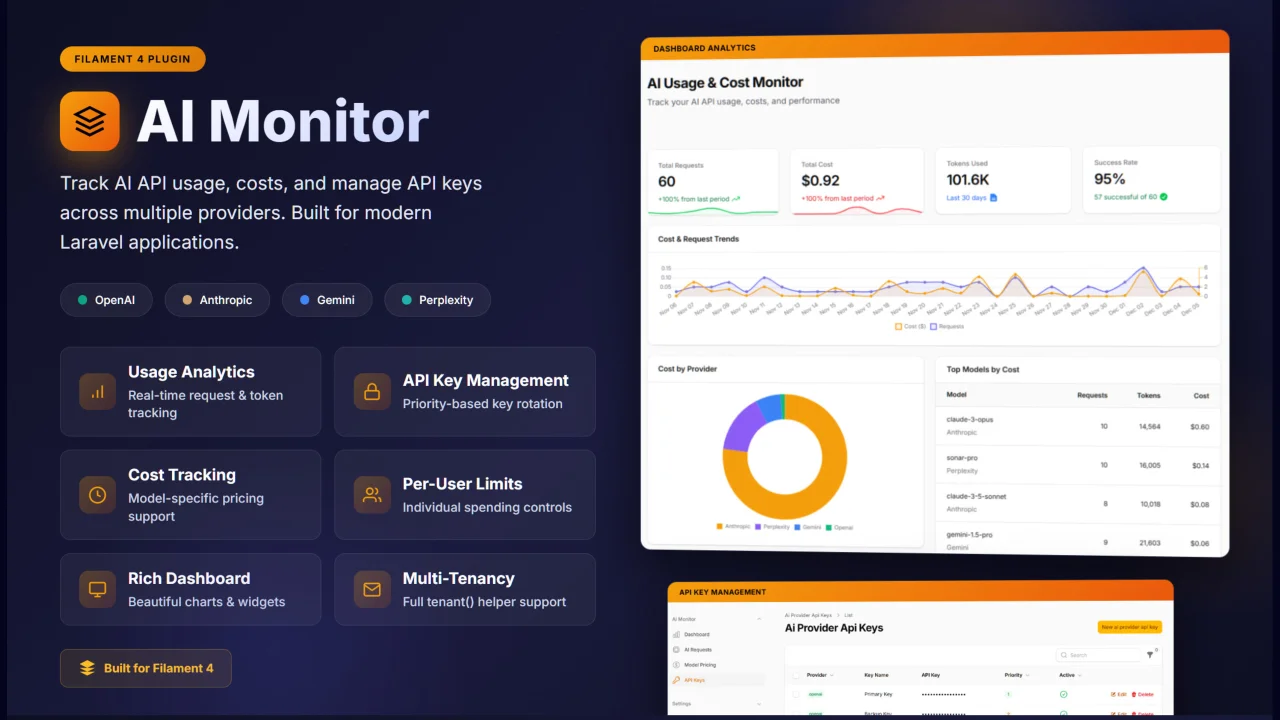
AI Monitor
CommunityMonitor AI API usage and costs across OpenAI, Anthropic, Gemini & Perplexity. Features include API key management, automatic cost calculation, per-user spending limits, and multi-tenancy support.
 Author:
Israr Minhas
Author:
Israr Minhas
Package health
BetaAutomated checks of this plugin's Composer package
15 checks
- Passed: GitHub Actions pinned to SHA
- Skipped: GitLab CI includes pinned to SHA
- Passed: Open security advisories
- Passed: Dependabot PR responsiveness — No stale Dependabot PRs.
- Skipped: Renovate MR responsiveness
- Passed: Dependabot or Renovate configured
- Passed: Dependency update cooldown configured
- Passed: Provides a security policy
- Passed: Abandoned or archived — No consulted source marks the package abandoned (packagist, github).
- Passed: Commit and release recency — Active: last commit 0 days ago; last release 0 days ago.
-
Passed:
composer.lock not committed by library
—
composer.lockis absent from the released dist archive. - Passed: Dist archive is lean
-
Passed:
Current Laravel version supported
—
Package dependencies resolve together with current Laravel
13.0. -
Passed:
Current PHP version supported
—
Constraint
^8.2supports current PHP8.5. - Skipped: Current Symfony version supported
filament/
namespace. Review the source and install at your own risk. Found
malware or an unresolved security issue the author won't
address?
Report it
.
Documentation
- Features
- Requirements
- Installation
- Register the Plugin
- Helper Functions
- Using the Services
- Usage Examples
- User Spending Limits
- Pricing Resolution
- Events
- Multi-Tenancy Support
- Dashboard
- Testing
- License
A Filament plugin (v4 and v5) for monitoring AI API usage, costs, and managing API keys across multiple providers (OpenAI, Anthropic, Gemini, Perplexity).
#Features
- Track AI API requests with token counts and automatic cost calculation
- Manage encrypted API keys for multiple providers with priority-based rotation
- Configure model-specific pricing with provider defaults, a global fallback, and automatic matching of dated model snapshots (
gpt-4o-2024-08-06→gpt-4o) - Dashboard with period (7 / 30 / 90 / 365 days) and provider filters, usage analytics, and cost trends
- Recalculate costs for past requests after adding or changing pricing
- Per-user spending tracking and limits
- Multi-tenancy support (
tenant()helper, Filament tenancy, or a custom resolver) AiRequestLoggedevent for alerts, budgets, and integrations
#Requirements
- PHP 8.2+
- Laravel 11.28+ (tested up to Laravel 13)
- Filament 4.x (Livewire 3) or Filament 5.x (Livewire 4)
#Installation
composer require israrminhas/filament-aimonitor
Publish and run migrations:
php artisan vendor:publish --tag="ai-monitor-migrations"
php artisan migrate
Publish config (optional):
php artisan vendor:publish --tag="ai-monitor-config"
Import current list prices for popular OpenAI, Anthropic, Gemini and Perplexity models (optional):
php artisan ai-monitor:setup-pricing          # skips models you already priced
php artisan ai-monitor:setup-pricing --force  # overwrite with the bundled prices
Provider prices change often. Check the imported values against each provider's pricing page.
#Upgrading from the Filament 4 version
No database changes are needed. Update the package, then run php artisan filament:upgrade. If you had published the package's views, delete resources/views/vendor/ai-monitor and publish them again, since ai-monitor-dashboard.blade.php, ai-top-models-widget.blade.php and ai-user-usage-widget.blade.php were removed.
#Register the Plugin
Add the plugin to your Filament panel in app/Providers/Filament/AdminPanelProvider.php:
use Filament\AiMonitor\AiMonitorPlugin;

public function panel(Panel $panel): Panel
{
    return $panel
        ->plugins([
            AiMonitorPlugin::make(),
        ]);
}
The plugin works on any panel ID and path; links are generated for the panel it is registered on.
#Plugin Options
AiMonitorPlugin::make()
    ->navigationGroup('Observability') // null to ungroup; defaults to config('ai-monitor.navigation_group')
    ->navigationSort(10)               // offset added to the sort of every AI Monitor nav item
    ->dashboard()                      // pass false to hide any of these
    ->requestsResource()
    ->pricingResource()
    ->apiKeysResource();
#Styling
The plugin uses only Filament's built-in components and classes, so no custom theme or Tailwind @source entry is required.
#Helper Functions
The package provides three global helper functions:
#ai_log() - Log AI Requests
// Log any AI request
ai_log([
    'provider' => 'openai',
    'model' => 'gpt-4o',
    'request_type' => 'chat',
    'prompt_tokens' => 150,
    'completion_tokens' => 50,
    'status' => 'success',
    'user_id' => auth()->id(),
]);
Cost is automatically calculated from your pricing configuration. The total_tokens and occurred_at are auto-filled if not provided.
#ai_key() - Get API Key
// Get the highest priority active API key for a provider
$apiKey = ai_key('openai');
$apiKey = ai_key('anthropic');
$apiKey = ai_key('gemini');
#ai_cost() - Calculate Cost
// Calculate cost for tokens without logging
$cost = ai_cost('openai', 'gpt-4o', 1000, 500);
// Returns cost in USD based on your pricing config
#Using the Services
#AiUsageLogger
use Filament\AiMonitor\Services\AiUsageLogger;

$logger = app(AiUsageLogger::class);

// Generic log
$logger->log([
    'provider' => 'openai',
    'model' => 'gpt-4o',
    'prompt_tokens' => 100,
    'completion_tokens' => 50,
    'status' => 'success',
    'user_id' => auth()->id(),
    'meta' => ['conversation_id' => 123],
]);

// Provider-specific shortcuts
$logger->logOpenAi([...]);
$logger->logAnthropic([...]);
$logger->logGemini([...]);
$logger->logPerplexity([...]);
#AiKeyManager
use Filament\AiMonitor\Services\AiKeyManager;

$keyManager = app(AiKeyManager::class);

// Get single key (highest priority)
$key = $keyManager->getKey('openai');

// Get all active keys for a provider
$keys = $keyManager->getAllKeys('openai');

// Check if provider has any active keys
if ($keyManager->hasProvider('anthropic')) {
    // ...
}
#AiPricingService
use Filament\AiMonitor\Services\AiPricingService;

$pricing = app(AiPricingService::class);

// Get pricing for a model
$rates = $pricing->getPricing('openai', 'gpt-4o');
// Returns: ['input_per_1k' => 0.005, 'output_per_1k' => 0.015]

// Check if pricing exists
if ($pricing->hasPricing('anthropic', 'claude-sonnet-5')) {
    // ...
}

// Calculate cost
$cost = $pricing->calculateCost('openai', 'gpt-4o', 1000, 500);

// Get all configured providers
$providers = $pricing->getProviders();

// Get models for a provider
$models = $pricing->getModelsForProvider('openai');
#AiUsageLimitService
use Filament\AiMonitor\Services\AiUsageLimitService;

$limitService = app(AiUsageLimitService::class);

// Get user's monthly spend
$spent = $limitService->getUserMonthlySpend($userId);

// Get full limit status
$status = $limitService->getUserLimitStatus($user);
// Returns:
// [
//     'limit' => 100.00,
//     'spent' => 45.50,
//     'remaining' => 54.50,
//     'percent_used' => 45.5,
//     'state' => 'ok', // 'ok', 'warning', 'over', 'no-limit'
// ]
#Usage Examples
#OpenAI Integration
use OpenAI\Laravel\Facades\OpenAI;

$response = OpenAI::chat()->create([
    'model' => 'gpt-4o',
    'messages' => [
        ['role' => 'user', 'content' => 'Hello!'],
    ],
]);

// Log the request
ai_log([
    'provider' => 'openai',
    'model' => $response->model,
    'request_type' => 'chat',
    'prompt_tokens' => $response->usage->promptTokens,
    'completion_tokens' => $response->usage->completionTokens,
    'status' => 'success',
    'user_id' => auth()->id(),
]);
#Anthropic Integration
$response = Http::withHeaders([
    'x-api-key' => ai_key('anthropic'),
    'anthropic-version' => '2023-06-01',
])->post('https://api.anthropic.com/v1/messages', [
    'model' => 'claude-3-5-sonnet-20241022',
    'max_tokens' => 1024,
    'messages' => [['role' => 'user', 'content' => 'Hello!']],
]);

$data = $response->json();

ai_log([
    'provider' => 'anthropic',
    'model' => $data['model'],
    'request_type' => 'chat',
    'prompt_tokens' => $data['usage']['input_tokens'],
    'completion_tokens' => $data['usage']['output_tokens'],
    'status' => $response->successful() ? 'success' : 'failed',
    'user_id' => auth()->id(),
]);
#With Error Handling
try {
    $response = OpenAI::chat()->create([...]);

    ai_log([
        'provider' => 'openai',
        'model' => 'gpt-4o',
        'prompt_tokens' => $response->usage->promptTokens,
        'completion_tokens' => $response->usage->completionTokens,
        'status' => 'success',
        'user_id' => auth()->id(),
    ]);
} catch (\Exception $e) {
    ai_log([
        'provider' => 'openai',
        'model' => 'gpt-4o',
        'prompt_tokens' => 0,
        'completion_tokens' => 0,
        'status' => 'failed',
        'user_id' => auth()->id(),
        'meta' => ['error' => $e->getMessage()],
    ]);
}
#User Spending Limits
#Add Columns to Users Table
php artisan make:migration add_ai_limits_to_users_table
Schema::table('users', function (Blueprint $table) {
    $table->decimal('ai_monthly_limit_usd', 10, 4)->nullable();
    $table->integer('ai_alert_threshold_percent')->default(80);
});
#Check Limits Before AI Calls
use Filament\AiMonitor\Services\AiUsageLimitService;

$limitService = app(AiUsageLimitService::class);
$status = $limitService->getUserLimitStatus(auth()->user());

if ($status['state'] === 'over') {
    throw new \Exception('Monthly AI spending limit reached.');
}

if ($status['state'] === 'warning') {
    // Notify user they're approaching limit
}
#Pricing Resolution
When a request is logged, its cost is calculated from the first match below:
- Exact model: a row whose model equals the request's model (case-insensitive).
- Snapshot of a priced model:
gpt-4o-2024-08-06,claude-sonnet-4-6-20260101,claude-3-5-sonnet-latest,gemini-2.5-pro-preview-05-06andmodel@20241022use the row for the base model. A different model that just shares a prefix (gpt-4o-minivsgpt-4o) does not match. - Provider default: the provider's row with Provider default enabled.
- Global fallback: the row with Global fallback enabled.
If nothing matches, the request is stored with cost_usd = null and flagged on the dashboard.
#Recalculating Costs
Added or changed pricing after requests were logged? Recalculate them:
- From the panel: AI Requests → Recalculate missing costs, or select requests and use the Recalculate cost bulk action.
- From the CLI:
php artisan ai-monitor:recalculate-costs                       # only requests missing a cost
php artisan ai-monitor:recalculate-costs --all --since=2026-01-01
php artisan ai-monitor:recalculate-costs --all --include-manual  # also overwrite manually logged costs
#Events
Every call to ai_log() / AiUsageLogger::log() dispatches Filament\AiMonitor\Events\AiRequestLogged, which you can use for budget alerts, Slack notifications, and so on:
use Filament\AiMonitor\Events\AiRequestLogged;
use Filament\AiMonitor\Services\AiUsageLimitService;
use Illuminate\Support\Facades\Event;

Event::listen(function (AiRequestLogged $event) {
    if ($user = $event->request->user) {
        $status = app(AiUsageLimitService::class)->getUserLimitStatus($user);

        if ($status['state'] === 'over') {
            // notify...
        }
    }
});
#Multi-Tenancy Support
When tenant_support is enabled, every AI Monitor model is scoped to the current tenant, and tenant_id is filled automatically on create. The current tenant is resolved from, in order:
- A custom resolver, if you register one.
- The global
tenant()helper (e.g. stancl/tenancy). - The current Filament panel tenant (
Filament::getTenant()).
// config/ai-monitor.php
'tenant_support' => true,
// AppServiceProvider::boot()
use Filament\AiMonitor\Support\Tenancy;

Tenancy::resolveUsing(fn () => auth()->user()?->team_id);
The plugin's resources set $isScopedToTenant = false, so they work on Filament panels with tenancy without needing an ownership relationship on the plugin's models.
#Dashboard
The dashboard (/{panel}/aimonitor) has a period filter (7 days, 30 days, 90 days, 12 months) and a provider filter that apply to every widget. The filters are kept in the URL and session.
| Widget | Description |
|---|---|
| Setup Alert | Shown when pricing or API keys are missing, or requests have no cost |
| Stats Overview | Requests, cost, tokens and success rate, with change vs the previous period |
| Cost & Request Trends | Daily cost and request line chart |
| Cost by Provider | Doughnut chart breakdown |
| Top Models by Cost | Five most expensive models |
| Usage by User | Five highest-spending users |
| Recent Requests | Latest calls, linking to the request detail page |
The widgets also work on your own dashboards; without page filters they show the last 30 days.
#Testing
composer install
composer test
The test suite runs against whichever Filament version is installed. CI runs it on Filament 4 and 5.
#License
MIT License. See LICENSE for details.
The author
Israr Minhas is a full-stack web developer with experience in Laravel, Filament, Livewire, Vue, and modern PHP development. He has worked on SaaS platforms, dashboards, and multi-tenant systems, focusing on building reliable and easy-to-use web applications. He enjoys learning new technologies and creating practical solutions that simplify work for users and teams.
From the same author
Featured Plugins
A selection of plugins curated by the Filament team

Custom Dashboards
Let your users build and share their own dashboards with a drag-and-drop interface. Define your data sources in PHP and let them do the rest.
 Filament

Sharp Theme
A theme that gives panels a precise, technical look with square corners, strong borders, and clear contrast.
Filament

Advanced Tables (formerly Filter Sets)
Supercharge your tables with powerful features like user-customizable views, quick filters, multi-column sorting, advanced table searching, convenient view management, and more. Compatible with Resource Panel Tables, Relation Managers, Table Widgets, and Table Builder!
 Kenneth Sese

