
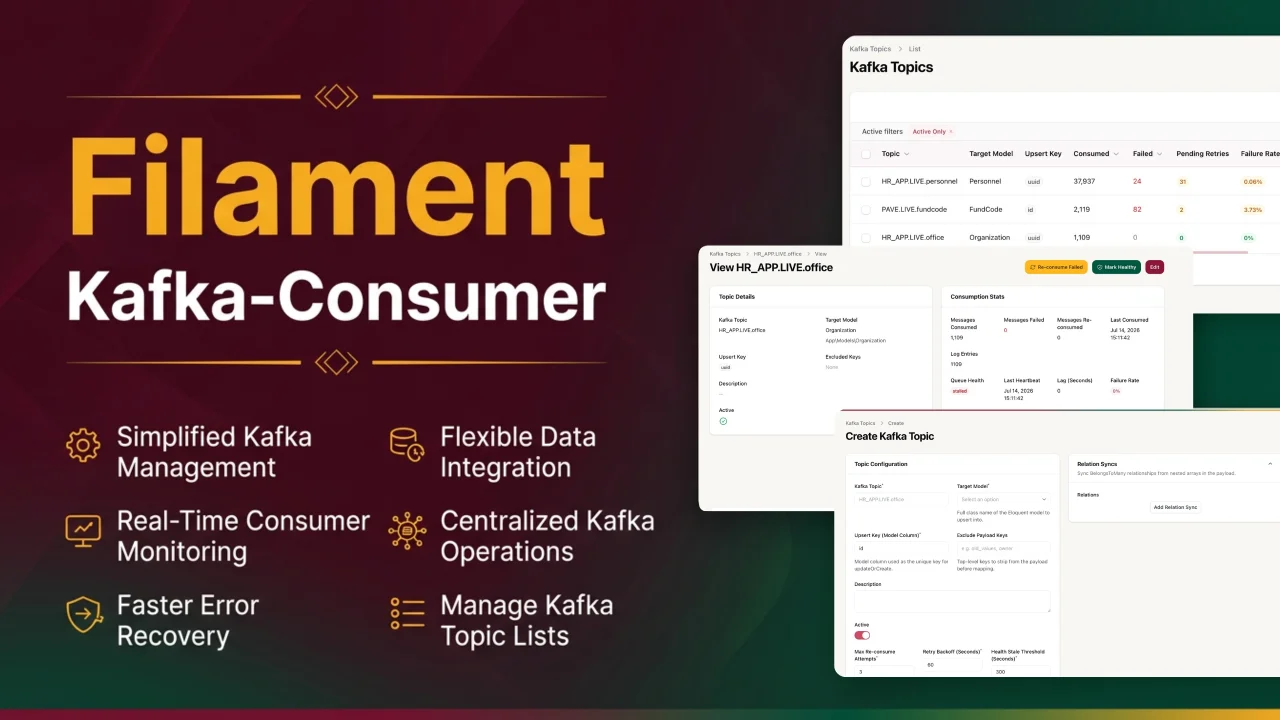
Kafka Consumer by Gurento
CommunityA Filament admin panel for gurento/kafka-consumer — manage Kafka topic mappings, monitor consumer health, and replay failed messages without leaving your admin panel.
 Author:
Gurento
Author:
Gurento
Package health
Automated checks of this plugin's Composer package
15 checks
- Skipped: GitHub Actions pinned to SHA
- Skipped: GitLab CI includes pinned to SHA
- Passed: Open security advisories
- Passed: Dependabot PR responsiveness — No open Dependabot PRs.
- Skipped: Renovate MR responsiveness
- Skipped: Dependabot or Renovate configured
- Skipped: Dependency update cooldown configured
- Passed: Provides a security policy
- Passed: Abandoned or archived — No consulted source marks the package abandoned (packagist, github).
- Passed: Commit and release recency — Active: last commit 1 days ago; last release 1 days ago.
-
Passed:
composer.lock not committed by library
—
composer.lockis absent from the released dist archive. - Passed: Dist archive is lean
-
Passed:
Current Laravel version supported
—
Package dependencies resolve together with current Laravel
13.0. -
Passed:
Current PHP version supported
—
Constraint
^8.2supports current PHP8.5. - Skipped: Current Symfony version supported
filament/
namespace. Review the source and install at your own risk. Found
malware or an unresolved security issue the author won't
address?
Report it
.
Documentation
- Features
- Requirements
- Installation
- Customization
- Creating a Topic Mapping
- Typical Workflow
- What It Registers
- Security & Access
- Troubleshooting
- Changelog
- License




A Filament admin panel for gurento/kafka-consumer — manage Kafka topic mappings, monitor consumer health, and replay failed messages without leaving your admin panel.
Sending messages too? Producing to Kafka has its own dedicated UI package:
gurento/kafka-producer-filament. Install it alongside this package if you need both directions.
#Features
- Topic management — full CRUD for topic-to-model mappings, field maps (with nested
office.name/items.*.idpaths), and relation syncs - Test mapping — preview the mapped attributes for a sample payload from the edit page, without writing anything
- Live monitoring — auto-polling table with consumed/failed counters, failure rate, heartbeat, lag, and health badges
- Consume logs — per-message log viewer with payload inspection, Kafka partition/offset/key metadata, and status filters
- One-click operations — re-consume failed messages, mark topics healthy, and reset counters from the UI
- Fully customizable — navigation label, icon, group, badge, slug, labels, and polling are all configurable via a fluent plugin API
#Requirements
| Dependency | Version |
|---|---|
| PHP | 8.2+ |
| Laravel | 11 / 12 / 13 |
| Filament | 4.x / 5.x |
| gurento/kafka-consumer | ^2.1 |
#Installation
#1. Install the packages
This plugin is the UI layer for gurento/kafka-consumer, which does the actual consuming. Install both:
composer require gurento/kafka-consumer gurento/kafka-consumer-filament
#2. Set up gurento/kafka-consumer
Publish the config and migrations, then migrate:
php artisan vendor:publish --tag=kafka-consumer-config
php artisan vendor:publish --tag=kafka-consumer-migrations
php artisan migrate
This publishes migrations for both the consumer and producer sides of gurento/kafka-consumer (the producer tables are only relevant if you also install gurento/kafka-producer-filament or use the producer service directly):
kafka_topics— consumer topic-to-model mappings, counters, and health metadata (what this plugin manages)kafka_consume_logs— per-message consume logs (what the logs viewer reads)kafka_producer_topics/kafka_produce_logs— producer-side tables (seegurento/kafka-producer-filament)
Review config/kafka-consumer.php for defaults (consumer group, retry attempts, backoff, health thresholds). The consumer itself ships with a plug-and-play engine based on mateusjunges/laravel-kafka — make sure the rdkafka PHP extension is installed and your broker settings are configured in the host app's config/kafka.php.
Add your Kafka connection settings to .env:
KAFKA_BROKERS=localhost:9092
KAFKA_CONSUMER_GROUP_ID=app-consumer
KAFKA_DEBUG=false
KAFKA_BROKERS— comma-separated broker list (host:port)KAFKA_CONSUMER_GROUP_ID— default consumer group used when--groupis not passedKAFKA_DEBUG— set totrueto enable verbose librdkafka debug output while troubleshooting
#3. Register the plugin
In your Filament panel provider:
use Gurento\KafkaConsumerFilament\Filament\Plugins\KafkaConsumerPlugin;

public function panel(Panel $panel): Panel
{
    return $panel
        ->plugins([
            KafkaConsumerPlugin::make(),
        ]);
}
That's it — a Kafka Topics resource appears in your panel's navigation.
#4. Start consuming
Create a topic mapping in the UI, then run the consumer (as a daemon under Supervisor/systemd in production):
php artisan gurento:kafka-consume
See the gurento/kafka-consumer README for command options (--topics, --group, --from-beginning, --stop-on-empty, --reconsume-failed), replay patterns, events, and custom engines.
#Customization
Every presentation element is dynamic. Configure it fluently on the plugin — each setter accepts a plain value or a Closure:
KafkaConsumerPlugin::make()
    ->navigationLabel('Event Streams')            // sidebar title
    ->navigationIcon('heroicon-o-queue-list')     // hero icon (string or BackedEnum)
    ->navigationGroup('Integrations')
    ->navigationSort(5)
    ->navigationBadge()                           // badge showing pending retries
    ->modelLabel('Stream')
    ->pluralModelLabel('Streams')
    ->slug('event-streams')                       // URL: /admin/event-streams
    ->tablePollInterval('30s')                    // null disables auto-refresh
    ->modelOptions(fn (): array => [              // restrict target-model dropdown
        \App\Models\Office::class => 'Office',
        \App\Models\Employee::class => 'Employee',
    ]),
#Available options
| Method | Type | Default | Description |
|---|---|---|---|
navigationLabel() |
string|Closure |
Kafka Topics |
Sidebar navigation title |
navigationIcon() |
string|BackedEnum|Closure |
heroicon-o-arrow-down-on-square |
Navigation icon |
navigationGroup() |
string|UnitEnum|Closure |
System |
Navigation group |
navigationSort() |
int|Closure |
Filament default | Sort order within the group |
navigationBadge() |
bool|Closure |
false |
Show pending-retry count as a badge |
modelLabel() / pluralModelLabel() |
string|Closure |
kafka topic(s) |
Record labels used across pages |
slug() |
string|Closure |
kafka-topics |
Resource URL slug |
tablePollInterval() |
string|null|Closure |
10s |
Table auto-refresh interval; null disables |
modelOptions() |
array|Closure |
app/Models scan |
Options for the target-model dropdown |
All options are optional — KafkaConsumerPlugin::make() alone keeps the defaults above.
#Creating a Topic Mapping
The create/edit form covers everything a topic needs to go from raw Kafka payload to an upserted Eloquent record — no code required.
#Topic Configuration
| Field | Description |
|---|---|
| Kafka Topic | The topic name to consume (e.g. HR_APP.LIVE.office), unique per row |
| Target Model | Eloquent model to upsert into — searchable dropdown scanned from app/Models (override via modelOptions()) |
| Upsert Key | Model column used as the unique key for updateOrCreate (default id); if unmapped, read from the payload (office.code) |
| Exclude Payload Keys | Payload keys to strip before mapping and logging (e.g. meta, owner.login_token, items.*.price) |
| Active | Toggle whether the consumer processes this topic |
| Retry settings | Max re-consume attempts, retry backoff (seconds), and health stale threshold — per topic, falling back to config when unset |
#Field Mapping (payload matching)
A repeater that maps payload fields to model columns — each row is one from → to pair:
Payload Field (from) |
Model Column (to) |
|---|---|
uuid |
id |
name |
name |
Given {"uuid": "off-001", "name": "Accounting Office"}, the consumer writes id = off-001, name = Accounting Office and upserts by the configured upsert key. Unmapped fields are skipped, so mappings stay explicit and reviewable. Rows collapse to a readable uuid → id label.
Nested payloads. Use dots for nested objects and * for every item of a list:
Payload Field (from) |
Model Column (to) |
Result |
|---|---|---|
office.name |
office_name |
"University Health Service" |
funding.*.code |
funding_codes |
["GAA", "IGF"] (use a JSON/array cast) |
A literal top-level key containing a dot still wins. A path that doesn't exist is skipped; a path that resolves to null maps null.
#Test mapping
On the edit page, Test mapping opens a modal with a sample payload (pre-filled from the topic's latest consumed message) and shows the upsert key, mapped attributes, and payload after excludes as you type. It uses the current, unsaved form values and never writes to the database.
#Relation Syncs (relationships)
A repeater for syncing BelongsToMany relationships from nested arrays in the payload:
| Field | Description |
|---|---|
| Payload Key | Path to the list in the payload (e.g. office_controller or office.controllers) |
| Model Relationship | The relationship method on the target model |
| Related Model | The related Eloquent model (searchable dropdown) |
| Lookup Key | Field inside each payload item used to find the related record — auto-detects uuid then id when blank |
| Related Model Key | Column on the related model to match against — defaults to its primary key |
Example: with payload key office_controller and payload
{
  "uuid": "off-001",
  "office_controller": [{ "uuid": "emp-001" }, { "uuid": "emp-002" }]
}
the consumer looks up each employee by uuid and calls $office->office_controller()->sync([...]). Items whose related record doesn't exist yet are skipped.
#Typical Workflow
-
Open Kafka Topics in your panel.
-
Create a topic mapping: topic name, target model, upsert key, field mappings, optional relation syncs.
-
Run the consumer:
php artisan gurento:kafka-consume -
Monitor counters, health, and logs in the resource (the table auto-refreshes).
-
Re-consume failed messages from the row action or the logs relation manager when needed.
#What It Registers
KafkaTopicResource— list, create, view, and edit pagesLogsRelationManager— read-only consume-log browser with payload inspection and per-log retry- Row actions: Re-consume Failed, Mark Healthy, Reset Counters
#Security & Access
This package ships UI classes only — it does not impose authorization. Define policies/permissions in your host app to control who can:
- edit topic mappings
- run replay actions
- inspect payload and error logs
#Troubleshooting
Resource not visible — ensure the plugin is registered on the panel you're viewing, then run php artisan optimize:clear.
Class not found — confirm both packages are installed and run composer dump-autoload.
Customizations not applying — plugin options are read at runtime from the current panel; make sure you configure them on the same KafkaConsumerPlugin::make() instance passed to ->plugins([...]).
#Changelog
See CHANGELOG.md for release history.
#License
The MIT License (MIT). See LICENSE for details.
Featured Plugins
A selection of plugins curated by the Filament team

Compact Theme
A theme that makes data-heavy panels easier to scan by fitting more useful information on each screen.
 Filament

Advanced Tables (formerly Filter Sets)
Supercharge your tables with powerful features like user-customizable views, quick filters, multi-column sorting, advanced table searching, convenient view management, and more. Compatible with Resource Panel Tables, Relation Managers, Table Widgets, and Table Builder!
 Kenneth Sese

Spotlight Pro
Browse your Filament Panel with ease. Filament Spotlight Pro adds a Spotlight like Command Palette to your Filament Panel.
 Dennis Koch
