

Pinpoint by Fahiem
CommunityGoogle Maps location picker component with search, draggable marker, and reverse geocoding.
 Author:
Fahiem
Author:
Fahiem
Package health
Automated checks of this plugin's Composer package
15 checks
- Skipped: GitHub Actions pinned to SHA
- Skipped: GitLab CI includes pinned to SHA
- Passed: Open security advisories
- Passed: Dependabot PR responsiveness — No open Dependabot PRs.
- Skipped: Renovate MR responsiveness
- Skipped: Dependabot or Renovate configured
- Skipped: Dependency update cooldown configured
- Failed: Provides a security policy — View details on Plumb
- Passed: Abandoned or archived — No consulted source marks the package abandoned (packagist, github).
- Passed: Commit and release recency — Active: last commit 4 days ago; last release 4 days ago.
-
Passed:
composer.lock not committed by library
—
composer.lockis absent from the released dist archive. - Passed: Dist archive is lean
-
Passed:
Current Laravel version supported
—
Package dependencies resolve together with current Laravel
13.0. -
Passed:
Current PHP version supported
—
Constraint
^8.1supports current PHP8.5. - Skipped: Current Symfony version supported
filament/
namespace. Review the source and install at your own risk. Found
malware or an unresolved security issue the author won't
address?
Report it
.
Documentation
- Features
- Requirements
- Installation
- Configuration
- Usage
- Available Methods
- Getting a Google Maps API Key (Google provider only)
- Database Migration
- Translations
- Changelog
- Contributing
- Security
- Credits
- License



📍 A location picker component for Filament 4 & 5 supporting Google Maps and Leaflet.js (OpenStreetMap) — with search, draggable marker, and reverse geocoding support.
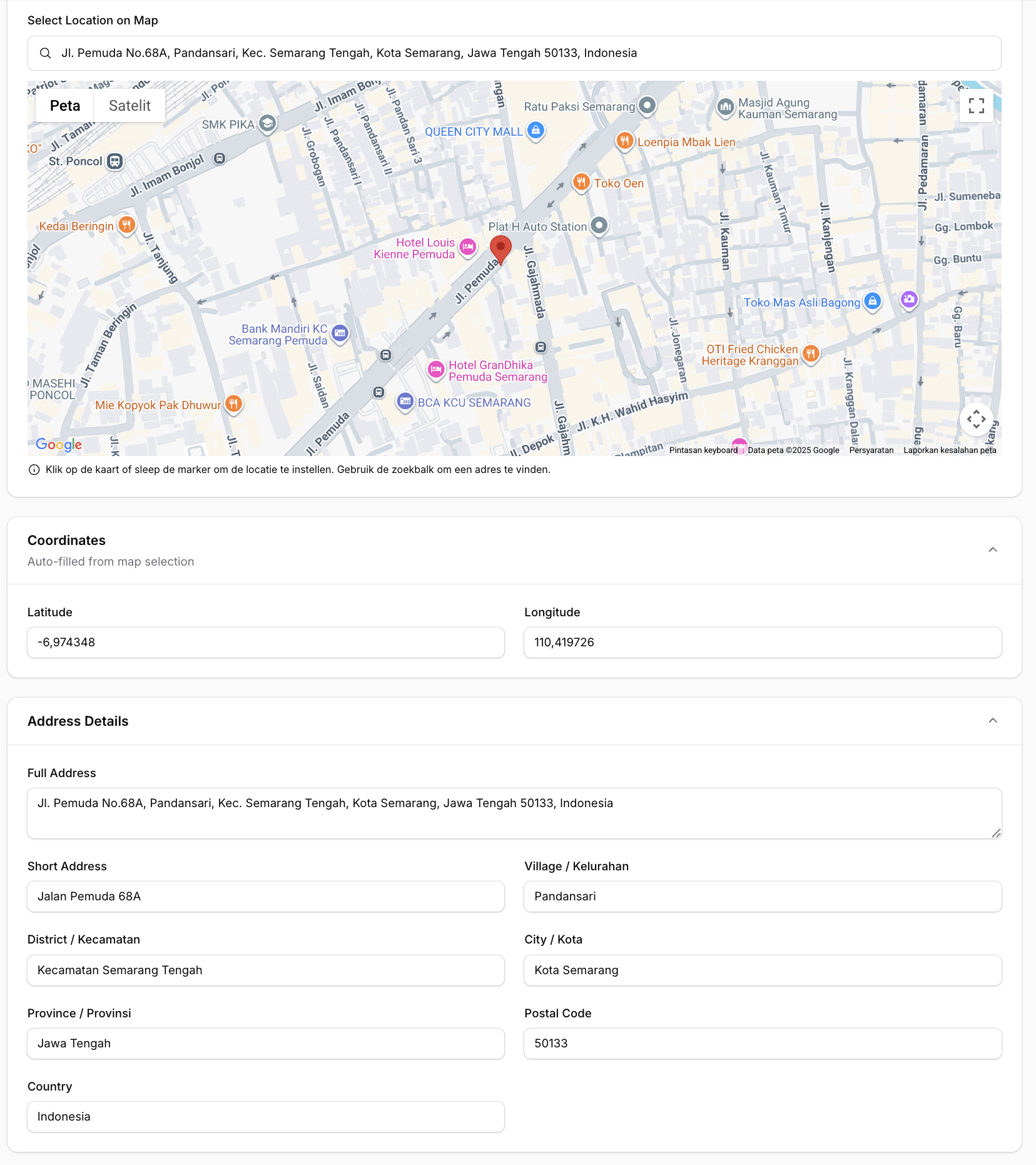
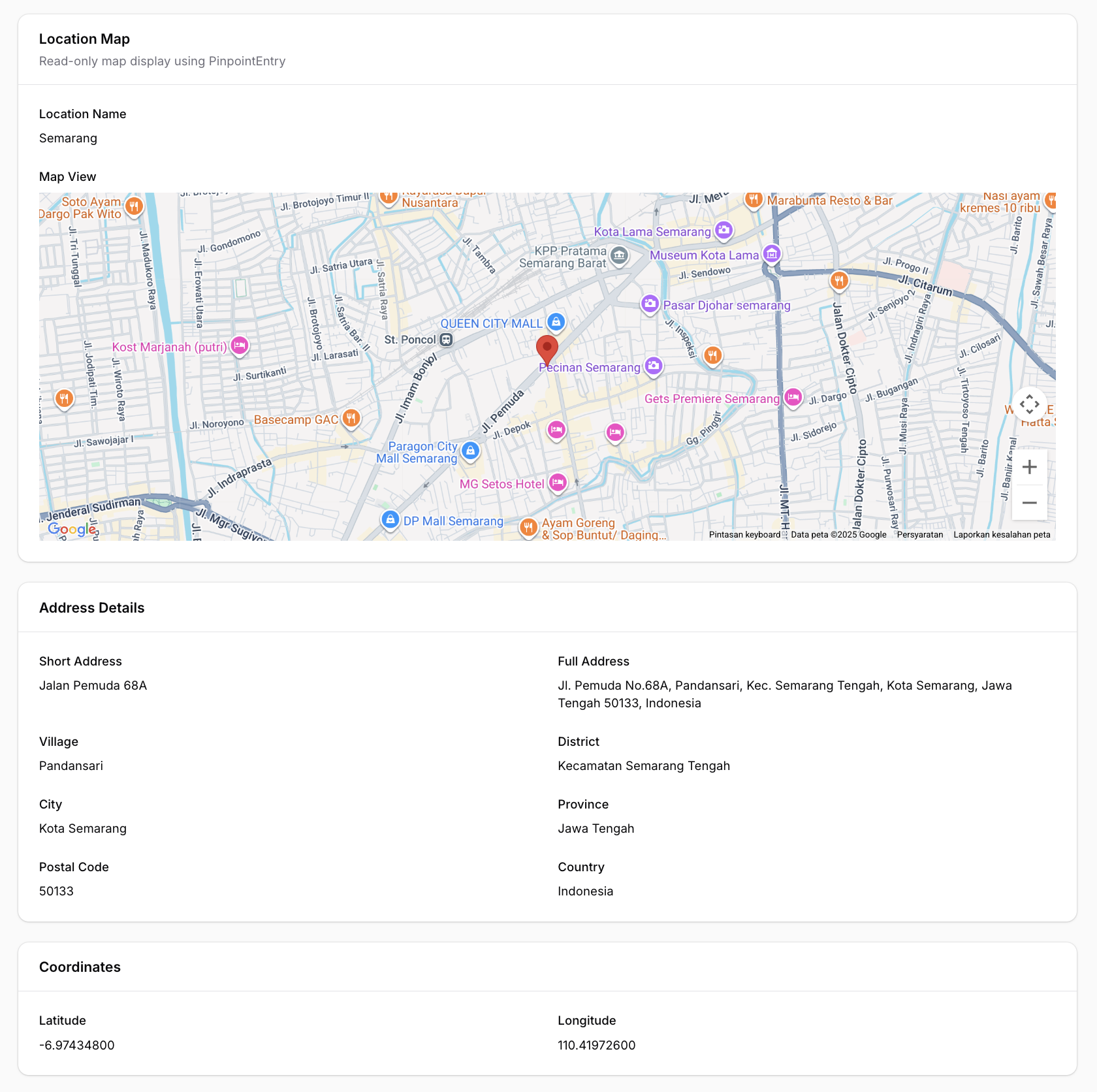
#Features
- 🗺️ Two map providers — Google Maps (default) or Leaflet.js / OpenStreetMap (free, no API key)
- 🔍 Search location — Google Places Autocomplete (Google) or Nominatim (Leaflet)
- 📍 Click to set marker — Click anywhere on the map to place a marker
- ✋ Draggable marker — Drag the marker to fine-tune the location
- 📱 Current location — Get user's current device location
- ⭕ Radius support — Display and edit radius around the location
- 🏠 Reverse geocoding — Auto-fill address fields from coordinates
- 🌙 Dark mode support — Fully compatible with Filament's dark mode
- 🌐 Multi-language support — Translations for EN, AR, NL, ID, ES
- ⚙️ Fully configurable — Customize height, zoom, default location, and more
#Requirements
- PHP 8.1+
- Laravel 10+ / 11+ / 12+
- Filament 4.0+ / 5.0+
- Google Maps provider (default): API Key with Maps JavaScript API, Places API, and Geocoding API enabled
- Leaflet provider: No API key required
#Installation
Install the package via Composer:
composer require fahiem/filament-pinpoint
#Configuration
#1. Choose a map provider
The default provider is Google Maps. To use Leaflet.js (OpenStreetMap) instead, set in your .env:
PINPOINT_PROVIDER=leaflet
You can also override the provider per field instance:
Pinpoint::make('location')->provider('leaflet')
#2. Google Maps — set your API Key
Required only when using provider = google:
GOOGLE_MAPS_API_KEY=your_api_key_here
#3. Leaflet — optional configuration
Leaflet works out of the box with OpenStreetMap tiles. Optionally customize:
# Custom tile server (default: OpenStreetMap)
LEAFLET_TILE_URL=https://{s}.tile.openstreetmap.org/{z}/{x}/{y}.png

# Optional dark mode tile URL (e.g. CartoDB Dark)
LEAFLET_TILE_URL_DARK=https://{s}.basemaps.cartocdn.com/dark_all/{z}/{x}/{y}{r}.png

# Nominatim base URL for search & reverse geocoding (default: nominatim.openstreetmap.org)
NOMINATIM_URL=https://nominatim.openstreetmap.org
#4. Publish the config file (optional)
php artisan vendor:publish --tag="filament-pinpoint-config"
You can also set default map values via environment variables:
GOOGLE_MAPS_DEFAULT_LAT=-6.200000
GOOGLE_MAPS_DEFAULT_LNG=106.816666
GOOGLE_MAPS_DEFAULT_ZOOM=15
GOOGLE_MAPS_DEFAULT_HEIGHT=500
#Usage
#Basic Usage (Google Maps)
use Fahiem\FilamentPinpoint\Pinpoint;

public static function form(Form $form): Form
{
    return $form
        ->schema([
            Pinpoint::make('location')
                ->label('Location')
                ->latField('lat')
                ->lngField('lng'),

            TextInput::make('lat')
                ->label('Latitude')
                ->readOnly(),

            TextInput::make('lng')
                ->label('Longitude')
                ->readOnly(),
        ]);
}
#Using Leaflet (Free / No API Key)
Set the provider globally via .env:
PINPOINT_PROVIDER=leaflet
Or per field instance:
Pinpoint::make('location')
    ->provider('leaflet')
    ->latField('lat')
    ->lngField('lng')
    ->addressField('address')
    ->draggable()
    ->searchable()
Same API, same methods — Leaflet uses OpenStreetMap tiles and Nominatim for search and reverse geocoding. No API key needed.
For PinpointEntry (infolist):
PinpointEntry::make('location')
    ->provider('leaflet')
    ->latField('lat')
    ->lngField('lng')
    ->columnSpanFull()
#Full Example with All Options
use Fahiem\FilamentPinpoint\Pinpoint;

Pinpoint::make('location')
    ->label('Business Location')
    ->defaultLocation(-6.200000, 106.816666) // Jakarta
    ->defaultZoom(15)
    ->height(400)
    ->draggable()
    ->searchable()
    ->latField('lat')
    ->lngField('lng')
    ->addressField('address')            // Auto-fill address field
    ->shortAddressField('short_address') // Auto-fill short address field (exclude province, city, district, village, and postal code)
    ->provinceField('province')          // Auto-fill province field
    ->cityField('city')                  // Auto-fill city/county field
    ->districtField('district')          // Auto-fill district field
    ->villageField('village')            // Auto-fill village/district field
    ->postalCodeField('postal_code')     // Auto-fill postal/zip code field
    ->countryField('country')            // Auto-fill country field
    ->streetField('street')              // Auto-fill street field
    ->streetNumberField('street_number') // Auto-fill street number field
    ->columnSpanFull()
#Radius Support
You can enable radius support by using radiusField():
Pinpoint::make('location')
    ->radiusField('radius') // 'radius' is the column name in your database
    ->defaultRadius(500)    // Default 500 meters
When radiusField is configured, an interactive blue circle will appear on the map. You can:
- Resize the radius by dragging the small white handle on the circle's edge
- View the radius visually on the map
- The radius value (in meters) is automatically saved to your database field in real-time
- The circle uses proper z-index layering so the marker always appears on top
Visual hierarchy:
- Marker (pin): zIndex 200 - always on top
- Circle (radius): zIndex 100 - below the marker
#Disable Features
Pinpoint::make('location')
    ->draggable(false)  // Disable marker dragging
    ->searchable(false) // Hide search box
#Read-Only Mode (New in v1.1.9)
Make the map display-only while keeping it visible in your form. The map remains pannable and zoomable for viewing, but all editing interactions are disabled.
// Always read-only
Pinpoint::make('location')
    ->readOnly()

// Conditional read-only
Pinpoint::make('location')
    ->readOnly(fn () => auth()->user()->cannot('edit-location'))

// Read-only on specific operations (e.g., view page only)
Pinpoint::make('location')
    ->readOnlyOn('view')
When read-only is active:
- Marker cannot be dragged
- Clicking the map does not move the marker
- Search box is hidden
- "Use My Location" button is hidden
- Radius circle is displayed but cannot be resized
- Helper text is hidden
#Using with Repeater
Pinpoint fully supports Filament's Repeater component. Each repeater item gets its own independent map and fields:
use Fahiem\FilamentPinpoint\Pinpoint;
use Filament\Forms\Components\Repeater;
use Filament\Forms\Components\TextInput;

Repeater::make('branches')
    ->schema([
        TextInput::make('branch_name')
            ->label('Branch Name')
            ->required(),

        Pinpoint::make('location')
            ->label('Location')
            ->latField('latitude')
            ->lngField('longitude')
            ->addressField('address')
            ->draggable()
            ->searchable()
            ->height(300),

        TextInput::make('latitude')
            ->label('Latitude')
            ->readOnly(),

        TextInput::make('longitude')
            ->label('Longitude')
            ->readOnly(),

        TextInput::make('address')
            ->label('Address')
            ->readOnly()
            ->columnSpanFull(),
    ])
    ->columns(2)
    ->columnSpanFull()
Note: When using with Repeater, the field paths are automatically calculated (e.g.,
data.branches.0.latitudefor the first item).
#Infolist Entry (Read-Only Display)
For displaying locations in infolists (view mode), use the PinpointEntry component. It displays a clean, read-only map with a marker at the specified coordinates.
#Single Marker
use Fahiem\FilamentPinpoint\PinpointEntry;

public static function infolist(Infolist $infolist): Infolist
{
    return $infolist
        ->schema([
            PinpointEntry::make('location')
                ->label('Location')
                ->latField('lat')
                ->lngField('lng')
                ->columnSpanFull(),
        ]);
}
#Multiple Markers (New in v1.1.3)
Display multiple locations on a single map:
PinpointEntry::make('branches')
    ->label('Branch Locations')
    ->pins([
        [
            'lat' => -6.200000,
            'lng' => 106.816666,
            'label' => 'Jakarta Office',
            'color' => 'red',
        ],
        [
            'lat' => -6.914744,
            'lng' => 107.609810,
            'label' => 'Bandung Office',
            'color' => 'blue',
        ],
        [
            'lat' => -7.797068,
            'lng' => 110.370529,
            'label' => 'Yogyakarta Office',
            'color' => 'green',
        ],
    ])
    ->fitBounds() // Auto-zoom to show all markers
    ->height(500)
    ->columnSpanFull()
#Pin Customization Options
Each pin in the pins() array supports:
| Option | Type | Description |
|---|---|---|
lat |
float |
Required. Latitude coordinate |
lng |
float |
Required. Longitude coordinate |
label |
string |
Optional. Marker title (shows on hover and in info window) |
color |
string |
Optional. Predefined color: red, blue, green, yellow, purple, pink, orange, ltblue |
icon |
string |
Optional. Custom marker icon URL (overrides color) |
info |
string |
Optional. Custom HTML content for info window (overrides default label) |
#Custom Marker Icons
PinpointEntry::make('locations')
    ->pins([
        [
            'lat' => -6.200000,
            'lng' => 106.816666,
            'label' => 'Main Office',
            'icon' => 'https://example.com/custom-marker.png', // Custom icon URL
        ],
        [
            'lat' => -6.914744,
            'lng' => 107.609810,
            'label' => 'Warehouse',
            'info' => '<div style="padding: 10px;"><strong>Warehouse A</strong><br>Open 24/7</div>', // Custom HTML
        ],
    ])
    ->columnSpanFull()
#Customization Options
PinpointEntry::make('location')
    ->label('Business Location')
    ->defaultLocation(-6.200000, 106.816666) // Jakarta
    ->defaultZoom(15)
    ->height(400)
    ->latField('lat')
    ->lngField('lng')
    ->fitBounds(false) // Disable auto-fit bounds
    ->columnSpanFull()
The PinpointEntry displays:
- A read-only map (Google Maps or Leaflet) with single or multiple markers
- Optional info windows / popups with labels or custom HTML content
- Auto-fit bounds to display all markers
- Full dark mode support
#Available Methods
#Pinpoint (Form Field)
| Method | Description | Default |
|---|---|---|
provider(string $provider) |
Map provider: 'google' or 'leaflet' |
config value |
defaultLocation(float $lat, float $lng) |
Set default center location | -0.5050, 117.1500 |
defaultZoom(int $zoom) |
Set default zoom level | 13 |
height(int $height) |
Set map height in pixels | 400 |
latField(string $field) |
Field name for latitude | 'lat' |
lngField(string $field) |
Field name for longitude | 'lng' |
addressField(string $field) |
Field name for auto-fill address | null |
shortAddressField(string $field) |
Field name for auto-fill short address | null |
provinceField(string $field) |
Field name for auto-fill province | null |
cityField(string $field) |
Field name for auto-fill city/county | null |
districtField(string $field) |
Field name for auto-fill district | null |
villageField(string $field) |
Field name for auto-fill village/sub-district | null |
postalCodeField(string $field) |
Field name for auto-fill postal/zip code | null |
countryField(string $field) |
Field name for auto-fill country | null |
streetField(string $field) |
Field name for auto-fill street | null |
streetNumberField(string $field) |
Field name for auto-fill street number | null |
radiusField(string $field) |
Field name for auto-fill radius | null |
defaultRadius(int $radius) |
Set default radius in meters | 500 |
draggable(bool $draggable) |
Enable/disable marker dragging | true |
searchable(bool $searchable) |
Enable/disable search box | true |
readOnly(bool|Closure $condition) |
Make the map display-only | false |
readOnlyOn(string|array $operations) |
Read-only on specific operations | null |
#PinpointEntry (Infolist Entry)
| Method | Description | Default |
|---|---|---|
provider(string $provider) |
Map provider: 'google' or 'leaflet' |
config value |
defaultLocation(float $lat, float $lng) |
Set default center location | -0.5050, 117.1500 |
defaultZoom(int $zoom) |
Set default zoom level | 13 |
height(int $height) |
Set map height in pixels | 400 |
latField(string $field) |
Field name for latitude | 'lat' |
lngField(string $field) |
Field name for longitude | 'lng' |
radiusField(string $field) |
Field name for radius | null |
pins(array $pins) |
Set array of multiple markers with lat, lng, label, color, icon, info | null |
fitBounds(bool $fit) |
Auto-zoom map to show all markers | true |
getLat() |
Get latitude from record | Returns field value or default |
getLng() |
Get longitude from record | Returns field value or default |
getPins() |
Get pins array | Returns pins or null |
hasPins() |
Check if pins are set | Returns boolean |
#Getting a Google Maps API Key (Google provider only)
- Go to Google Cloud Console
- Create a new project or select an existing one
- Enable the following APIs:
- Maps JavaScript API
- Places API
- Geocoding API
- Go to Credentials and create an API key
- (Recommended) Restrict your API key to specific domains
#Database Migration
Make sure your table has columns for latitude and longitude:
Schema::create('locations', function (Blueprint $table) {
    $table->id();
    $table->string('name');
    $table->decimal('lat', 10, 7)->nullable();
    $table->decimal('lng', 10, 7)->nullable();
    $table->text('address')->nullable();
    $table->text('short_address')->nullable();
    $table->string('province')->nullable();
    $table->string('city')->nullable();
    $table->string('district')->nullable();
    $table->string('village')->nullable();
    $table->string('postal_code')->nullable();
    $table->string('country')->nullable();
    $table->string('street')->nullable();
    $table->string('street_number')->nullable();
    $table->timestamps();
});
#Translations
This package supports multiple languages out of the box:
| Language | Code |
|---|---|
| English | en |
| Arabic | ar |
| Dutch | nl |
| Indonesian | id |
| Spanish | es |
#Publishing Translations
To customize the translations, publish them to your application:
php artisan vendor:publish --tag="filament-pinpoint-translations"
This will publish the translation files to lang/vendor/filament-pinpoint/.
#Adding New Languages
Create a new folder in lang/vendor/filament-pinpoint/{locale}/ with a pinpoint.php file:
<?php

return [
    'search' => 'Your translation...',
    'use_my_location' => 'Your translation...',
    'instructions' => 'Your translation...',
    'loading_map' => 'Your translation...',
];
#Changelog
Please see CHANGELOG for more information on what has changed recently.
#Contributing
Please see CONTRIBUTING for details.
#Security
If you discover any security-related issues, please email [email protected] instead of using the issue tracker.
#Credits
#License
The MIT License (MIT). Please see License File for more information.
Featured Plugins
A selection of plugins curated by the Filament team

Soft Theme
A theme that gives panels a warm, approachable look with rounded shapes, gentle colors, and serif headings.
 Filament

Advanced Tables (formerly Filter Sets)
Supercharge your tables with powerful features like user-customizable views, quick filters, multi-column sorting, advanced table searching, convenient view management, and more. Compatible with Resource Panel Tables, Relation Managers, Table Widgets, and Table Builder!
 Kenneth Sese

Spotlight Pro
Browse your Filament Panel with ease. Filament Spotlight Pro adds a Spotlight like Command Palette to your Filament Panel.
 Dennis Koch
