
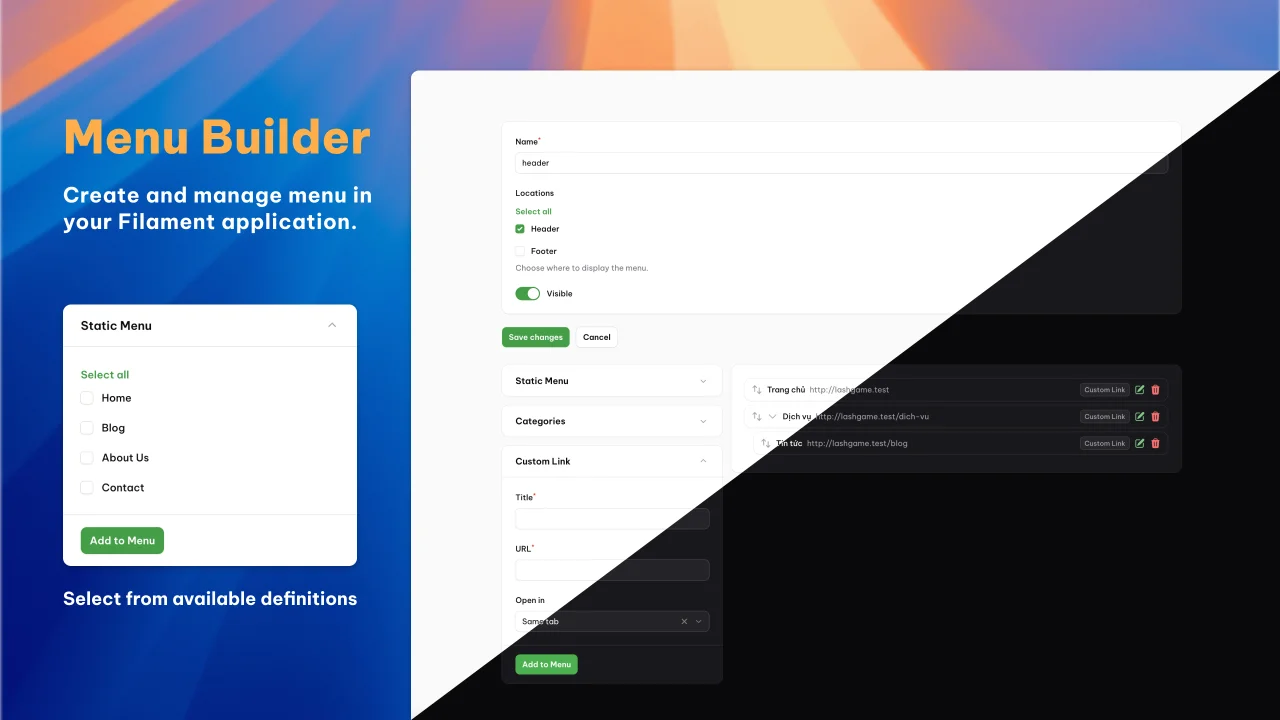
Menu Builder by Ngô Quốc Đạt
CommunityCreate and manage menus in your Filament application.
 Author:
Ngô Quốc Đạt
Author:
Ngô Quốc Đạt
Package health
Automated checks of this plugin's Composer package
15 checks
- Failed: GitHub Actions pinned to SHA — View details on Plumb
- Skipped: GitLab CI includes pinned to SHA
- Passed: Open security advisories
- Passed: Dependabot PR responsiveness — No open Dependabot PRs.
- Skipped: Renovate MR responsiveness
- Failed: Dependabot or Renovate configured — No dependency updater configuration found. View details on Plumb
- Skipped: Dependency update cooldown configured
- Failed: Provides a security policy — View details on Plumb
- Passed: Abandoned or archived — No consulted source marks the package abandoned (packagist, github).
- Passed: Commit and release recency — Active: last commit 19 days ago; last release 19 days ago.
-
Passed:
composer.lock not committed by library
—
composer.lockis absent from the released dist archive. - Passed: Dist archive is lean
-
Passed:
Current Laravel version supported
—
Package dependencies resolve together with current Laravel
13.0. -
Passed:
Current PHP version supported
—
Constraint
^8.3supports current PHP8.5. - Skipped: Current Symfony version supported
filament/
namespace. Review the source and install at your own risk. Found
malware or an unresolved security issue the author won't
address?
Report it
.
Documentation
- Requirements
- Upgrading
- Installation
- Usage
- Testing
- Changelog
- License




A Filament plugin for building menus with drag-and-drop ordering, nesting, custom links, and dynamic panels.
#Requirements
- PHP 8.3+
- Filament 5.0+
- Laravel 12+
#Upgrading
#From v0.7.x (Filament v3) to v1.x (Filament v5)
- Update your
composer.json:
composer require datlechin/filament-menu-builder:^1.0
- Publish and run the new migration to add the
panel,icon, andclassescolumns:
php artisan vendor:publish --tag="filament-menu-builder-migrations"
php artisan migrate
The upgrade migration checks for existing columns before adding them, so it's safe on fresh installs too.
- Re-publish the config file if you published it previously:
php artisan vendor:publish --tag="filament-menu-builder-config" --force
#Installation
Install via Composer:
composer require datlechin/filament-menu-builder
Publish and run the migrations:
php artisan vendor:publish --tag="filament-menu-builder-migrations"
php artisan migrate
Optionally, publish the config file:
php artisan vendor:publish --tag="filament-menu-builder-config"
Or use the install command:
php artisan filament-menu-builder:install
You will need to set up a Filament custom theme
If you don't yet have a custom theme, run the following command:
php artisan make:filament-theme
Next, open up the theme.css file for the custom theme and add the following line:
@import "../../../../vendor/datlechin/filament-menu-builder/resources/css/index.css";
@source "../../../../vendor/datlechin/filament-menu-builder/resources/**/*.blade.php";
#Usage
Register the plugin in your panel provider:
use Datlechin\FilamentMenuBuilder\FilamentMenuBuilderPlugin;

public function panel(Panel $panel): Panel
{
    return $panel
        ->plugins([
            FilamentMenuBuilderPlugin::make(),
        ]);
}
#Locations
Locations define where menus appear in your application:
FilamentMenuBuilderPlugin::make()
    ->addLocations([
        'header' => 'Header',
        'footer' => 'Footer',
    ])
#Menu Panels
Panels provide item sources for menus, either from Eloquent models or static lists.
#Model Panel
Implement MenuPanelable on your model:
use Datlechin\FilamentMenuBuilder\Contracts\MenuPanelable;

class Page extends Model implements MenuPanelable
{
    public function getMenuPanelTitle(): string
    {
        return $this->title;
    }

    public function getMenuPanelUrl(): string
    {
        return route('pages.show', $this);
    }

    public function getMenuPanelName(): string
    {
        return 'Pages';
    }
}
Then register it:
use Datlechin\FilamentMenuBuilder\MenuPanel\ModelMenuPanel;

FilamentMenuBuilderPlugin::make()
    ->addMenuPanels([
        ModelMenuPanel::make()
            ->model(Page::class),
    ])
#Static Panel
use Datlechin\FilamentMenuBuilder\MenuPanel\StaticMenuPanel;

FilamentMenuBuilderPlugin::make()
    ->addMenuPanels([
        StaticMenuPanel::make()
            ->name('pages')
            ->add('Home', '/')
            ->add('About', '/about')
            ->add('Contact', '/contact'),
    ])
add() also accepts target, icon, and classes:
StaticMenuPanel::make()
    ->name('social')
    ->add('GitHub', 'https://github.com', target: '_blank', icon: 'heroicon-o-code-bracket')
    ->add('Twitter', 'https://twitter.com', target: '_blank', classes: 'text-blue-500')
#Custom Link & Custom Text Panels
The custom link panel is shown by default. The custom text panel (for non-link items like headings) is opt-in:
FilamentMenuBuilderPlugin::make()
    ->showCustomLinkPanel(true)
    ->showCustomTextPanel(true)
#Custom Fields
Add extra fields to the menu or menu item forms:
use Filament\Forms\Components\TextInput;

FilamentMenuBuilderPlugin::make()
    ->addMenuFields([
        TextInput::make('description'),
    ])
    ->addMenuItemFields([
        TextInput::make('badge'),
    ])
Singular methods work too:
FilamentMenuBuilderPlugin::make()
    ->addMenuField(TextInput::make('description'))
    ->addMenuItemField(TextInput::make('badge'))
Multiple calls are merged, so fields registered from different service providers won't overwrite each other.
#Customizing Navigation
FilamentMenuBuilderPlugin::make()
    ->navigationLabel('Menus')
    ->navigationGroup('Content')
    ->navigationIcon('heroicon-o-bars-3')
    ->navigationSort(3)
    ->navigationCountBadge(true)
#Indent / Unindent
Nesting via indent/unindent actions is enabled by default:
FilamentMenuBuilderPlugin::make()
    ->enableIndentActions(true)
#Maximum Depth
By default, menu items can be nested indefinitely. Use maxDepth() to limit how deep items may be nested, both through the indent action and drag and drop. Depth is zero-based: root items have a depth of 0, so maxDepth(0) keeps a menu flat and maxDepth(2) allows up to three levels.
FilamentMenuBuilderPlugin::make()
    ->maxDepth(2)
Pass a closure to use a different limit per menu. The closure receives the $menu being edited:
use Datlechin\FilamentMenuBuilder\Models\Menu;

FilamentMenuBuilderPlugin::make()
    ->maxDepth(fn (Menu $menu): ?int => $menu->locations()->where('location', 'footer')->exists() ? 0 : 2)
Moving an item also moves its children, so a move is only allowed when the item's deepest descendant stays within the limit. Unindenting is always allowed, and menus that are already deeper than a newly configured limit remain editable: their items can be reordered and moved up, but never deeper.
#Translatable Menus
Built-in multilingual support with no extra packages required. Translatable fields are stored as JSON with locale tabs in the form UI.
#Setup
- Enable translatable with your locales:
FilamentMenuBuilderPlugin::make()
    ->translatable(['en', 'nl', 'vi'])
- Publish and run the migration to convert columns from
stringtojson:
php artisan vendor:publish --tag="filament-menu-builder-translatable-migrations"
php artisan migrate
Existing string data is wrapped in the default locale (en). Edit $defaultLocale in the published migration to change this.
#Configuring Translatable Fields
Only MenuItem.title is translatable by default:
FilamentMenuBuilderPlugin::make()
    ->translatable(['en', 'nl', 'vi'])
    ->translatableMenuItemFields(['title'])  // default
    ->translatableMenuFields(['name'])       // opt-in: make Menu name translatable too
#Rendering Translated Titles
Use resolveLocale() in Blade to display titles in the current locale:
@foreach($menu->menuItems as $item)
    <a href="{{ $item->url }}">
        {{ $item->resolveLocale($item->title) }}
    </a>
@endforeach
resolveLocale() returns the translation for app()->getLocale(), falls back to the first available translation, or returns the raw string for non-translatable setups.
#Spatie Translatable Compatibility
The JSON format is compatible with Spatie Laravel Translatable. If you add HasTranslations to a custom model, the plugin detects it and defers to Spatie's mutators.
use Spatie\Translatable\HasTranslations;

class CustomMenuItem extends MenuItem
{
    use HasTranslations;

    public array $translatable = ['title'];
}
#Custom Models
Replace the default models with your own:
FilamentMenuBuilderPlugin::make()
    ->usingMenuModel(CustomMenu::class)
    ->usingMenuItemModel(CustomMenuItem::class)
    ->usingMenuLocationModel(CustomMenuLocation::class)
#Rendering Menus
Retrieve a menu by location. Results are cached and automatically busted on changes:
use Datlechin\FilamentMenuBuilder\Models\Menu;

$menu = Menu::location('header');
Render menu items:
@if($menu)
    <nav>
        <ul>
            @foreach($menu->menuItems as $item)
                <li class="{{ $item->classes }} {{ $item->isActive() ? 'active' : '' }}">
                    @if($item->url)
                        <a href="{{ $item->url }}" target="{{ $item->target }}" @if($item->rel) rel="{{ $item->rel }}" @endif>
                            {{ $item->resolveLocale($item->title) }}
                        </a>
                    @else
                        <span>{{ $item->resolveLocale($item->title) }}</span>
                    @endif

                    @if($item->children->isNotEmpty())
                        <ul>
                            @foreach($item->children as $child)
                                <li>
                                    <a href="{{ $child->url }}">{{ $child->resolveLocale($child->title) }}</a>
                                </li>
                            @endforeach
                        </ul>
                    @endif
                </li>
            @endforeach
        </ul>
    </nav>
@endif
#Active State Detection
Check if a menu item matches the current URL:
$item->isActive();                 // exact URL match
$item->isActiveOrHasActiveChild(); // matches self or any descendant
#MenuItem Properties
| Property | Type | Description |
|---|---|---|
title |
string|array | The display title (array when translatable) |
url |
?string | The URL (null for text-only items) |
target |
string | Link target (_self, _blank, etc.) |
icon |
?string | Icon identifier (e.g. heroicon-o-home) |
classes |
?string | CSS classes for the item |
rel |
?string | Link rel attribute (e.g. nofollow noopener) |
type |
string | Panel name / source type (accessor) |
children |
Collection | Nested child items |
#Testing
composer test
#Changelog
See CHANGELOG for recent changes.
#License
MIT License. See LICENSE.md.
The author
I'm a Software Developer from Vietnam and working on Laravel.
Featured Plugins
A selection of plugins curated by the Filament team

Blueprint
Filament Blueprint is a premium Laravel Boost extension that helps AI agents produce accurate, detailed implementation plans and security reports for Filament apps.
 Filament

Spotlight Pro
Browse your Filament Panel with ease. Filament Spotlight Pro adds a Spotlight like Command Palette to your Filament Panel.
 Dennis Koch

Sharp Theme
A theme that gives panels a precise, technical look with square corners, strong borders, and clear contrast.
Filament

