
Craft Forge Translation Workflow by Craft Forge
CommunityAI-powered workflow for Laravel language files. Scan, translate, and sync automatically.
filament/
namespace. Review the source and install at your own risk. Found
malware or an unresolved security issue the author won't
address?
Report it
.
 Author:
Craft Forge
Author:
Craft Forge
Documentation
- Features
- Demo
- Requirements
- Usage
- Installation
- Authorization
- Events
- Configuration
- Artisan Commands
- Customizing Plugin Translations
- Testing
- Support
- License
A complete translation workflow for Laravel language files inside Filament.
Manage JSON translations, PHP group files, and vendor language files from one place. Scan code for missing keys, translate with AI, review unpublished changes, and publish back to standard Laravel lang/ files.
#Features
#AI-Powered Translation
Translate instantly using integrated AI services.
- One-click translation for individual fields
- Bulk translate entire locales in seconds
- Choose your preferred provider: DeepL, Google Translate, ChatGPT, or Claude
- Placeholders (
:attribute,:count) preserved automatically - Handles Laravel pluralization syntax (
{0} None|{1} One|[2,*] :count items)
#Automatic Code Scanner
Never miss translation keys again.
- Scan the entire codebase for
__()and other translation helpers - Automatically generate missing translation keys
- See exactly where each key is used in the codebase
#File-Based Storage (Zero Runtime Overhead)
Unlike database-driven translation managers, this plugin uses file-based storage.
Translations are published directly to Laravel lang/ files.
Benefits:
- Zero database queries for translations at runtime
- Full compatibility with Laravel translation caching
- No performance impact on production applications
#Two-Way Sync with Lang Files
Work safely between the UI and your Laravel translation files.
- Import existing translations from
lang/ - Edit them in the Filament UI
- Publish changes back to files
- Visual indicators show unpublished changes
#Unified Translation Editor
Edit all locales for a translation key from a single page.
- Inline editing for all languages
- Quickly identify missing translations
- Track which values differ from published files
#Vendor Translation Explorer
Laravel packages often ship with their own translation files, but discovering and publishing them is usually manual.
This plugin provides a dedicated interface where you can:
- Explore all vendor translations available in your project
- Instantly see which ones are already published
- Publish missing translations with one click
- Override package language files safely
No artisan commands. No digging through vendor/.
#Smart Filtering & Search
Quickly find the translations you need. Filter by:
- group
- vendor package
- translation type
- missing translations
- duplicate values
- unpublished changes
- date range
#CSV Import & Export
Collaborate with translators outside your application.
- Export translations to CSV
- Import updates from translators
- Create translation backups
#Automatic Backup System
Every publish action creates a snapshot.
- Prevent accidental data loss
- Restore previous translation states if needed
#Demo
#Requirements
| Plugin Version | Filament Version | PHP Version |
|---|---|---|
| 1.x | 3.x | 8.2+ |
| 2.x | 4.x / 5.x | 8.2+ |
This plugin is distributed via Anystack. See Installation for setup steps.
#Usage
#Workflow
- Scan & Import translation keys from the codebase and existing translations from Laravel
lang/files - Edit translations in the Filament UI
- Publish changes back to
lang/files
💡 Alternative: Gitignore Lang Directory
To avoid merge conflicts in `lang/` when working in a team, exclude translation files from version control:# .gitignore
/lang/*
!/lang/.gitkeep
Translations are then managed via the UI and published to files; for deployment use CSV export/import or the Artisan commands (see below).
#Translation List
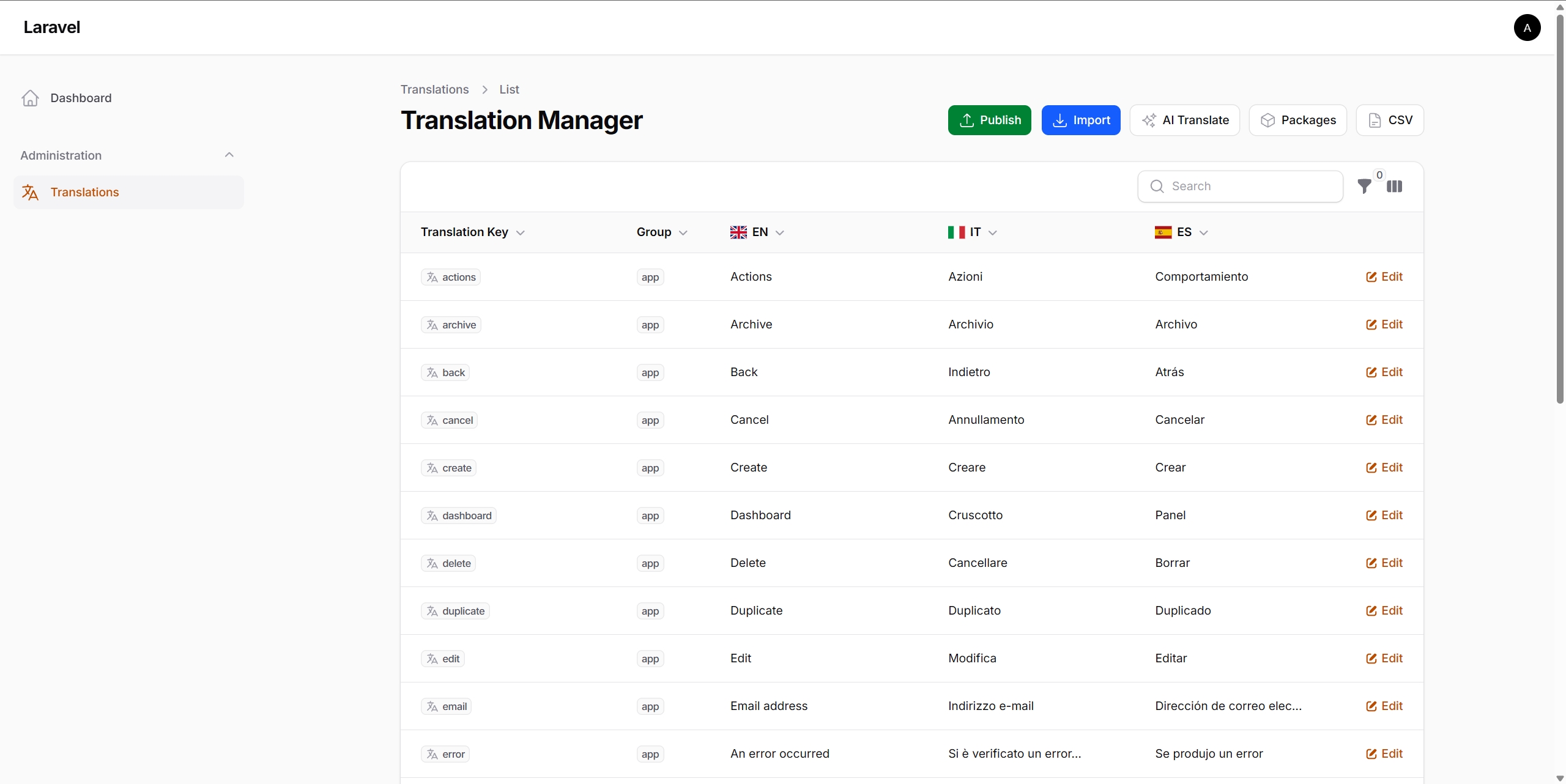
Browse all translations with dynamic columns for each locale. Search by key, group, or translation value. Filter by group, vendor (package), translation type (regular/vendor), date range (updated from/until), missing translation, duplicate values, or unpublished changes.
#Import Translations
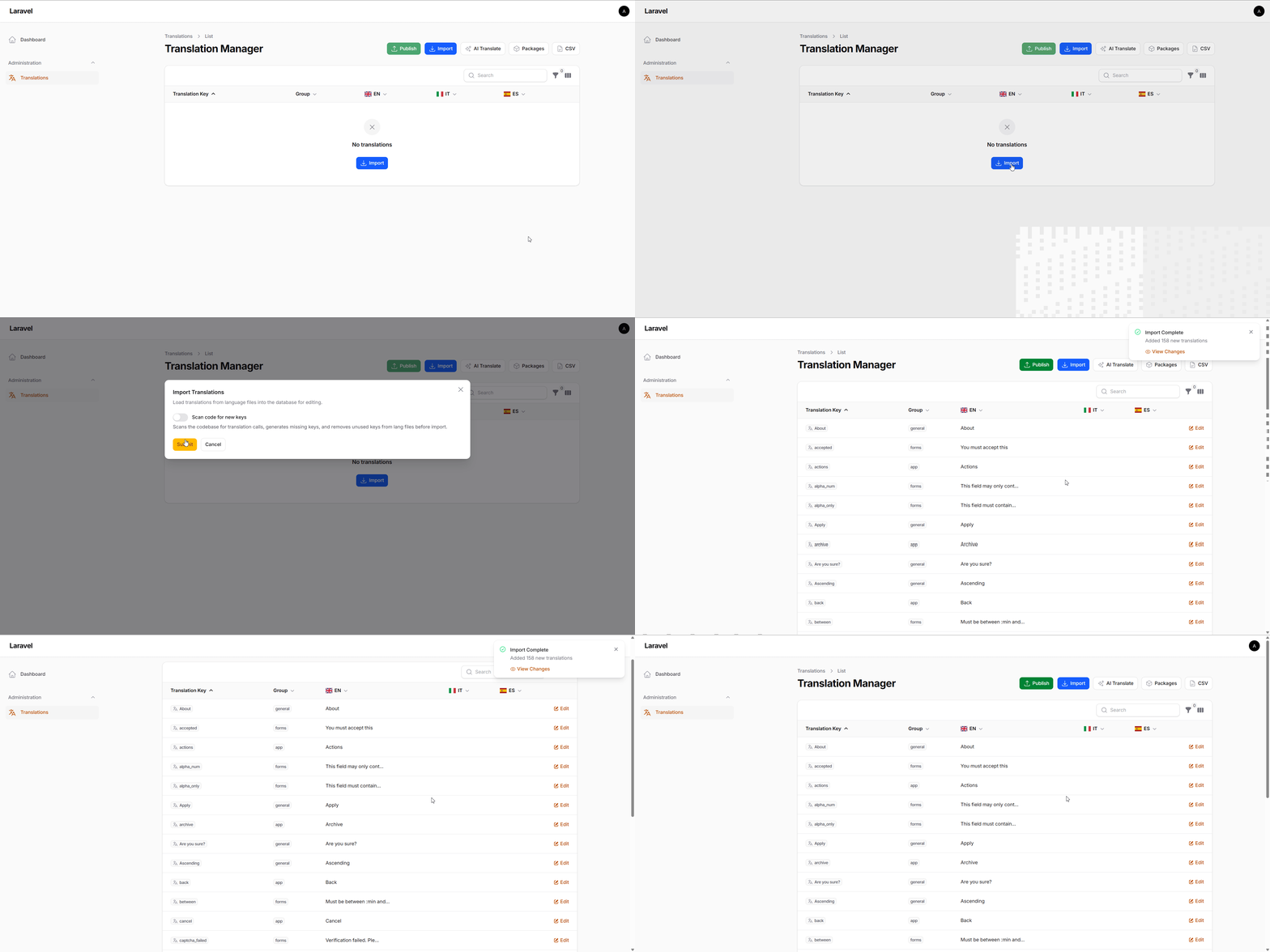
Load translations from lang/ files into the database with optional code scanning to catch new keys first.
CSV workflows:
- CSV Export: Download all translations for external translators or backup
- CSV Import: Upload translations from a CSV file
#Editing Translations
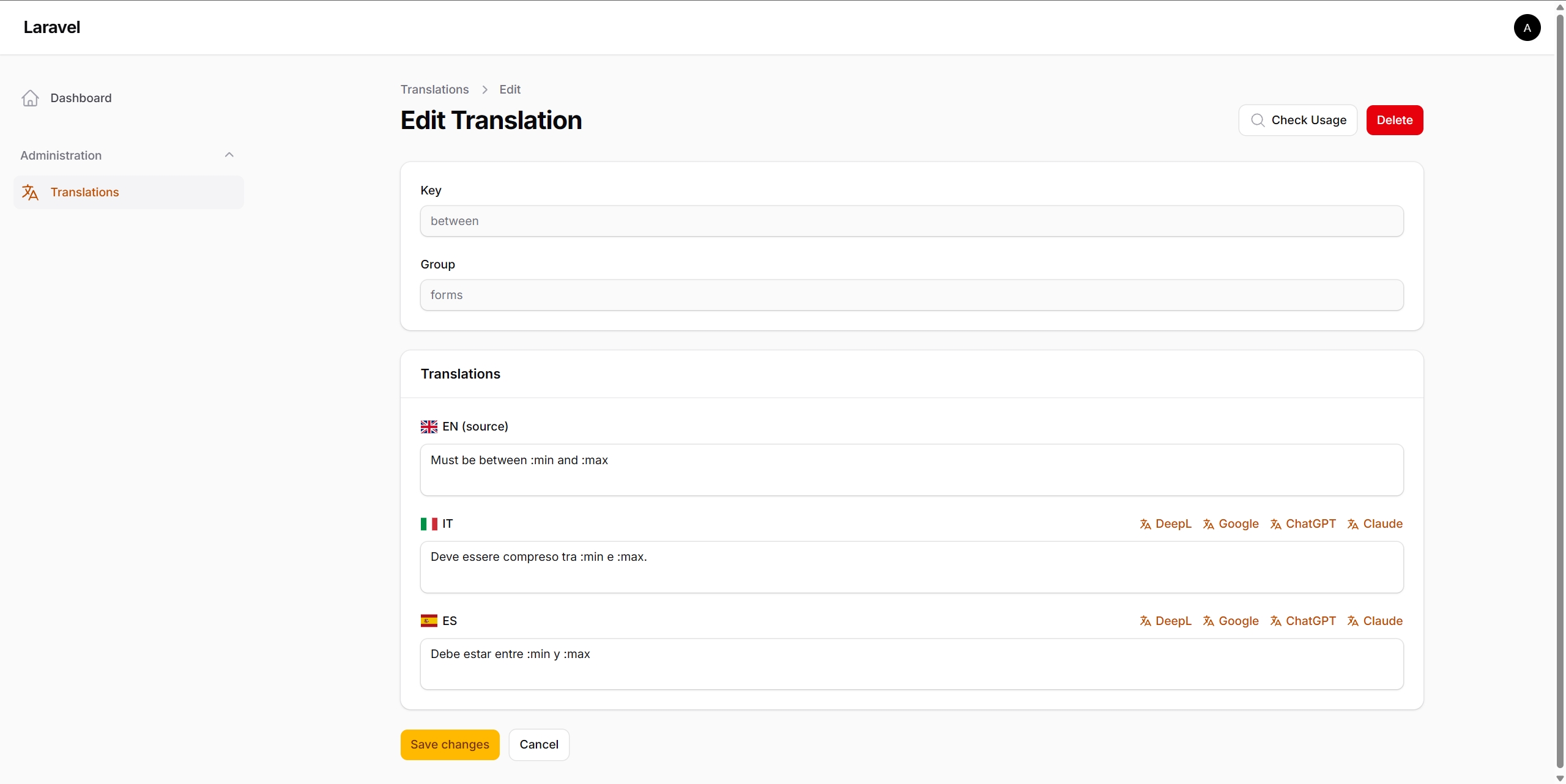
Edit all locale values for a translation key on a single page. Each locale field shows AI translation buttons (DeepL, Google, ChatGPT, Claude) when services are configured. Click to translate that field instantly.
#Bulk AI Translation
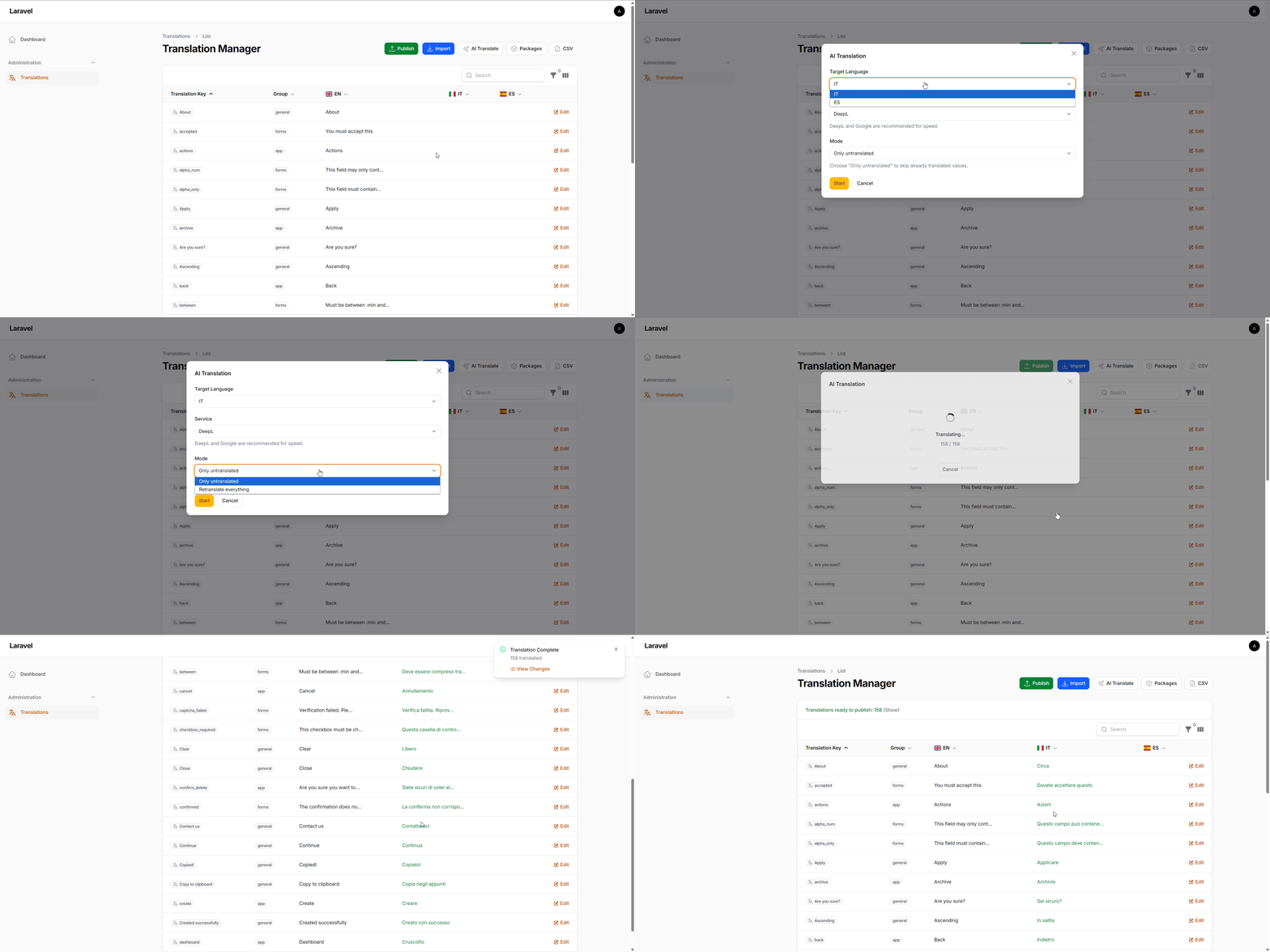
Translate an entire locale in seconds. Click AI Translate from the list page:
- Select target language
- Choose translation service (DeepL, Google, ChatGPT, or Claude)
- Select mode: translate only untranslated values, or retranslate everything
- Watch real-time progress
Laravel placeholders and pluralization syntax are preserved automatically.
#Change Tracking
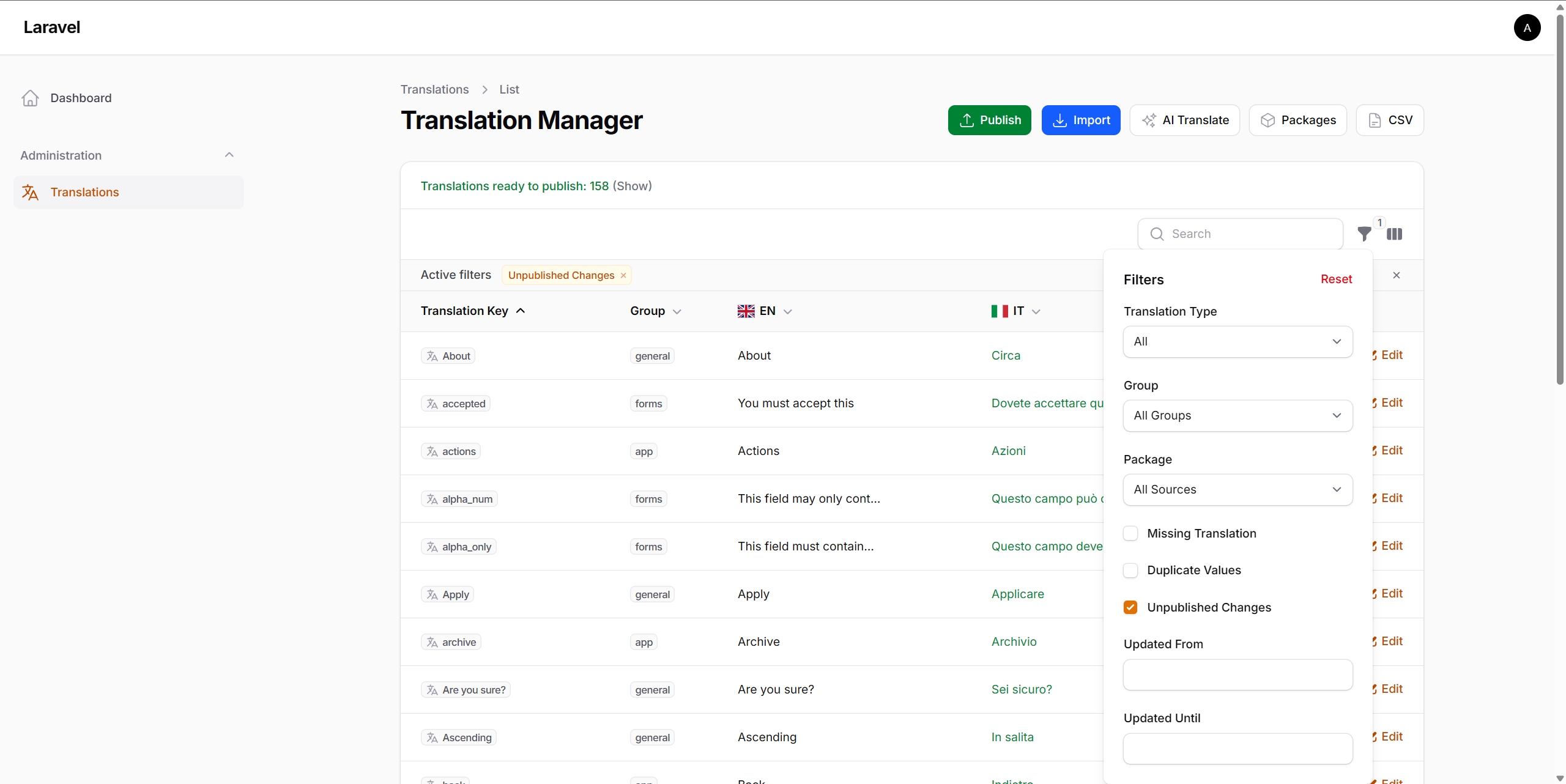
The plugin tracks which translations have unpublished changes, i.e. values that differ from what is currently in lang/ files.
Visual indicators:
- Table view: Modified locale values are highlighted in green
- Edit page: Each modified field shows the previous value from files
- Filter: Use "Has Unpublished Changes" filter to see only modified translations
This makes it clear exactly what will be written when Publish is clicked.
Note: Change tracking can be disabled in config with
'track_changes' => false
#Publishing
Click Publish to write all translations from the database to lang/ files. A backup is automatically created before publishing.
#Package Management
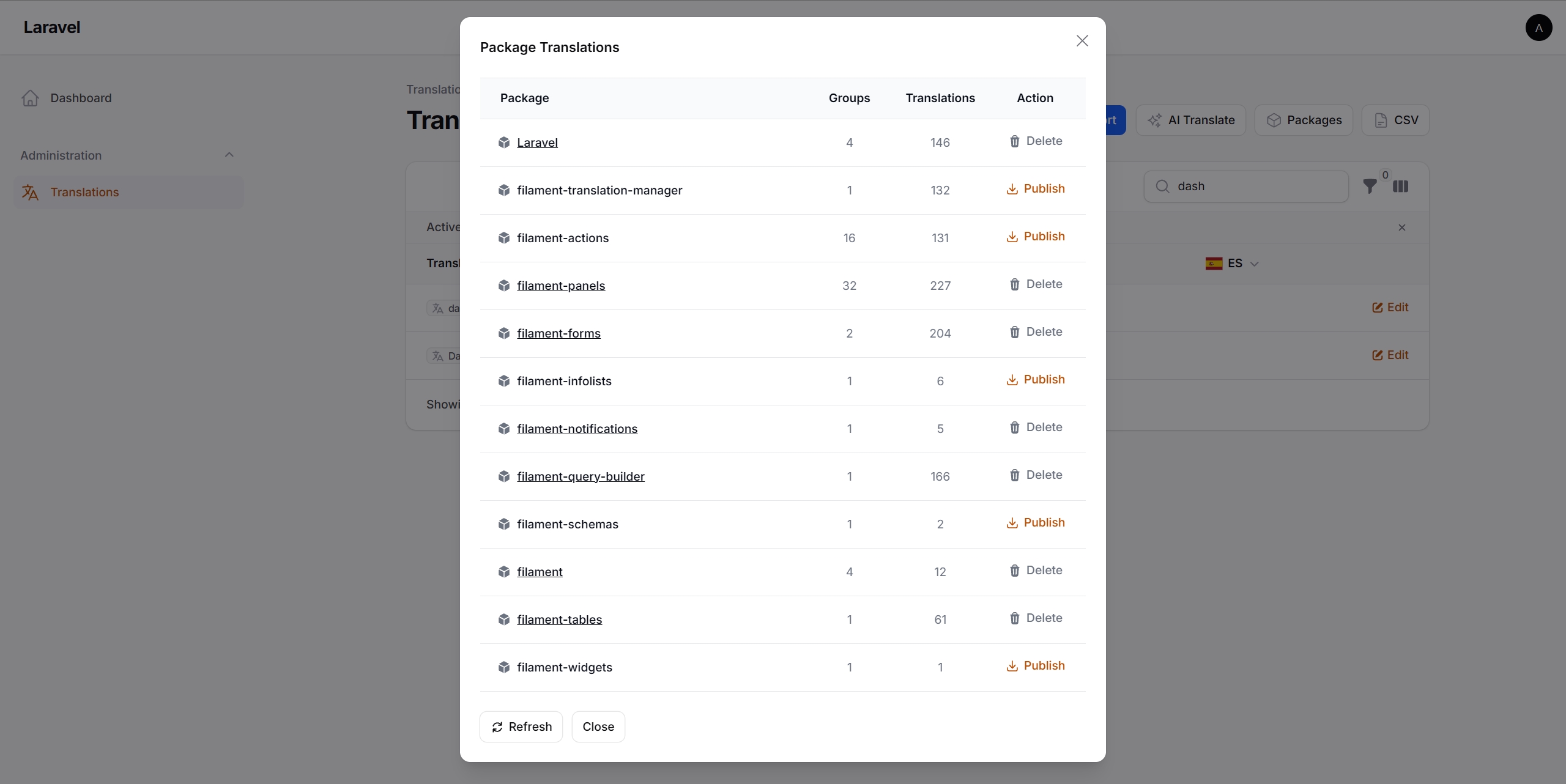
Click Manage Packages to open the package management panel:
- Publish vendor package translations to
lang/vendor/{package}/for editing - Publish Laravel core translations (
auth.php,validation.php,passwords.php,pagination.php) - Delete published translations when no longer needed
- View groups and translations count for each package
Published translations are automatically imported into the database and become editable in the UI. After editing, use Publish to write changes back to files.
#Key Usage Finder
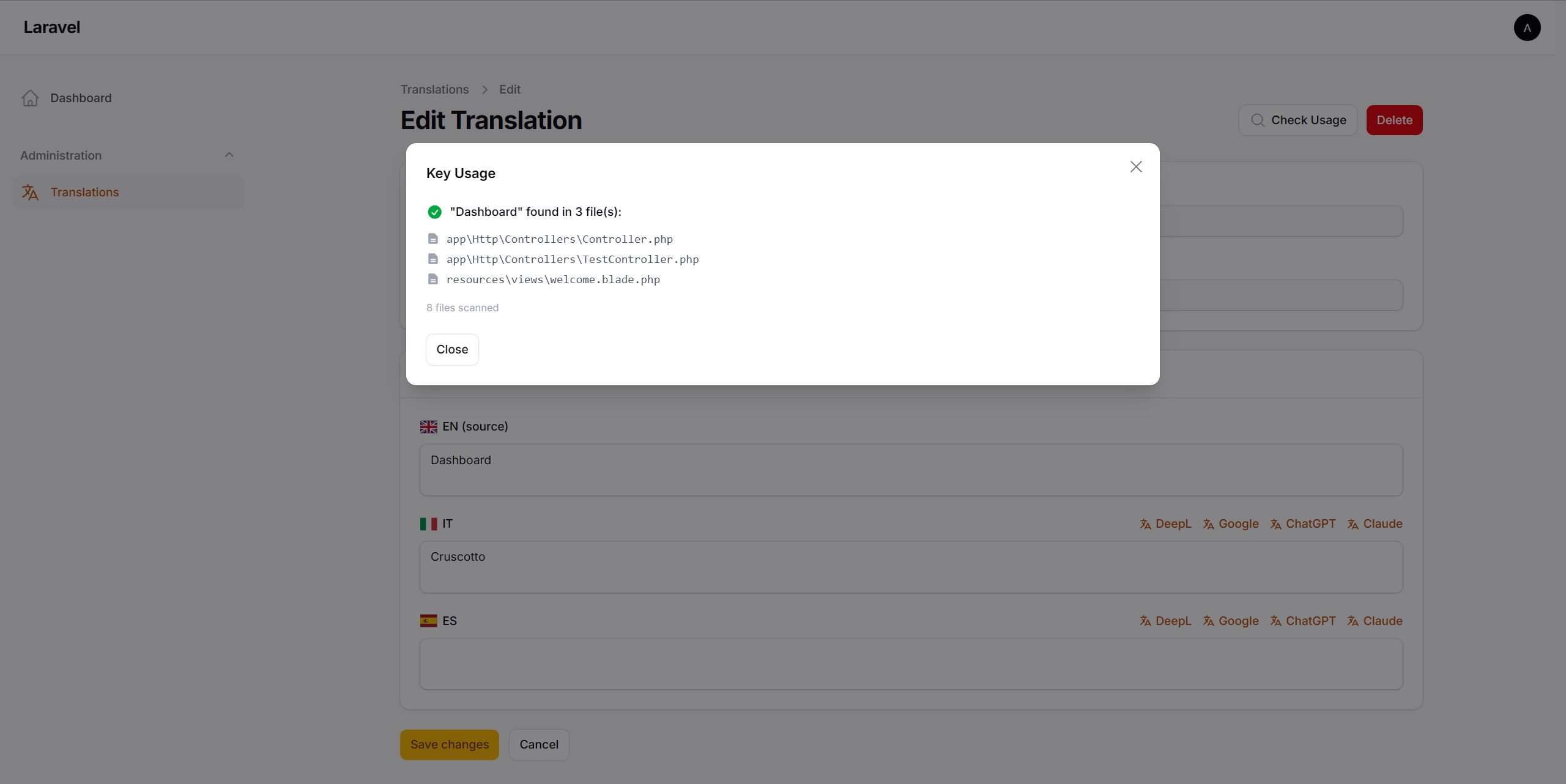
Click Check Usage on any translation to see where the key is used in the codebase. Laravel system keys (validation, auth, etc.) are recognized as framework-internal.
#Backup & Restore
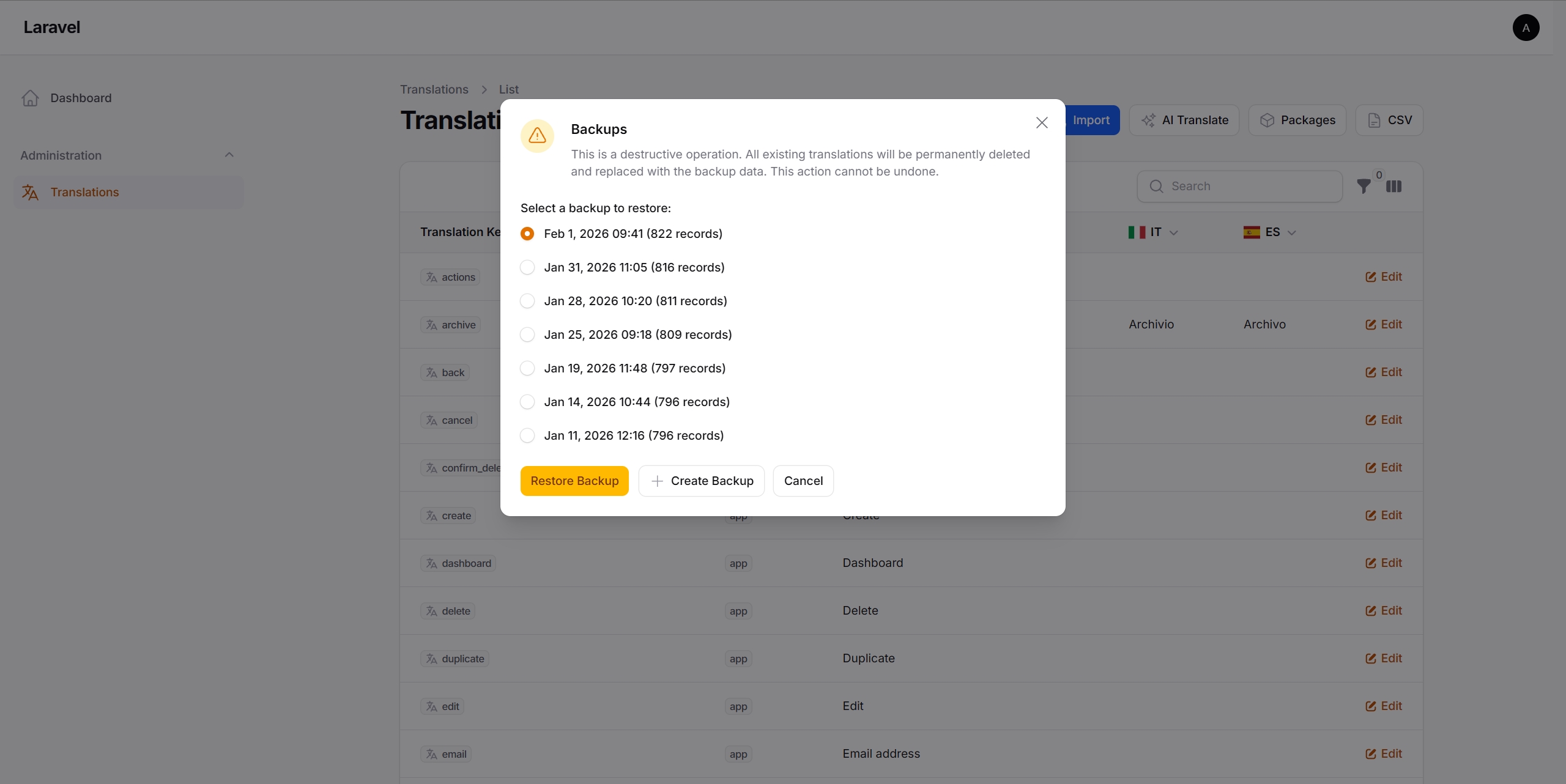
The plugin automatically creates a backup before Publish (the operation that writes translations from the database to lang/ files). This ensures translations can be restored if needed.
Any previous backup can be restored from the CSV → Backups menu. Note: restoring a backup will replace all current translations in the database.
#Installation
This plugin is distributed via Anystack. After purchase, activate the license in your Anystack account and follow the installation steps below.
1. Configure Composer. Add the Anystack repository to composer.json:
{
    "repositories": [
        {
            "type": "composer",
            "url": "https://translation-manager.composer.sh"
        }
    ]
}
2. Authenticate. Store the license credentials for the project:
composer config http-basic.translation-manager.composer.sh EMAIL KEY
Replace EMAIL and KEY with your actual license credentials from Anystack.
3. Install the package:
composer require craft-forge/filament-translation-manager
4. Run the installer. This will publish the configuration file, migration, and run the migration:
php artisan filament-translation-manager:install
5. Register the plugin in the Filament Panel:
use CraftForge\FilamentTranslationManager\FilamentTranslationManagerPlugin;

public function panel(Panel $panel): Panel
{
    return $panel
        ->plugins([
            FilamentTranslationManagerPlugin::make(),
        ]);
}
#Authorization
Access to the plugin can be restricted using the authorize method. The closure receives the authenticated user and should return true to grant access:
FilamentTranslationManagerPlugin::make()
    ->authorize(fn ($user) => $user->can('manage-translations'))
#Events
The plugin dispatches Laravel events for all major actions. These events can be used for audit logging, notifications, usage tracking, and other integrations.
Each event includes an action property (TranslationActionEnum) identifying the action type, along with relevant contextual data.
#Available events
| Event | Data | Description |
|---|---|---|
| TranslationsGeneratedEvent | array $stats | Translation keys scanned from source code |
| TranslationsImportedEvent | int $created, int $updated, bool $overwrite, array $locales | Language files imported into the database |
| TranslationsPublishedEvent | array $locales | Database translations written to language files |
| TranslationSavedEvent | int $translationId, string $key, string $group | Single translation updated on the edit page |
| TranslationDeletedEvent | string $key, string $group | Single translation deleted on the edit page |
| AiBulkTranslationStartedEvent | string $targetLocale, string $driver, int $keysCount | AI bulk translation started |
| AiBulkTranslationCompletedEvent | string $targetLocale, string $driver, int $translated, int $failed, int $keysCount | AI bulk translation finished |
| AiSingleTranslationCompletedEvent | int $translationId, string $targetLocale, string $driver | Single field AI translation completed |
| PackageTranslationsPublishedEvent | string $namespace | Vendor package translations published |
| PackageTranslationsDeletedEvent | string $namespace | Vendor package translations deleted |
| CsvExportedEvent | — | Translations exported to CSV |
| CsvImportedEvent | int $created, int $updated | Translations imported from CSV |
| BackupCreatedEvent | string $filePath | Translation backup created |
| BackupRestoredEvent | int $restoredCount | Translation backup restored |
| KeyUsageCheckedEvent | string $fullKey, bool $isUsed, int $filesCount | Key usage check performed on the edit page |
#Listening to events
Register listeners in your AppServiceProvider or a dedicated event service provider:
use CraftForge\FilamentTranslationManager\Events\TranslationsPublishedEvent;
use CraftForge\FilamentTranslationManager\Events\AiBulkTranslationCompletedEvent;
use Illuminate\Support\Facades\Event;

public function boot(): void
{
    // Notify team when translations are published
    Event::listen(TranslationsPublishedEvent::class, function (TranslationsPublishedEvent $event): void {
        Notification::route('slack', config('services.slack.webhook'))
            ->notify(new TranslationsPublishedNotification($event->locales));
    });

    // Track AI translation usage
    Event::listen(AiBulkTranslationCompletedEvent::class, function (AiBulkTranslationCompletedEvent $event): void {
        AiUsageLog::create([
            'driver' => $event->driver,
            'locale' => $event->targetLocale,
            'translated' => $event->translated,
        ]);
    });
}
#Configuration
// config/translation-manager.php

return [
    // Supported locales (first is a source language for AI)
    'locales' => ['en', 'de', 'fr', '...'],

    'navigation' => [
        'group' => 'Administration',
        'label' => 'Translations',
        'icon' => 'heroicon-o-language',
        'sort' => 100,
    ],

    'disable_key_and_group_editing' => true,

    'scan_directories' => [
        app_path(),
        resource_path('views'),
        base_path('routes'),
        base_path('modules'),
    ],

    // Permission mode for created directories (0775 = group-writable)
    // Use 02775 on servers with setgid group setup
    'directory_permissions' => 0775,

    'backup' => [
        'enabled' => true,
        'path' => storage_path('app/translation-backups'),
        'keep_last' => 10,
    ],

    'flags' => [
        'show_flags' => true,
        'circular_flags' => false,
    ],

    // Show visual indicators for unpublished changes
    'track_changes' => true,

    // AI Translation Services
    'translation_service' => [

        // DeepL - High quality, especially for European languages
        // Free plan: 500,000 chars/month
        // Get API key: https://www.deepl.com/your-account/keys
        'deepl' => [
            'enabled' => true,
            'api_key' => env('DEEPL_API_KEY'),
            // Free: api-free.deepl.com | Pro: api.deepl.com
            'api_url' => env('DEEPL_API_URL', 'https://api-free.deepl.com/v2/translate'),
        ],

        // Google Cloud Translation
        // Get API key: https://console.cloud.google.com/apis/credentials
        // Enable API: https://console.cloud.google.com/apis/library/translate.googleapis.com
        'google' => [
            'enabled' => true,
            'api_key' => env('GOOGLE_TRANSLATE_API_KEY'),
        ],

        // OpenAI (ChatGPT)
        // Get API key: https://platform.openai.com/api-keys
        'openai' => [
            'enabled' => true,
            'api_key' => env('OPENAI_API_KEY'),
            'model' => env('OPENAI_MODEL', 'gpt-5.2'),
            'temperature' => 0.3,
        ],

        // Anthropic Claude
        // Get API key: https://console.anthropic.com/settings/keys
        'claude' => [
            'enabled' => true,
            'api_key' => env('ANTHROPIC_API_KEY'),
            'model' => env('ANTHROPIC_MODEL', 'claude-haiku-4-5-20251001'),
        ],
    ],
];
#Artisan Commands
All these operations are available through the UI, but can also be run via command line:
# Scan code and generate missing translation keys to lang/ files
php artisan translations:generate

# Import translations from lang/ files to database
php artisan translations:import

# Publish translations from database to lang/ files
php artisan translations:publish
#Customizing Plugin Translations
Publish the plugin's language files (lang/vendor/filament-translation-manager) to customize UI text:
php artisan vendor:publish --tag="filament-translation-manager-translations"
#Testing
This plugin is backed by 600+ automated tests covering all functionality.
#Support
For assistance:
- Email: [email protected]
#License
This plugin is proprietary software. See LICENSE.md for details.
The author
From the same author
Featured Plugins
A selection of plugins curated by the Filament team

Custom Dashboards
Let your users build and share their own dashboards with a drag-and-drop interface. Define your data sources in PHP and let them do the rest.
 Filament

Spotlight Pro
Browse your Filament Panel with ease. Filament Spotlight Pro adds a Spotlight like Command Palette to your Filament Panel.
 Dennis Koch

Advanced Tables (formerly Filter Sets)
Supercharge your tables with powerful features like user-customizable views, quick filters, multi-column sorting, advanced table searching, convenient view management, and more. Compatible with Resource Panel Tables, Relation Managers, Table Widgets, and Table Builder!
 Kenneth Sese
