Export cleanup
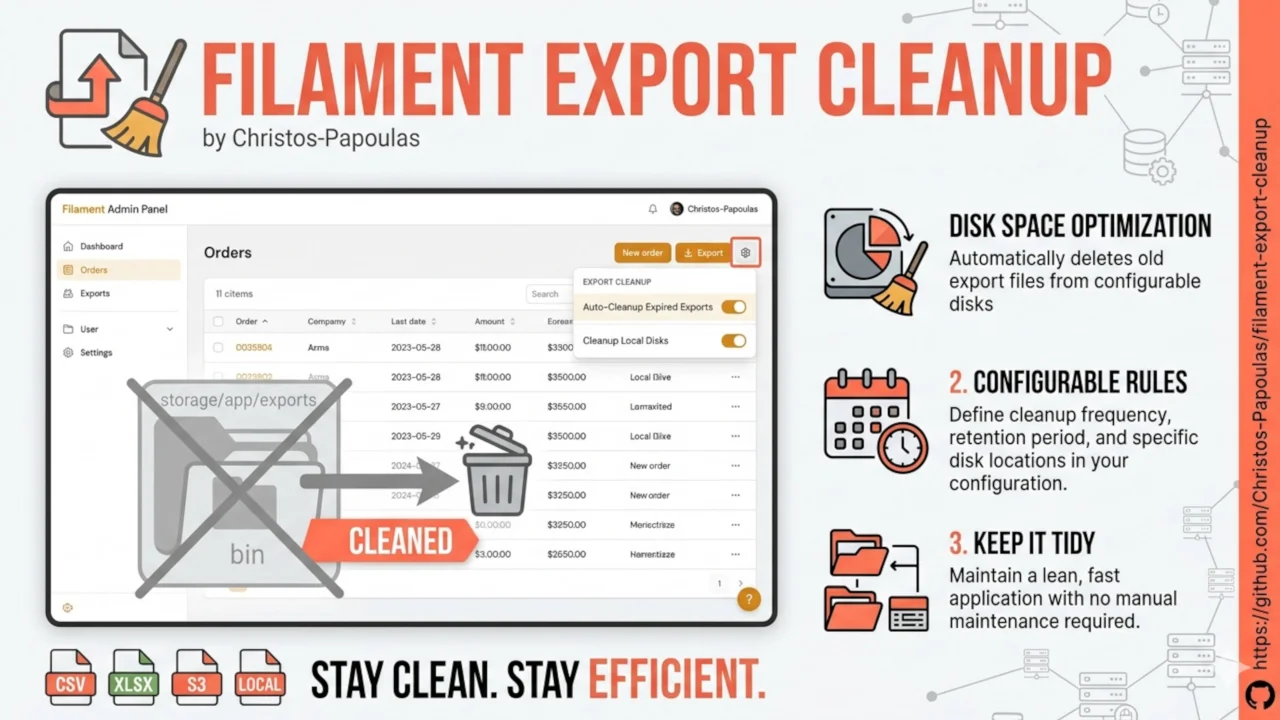
Automatically remove old Filament export files from disk and optionally delete their exports table rows.
 Author:
Christos Papoulas
Author:
Christos Papoulas
Documentation
- Requirements
- Installation
- Configuration
- Usage
- Scheduling
- How it works
- Testing
- Changelog
- Sponsoring
- License



Automatically remove old Filament export files from disk and optionally delete their exports table rows.
Filament table exports store files on disk and keep metadata in the database. Over time these accumulate. This package finds completed exports older than a configurable retention period, deletes their file directories, and optionally removes the database records.
#Requirements
- PHP 8.2+
- Laravel 11, 12 or 13
- Filament Actions (exports) v4 or v5
#Installation
Install the package via Composer:
composer require pachristos/filament-export-cleanup
Publish the configuration file:
php artisan vendor:publish --tag="filament-export-cleanup-config"
Or use the install command, which publishes the config for you:
php artisan filament-export-cleanup:install
The package auto-registers its service provider. No further setup is required beyond configuration.
#Configuration
Configuration lives in config/filament-export-cleanup.php. All options can be overridden with environment variables.
| Option | Env variable | Default | Description |
|---|---|---|---|
enabled |
FILAMENT_EXPORT_CLEANUP_ENABLED |
true |
Master switch for cleanup |
retention_hours |
FILAMENT_EXPORT_CLEANUP_RETENTION_HOURS |
72 |
Delete exports completed more than this many hours ago |
delete_database_records |
FILAMENT_EXPORT_CLEANUP_DELETE_DATABASE_RECORDS |
true |
Also delete rows from the exports table |
file_disk |
FILAMENT_EXPORT_CLEANUP_FILE_DISK |
local |
Filesystem disk to clean (must match your Filament export disk) |
schedule.enabled |
FILAMENT_EXPORT_CLEANUP_SCHEDULE_ENABLED |
true |
Register the cleanup command on the Laravel scheduler |
schedule.frequency |
— | Weekdays at 02:00 |
When to run (see Scheduling) |
Set file_disk to the same disk your Filament exports use (local or public). S3 and other remote disks are not supported yet.
#Usage
#Scheduled cleanup (recommended)
When schedule.enabled is true, the package registers cleanup:filament-export on Laravel's scheduler. Ensure your server runs the scheduler (for example via cron):
* * * * * cd /path-to-your-project && php artisan schedule:run >> /dev/null 2>&1
The default schedule runs on weekdays at 02:00.
#Manual cleanup
Run the Artisan command at any time:
php artisan cleanup:filament-export
The command reports how many export file directories were removed, or that nothing needed deletion.
#Programmatic cleanup
Resolve the service from the container:
use Pachristos\FilamentExportCleanup\FilamentExportCleanup;

$deletedIds = app(FilamentExportCleanup::class)->run();
Or use the facade:
use FilamentExportCleanup;

$deletedIds = FilamentExportCleanup::run();
run() returns an array of deleted export IDs. When enabled is false, it returns an empty array without doing any work.
#Scheduling
The schedule.frequency config controls when the cleanup command is registered on Laravel's scheduler. You can configure it with any of Laravel's schedule frequency options by passing a Closure that receives the scheduled Event and chains any combination of frequency methods (dailyAt(), hourly(), weekdays(), cron(), timezone constraints, etc.). A raw cron expression string is also accepted.
The default runs the cleanup on weekdays at 02:00:
use Illuminate\Console\Scheduling\Event;

'schedule' => [
    'enabled' => env('FILAMENT_EXPORT_CLEANUP_SCHEDULE_ENABLED', true),
    'frequency' => fn (Event $event) => $event
        ->weekdays()
        ->dailyAt('02:00'),
],
Use any frequency method (or combination) Laravel supports. A few examples:
'frequency' => fn (Event $event) => $event->hourly(),

'frequency' => fn (Event $event) => $event
    ->twiceDaily(1, 13)
    ->timezone('Europe/Athens'),

'frequency' => fn (Event $event) => $event
    ->weeklyOn(0, '03:00'),
Or supply a raw cron expression directly:
'frequency' => '0 3 * * 0',
Disable automatic scheduling and run cleanup only manually or from your own scheduler:
FILAMENT_EXPORT_CLEANUP_SCHEDULE_ENABLED=false
See the Laravel schedule frequency options documentation for the full list of available methods.
#How it works
- Query the Filament
exportstable for records wherecompleted_atis older thanretention_hoursandfile_diskmatches your configured disk. - Delete each export's file directory from disk via Filament's
Exportmodel. - If
delete_database_recordsistrue, delete the matching rows from theexportstable.
Exports still within the retention window are left untouched.
#Testing
composer test
#Changelog
Please see CHANGELOG for more information on what has changed recently.
#Sponsoring
Development of this package is supported by Christos Papoulas.
#License
The MIT License (MIT). Please see License File for more information.
The author
I’m a PHP developer focused on building modern web applications with Laravel and Filament. Most of my day is spent designing backend systems, crafting clean developer experiences, and building efficient admin panels, APIs, and automation tools with the Laravel ecosystem.
Featured Plugins
A selection of plugins curated by the Filament team

Custom Dashboards
Let your users build and share their own dashboards with a drag-and-drop interface. Define your data sources in PHP and let them do the rest.
 Filament

Custom Fields
Eliminate custom field migrations forever. Let your users create and manage form fields directly in Filament admin panels with 20+ built-in field types, validation, and zero database changes.
 Relaticle

Advanced Tables (formerly Filter Sets)
Supercharge your tables with powerful features like user-customizable views, quick filters, multi-column sorting, advanced table searching, convenient view management, and more. Compatible with Resource Panel Tables, Relation Managers, Table Widgets, and Table Builder!
 Kenneth Sese

