
Page Builder
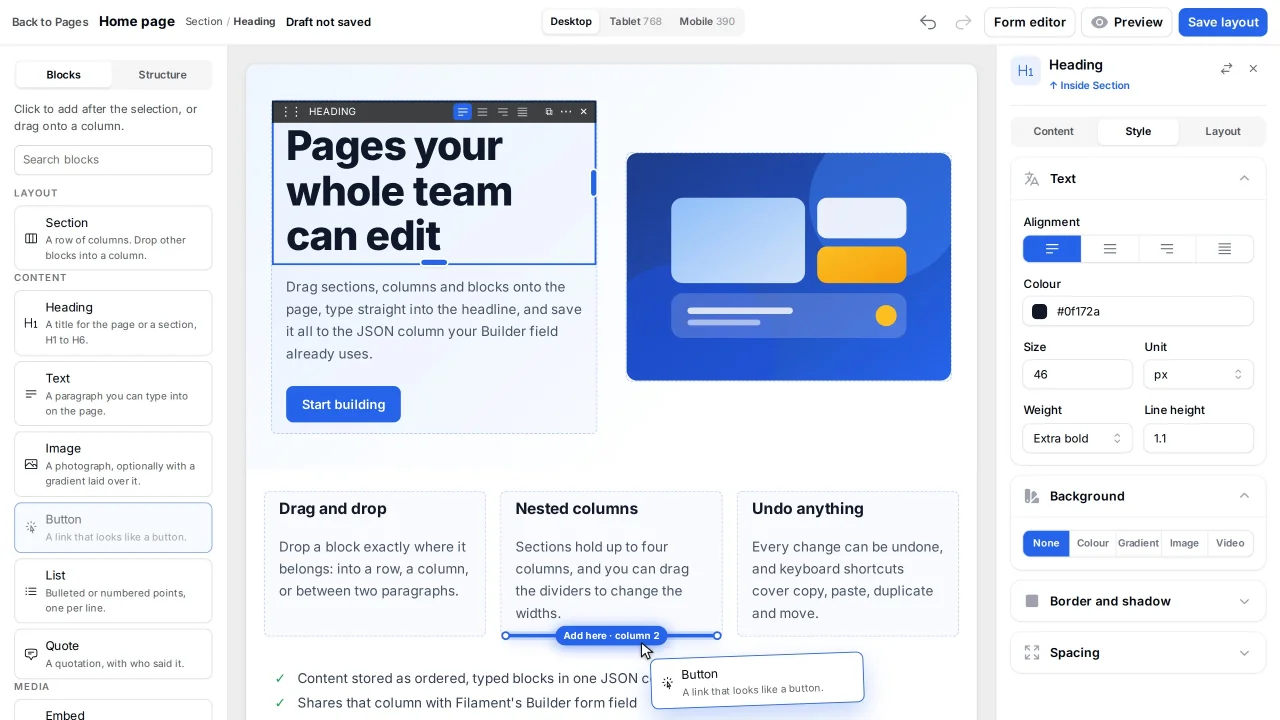
CommunityA drag-and-drop visual page builder for Filament 5 that stores content as ordered, typed blocks in a single JSON column.
 Author:
Carl Janzell
Author:
Carl Janzell
Package health
BetaAutomated checks of this plugin's Composer package
15 checks
- Failed: GitHub Actions pinned to SHA — View details on Plumb
- Skipped: GitLab CI includes pinned to SHA
- Skipped: Open security advisories
- Passed: Dependabot PR responsiveness — No open Dependabot PRs.
- Skipped: Renovate MR responsiveness
- Failed: Dependabot or Renovate configured — No dependency updater configuration found. View details on Plumb
- Skipped: Dependency update cooldown configured
- Passed: Provides a security policy
- Passed: Abandoned or archived — No consulted source marks the package abandoned (packagist, github).
- Passed: Commit and release recency — Active: last commit 0 days ago; no release date available.
-
Passed:
composer.lock not committed by library
—
composer.lockis absent from the released dist archive. - Passed: Dist archive is lean
-
Passed:
Current Laravel version supported
—
Package dependencies resolve together with current Laravel
13.0. -
Passed:
Current PHP version supported
—
Constraint
^8.3supports current PHP8.5. - Skipped: Current Symfony version supported
filament/
namespace. Review the source and install at your own risk. Found
malware or an unresolved security issue the author won't
address?
Report it
.
Documentation
- Why
- Design principles
- Installation
- The canvas
- Editing on the page
- Defining a block
- Rendering publicly
- Tests
- Contributing
- Licence
A drag-and-drop visual page builder for Filament, storing page content as an ordered array of typed blocks in a single JSON column.



Status: the canvas is a nested layout editor. Palette with layout primitives (including Embed), drag into columns, a document outline, token style inspector, inline plaintext editing, undo/redo, ghost recovery and an optimistic save lock — all persisting to the same JSON the form editor uses. On a phone, Design mode is a one-panel editor (Blocks / Page / Settings). Still to come: rich text in place, an image picker, draft/publish and reusable sections. See ROADMAP.md and the improvement pack.
#Why
Filament's Builder field is an excellent structured editor, but it is a form: a vertical
stack of collapsible panels. You cannot drop a block where you want it on the page, or see
the layout you are actually building. This package adds a canvas alongside it — both editing
surfaces read and write the same JSON, so neither owns the content.
#Design principles
- The package owns the mechanism, the application owns the content. Blocks are classes in
your app, free to query your models and render your markup. The package never ships a
Pagemodel or a migration. - One registry, one set of components. The form, the canvas and the public renderer all resolve through the same registry, so a block cannot mean different things in each.
- Consumers never run a bundler. The canvas assets are shipped ready to serve and registered under the package's own namespace, so they never touch your application's build. This was written for hosts with no Node installed.
- Unknown block types are skipped, not fatal. Content outlives schema changes.
#Installation
Requires PHP 8.3+ and Filament 5.x.
composer require carljanzell/filament-page-builder
The service provider is auto-discovered. Publish the canvas assets. If your composer.json
already runs php artisan filament:upgrade after autoload, this happens on every install:
php artisan filament:assets
Register the plugin on a panel:
use CarlJanzell\FilamentPageBuilder\FilamentPageBuilderPlugin;

$panel->plugin(
    FilamentPageBuilderPlugin::make()
        ->blocks([
            HeroBlock::class,
            RichTextBlock::class,
        ])
        // Section, text, image, button, embed, spacer and divider ship with the package.
        // Register a class with the same type() to replace one.
        ->recordModel(\App\Models\Page::class) // stored, unused by the canvas
        ->blocksAttribute('blocks'),
);
Apply the trait to the model that stores blocks:
use CarlJanzell\FilamentPageBuilder\Concerns\HasBlocks;

class Page extends Model
{
    use HasBlocks;
}
#The canvas
Extend the packaged page and bind it to your resource:
use CarlJanzell\FilamentPageBuilder\Filament\Pages\DesignPage as BaseDesignPage;

class DesignPage extends BaseDesignPage
{
    protected static string $resource = PageResource::class;
}
Register it as a resource page and the canvas is available at
/admin/pages/{record}/design as a full-screen editor — Filament's sidebar and
page heading stay behind so the page itself is the workspace:
public static function getPages(): array
{
    return [
        // …
        'design' => DesignPage::route('/{record}/design'),
    ];
}
Blocks are mutated in memory and written on an explicit save, so a drag never waits on a database round trip. Drop a Section to get columns; drag text, images and your own blocks into a column. Click a block and open the Style tab for padding, width, background and alignment — tokens, not raw CSS.
#Making the canvas match your site
The package styles the builder chrome but knows nothing about how you style your blocks. Point it at a view that supplies your design tokens and block stylesheet:
FilamentPageBuilderPlugin::make()
    ->canvasStylesView('filament.pages.canvas-styles')
Scope that view's rules to .fpb-canvas. A bare body or h2 rule leaks out of the
canvas and restyles the builder around it.
#Theming the chrome
The builder follows the panel's light and dark mode on its own. Four variables override
what it picks, set on :root for light and on html.dark .fpb for dark:
| Variable | Default | What it paints |
|---|---|---|
--fpb-editor-bg |
#f4f4f5 |
Behind the whole editor |
--fpb-panel-bg |
#fff |
The toolbar, palette and inspector |
--fpb-raised-bg |
#fff |
The selected tab and preview-width pill |
--fpb-canvas-bg / --fpb-canvas-fg |
#fff / #111827 |
The page preview itself |
The canvas keeps its light default in dark mode, because it is a preview of a public page rather than part of the admin chrome. Change the last pair if your site is dark.
#Editing on the page
A block can open its own text fields for editing directly on the canvas. Declare which fields, then mark the matching element in your own markup:
use CarlJanzell\FilamentPageBuilder\Contracts\InlineEditable;
use CarlJanzell\FilamentPageBuilder\Editable;

class HeroBlock implements PageBlock, InlineEditable
{
    public static function editables(): array
    {
        return [
            'heading' => Editable::text()->placeholder('Write a heading'),
            'subheading' => Editable::text()->multiline(),
        ];
    }
}
<h1 @editable('heading')>{{ $data['heading'] ?? '' }}</h1>
@editable expands to editing attributes while the canvas is rendering and to nothing
anywhere else, so the public page ships the same markup without them — one component,
two contexts.
The declaration is the authority, not the markup: @editable on a field the block never
listed emits nothing, and the canvas independently refuses to write an undeclared field, a
value of the wrong kind, a richText field (until TipTap is mounted in place), or a
block the current user may not author.
#Defining a block
use CarlJanzell\FilamentPageBuilder\Contracts\PageBlock;
use Filament\Forms\Components\TextInput;

class HeroBlock implements PageBlock
{
    public static function type(): string { return 'hero'; }
    public static function label(): string { return 'Hero'; }
    public static function icon(): ?string { return 'heroicon-o-photo'; }
    public static function view(): string { return 'blocks.hero'; }
    public static function fileFields(): array { return ['image']; }
    public static function isVisible(): bool { return true; }

    public static function schema(): array
    {
        return [
            TextInput::make('heading')->required(),
        ];
    }
}
fileFields() is explicit rather than inferred: an upload is an array in form state but a
plain path once stored, and a map of strings is indistinguishable from a repeater item.
#Rendering publicly
A naive @foreach of the stored array will also print the children of a section as
top-level blocks. Use the shipped renderer, which walks the tree:
<x-page-builder::blocks :blocks="$page->blocks" />
Each column renders as a .fpb-slot inside its .fpb-section. That wrapper is what
keeps a column's blocks in that column — a section is a grid, and without it every
block becomes its own grid cell. Ship the package stylesheet on the public site, or
give .fpb-section and .fpb-slot the equivalent rules in your own theme.
#Tests
composer install
vendor/bin/pest
The suite boots a real Filament panel under Testbench, with its own resource, canvas page and block fixtures.
#Contributing
Issues and pull requests are welcome on GitHub.
Work lands on dev, so open pull requests against dev, and run vendor/bin/pest and
composer lint before you push.
Report security problems privately, as SECURITY.md describes, rather than in a public issue.
#Licence
The MIT licence. See LICENSE.
The author
Carl Janzell is a full-stack software engineer based in Los Baños, Philippines. He builds the Laravel and Filament applications behind HR operations for more than 4,000 personnel at the University of the Philippines Los Baños, with systems that exchange data over Apache Kafka. He cares most about systems thinking, event-driven architecture, and tools that make admin panels faster to build and nicer to use.
Featured Plugins
A selection of plugins curated by the Filament team

Noir Theme
A theme that gives panels a focused, refined look with near-black surfaces, crisp actions, and restrained color.
 Filament

Blueprint
Filament Blueprint is a premium Laravel Boost extension that helps AI agents produce accurate, detailed implementation plans and security reports for Filament apps.
Filament

Spotlight Pro
Browse your Filament Panel with ease. Filament Spotlight Pro adds a Spotlight like Command Palette to your Filament Panel.
 Dennis Koch

