
Developer Logins by Bram Raaijmakers
CommunityAdd one-click login buttons to your login page.
 Author:
Bram Raaijmakers
Author:
Bram Raaijmakers
Package health
Automated checks of this plugin's Composer package
15 checks
- Failed: GitHub Actions pinned to SHA — View details on Plumb
- Skipped: GitLab CI includes pinned to SHA
- Passed: Open security advisories
- Passed: Dependabot PR responsiveness — No open Dependabot PRs.
- Skipped: Renovate MR responsiveness
- Failed: Dependabot or Renovate configured — No dependency updater configuration found. View details on Plumb
- Skipped: Dependency update cooldown configured
- Passed: Provides a security policy
- Passed: Abandoned or archived — No consulted source marks the package abandoned (packagist, github).
- Warning: Commit and release recency — Low activity: last commit 187 days ago; last release 187 days ago.
-
Passed:
composer.lock not committed by library
—
composer.lockis absent from the released dist archive. - Failed: Dist archive is lean — View details on Plumb
-
Passed:
Current Laravel version supported
—
Package dependencies resolve together with current Laravel
13.0. -
Passed:
Current PHP version supported
—
Constraint
^8.2supports current PHP8.5. - Skipped: Current Symfony version supported
filament/
namespace. Review the source and install at your own risk. Found
malware or an unresolved security issue the author won't
address?
Report it
.
Documentation




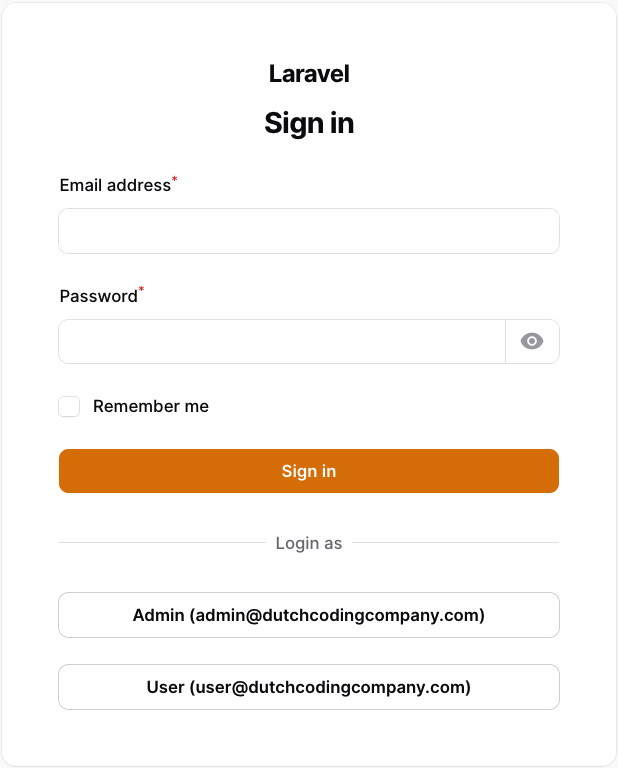
This plugin allows you to enable one-click logins for your local Filament panels, which is useful when developing a Filament project with multiple users and various roles.
#Installation
You can install the package via composer.
composer require dutchcodingcompany/filament-developer-logins
#Usage
Register the plugin in the Filament panel provider (the default file is app/Providers/Filament/AdminPanelProvider.php).
In the users method you can define the users (note: the users must exist), the key is used as a label on the login button and the value is used to search the user in the database.
// ...
->plugins([
    FilamentDeveloperLoginsPlugin::make()
        ->enabled(app()->environment('local'))
        ->users([
            'Admin' => '[email protected]',
            'User' => '[email protected]',
        ])
]);
The users() method can also be passed a closure to compute the users list at render time, for example from the database.
// ...
FilamentDeveloperLoginsPlugin::make()
    ->users(fn () => User::pluck('email', 'name')->toArray())
]);
#Customization
#enabled()
By default, the plugin is disabled. You can enable it by calling the enabled() method. I strongly suggest enabling this plugin only in the local environment. You can achieve this by using the app()->environment() method. Additionally, the enabled() method also accepts a closure if you wish to enable the plugin based on a custom condition.
Example:
// ...
FilamentDeveloperLoginsPlugin::make()
    ->enabled(fn() => app()->environment('local'))
#switchable()
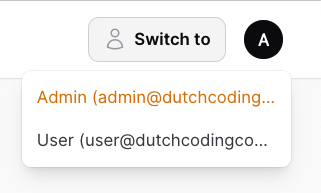
By default, a "Switch to" button is shown in the top right corner of the screen, so you can easily switch between the provided users. If you want to disable this feature, you can use the switchable() method.
// ...
FilamentDeveloperLoginsPlugin::make()
    ->switchable(false) // This also accepts a closure.
#column()
By default, the user column is set to email. If you want to use a different column, you can use the column() method.
Example:
FilamentDeveloperLoginsPlugin::make()
    ->column('name')
#modelClass()
By default, the model class is set to App\Models\User. If you want to use a different model, you can use the modelClass() method.
Example:
FilamentDeveloperLoginsPlugin::make()
    ->modelClass(Admin::class)
#redirectTo()
By default, the user will be redirected using the Filament::getUrl() method, which directs them to the dashboard. In the case of multi-tenancy, the user will also be redirected to the correct tenant. If you prefer to use a different url, you can utilize the redirectTo() method.
FilamentDeveloperLoginsPlugin::make()
    ->redirectTo('/custom-url')
Since the routes are not yet registered when the plugin is created, you need to use a closure to redirect to a named route.
FilamentDeveloperLoginsPlugin::make()
    ->redirectTo(fn () => route('custom.route'))
#Testing
composer test
#Changelog
Please see CHANGELOG for more information on what has changed recently.
#Contributing
Please see CONTRIBUTING for details.
#Security Vulnerabilities
Please review our security policy on how to report security vulnerabilities.
#Credits
#License
The MIT License (MIT). Please see License File for more information.
The author
Hello everyone, I'm Bram! A Laravel developer from the Netherlands working at Dutch Coding Company_.
Featured Plugins
A selection of plugins curated by the Filament team

Custom Dashboards
Let your users build and share their own dashboards with a drag-and-drop interface. Define your data sources in PHP and let them do the rest.
 Filament

Blueprint
Filament Blueprint is a premium Laravel Boost extension that helps AI agents produce accurate, detailed implementation plans and security reports for Filament apps.
Filament

Spotlight Pro
Browse your Filament Panel with ease. Filament Spotlight Pro adds a Spotlight like Command Palette to your Filament Panel.
 Dennis Koch

