
Resource Lock by Blendbyte
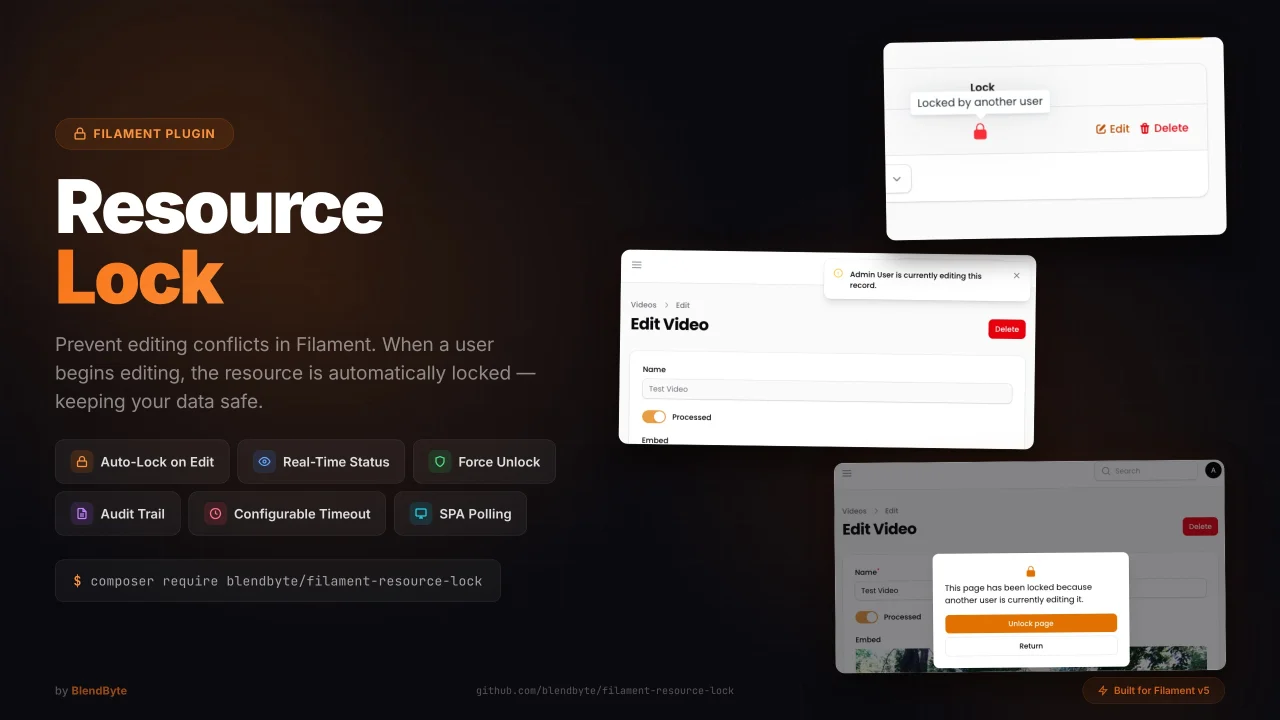
CommunityResource Lock automatically locks Filament resources when a user starts editing, preventing conflicts with real-time lock indicators, warning notifications, and force-unlock support.
 Author:
Blendbyte
Author:
Blendbyte
Package health
Automated checks of this plugin's Composer package
15 checks
- Passed: GitHub Actions pinned to SHA
- Skipped: GitLab CI includes pinned to SHA
- Passed: Open security advisories
- Passed: Dependabot PR responsiveness — No open Dependabot PRs.
- Skipped: Renovate MR responsiveness
- Passed: Dependabot or Renovate configured
- Passed: Dependency update cooldown configured
- Passed: Provides a security policy
- Passed: Abandoned or archived — No consulted source marks the package abandoned (packagist, github).
- Passed: Commit and release recency — Active: last commit 0 days ago; last release 32 days ago.
-
Failed:
composer.lock not committed by library
—
composer.lockis present in the released dist archive. View details on Plumb - Warning: Dist archive is lean
-
Passed:
Current Laravel version supported
—
Package dependencies resolve together with current Laravel
13.0. -
Passed:
Current PHP version supported
—
Constraint
^8.2supports current PHP8.5. - Skipped: Current Symfony version supported
filament/
namespace. Review the source and install at your own risk. Found
malware or an unresolved security issue the author won't
address?
Report it
.
Documentation
- Installation
- Quick Start
- Usage
- Events
- Audit Trail
- Configuration
- Publishing Assets
- Migrating from kenepa/resource-lock
- Contributing
- Maintained by Blendbyte




Filament Resource Lock is a Filament plugin that adds resource locking functionality to your site. When a user begins editing a resource, it is automatically locked to prevent other users from editing it at the same time. The resource will be automatically unlocked after a set period of time, or when the user saves or discards their changes.
Note: This package is a fork of kenepa/resource-lock, updated for Filament v5 compatibility. If you are currently using
kenepa/resource-lock, see the migration guide below.
#Installation
composer require blendbyte/filament-resource-lock
Then run the installation command to publish and run the migration:
php artisan filament-resource-lock:install
Register the plugin with a panel:
use Blendbyte\FilamentResourceLock\ResourceLockPlugin;
use Filament\Panel;

public function panel(Panel $panel): Panel
{
    return $panel
        // ...
        ->plugin(ResourceLockPlugin::make());
}
#Quick Start
#1. Add locks to your model
Add the HasLocks trait to the model you want to lock:
use Blendbyte\FilamentResourceLock\Models\Concerns\HasLocks;

class Post extends Model
{
    use HasFactory;
    use HasLocks;
}
#2. Add locks to your EditRecord page
Add the UsesResourceLock trait to your EditRecord page:
use Blendbyte\FilamentResourceLock\Resources\Pages\Concerns\UsesResourceLock;

class EditPost extends EditRecord
{
    use UsesResourceLock;

    protected static string $resource = PostResource::class;
}
That's it — editing a resource now locks it automatically.
#Usage
#Simple modal resources
For simple modal resources, use UsesSimpleResourceLock instead:
use Blendbyte\FilamentResourceLock\Resources\Pages\Concerns\UsesSimpleResourceLock;

class ManagePosts extends ManageRecords
{
    use UsesSimpleResourceLock;

    protected static string $resource = PostResource::class;
}
#Relation manager locking
To lock related records when editing them via a relation manager, add UsesRelationManagerResourceLock to your relation manager class. The related model also needs the HasLocks trait.
use Blendbyte\FilamentResourceLock\Resources\Pages\Concerns\UsesRelationManagerResourceLock;

class PostCommentsRelationManager extends RelationManager
{
    use UsesRelationManagerResourceLock;

    protected static string $relationship = 'comments';
}
When a user opens the edit modal for a related record, it is locked for the duration of the edit session and released when the modal is closed.
#Table lock indicators
Add ResourceLockColumn to any resource table to display a visual lock status indicator for each row. It shows a lock icon in primary (blue) when the record is locked by the current user, or danger (red) when locked by another user. Unlocked records show no icon.
use Blendbyte\FilamentResourceLock\Tables\Columns\ResourceLockColumn;

public static function table(Table $table): Table
{
    return $table
        ->columns([
            ResourceLockColumn::make(),
            // other columns...
        ]);
}
Add the WithResourceLockIndicator trait to the corresponding ListRecords page to eager-load the lock relationship and avoid N+1 queries:
use Blendbyte\FilamentResourceLock\Resources\Pages\Concerns\WithResourceLockIndicator;

class ListPosts extends ListRecords
{
    use WithResourceLockIndicator;

    protected static string $resource = PostResource::class;
}
When shouldDisplayResourceLockOwner() is enabled on the plugin, the column tooltip will display the lock owner's name (e.g. "Locked by John Doe"). Otherwise it falls back to "Locked by another user".
#Polling (SPA mode)
To support SPA mode, enable polling-based presence detection in the plugin:
->plugin(ResourceLockPlugin::make()
    ->usesPollingToDetectPresence()
    ->presencePollingInterval(10)
    ->lockTimeout(15)
)
Tip: Make sure the lock timeout is not lower than the polling interval — otherwise the lock may expire before the next heartbeat is sent.
Additional polling options:
pollingKeepAlive()— keeps polling alive when the tab is in the background.pollingVisible()— only polls when the browser tab is visible.
#Resource Lock Manager
The package includes a UI to view and manage all active and expired locks, and to unlock resources individually or in bulk.
#Events
The package dispatches Laravel events for every lock lifecycle transition. Events are enabled by default and can be consumed by any standard Laravel listener.
| Event | Payload |
|---|---|
ResourceLocked |
$lockable, $userId |
ResourceUnlocked |
$lockable, $userId |
ResourceLockExpired |
$lockable, $originalUserId |
ResourceLockForceUnlocked |
$lockable, $originalUserId, $actorUserId |
Register a listener in your AppServiceProvider or EventServiceProvider:
use Blendbyte\FilamentResourceLock\Events\ResourceLocked;
use Blendbyte\FilamentResourceLock\Events\ResourceUnlocked;
use Blendbyte\FilamentResourceLock\Events\ResourceLockForceUnlocked;

Event::listen(ResourceLocked::class, function (ResourceLocked $event) {
    // $event->lockable — the model that was locked
    // $event->userId   — the user who acquired the lock
});
To disable all event dispatching:
// config/filament-resource-lock.php
'events' => [
    'enabled' => false,
],
Or via the plugin fluent API:
->plugin(ResourceLockPlugin::make()
    ->enableEvents(false)
)
#Audit Trail
The audit trail records every lock lifecycle event to a resource_lock_audit table, giving you a permanent, queryable history of who locked what and when.
Audit logging is opt-in (audit.enabled defaults to false) and requires events.enabled to be true, as it is powered by the event system.
#Enabling the audit trail
Publish and run the migration (if not already done via filament-resource-lock:install):
php artisan vendor:publish --tag="filament-resource-lock-migrations"
php artisan migrate
Enable audit logging in your config:
// config/filament-resource-lock.php
'audit' => [
    'enabled' => true,
],
Or via the plugin fluent API:
->plugin(ResourceLockPlugin::make()
    ->enableAudit()
)
#Audit resource
When audit.enabled is true, a read-only Lock Audit Log resource becomes visible in your Filament panel. It displays all recorded events with a colour-coded action badge, filterable by action type and date range.
The audit resource navigation can be customised independently of the lock manager:
->plugin(ResourceLockPlugin::make()
    ->enableAudit()
    ->auditNavigationLabel('Lock History')
    ->auditNavigationIcon('heroicon-o-clock')
    ->auditNavigationGroup('Security')
    ->auditNavigationSort(3)
)
To restrict who can view the Audit Log resource, enable limited access and specify a gate:
->plugin(ResourceLockPlugin::make()
    ->enableAudit()
    ->auditLimitedAccess()
    ->auditGate('view-audit-log')
)
Or via config:
// config/filament-resource-lock.php
'audit' => [
    'enabled' => true,
    'limited_access' => true,
    'gate' => 'view-audit-log',
],
When limited_access is true, only users for whom Gate::allows($gate) returns true can view the resource. This works with any standard Laravel gate or Spatie permissions ('gate' => 'view audit log').
To enable audit logging but hide the built-in resource (e.g. you have a custom UI):
// config/filament-resource-lock.php
'audit' => [
    'enabled' => true,
    'should_register_navigation' => false,
],
#Configuration
#Read-only mode
By default, when a user opens a resource that is locked by someone else, a blocking modal is shown. Enable read-only mode to show a warning banner instead, while keeping the page accessible for viewing:
->plugin(ResourceLockPlugin::make()
    ->readOnlyWhenLocked()
)
When read-only mode is active:
- All form fields are disabled.
- Save, cancel, and delete actions are hidden.
- A persistent warning banner is displayed, optionally showing the lock owner's name when
shouldDisplayResourceLockOwner()is enabled. - If the user has permission to force-unlock, they can do so from the banner and immediately take over editing.
Or configure it via the config file:
// config/filament-resource-lock.php
'read_only_mode' => [
    'enabled' => true,
],
#Per-model lock timeout
Declare a $lockTimeout property (in seconds) on any model using HasLocks to override the global default for that model:
use Blendbyte\FilamentResourceLock\Models\Concerns\HasLocks;

class Post extends Model
{
    use HasLocks;

    protected int $lockTimeout = 30; // seconds, overrides the global default
}
The global default (lock_timeout in config, or ->lockTimeout() on the plugin) is used for all models that do not declare their own property.
#Access control
Restrict access to the Unlock button or resource manager using a gate or Spatie permission:
->plugin(ResourceLockPlugin::make()
    ->limitedAccessToResourceLockManager()
    ->gate('unlock')
)
#Custom models
->plugin(ResourceLockPlugin::make()
    ->userModel(\App\Models\CustomUser::class)
    ->resourceLockModel(\App\Models\CustomResourceLock::class)
)
#Custom lock owner display
Create a custom action class extending GetResourceLockOwnerAction:
namespace App\Actions;

use Blendbyte\FilamentResourceLock\Actions\GetResourceLockOwnerAction;

class CustomResourceLockOwnerAction extends GetResourceLockOwnerAction
{
    public function execute($userModel): string|null
    {
        return $userModel->email;
    }
}
Register it in the plugin:
->plugin(ResourceLockPlugin::make()
    ->resourceLockOwnerAction(\App\Actions\CustomResourceLockOwnerAction::class)
)
#Overriding the return URL
Override resourceLockReturnUrl() to change where the Return button redirects:
public function resourceLockReturnUrl(): string
{
    return route('dashboard');
}
#Scheduled auto-clear
The package automatically registers a scheduled task that runs filament-resource-lock:clear-expired --force every hour. This is enabled by default (opt-out).
To disable it and manage the schedule yourself:
// config/filament-resource-lock.php
'schedule' => [
    'auto_clear_expired' => false,
],
Then register it manually with whatever frequency suits your app:
// app/Console/Kernel.php  (or a ServiceProvider using Schedule)
$schedule->command('filament-resource-lock:clear-expired --force')->everyThirtyMinutes();
Note: Laravel's scheduler requires a cron entry on your server:
* * * * * php /path/to/artisan schedule:run >> /dev/null 2>&1
#Publishing Assets
# Migrations
php artisan vendor:publish --tag="filament-resource-lock-migrations"
php artisan migrate

# Views
php artisan vendor:publish --tag="filament-resource-lock-views"
#Migrating from kenepa/resource-lock
This fork introduces the following breaking changes:
-
Composer package — replace
kenepa/resource-lockwithblendbyte/filament-resource-lock -
PHP namespace — find and replace
Kenepa\ResourceLockwithBlendbyte\FilamentResourceLockacross your application -
Config file — the config was renamed from
resource-lock.phptofilament-resource-lock.php. Re-publish if you have a customised config:php artisan vendor:publish --tag="filament-resource-lock-config" --force -
Artisan commands — command signatures changed from
resource-lock:*tofilament-resource-lock:*(e.g.filament-resource-lock:install) -
Filament version — this package requires Filament v5. The original
kenepa/resource-locktargets Filament v3/v4.
Quick steps:
composer remove kenepa/resource-lock
composer require blendbyte/filament-resource-lock
php artisan filament-resource-lock:install
Then update all use Kenepa\ResourceLock\... import statements to use Blendbyte\FilamentResourceLock\....
#Contributing
Please see GitHub releases for changelog information.
#Maintained by Blendbyte

Blendbyte builds cloud infrastructure, web apps, and developer tools.
We've been shipping software to production for 20+ years.
This package runs in our own stack, which is why we keep it maintained.
Issues and PRs get read. Good ones get merged.
The author
From the same author
Featured Plugins
A selection of plugins curated by the Filament team

Compact Theme
A theme that makes data-heavy panels easier to scan by fitting more useful information on each screen.
 Filament

Advanced Tables (formerly Filter Sets)
Supercharge your tables with powerful features like user-customizable views, quick filters, multi-column sorting, advanced table searching, convenient view management, and more. Compatible with Resource Panel Tables, Relation Managers, Table Widgets, and Table Builder!
 Kenneth Sese

Soft Theme
A theme that gives panels a warm, approachable look with rounded shapes, gentle colors, and serif headings.
Filament

