
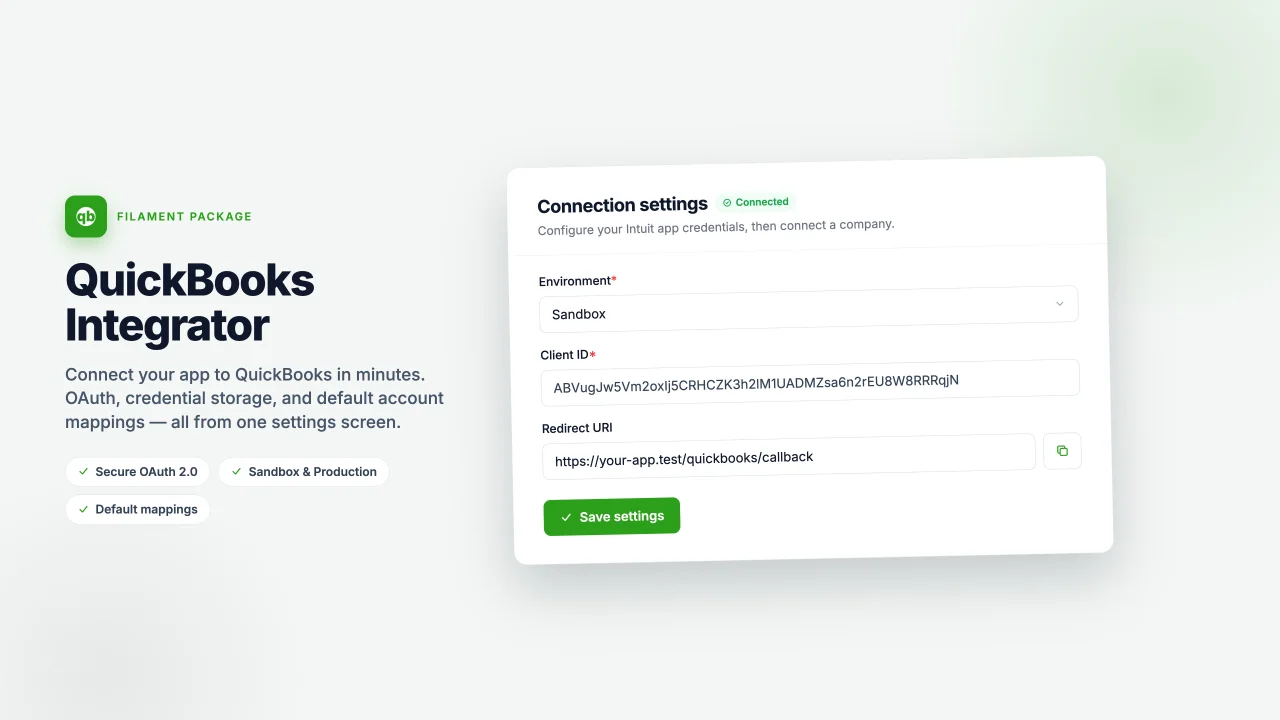
Quickbooks integrator by Better Futures Studio
Community- Connect your Filament app to QuickBooks Online to automatically sync customers, invoices, and payments in real time. - Integrate QuickBooks Online with your Filament panel to keep accounting records synchronized across both systems. - A seamless QuickBooks Online integration for Filament that syncs invoices, customers, and payments between your app and your accounting software.
 Author:
Better Futures Studio
Author:
Better Futures Studio
Package health
Automated checks of this plugin's Composer package
15 checks
- Failed: GitHub Actions pinned to SHA — View details on Plumb
- Skipped: GitLab CI includes pinned to SHA
- Passed: Open security advisories
- Passed: Dependabot PR responsiveness — No open Dependabot PRs.
- Skipped: Renovate MR responsiveness
- Failed: Dependabot or Renovate configured — No dependency updater configuration found. View details on Plumb
- Skipped: Dependency update cooldown configured
- Failed: Provides a security policy — View details on Plumb
- Passed: Abandoned or archived — No consulted source marks the package abandoned (packagist, github).
- Passed: Commit and release recency — Active: last commit 3 days ago; last release 3 days ago.
-
Passed:
composer.lock not committed by library
—
composer.lockis absent from the released dist archive. - Passed: Dist archive is lean
-
Passed:
Current Laravel version supported
—
Package dependencies resolve together with current Laravel
13.0. -
Passed:
Current PHP version supported
—
Constraint
^8.2supports current PHP8.5. - Skipped: Current Symfony version supported
filament/
namespace. Review the source and install at your own risk. Found
malware or an unresolved security issue the author won't
address?
Report it
.
Documentation


A Filament panel plugin that connects your app to QuickBooks Online. It ships a settings page to configure and OAuth-connect a company, and a Qbo facade to work with invoices, payments, credit notes and customers.
#Installation
composer require bocapro/quickbooks-connector
Publish and run the migration:
php artisan vendor:publish --tag="quickbooks-connector-migrations"
php artisan migrate
Optionally publish the config:
php artisan vendor:publish --tag="quickbooks-connector-config"
Register the plugin on your panel:
use Bocapro\QuickbooksConnector\QuickbooksConnectorPlugin;

$panel->plugin(QuickbooksConnectorPlugin::make());
#Configuring & connecting
There is nothing to put in .env. Everything is managed from the plugin's settings page in your panel:
- Open the QuickBooks Online page under the Integrations navigation group.
- Choose the environment (Sandbox or Production) and paste the Client ID and Client secret from your Intuit developer app, then Save. The client secret is stored encrypted at rest.
- Copy the Redirect URI shown on the page and register it verbatim on your Intuit app. It is fixed by the package's callback route and is not editable.
- Click Connect to QuickBooks. After authorizing on Intuit you'll be redirected back and the company tokens are stored (encrypted). Tokens refresh automatically.
#Usage
use Bocapro\QuickbooksConnector\Facades\Qbo;

// Read
$invoice   = Qbo::invoices()->find(130);
$open      = Qbo::invoices()->query("WHERE Balance > '0'");
$customers = Qbo::customers()->all();

// Create
$invoice = Qbo::invoices()->create([
    'Line' => [/* ... */],
    'CustomerRef' => ['value' => '1'],
]);

// Update
$invoice = Qbo::invoices()->find(130);
Qbo::invoices()->update($invoice, ['PrivateNote' => 'Paid in full']);

// Same API for payments and credit notes
Qbo::payments()->all();
Qbo::creditNotes()->find(5);

if (Qbo::isConnected()) {
    // ...
}
Each of invoices, payments, creditNotes, customers exposes find(), query(), all(), create(), update() and delete().
#Default mappings
Once a company is connected, the settings page shows a Default mappings section. Pick a default item (used on invoice / credit-note lines), a default income account, and a default deposit-to account (used when recording payments). These are pulled live from the connected company's Chart of Accounts and Items.
When a default is set, it is applied automatically to any create() payload that omits the corresponding reference:
// No ItemRef on the line — the default item is filled in for you.
Qbo::invoices()->create([
    'CustomerRef' => ['value' => '1'],
    'Line' => [[
        'Amount' => 100.00,
        'DetailType' => 'SalesItemLineDetail',
        'SalesItemLineDetail' => ['Qty' => 1, 'UnitPrice' => 100.00],
    ]],
]);

// No DepositToAccountRef — the default deposit account is filled in.
Qbo::payments()->create([
    'CustomerRef' => ['value' => '1'],
    'TotalAmt' => 100.00,
]);
You can also read the reference data yourself for building your own selects:
Qbo::items()->options();               // ['3' => 'Concrete', ...]
Qbo::accounts()->options('Income');    // income accounts only
Qbo::accounts()->options('Bank');      // bank accounts only
Anything you pass explicitly always wins over the configured default.
#Testing
composer test
#License
The MIT License (MIT). Please see the License File for more information.
The author
From the same author
Featured Plugins
A selection of plugins curated by the Filament team

Noir Theme
A theme that gives panels a focused, refined look with near-black surfaces, crisp actions, and restrained color.
 Filament

Spotlight Pro
Browse your Filament Panel with ease. Filament Spotlight Pro adds a Spotlight like Command Palette to your Filament Panel.
 Dennis Koch

Custom Fields
Eliminate custom field migrations forever. Let your users create and manage form fields directly in Filament admin panels with 20+ built-in field types, validation, and zero database changes.
 Relaticle
