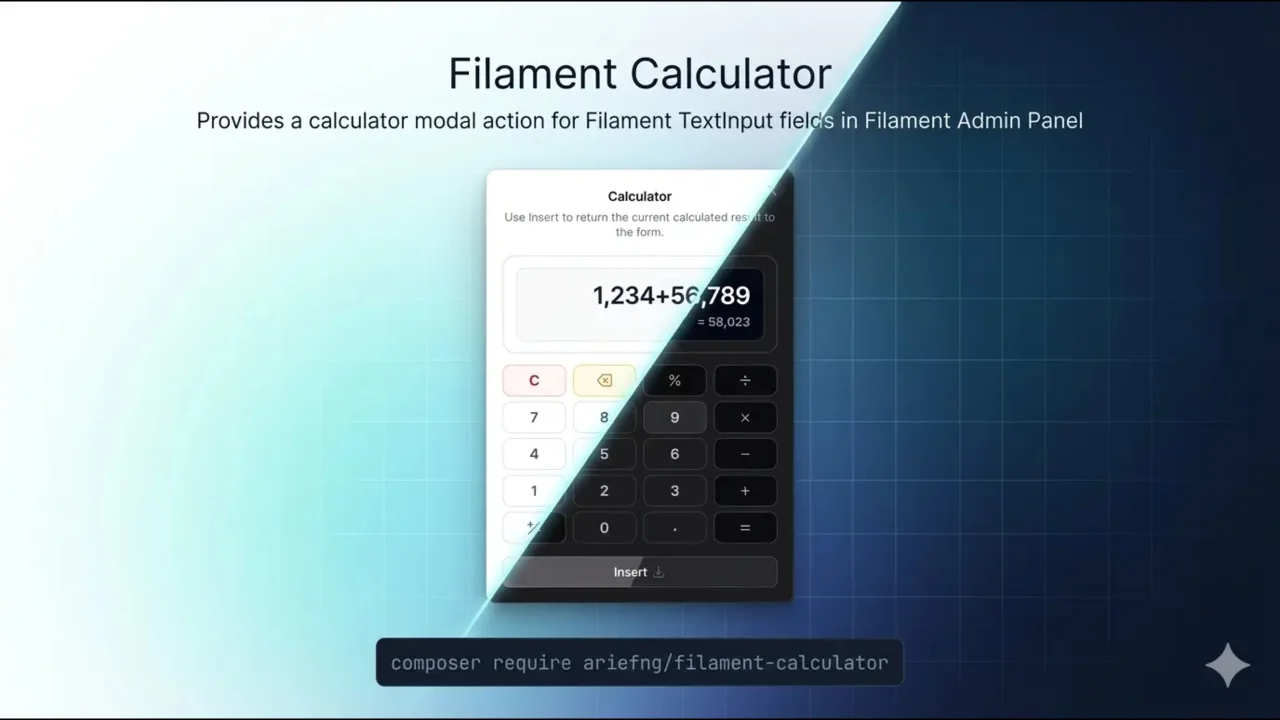
Calculator Plugin
CommunityProvides a calculator modal action for Filament TextInput fields in Filament Admin Panel
 Author:
Arief Ng
Author:
Arief Ng
Package health
BetaAutomated checks of this plugin's Composer package
15 checks
- Failed: GitHub Actions pinned to SHA — View details on Plumb
- Skipped: GitLab CI includes pinned to SHA
- Passed: Open security advisories
- Passed: Dependabot PR responsiveness — No open Dependabot PRs.
- Skipped: Renovate MR responsiveness
- Failed: Dependabot or Renovate configured — No dependency updater configuration found. View details on Plumb
- Skipped: Dependency update cooldown configured
- Passed: Provides a security policy
- Passed: Abandoned or archived — No consulted source marks the package abandoned (packagist, github).
- Passed: Commit and release recency — Active: last commit 116 days ago; last release 116 days ago.
-
Passed:
composer.lock not committed by library
—
composer.lockis absent from the released dist archive. - Passed: Dist archive is lean
-
Passed:
Current Laravel version supported
—
Package dependencies resolve together with current Laravel
13.0. -
Passed:
Current PHP version supported
—
Constraint
^8.2supports current PHP8.5. - Skipped: Current Symfony version supported
filament/
namespace. Review the source and install at your own risk. Found
malware or an unresolved security issue the author won't
address?
Report it
.
Documentation
- What this plugin tries to solve
- Features
- Requirements
- Installation
- Quick Start
- Usage
- Configuration
- Testing
- Credits
Provides a calculator modal action for Filament TextInput fields in Filament Admin Panel.
#What this plugin tries to solve
When filling numeric fields in Filament Admin Panel forms, users often need to perform quick calculations—but the system itself doesn’t provide a built-in way to do that.
-
🧮 Dependency on External Calculators
Users frequently open phone or desktop calculators just to compute simple values before inputting them. -
🔄 Context Switching
Moving in and out of the system interrupts workflow and reduces efficiency. -
❌ Input Friction
Calculated values must be manually transferred, increasing the chance of typo or incorrect input. -
🧠 Cognitive Load
Users must remember intermediate results while switching between tools.
This plugin solves a very specific problem:
👉 eliminating the need for external calculators when entering numeric values.
By bringing a calculator directly into the input field, users can calculate and input values in one place—faster, simpler, and with fewer mistakes.

#Features
- 🖼️ Calculator Modal - Full-featured calculator with arithmetic, percentage, sign toggle, and live result preview
- 🔎 Readable Display - Shows locale-aware decimal and thousands separators while typing in the calculator modal
- 🔁 State Aware Reopen - Reopens with the current field value, or falls back to a configurable initial value
- 🔧 Flexible Attachment - Attach as prefix or suffix action to any TextInput
- ⚙️ Configurable - Customize icon, color, modal width, decimal separator, and more
- 🌐 Multi-language - Built-in translations for English and Indonesian
- 🔢 Digit Limit - Configurable maximum digits for input validation
- ⚡ Zero Configuration - Works out of the box with sensible defaults
- 🎨 Responsive - Works seamlessly on desktop and mobile
#Requirements
- Filament 4.0 or 5.0
#Installation
Install the package via Composer:
composer require ariefng/filament-calculator
Publish the package configuration (optional):
php artisan vendor:publish --tag="filament-calculator-config"
Publish the package translations (optional):
php artisan vendor:publish --tag="filament-calculator-translations"
Currently, the package ships with translations for English (en) and Indonesian (id) only.
#Quick Start
Register the plugin in your Filament panel, then attach the calculator action to your form field.
use Ariefng\FilamentCalculator\CalculatorPlugin;
use Filament\Panel;

public function panel(Panel $panel): Panel
{
    return $panel
        ->plugin(CalculatorPlugin::make());
}
#Usage
Attach the calculator action to a TextInput using prefixAction() or suffixAction():
use Ariefng\FilamentCalculator\Actions\CalculatorAction;
use Filament\Forms\Components\TextInput;

TextInput::make('amount')
    ->suffixAction(CalculatorAction::make());

TextInput::make('amount')
    ->prefixAction(CalculatorAction::make());
Since CalculatorAction extends Filament's default Action, we can use overlayParentActions methods on it. If you place the calculator inside another Filament modal or slide-over form, you may want the calculator modal to open on top of the parent modal instead of closing and reopening the parent. Filament documents this pattern here:
Example:
TextInput::make('amount')
    ->suffixAction(
        CalculatorAction::make()
            ->overlayParentActions()
    );
#Configuration
The published config file looks like this:
return [
    'max_digits' => 15,

    'initial_value' => 'field',

    'decimal_separator' => 'locale',

    'operator_buttons' => [
        'color' => 'gray',
    ],

    'action' => [
        'icon' => 'heroicon-o-calculator',
        'color' => 'gray',
        'modal_width' => 'sm',
    ],

    'insert_action' => [
        'color' => 'gray',
        'icon' => 'heroicon-o-arrow-down-tray',
        'icon_position' => 'after',
    ],
];
Available options:
max_digits: maximum numeric digits allowed in the calculator.initial_value: controls how the calculator starts. Use'field'to preload the current field value and fall back to0when blank, or use0/'zero'to always start from0. Default:'field'.decimal_separator: controls the decimal separator used by the calculator. Use'locale'to follow the current app locale automatically,'.'/'dot'to force a dot, or','/'comma'to force a comma.operator_buttons.color: color alias used by the+,-,*,/, and=buttons. Default:gray.action.icon: calculator trigger icon. Default:heroicon-o-calculator.action.color: calculator trigger color. Default:gray.action.modal_width: modal width. Default:sm.insert_action.color: insert button color. Default:gray.insert_action.icon: insert button icon. Default:heroicon-o-arrow-down-tray.insert_action.icon_position: insert button icon position. Default:after.
Example:
return [
    'max_digits' => 12,

    'initial_value' => 'zero',

    'decimal_separator' => ',',

    'operator_buttons' => [
        'color' => 'warning',
    ],

    'action' => [
        'icon' => 'heroicon-o-bolt',
        'color' => 'success',
        'modal_width' => 'md',
    ],

    'insert_action' => [
        'color' => 'danger',
        'icon' => 'heroicon-o-arrow-left',
        'icon_position' => 'before',
    ],
];
#Testing
composer test
#Credits
This plugin was built entirely with Codex.
Featured Plugins
A selection of plugins curated by the Filament team

Blueprint
Filament Blueprint is a premium Laravel Boost extension that helps AI agents produce accurate, detailed implementation plans and security reports for Filament apps.
 Filament

Custom Dashboards
Let your users build and share their own dashboards with a drag-and-drop interface. Define your data sources in PHP and let them do the rest.
Filament

Spotlight Pro
Browse your Filament Panel with ease. Filament Spotlight Pro adds a Spotlight/Raycast like Command Palette to your Filament Panel.
 Dennis Koch

