LocationPickr Field
Just a simple location picker field within Filament using Google Maps.
 Author:
Arbër Mustafa
Author:
Arbër Mustafa
Documentation
- Installation
- Setting your Google Maps API Key
- Preparing the models
- Usage
- Changelog
- Contributing
- Security Vulnerabilities
- Credits
- License
This package provides just a simplified location picker field within Filament using Google Maps based on the excellent work of Hugh Messenger.
#Installation
You can install the package into a Laravel app that uses Filament via composer::
composer require arbermustafa/filament-locationpickr-field:"^2.0.0"
Filament V2 - if you are using Filament v2.x, you can use 1.x branch.
You can publish the config file with:
php artisan vendor:publish --tag=filament-locationpickr-field-config
The config file contains default global customization options for map rendering, like: api key, default location, etc.
Optionally, you can publish the view using:
php artisan vendor:publish --tag=filament-locationpickr-field-views
#Setting your Google Maps API Key
All use of the Google Maps API requires an API key. If you don't have one, refer to Google's documentation.
Once you have a key, either add it to your .env file as:
GMAP_API=your_map_api_key_here
... or publish and edit the filament-locationpickr-field.php config file.
#Preparing the models
Add a location column to any model migration schema used for map data
...

Schema::table('table_name', function (Blueprint $table) {
    $table->json('location')->nullable();
});

...
and add the column to the model fillable array
...

protected $fillable = [
    ...
    'location',
];
If you have separate columns for lat and lng you can use a computed property on any model being used for map data and use a mutator which converts between separate lat and lng fields on your table, and a Google Point style array of 'lat' and 'lng' keys.
...

protected $appends = [
    ...
    'location',
];

...

public function location(): Attribute
{
    return Attribute::make(
        get: fn ($value, $attributes) => json_encode([
            'lat' => (float) $attributes['lat'],
            'lng' => (float) $attributes['lng'],
        ]),
        set: fn ($value) => [
            'lat' => $value['lat'],
            'lng' => $value['lng'],
        ],
    );
}

...
#Usage
#Form field
The form field can be used with no options, by simply adding this to your Filament Form schema:
use ArberMustafa\FilamentLocationPickrField\Forms\Components\LocationPickr;
...

    ->schema([
        ...
        LocationPickr::make('location'),
        ....
    ]);
...
The name used in the make() function must be the one you set up as your model's column/computed location property.
#Full options
The full set of options is as follows. All option methods support closures, as well as direct values.
use ArberMustafa\FilamentLocationPickrField\Forms\Components\LocationPickr;
...

    ->schema([
        ...
        LocationPickr::make('location')
            ->mapControls([
                'mapTypeControl'    => true,
                'scaleControl'      => true,
                'streetViewControl' => true,
                'rotateControl'     => true,
                'fullscreenControl' => true,
                'zoomControl'       => false,
            ])
            ->defaultZoom(5)
            ->draggable()
            ->clickable()
            ->height('40vh')
            ->defaultLocation([41.32836109345274, 19.818383186960773])
            ->myLocationButtonLabel('My location'),
        ....
    ]);
...
#Infolist entry
The infolist entry can be used with no options, by simply adding this to your Filament Infolist schema:
use ArberMustafa\FilamentLocationPickrField\Infolists\Components\LocationPickr;
...

    ->schema([
        ...
        LocationPickr::make('location'),
        ....
    ]);
...
The name used in the make() function must be the one you set up as your model's column/computed location property. The components accepts options like defaultZoom, defaultLocation and height.
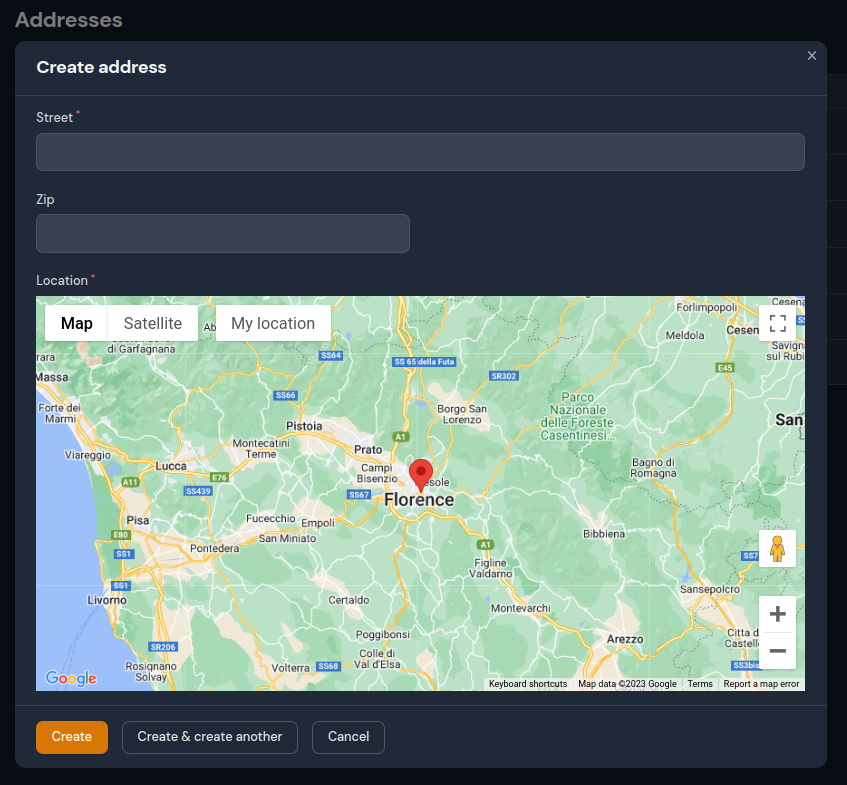
#Example usage in simple resource
#Changelog
Please see CHANGELOG for more information on what has changed recently.
#Contributing
If you want to contribute to this package, you may want to test it in a real Filament project:
- Fork this repository to your Github account.
- Create a Filament app locally.
- Clone your fork in your Filament app root directoy.
- In the
/filament-locationpickr-fielddirectory, create a branch for your fix/improvement, e.g.fix/pickr-field.
Install the package in your app's composer.json:
"require": {
    "arbermustafa/filament-locationpickr-field": "dev-fix/pickr-field as dev-main",
},
"repositories": [
    {
        "type": "path",
        "url": "./filament-locationpickr-field"
    }
]
Now run composer update.
#Security Vulnerabilities
Please review our security policy on how to report security vulnerabilities.
#Credits
#License
The MIT License (MIT). Please see License File for more information.
The author
From the same author
Featured Plugins
A selection of plugins curated by the Filament team

Custom Dashboards
Let your users build and share their own dashboards with a drag-and-drop interface. Define your data sources in PHP and let them do the rest.
 Filament

Advanced Tables (formerly Filter Sets)
Supercharge your tables with powerful features like user-customizable views, quick filters, multi-column sorting, advanced table searching, convenient view management, and more. Compatible with Resource Panel Tables, Relation Managers, Table Widgets, and Table Builder!
 Kenneth Sese

Spotlight Pro
Browse your Filament Panel with ease. Filament Spotlight Pro adds a Spotlight/Raycast like Command Palette to your Filament Panel.
 Dennis Koch

