ZKT
CommunityDiscovering, connecting to, and managing ZKTeco biometric devices within your Filament admin panel.
filament/
namespace. Review the source and install at your own risk. Found
malware or an unresolved security issue the author won't
address?
Report it
.
 Author:
Akram Ghaleb
Author:
Akram Ghaleb
Documentation
- 🧭 Table of Contents
- Introduction
- Video
- Features
- Screenshots
- Requirements
- Compatibility Matrix
- Licensing (Commercial / Private)
- Installation (Private via AnyStack)
- Panel Integration (Filament 5)
- Customization
- Theme / Assets
- Publish & Migrate
- Configuration
- What You Get
- Quick Usage
- Testing
- Troubleshooting
- Security & Vulnerabilities
- Changelog
- Contributing
- Credits
- License
- Code Distribution
- Questions?





#🧭 Table of Contents
- Introduction
- Video
- Features
- Screenshots
- Requirements
- Compatibility Matrix
- Licensing (Commercial / Private)
- Installation (Private via AnyStack)
- Panel Integration (Filament 5)
- Customization
- Theme / Assets
- Publish & Migrate
- Configuration
- What You Get
- Quick Usage
- Testing
- Troubleshooting
- Security & Vulnerabilities
- Changelog
- Contributing
- Credits
- License
- Code Distribution
- Questions?
#Introduction
Discover, connect to, and manage ZKTeco biometric devices from your Filament admin panel.
#Video
#Features
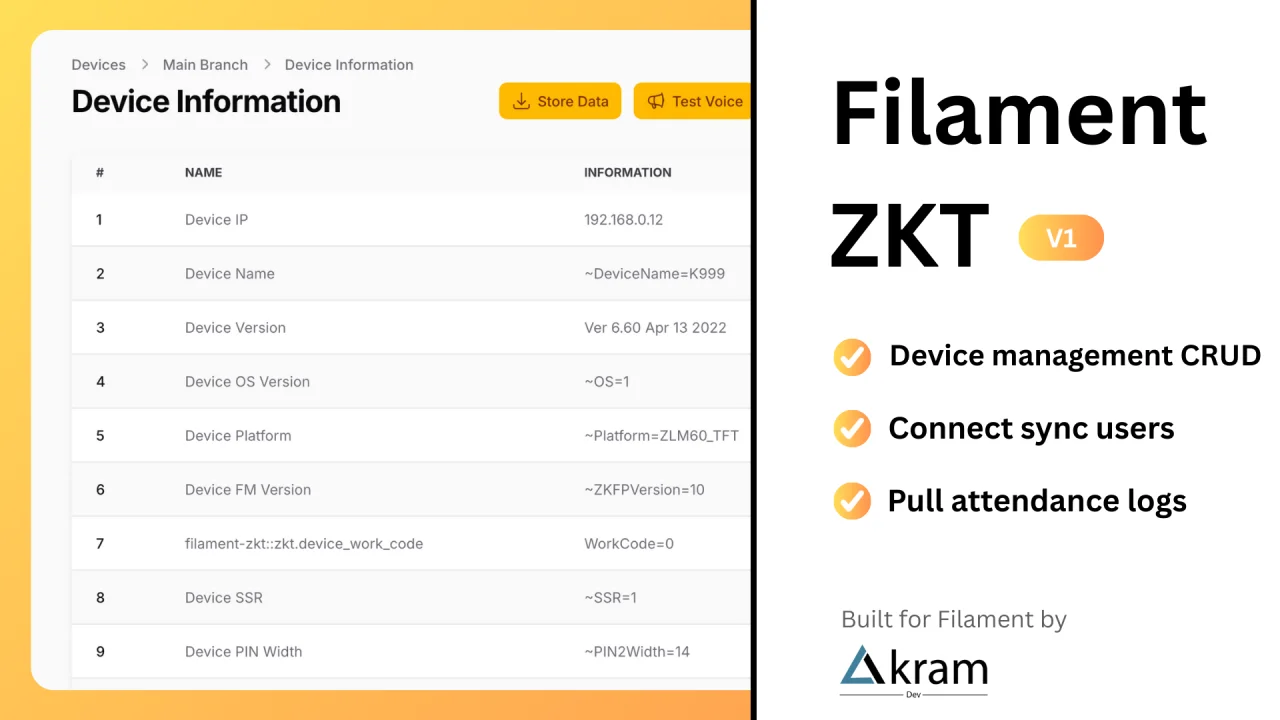
- Device Management (CRUD)
- Sync device users
- Pull attendance log
- Multilingual UI (32 locales): Arabic (ar), Kurdish Sorani (ckb), Czech (cs), German (de), English (en), Spanish (es), Persian/Farsi (fa), French (fr), Hungarian (hu), Armenian (hy), Indonesian (id), Italian (it), Japanese (ja), Georgian (ka), Khmer (km), Korean (ko), Kurdish Kurmanji (ku), Latvian (lv), Dutch (nl), Polish (pl), Portuguese—Brazil (pt_BR), Portuguese—Portugal (pt_PT), Romanian (ro), Russian (ru), Slovak (sk), Albanian (sq), Turkish (tr), Ukrainian (uk), Vietnamese (vi), Chinese—Simplified (zh_CN), Chinese—Hong Kong (zh_HK), Chinese—Traditional (zh_TW).
#Screenshots
Devices List
Edit Device
Device Information
Device Users
User Information
Attendance Log
#Requirements
- PHP 8.2+
- Laravel 11.28+
- Filament 5.x (Panels) + Livewire v4
- Tailwind CSS v4.0+
- MySQL 8.x
ext-sockets(for TCP/UDP communication)- Node 18+ (for building your Filament theme)
#Compatibility Matrix
| Package | PHP | Laravel | Filament | Livewire |
|---|---|---|---|---|
akramghaleb/filament-zkt ^2.0 |
8.2+ | 11.28+ | 5.x | 4.x |
akramghaleb/filament-zkt ^1.0 |
8.3+ | 12.x | 4.x | 3.x |
Using Filament 4? See the v1.x documentation for Filament 4 specific instructions.
#Licensing (Commercial / Private)
- This package is not open-source; it is licensed under a commercial agreement.
- Redistribution, resale, or public publishing is strictly prohibited.
- Distributed via private repositories (GitHub or Private Packagist).
For licensing/support: support@akramdev.com
#Installation (Private via AnyStack)
Filament ZKT uses AnyStack to handle payments, licensing, and package distribution.
During purchase, AnyStack will provide you with a license key and ask you to activate it by assigning a domain.
This domain should be where your final project will live (e.g., myproject.com).
You’ll use the same domain for both local development and production environments.
Once your license is activated, you can install the package with Composer.
💡 Tip: If you missed activation or need to add more domains,
go to your AnyStack account → Transactions → View Details for the Filament ZKT product.
💡 You’ll need both your license key and your domain to authenticate installation.
#1️⃣ Add the Repository to composer.json
{
  "repositories": [
    {
      "type": "composer",
      "url": "https://filament-zkt.composer.sh"
    }
  ],
}
#2️⃣ Require the Package
composer require akramghaleb/filament-zkt
When prompted for authentication:
Example:
Username: my_email@gmail.com
Password: 8c21df8f-6273-4932-b4ba-8bcc723ef500:my_domain.com
The license key and domain must be separated by a colon (:).
Example:8c21df8f-6273-4932-b4ba-8bcc723ef500:my_domain.com
⚠️ If you get a 402 error, you likely forgot the colon (
:) or entered the wrong domain.
#3️⃣ Verify Installation
Once authenticated, Composer will fetch the package and install it like any other dependency.
You can confirm with:
php artisan package:discover
#4️⃣ Proceed with Filament Setup
Continue with:
#✅ Notes
- License key = provided by AnyStack at purchase.
- Domain = same used for activation in AnyStack.
- Username = your AnyStack account email.
- Repository endpoint:
https://filament-zkt.composer.sh.
#Panel Integration (Filament 5)
use AkramGhaleb\FilamentZkt\FilamentZktPlugin;
use Filament\Panel;

// app/Providers/Filament/AdminPanelProvider.php
public function panel(Panel $panel): Panel
{
    return $panel
        ->plugins([
            FilamentZktPlugin::make(),
        ]);
}
#Customization
You can customize navigation labels, icons, order, and whether each area appears in the sidebar. Add the following to your Filament panel provider:
use AkramGhaleb\FilamentZkt\FilamentZktPlugin;
use Filament\Panel;
use Filament\Support\Icons\Heroicon;

// app/Providers/Filament/AdminPanelProvider.php
public function panel(Panel $panel): Panel
{
    return $panel
        ->plugins([
            FilamentZktPlugin::make()
                ->navigationGroup('ZKT')
                // Devices
                ->devicesIcon(Heroicon::DeviceTablet)
                ->devicesModelLabel('Device')
                ->devicesNavigationSort(1)
                ->devicesPluralModelLabel('Devices')
                ->devicesRegisterNavigation(true) // false if you want to hide devices

                // Device Users
                ->deviceUsersIcon(Heroicon::OutlinedUserGroup)
                ->deviceUsersModelLabel('Device User')
                ->deviceUsersNavigationSort(2)
                ->deviceUsersPluralModelLabel('Device Users')
                ->deviceUsersRegisterNavigation(true) // false if you want to hide device users

                // Attendance Log
                ->logsIcon(Heroicon::DocumentText)
                ->logsModelLabel('Log')
                ->logsNavigationSort(3)
                ->logsPluralModelLabel('Attendance Log')
                ->logsRegisterNavigation(true), // false if you want to hide device users
        ]);
}
#What each method does
| Method | Description | Example values |
|---|---|---|
->navigationGroup('...') |
Places all plugin navigation items under the given Navigation Group. If the group doesn’t exist, Filament will create it. | 'ZKT' |
->devicesIcon(...) |
Sets the navigation icon for Devices. | Heroicon::DeviceTablet or 'heroicon-o-device-tablet' |
->deviceUsersIcon(...) |
Sets the navigation icon for Device Users. | Heroicon::OutlinedUserGroup or 'heroicon-o-user-group' |
->logsIcon(...) |
Sets the navigation icon for Attendance Log. | Heroicon::DocumentText or 'heroicon-o-document-text' |
->devicesModelLabel('...') |
Singular label used in UI for Device. | 'Device' |
->devicesPluralModelLabel('...') |
Plural label used in UI for Devices. | 'Devices' |
->deviceUsersModelLabel('...') |
Singular label for a Device User. | 'Device User' |
->deviceUsersPluralModelLabel('...') |
Plural label for Device Users. | 'Device Users' |
->logsModelLabel('...') |
Singular label for a Log. | 'Log' |
->logsPluralModelLabel('...') |
Plural label for Attendance Log section. | 'Attendance Log' |
->devicesNavigationSort(int) |
Sidebar order for Devices (lower = higher). | 1 |
->deviceUsersNavigationSort(int) |
Sidebar order for Device Users. | 2 |
->logsNavigationSort(int) |
Sidebar order for Attendance Log. | 3 |
->devicesRegisterNavigation(bool) |
Show/Hide Devices in sidebar. | true (show) / false (hide) |
->deviceUsersRegisterNavigation(bool) |
Show/Hide Device Users in sidebar. | true / false |
->logsRegisterNavigation(bool) |
Show/Hide Attendance Log in sidebar. | true / false |
Notes
- You can pass either the
Heroiconenum or a Heroicons string (e.g.'heroicon-o-document-text') to the*Icon()methods.*NavigationSort()only affects ordering within the same navigation group.- Hiding navigation does not disable routes or permissions; it only removes the sidebar entry.
#Theme / Assets
Required if using Filament Panels with custom Blade components.
- Create a custom theme (per Filament docs).
- Add plugin view paths:
/* resources/css/filament/admin/theme.css */
@source '../../../../vendor/akramghaleb/filament-zkt/resources/**/*.blade.php';
- Rebuild:
npm install
npm run build
#Publish & Migrate
You can publish and run the migrations with:
php artisan vendor:publish --tag="filament-zkt-migrations"
php artisan migrate
You can publish the config file with:
php artisan vendor:publish --tag="filament-zkt-config"
Optionally, you can publish the views using
php artisan vendor:publish --tag="filament-zkt-views"
#Configuration
The config file is located at config/filament-zkt.php.
You can customize the settings as needed.
return [
    'port' => env('ZKT_PORT', 4370),
    'timeout' => env('ZKT_TIMEOUT', 1),
];
#What You Get
- Device Resource (CRUD)
- Actions: Connect / Sync Users / Pull Attendance
- Pages: Attendance Log, Device Users, Reports
- Relation Managers: Device Users ↔ Devices, Logs ↔ Devices
- Translations
#Quick Usage
- Open Filament → Devices
- Add a device (IP , Name, etc.)
- Use actions “Store Data”, “Test Voice”, “Restart”, “Shutdown”, “Store & Clear”
#Testing
composer test
#Troubleshooting
| Issue | Fix |
|---|---|
| Theme styles missing | Check @source path, rebuild assets |
| Device not connecting | Verify IP/port/firewall, increase timeout |
| Policy denied | Ensure policy is registered or auto-discovered |
#Security & Vulnerabilities
Report privately via support@akramdev.com (include Laravel & Filament versions, logs, and repro steps).
#Changelog
Please see CHANGELOG for more information on what has changed recently.
#Contributing
Users with active licenses may access the private repo to contribute by visiting the Licenses tab of your AnyStack account.
#Credits
#License
#🔹 Single License
The Single License grants you (the Licensee) permission to use Filament ZKT in one production project hosted on a single domain or subdomain.
Typical examples include a personal website or a project built for a single client.
If you intend to integrate Filament ZKT into a SaaS or multi-tenant application, you will need an Unlimited or Lifetime license.
- Permits access for up to 5 developers (employees or contractors).
- Includes 1 year of updates and bug fixes from the date of purchase.
- After expiration, you may continue using the last version available before your license ended.
- You can renew at a discounted rate to regain access to updates and new features.
#🔸 Unlimited License
The Unlimited License allows you to use Filament ZKT on unlimited domains and subdomains, including SaaS platforms and multi-client projects.
- Permits access for up to 25 developers.
- No limit on the number of end-users or clients.
- Includes 1 year of updates and bug fixes from the date of purchase.
- After expiration, you may continue using the last version before expiration or renew at a discount for continued updates and new features.
#🟢 Lifetime License
The Lifetime License provides the same permissions as the Unlimited License with lifetime updates — no renewals required.
- Use on unlimited domains, including SaaS.
- Up to 25 developers may access and use the product.
- Receive updates, features, and bug fixes for the lifetime of Filament ZKT.
- No restrictions on the number of end-users.
#⚖️ Summary
| License Type | Domains | Developers | Updates Duration | SaaS Allowed |
|---|---|---|---|---|
| Single | 1 | 5 | 1 year | ❌ No |
| Unlimited | Unlimited | 25 | 1 year | ✅ Yes |
| Lifetime | Unlimited | 25 | Lifetime | ✅ Yes |
For license upgrades or renewals, please contact
#Code Distribution
None of Filament ZKT’s licenses permit the public distribution of its source code.
You may not include or redistribute any part of Filament ZKT in an open-source repository, public hosting platform, or any other form of public code distribution — whether directly or as part of another product.
In other words:
- ❌ You cannot publish Filament ZKT’s source code on GitHub, GitLab, Bitbucket, or similar services.
- ❌ You cannot include Filament ZKT inside a publicly shared project or open-source SaaS template.
- ✅ You can use Filament ZKT in your private or client projects covered by your valid license.
Violating this policy will result in immediate license termination.
#Questions?
Not sure which license suits your project?
📩 Email us at support@akramdev.com — we’ll be happy to help you choose the right license or assist with upgrades.
The author
My name is Akram Ghaleb. I’m a Full-Stack Developer with 7+ years of experience building scalable, high-performance web applications. I specialize in Laravel, Filament, Vue, and React, with a strong focus on clean, maintainable code and seamless user experiences.
Featured Plugins
A selection of plugins curated by the Filament team

Blueprint
Filament Blueprint is a premium Laravel Boost extension that helps AI agents produce accurate, detailed implementation plans and security reports for Filament apps.
 Filament

Advanced Tables (formerly Filter Sets)
Supercharge your tables with powerful features like user-customizable views, quick filters, multi-column sorting, advanced table searching, convenient view management, and more. Compatible with Resource Panel Tables, Relation Managers, Table Widgets, and Table Builder!
 Kenneth Sese

Custom Fields
Eliminate custom field migrations forever. Let your users create and manage form fields directly in Filament admin panels with 20+ built-in field types, validation, and zero database changes.
 Relaticle

