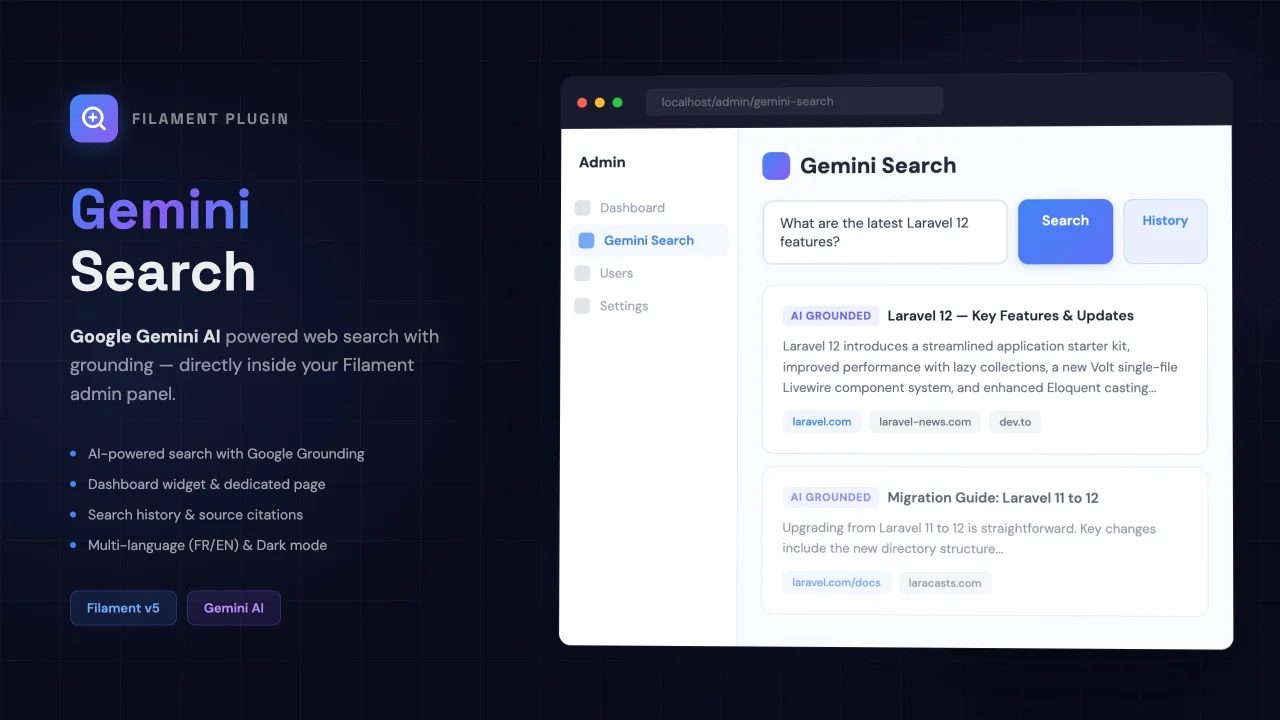
Gemini Search
A Filament plugin that integrates Google Gemini API with Google Search Grounding to perform real-time web searches directly from your admin panel. Supports page and widget modes, search history, and FR/EN translations..
 Author:
Augustin Akpagni
Author:
Augustin Akpagni
Documentation
- Features
- Getting a Gemini API Key
- Installation
- Configuration
- Use Cases
- How It Works (Under the Hood)
- Available Gemini Models
- Testing
- License
A Filament v4/v5 plugin that integrates Google Gemini API with Google Search Grounding to perform real-time web searches directly from your admin panel.
Gemini doesn't just generate text — it performs real Google searches, analyzes the results, and returns structured responses with verifiable sources.
#Features
- Real-time web search via Gemini + Google Search Grounding
- Dedicated search page with Markdown result rendering
- Compact dashboard widget
- Clickable sources and links to found websites
- Search history stored in database
- Multi-language support (EN/FR)
- Full dark mode support
- Compatible with Filament v4 and v5
#Getting a Gemini API Key
#Step 1: Create a Google AI Studio Account
- Go to Google AI Studio
- Sign in with your Google account
#Step 2: Generate an API Key
- Click "Get API Key" in the left menu
- Click "Create API Key"
- Select a Google Cloud project (or create one)
- Copy the generated key (format:
AIzaSy...)
#Step 3: Free vs Paid Plan
| Free Plan | Paid Plan (Pay-as-you-go) | |
|---|---|---|
| Requests/minute | 15 | 2,000 |
| Requests/day | 1,500 | Unlimited |
| Grounding Search | Included | Included |
| Cost | $0 | ~$0.001-0.01 / request |
Tip: The free plan is more than enough for development and moderate production use. To enable billing, visit Google Cloud Console > Billing.
#Step 4: Enable the API
If you encounter 403 errors, enable the API manually:
- Go to Google Cloud Console > APIs
- Search for "Generative Language API"
- Click "Enable"
#Installation
composer require akpagni5547/filament-gemini-search
Add your key to .env:
GEMINI_API_KEY=AIzaSy...your-key-here
GEMINI_MODEL=gemini-2.5-flash
Publish the configuration and run migrations:
php artisan vendor:publish --tag=gemini-search-config
php artisan migrate
Register the plugin in your PanelProvider:
use SelfProject\FilamentGeminiSearch\FilamentGeminiSearchPlugin;

public function panel(Panel $panel): Panel
{
    return $panel
        // ...
        ->plugin(FilamentGeminiSearchPlugin::make());
}
#Configuration
// config/gemini-search.php

return [
    'api_key' => env('GEMINI_API_KEY'),
    'model' => env('GEMINI_MODEL', 'gemini-2.5-flash'),
    'grounding' => [
        'enabled' => true, // Enable Google Search Grounding
    ],
    'history' => [
        'enabled' => true,  // Save searches in DB
        'max_records' => 500,
    ],
    'navigation' => [
        'group' => null,         // Filament navigation group
        'icon' => 'heroicon-o-magnifying-glass',
        'sort' => 100,
    ],
];
#Disable page or widget
FilamentGeminiSearchPlugin::make()
    ->disablePage()    // Keep only the widget
    ->disableWidget()  // Keep only the page
#Use Cases
#1. Price Monitoring / Comparison
Search for product prices across different e-commerce sites. Gemini performs the Google search and returns prices with links to stores.
"iPhone 16 Pro price comparison 2026"
Result: Price list with links to Amazon, Best Buy, etc.
#2. Competitive Intelligence
Monitor what your competitors are doing, their offers, and latest news.
"Latest AWS pricing changes cloud computing March 2026"
Result: Summary of current offers with official sources.
#3. Supplier Research
Find suppliers for your business needs directly from your back-office.
"Best wholesale office supplies distributors with delivery"
Result: List of suppliers with contacts and websites.
#4. Enhanced Customer Support
Your support agents can search for product information in real-time to assist customers.
"Samsung Galaxy A15 full technical specifications"
Result: Detailed specifications with reliable sources.
#5. Regulatory / Legal Research
Find information about current regulations.
"GDPR compliance requirements for SaaS companies 2026"
Result: Steps and required documents with official links.
#6. Tech Watch
Stay informed about the latest tech trends from your admin dashboard.
"Laravel 12 new features and improvements"
Result: Summary of new features with links to official docs.
#How It Works (Under the Hood)
+--------------+     +--------------+     +--------------+
| Filament UI  |---->| Gemini API   |---->| Google Search|
| (your app)   |     | (LLM)        |     | (grounding)  |
+--------------+     +------+-------+     +--------------+
                            |
                    +-------v-------+
                    | Response with |
                    | - AI text     |
                    | - Web sources |
                    | - Queries     |
                    +---------------+
The key is the tools: [{ google_search: {} }] parameter in the API call. This tells Gemini: "Before answering, perform a real Google search and base your response on the results."
#Available Gemini Models
| Model | Speed | Quality | Grounding |
|---|---|---|---|
gemini-2.5-flash |
Fast | Very good | Yes |
gemini-2.5-pro |
Slower | Excellent | Yes |
gemini-2.0-flash |
Very fast | Good | Yes |
gemini-2.0-flash-lite |
Ultra fast | Decent | Yes |
Recommended:
gemini-2.5-flash— best speed/quality ratio.
#Testing
#Quick Test (without Laravel)
curl "https://generativelanguage.googleapis.com/v1beta/models/gemini-2.5-flash:generateContent" \
  -H "x-goog-api-key: YOUR_KEY" \
  -H "Content-Type: application/json" \
  -X POST \
  -d '{
    "contents": [{"parts": [{"text": "Latest Laravel features"}]}],
    "tools": [{"google_search": {}}]
  }'
#Test in Laravel (Tinker)
php artisan tinker
$service = app(\SelfProject\FilamentGeminiSearch\Services\GeminiSearchService::class);
$result = $service->search('Latest Laravel 12 features');

echo $result->text;           // Formatted response
dump($result->sources);       // Sources with URLs
dump($result->searchQueries); // Google queries performed
#License
MIT
The author
Augustin is a technology engineer with strong expertise in secure systems, database management, and cloud infrastructure. Passionate about cybersecurity, he focuses on preventing vulnerabilities and ensuring reliable, scalable solutions. Always eager to learn, he stays at the forefront of emerging technologies to drive innovation and efficiency.
Featured Plugins
A selection of plugins curated by the Filament team

Custom Dashboards
Let your users build and share their own dashboards with a drag-and-drop interface. Define your data sources in PHP and let them do the rest.
 Filament

Data Lens
Advanced Data Visualization for Laravel Filament - a premium reporting solution enabling custom column creation, sophisticated filtering, and enterprise-grade data insights within admin panels.
 Padmission

Spotlight Pro
Browse your Filament Panel with ease. Filament Spotlight Pro adds a Spotlight/Raycast like Command Palette to your Filament Panel.
 Dennis Koch

