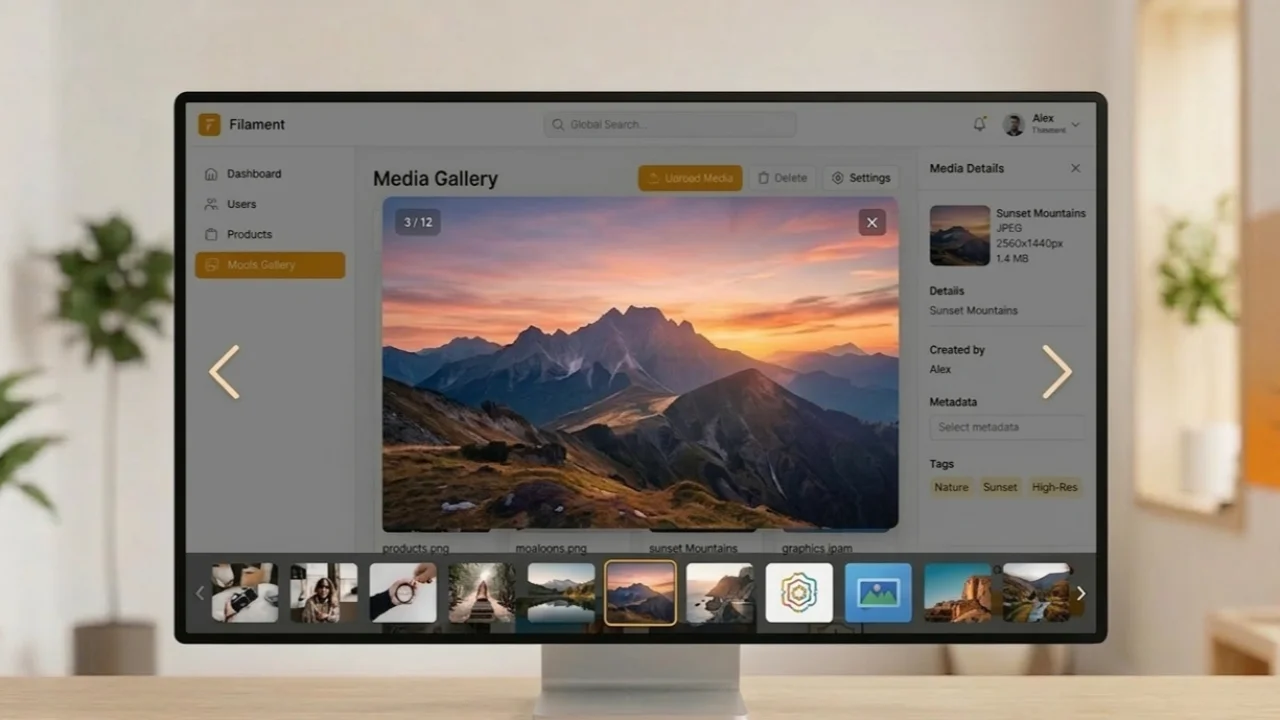
Infolist Media Gallery
A custom Filament infolist entry that renders Spatie Media Library collections as an interactive
 Author:
Ahmed Abdelrhman
Author:
Ahmed Abdelrhman
Documentation
- Problem It Solves
- Requirements
- Installation
- Usage
- API Reference — MediaGalleryEntry
- Blade Component — standalone usage
- Lightbox Behaviour
- Image Conversion Priority
- Dark Mode
- License
A custom Filament infolist entry that renders Spatie Media Library collections as an interactive media grid — with a fullscreen Alpine.js lightbox for images and proper PDF cards that open in a new tab. Zero external dependencies; built entirely on tools already bundled with Filament.
#Problem It Solves
Out of the box, Filament's SpatieMediaLibraryImageEntry has two issues:
- Images are not clickable — no built-in lightbox or fullscreen view.
- PDFs render as broken images — Filament tries to display every media item as an
<img>, which shows a broken icon for PDF files with no way to open them.
This package replaces that entry with a smart, type-aware gallery component.
#Requirements
| Dependency | Version | Notes |
|---|---|---|
| Laravel | 10+ | |
| Filament | 3, 4, 5 | Alpine.js + Tailwind bundled |
| Spatie Media Library | 10+ | Models must use HasMedia + InteractsWithMedia |
| PHP | 8.2+ |
No additional npm packages or Composer packages required.
#Installation
composer require ahmed-abdelrhman/filament-media-gallery
The service provider is auto-discovered by Laravel. No manual registration needed.
Optionally, publish the views to customize them:
php artisan vendor:publish --tag=media-gallery-views
Optionally, register the plugin in your Filament panel for explicit panel-level registration:
// app/Providers/Filament/AdminPanelProvider.php
->plugins([
    \AhmedAbdelrhman\FilamentMediaGallery\FilamentMediaGalleryPlugin::make(),
])
#Usage
#Basic usage
use AhmedAbdelrhman\FilamentMediaGallery\Infolists\Components\MediaGalleryEntry;

MediaGalleryEntry::make('gallery')
    ->collection('coach_gallery')
    ->label('Gallery Images')
#With a fixed card size
MediaGalleryEntry::make('certificates')
    ->collection('coach_certificates')
    ->size(300)          // 300×300 px cards
    ->label('Certificates')
#With circular cards
MediaGalleryEntry::make('profile')
    ->collection('profile_picture')
    ->size(120)
    ->rounded()          // rounded-full
    ->label('Profile Photo')
#Media on a related model
Use ->fromRelation() when the infolist is bound to a parent model but the media
belongs to a child relation:
// Infolist record = User, but media lives on User->coachProfile (CoachProfile model)
MediaGalleryEntry::make('gallery')
    ->collection('coach_gallery')
    ->fromRelation('coachProfile')
    ->label('Gallery Images')
#Full example in a Filament Resource infolist
use AhmedAbdelrhman\FilamentMediaGallery\Infolists\Components\MediaGalleryEntry;

public static function infolist(Infolist $infolist): Infolist
{
    return $infolist->schema([

        Infolists\Components\Section::make('Gallery')
            ->schema([
                MediaGalleryEntry::make('gallery')
                    ->label('Gallery Images')
                    ->collection('coach_gallery')
                    ->fromRelation('coachProfile')
                    ->visible(fn ($record) => $record->coachProfile?->getMedia(
                        'coach_gallery'
                    )->isNotEmpty()),
            ])
            ->collapsible()
            ->collapsed(),

        Infolists\Components\Section::make('Certificates')
            ->schema([
                MediaGalleryEntry::make('certificates')
                    ->label('Certificates')
                    ->collection('coach_certificates')
                    ->fromRelation('coachProfile')
                    ->size(250)
                    ->visible(fn ($record) => $record->coachProfile?->getMedia(
                        'coach_certificates'
                    )->isNotEmpty()),
            ])
            ->collapsible()
            ->collapsed(),

    ]);
}
#API Reference — MediaGalleryEntry
#::make(string $name)
Standard Filament Entry factory. $name is the entry identifier (used internally by Filament).
#->collection(string $collection): static
Required. Sets the Spatie Media Library collection name to load.
| Param | Type | Description |
|---|---|---|
$collection |
string |
Must match a collection name registered in the model's registerMediaCollections() |
#->fromRelation(string $relation): static
Load media from a related model instead of the infolist's root record.
Use this when the infolist record (e.g. User) is not the model that owns the media
collection — the media belongs to a related model (e.g. CoachProfile via $user->coachProfile).
| Param | Type | Description |
|---|---|---|
$relation |
string |
The relation method name on the infolist record |
Omit this method entirely when the media belongs directly to the infolist record.
#->size(int $pixels): static
Set a fixed card size (width = height) in pixels.
| Param | Type | Default | Description |
|---|---|---|---|
$pixels |
int |
250 |
Card dimension in pixels |
When not called, cards use Tailwind's aspect-square for a responsive square.
#->rounded(bool $condition = true): static
Toggle fully rounded (circular) card corners.
true→ appliesrounded-full(circle for images, pill shape for PDF cards)false→ appliesrounded-lg(standard rounded rectangle, this is the default)
#Blade Component — standalone usage
The underlying component can also be used standalone (outside of infolists), for example in custom Filament pages or Livewire components:
<x-media-gallery-viewer
    :media="$model->getMedia('gallery')"
    :size="200"
    :rounded="true"
/>
#Props
| Prop | Type | Default | Description |
|---|---|---|---|
media |
Collection |
collect() |
Spatie Media items to display |
size |
int|null |
null |
Fixed card size in px. Null = aspect-square |
rounded |
bool |
false |
Use rounded-full instead of rounded-lg |
#Lightbox Behaviour
The lightbox is powered entirely by Alpine.js (no external libraries).
| Interaction | Effect |
|---|---|
| Click image card | Opens fullscreen lightbox |
| Click dark backdrop | Closes lightbox |
Press ESC |
Closes lightbox |
| Click close button | Closes lightbox |
| Click prev/next arrows | Navigate between images (hidden when only 1 image) |
| Counter badge | Shows current / total (hidden when only 1 image) |
PDF files are never added to the lightbox. They open directly in a new browser tab.
#Image Conversion Priority
When rendering image thumbnails in the grid, the component tries conversions in this order:
thumbnailconversion (fastest, smallest)previewconversion (medium quality)- Full original URL (fallback)
The lightbox always loads the full original URL for maximum quality.
To register these conversions on your model:
public function registerMediaConversions(?Media $media = null): void
{
    $this->addMediaConversion('thumbnail')
        ->width(150)->height(150)->nonQueued();

    $this->addMediaConversion('preview')
        ->width(400)->height(400)->nonQueued();
}
#Dark Mode
All colours use Tailwind's dark: variants. The component respects Filament's dark mode
toggle automatically — no additional configuration needed.
#License
MIT — see LICENSE.
The author
I am a Backend developer specializing in PHP and Laravel, building scalable APIs, dashboards, and admin panels using Filament. Experienced with clean architecture patterns such as repositories and services, and focused on creating practical tools that improve developer workflows.
Featured Plugins
A selection of plugins curated by the Filament team

Custom Dashboards
Let your users build and share their own dashboards with a drag-and-drop interface. Define your data sources in PHP and let them do the rest.
 Filament

Custom Fields
Eliminate custom field migrations forever. Let your users create and manage form fields directly in Filament admin panels with 20+ built-in field types, validation, and zero database changes.
 Relaticle

Spotlight Pro
Browse your Filament Panel with ease. Filament Spotlight Pro adds a Spotlight/Raycast like Command Palette to your Filament Panel.
 Dennis Koch

