Passkeys
Integrate laravel/passkeys into your Filament Panel
 Author:
Adriaan Zonnenberg
Author:
Adriaan Zonnenberg
Documentation
- Installation
- Configuration
- WebAuthn configuration
- Changelog
- Contributing
- Security Vulnerabilities
- Credits
- License
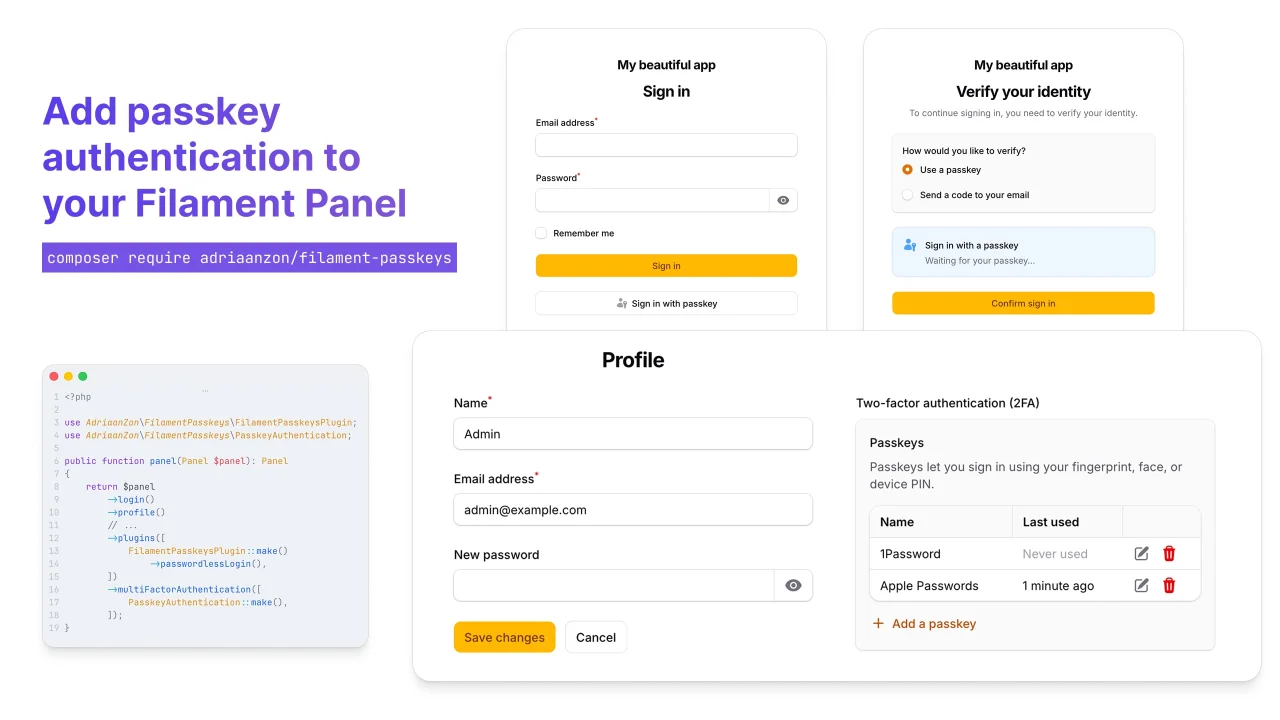
A Filament v5 panel plugin for passkey/WebAuthn authentication. Use passkeys as a second factor, as a passwordless sign-in option on the login page, or both. Users register passkeys (fingerprint, face, device PIN, security key) from their profile page. Built on top of laravel/passkeys.
#Installation
-
Install the package via Composer:
composer require adriaanzon/filament-passkeys -
Publish and run the
laravel/passkeysmigration:php artisan vendor:publish --tag="passkeys-migrations" php artisan migrate -
Add the
PasskeyUsercontract andPasskeyAuthenticatabletrait to your user model:use Filament\Models\Contracts\FilamentUser; use Illuminate\Foundation\Auth\User as Authenticatable; use Laravel\Passkeys\Contracts\PasskeyUser; use Laravel\Passkeys\PasskeyAuthenticatable; class User extends Authenticatable implements FilamentUser, PasskeyUser { use PasskeyAuthenticatable; // ... } -
Register the plugin on your panel. See Configuration for all available modes.
use AdriaanZon\FilamentPasskeys\FilamentPasskeysPlugin;
use AdriaanZon\FilamentPasskeys\PasskeyAuthentication;

public function panel(Panel $panel): Panel
{
    return $panel
        ->login()
        ->profile()
        // ...
        ->plugins([
            FilamentPasskeysPlugin::make()->passwordlessLogin(),
        ])
        ->multiFactorAuthentication([
            PasskeyAuthentication::make()->managementOnly(),
        ]);
}
#Configuration
This plugin supports the following setups:
#Passwordless sign-in only
A "Sign in with passkey" button + browser autofill on the login page, with passkeys excluded from Filament's MFA challenge.
Users can register and manage passkeys from their profile page. The ->managementOnly() setting keeps that UI intact while skipping the MFA challenge step.
->plugins([
    FilamentPasskeysPlugin::make()->passwordlessLogin(),
])
->multiFactorAuthentication([
    PasskeyAuthentication::make()->managementOnly(),
]);
#Passkey MFA
If you'd rather use passkeys as a second factor on top of password login (and not enable passwordless sign-in), drop both ->passwordlessLogin() and ->managementOnly():
->plugins([
    FilamentPasskeysPlugin::make(),
])
->multiFactorAuthentication([
    PasskeyAuthentication::make(),
])
#Fallback MFA method
Without a usable passkey, users cannot get past the MFA challenge and would be locked out. Pair PasskeyAuthentication with one of Filament's built-in providers like EmailAuthentication so they can still sign in:
use Filament\Auth\MultiFactor\Email\EmailAuthentication;

->multiFactorAuthentication([
    PasskeyAuthentication::make(),
    EmailAuthentication::make(),
])
#Passwordless sign-in + passkey MFA
To use passkeys as both a login option and an MFA factor for password sign-ins, enable passwordless sign-in without ->managementOnly():
->plugins([
    FilamentPasskeysPlugin::make()->passwordlessLogin(),
])
->multiFactorAuthentication([
    PasskeyAuthentication::make(),
])
#WebAuthn configuration
WebAuthn settings (relying party ID, allowed origins, user handle secret, timeout, throttling) live in laravel/passkeys's config. Publish it with:
php artisan vendor:publish --tag="passkeys-config"
The passkeys.throttle value is applied to every passkey endpoint this plugin registers (defaults to throttle:6,1).
#Changelog
Please see the releases for more information on what has changed recently.
#Contributing
Please see CONTRIBUTING for details.
#Security Vulnerabilities
Please review our security policy on how to report security vulnerabilities.
#Credits
#License
The MIT License (MIT). Please see License File for more information.
Featured Plugins
A selection of plugins curated by the Filament team

Custom Dashboards
Let your users build and share their own dashboards with a drag-and-drop interface. Define your data sources in PHP and let them do the rest.
 Filament

Spotlight Pro
Browse your Filament Panel with ease. Filament Spotlight Pro adds a Spotlight/Raycast like Command Palette to your Filament Panel.
 Dennis Koch

Advanced Tables (formerly Filter Sets)
Supercharge your tables with powerful features like user-customizable views, quick filters, multi-column sorting, advanced table searching, convenient view management, and more. Compatible with Resource Panel Tables, Relation Managers, Table Widgets, and Table Builder!
 Kenneth Sese

